

248ヴィンテージアルバムの飾り紙
写真を囲む窓枠マットか独立した三角コーナーポケットを選び、同じ版画柄の記録用紙や封筒と一枚にまとめます。
受け取れるもの
- 窓枠マットまたは三角コーナーポケットの写真用パーツ
- 同じ版画柄の記録用紙、タグ、閉じた封筒
- 切って使うヴィンテージ飾り紙の画像一枚
ChatGPT 無料 OK
項目を入力
- 1項目を入力します
- 2コピーを押します
- 3GPTのチャットに貼り付けます
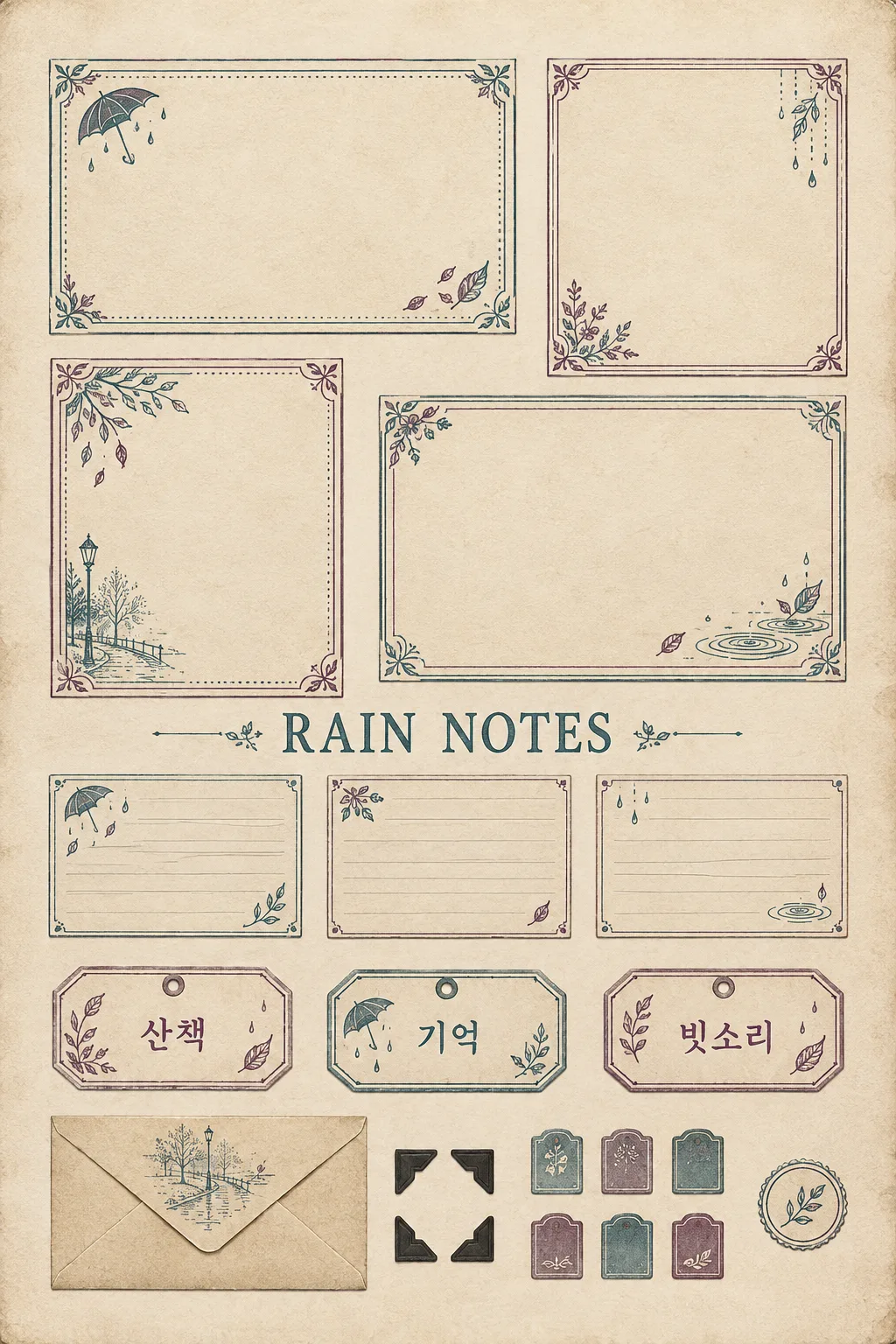
- 4そのまま送ると、サムネイルの例のような画像になります
- 5カードに合う実際の写真を一緒に入れると反映されます。背景カードなら背景の写真、人物・料理カードならその写真 任意
プロンプト全文を見る 3,415文字
Create one printable vintage scrapbook embellishment sheet, portrait 2:3. Its organizing device is a PHOTO-MOUNT PARTS CABINET: empty photo mounting pieces occupy the upper two-thirds, while matching memory slips, tags and a flat closed envelope sit separately below. The output is the sheet itself, viewed straight on, never a desk photograph or an assembled album page.

MEMORY: 【記憶のまとまり】
ENGRAVED MOTIFS: 【思い出の品】
STATIONERY IMPRINT: 【文具工房名】
TAG WORDS: 【タグの言葉】
PHOTO MOUNT: 【写真の留め方】

Invent fine copperplate-style line engravings from MEMORY and ENGRAVED MOTIFS. Repeat their visual vocabulary across the mounting parts, envelope flap and tag margins, with different crops rather than identical copied icons. Worn cream paper, faded teal and plum printing, pressed paper fibers, narrow double-line borders and delicately scuffed outer corners. Keep all writing surfaces clean ivory. No real brands, artists, stamps, tickets or identifiable commercial characters.

PHOTO MOUNT determines the physical silhouette of the pieces. Follow only the selected branch:
- 窓枠マット: upper section contains broad rectangular paper mats, landscape and portrait, each surrounding a LARGE uninterrupted empty ivory opening. Scalloped outer contours and narrow engraved inner borders make these look like antique photo mounts. Nothing is inside the openings. The upper region reads as a cabinet of complete hollow rectangular frames. Do not include separate triangular corner pockets.
- コーナーポケット: remove EVERY complete rectangular mat from the upper section. Replace them with widely separated triangular paper corner pockets arranged in open diagonal rows. Each pocket has a diagonal folded lip and a small engraved leaf or supplied motif. Each is a freestanding triangular silhouette with white cutting space around it. Do not connect pockets with lines, do not put them at the corners of imaginary rectangles, and do not draw photos or rectangular placeholders. The upper region reads as loose triangle parts instead of framed holes.

Lower section, identical in function in both branches: shallow lined journaling slips, hanging paper tags with punched holes, a closed cream envelope with a visible triangular flap, and slim blank index tabs. Separate every part with clean pale cutting gutters; no overlap or clipping. These remain paper illustrations, not a mechanically measured envelope template. Use a flat sheet with restrained printed depth and no cast-shadow mockup.

Print STATIONERY IMPRINT once in small serif type on the background divider between mounting parts and writing slips. It is a fictional stationery studio, not the name of the memory. Split TAG WORDS at commas and place each short phrase on its own tag in supplied order. Preserve their exact letters. No extra labels or numbering. All other pieces remain unlettered except the faint ruled lines on slips. Keep decoration at the edges so photos and handwriting have clear space. Deliver the finished sheet directly, without explanations, scissors, rulers, hands or comparison panels.

[Final output format]
完成した2:3の縦型画像を1枚、1024×1536ピクセルで出力してください。重要な文字は上12%と下15%に置かないでください。
This selected output format takes priority over any fixed canvas size or aspect ratio elsewhere in this template. Adapt the composition, text zones and margins to the selected canvas without stretching or cropping essential content. Device safe areas apply only when a device is selected. Never print these format instructions on the image.
結果はどうでしたか?
同じ分類のほかのカード



使い方・よくある質問
四角い枠が消えて三角のパーツになりました
同じ指定で二度生成すると、横長と縦長の窓枠マットが並びました。「写真の留め方」だけを「コーナーポケット」に変えると、上部のつながった四角い枠が消え、独立した三角のパーツに変わりました。下には記録用紙、WALK・LEAF・RAINのタグ、温室柄の封筒が残りました。色ではなく、写真の周囲に使う部品の形が変わります。
温室は写真の中ではなく紙の縁に
一枚目では傘と温室の版画が太い縁に収まり、写真の場所は空いていました。二枚目では葉や水たまりの線が、写真用の余白の内側に少し入りました。写真にかかる場合は「写真の余白内の葉と波紋を消し、枠の縁だけに残して」と続けて頼めます。MISTFERN PAPERは三枚とも、部品の間の区切りに一度だけ印字されました。
ポケットの絵は折り図ではありません
三角のパーツには入口に見える明るい斜めの縁が付きましたが、大半が同じ方向を向きました。印刷するだけで写真の四隅に合うポケットが完成するわけではありません。向きを回す、裏に紙を足すなど、手元で合わせてください。封筒も閉じた状態の絵で、切って折るための展開図ではありません。
印刷前に実物の写真を当て、倍率を決めてください。部品数や写真寸法は固定していません。三枚ともクリーム色の紙と退色した青緑・プラム色のインクが続きましたが、部品の大きさと版画の位置は変わりました。実際の印刷と接着は今回確認していません。
最終確認日 · 公開