
전체 · 만화/일러스트 · 캐릭터
263귀여운 할로윈 스티커 시트 — 유령 · 호박 · 박쥐 · 사탕 다꾸 스티커
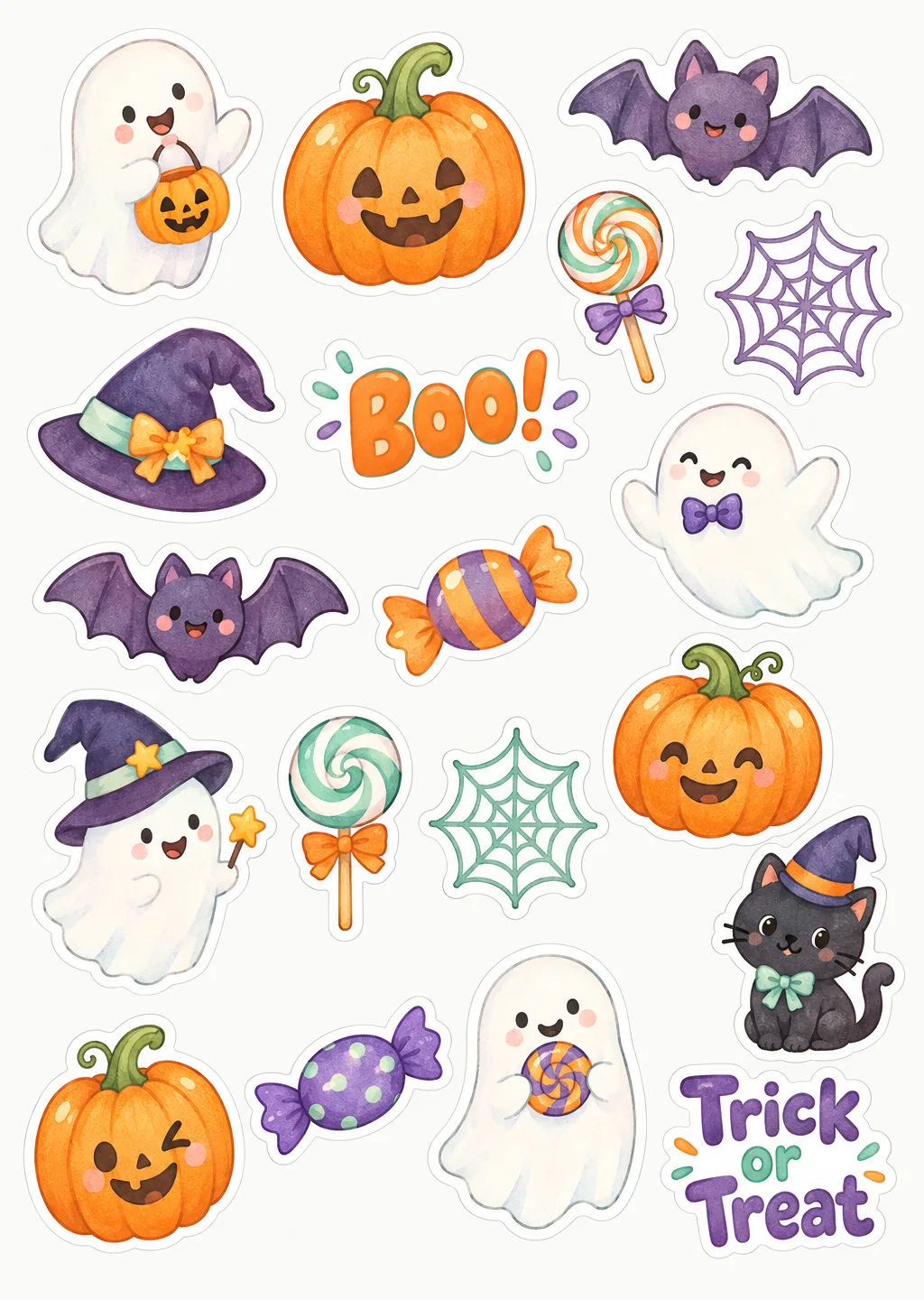
흰 테두리가 둘린 귀여운 할로윈 스티커 20여 개가 한 장에. 출력해서 다이어리 · 선물 포장 · 아이 사탕 봉투에 붙여요.
ChatGPT 무료 OK
칸 채우기
- 1칸을 채워요
- 2복사 버튼을 눌러요
- 3GPT 채팅창에 붙여넣어요
- 4그대로 보내면 썸네일 예시처럼 나와요
- 5카드에 맞는 실제 사진을 같이 넣으면 그 사진이 반영돼요 — 배경 카드는 배경 사진, 인물 · 음식 카드는 그 사진 선택
프롬프트 원문 보기 9,163자
Generate this image now. Draw it directly - do not describe it, explain it, or ask questions.
Output size 2480x3508 pixels, A4 portrait, 300dpi, print-ready poster.
PHOTO RULE (this overrides any other line in this prompt, before or after it, that calls the photo required or mandatory or says to ask for it): if a photo is attached, use it exactly as the instructions below describe. If no photo is attached, never ask for one and never stop — invent a fitting fictional subject (person, pet, food, product or place, whatever this card is about) in the spirit of the card's example image, and finish the image.

[One usable printable sheet; resolve inputs first]
Create exactly ONE A4 portrait sheet of individually cuttable original Halloween stickers, seen straight on as the artwork itself. The requested size on line two controls the canvas; use an A4 210:297 portrait ratio when absent. This is the finished printable sheet, not a photo of a notebook, an advertising poster, a stationery-shop mockup, a sticker package, a stack of pages or several options. Every sticker is a separate closed silhouette with a white die-cut border and a usable gap from its neighbors.
DRAWING_STYLE = "【그림체】". If absent, use plump cute illustration. This selection controls every sticker: rounded cute, watercolor hand-drawn or retro cartoon; do not mix independent styles.
PALETTE = "【색】". If absent, use orange, purple and mint. A pastel choice replaces these with soft pastel pumpkin, lavender, blush and cream tones; classic black/orange uses black and pumpkin orange with white highlights, not a hidden purple-and-mint default.
MUST_INCLUDE = "【꼭 넣을 것】". If absent, add no custom subject. If supplied, reserve one or two stickers within the total for this requested subject or label, replacing ordinary stickers rather than increasing the total. Treat a description as drawing instructions, not automatic visible lettering.
TEXT_STICKERS = "【글자 스티커】". If absent, use two text stickers reading exactly "Boo!" and "Trick or Treat". If supplied, split only at an explicit middle dot, slash or line break that separates complete phrases; each phrase becomes one separate text sticker with its original wording. Never split the words inside a phrase or print the separator as a sticker.
COUNT = "【스티커 수】". If absent, use exactly 20 stickers. The approximately-12, approximately-20 and approximately-30 choices resolve to exactly 12, 20 and 30 individual stickers respectively, including all text and custom-subject stickers.

[Fallbacks for absent input lines]
When an optional named input line is absent, resolve DRAWING_STYLE to plump cute, PALETTE to orange/purple/mint, COUNT to exactly 20 and TEXT_STICKERS to exactly two phrases: "Boo!" and "Trick or Treat". MUST_INCLUDE is absent unless its own line is supplied. Active lines above always take precedence over this fallback map.

[Input priority]
Resolve the named inputs BEFORE planning the image. An optional input exists only when its own input line is supplied; blank values and "고르지 않음" mean absent. "알아서 골라줘" and "알아서" are automatic-choice MENU COMMANDS, never visible copy: choose a fitting concrete result yourself. Never print a selector, field label, these commands, or placeholder braces. Defaults apply only to absent inputs. A supplied choice replaces its corresponding default everywhere; subsequent scene descriptions refer to the resolved named value, never to a competing fixed default.
An automatic TEXT_STICKERS choice means choose one or two concrete short Halloween phrases, never draw the menu command. An automatic MUST_INCLUDE choice means choose a fitting extra Halloween motif, not words. A custom class name or label inscription must be genuinely supplied, not guessed. If MUST_INCLUDE merely asks for a class-name label without providing the name, include a useful blank label-shaped sticker and invent no class number or name. If it names a specific text to print, use that text exactly once on its reserved sticker. Do not add a sheet title or explanation.

[Count and inventory]
Plan COUNT separate sticker silhouettes before drawing. Include friendly ghosts, smiling pumpkins, tiny bats, witch hats, sweets and spiderwebs; use at least one of each motif when the total permits. The default 20-sticker inventory, when no custom subject is requested, is four different ghosts, four different smiling pumpkins, three different bats, two different witch hats, three different candy stickers, two delicate spiderwebs and the two resolved default text stickers. This totals 20. A different COUNT, number of text phrases or MUST_INCLUDE changes that inventory before rendering; never keep the default inventory in addition. For 12 use fewer motifs with larger individual sizes; for 30 use smaller distinct motifs while preserving scissors clearance. Count the outside cuttable shapes, not decorative details inside a sticker. A ghost holding one sweet inside a single white border is one sticker.

[Layout for actual cutting]
Use a white or extremely pale cool-cream page background. Arrange an airy but well-filled staggered sheet with no visible grid: roughly three columns for 12, four for 20 and five for 30, adjusting rows and spacing to fit all shapes. Mix circular pumpkins, tall ghosts, wide bat wings, angled hats and long word stickers without tiling identical shapes. Leave at least 8 mm of page margin, a continuous 2-3 mm WHITE border around each silhouette and at least 4-5 mm of clear page between the OUTSIDE edges of neighboring white borders. Prefer a very pale background or a faint pale-gray outer hairline so the white cut edge remains visible. No border may touch, overlap or share an outline with another sticker. No isolated internal fragments requiring a second cut. Do not add dashed cutting guides, alignment crosses, perforations, shadows that look like extra stickers or cropped stickers at the page edge.

[Original illustrated motifs]
Ghosts have distinct rounded cloth bodies, soft flared hems, tiny friendly eyes and different waving or floating poses. Pumpkins have uneven organic ribs, short curling stems and happy cutout-style faces, with varied shapes rather than duplicate copies. Bats have rounded ears, soft scalloped wings and cheerful expressions. Witch hats have different bent tips, broad brims and simple unbranded ribbons. Candy appears as loose striped sweets, spiral lollipops or plain twist-wrapped pieces with NO package words or branded designs. Spiderwebs are simple sturdy rounded-line webs within their own closed white-backed silhouettes, without microscopic fragile cutouts. Give each sticker a clear large shape and two or three considered interior details; the page should look like a cohesive professionally illustrated collection rather than generic tiny clip art.

For plump cute, use softly modeled rounded shapes, confident clean outlines, restrained shadow and small warm highlights, all consistently drawn. For watercolor, use visible pigment blooms, textured brush edges and a fine hand-drawn contour INSIDE the crisp white cut border; retain shape clarity and sturdy lettering. For retro cartoon, use lively ink contours, flat controlled color, subtle printed grain and varied comic expressions; do not copy an existing cartoon or make the page heavily aged. PALETTE applies consistently across all motifs and text.

[Custom subject and photo handling]
If MUST_INCLUDE asks for the owner's dog or pet as a ghost and a photo is attached, use that pet's species, face, ears, coat color and markings on the reserved sticker, stylized in DRAWING_STYLE, with an original open-faced ghost cape. If no photo is supplied, invent a fictional pet according to PHOTO RULE without asking. A cat witch is an original cat in a small hat, with no famous character resemblance. A candy-bag label is one cuttable blank or genuinely supplied-text label, with a few tiny drawn motifs contained INSIDE its own white outline, never a second sheet. Photo-derived custom stickers use only the supplied subject, not a photographic crop pasted among illustrations.

[Letter stickers and quality]
Render each resolved phrase exactly once as one legible letter sticker with a single continuous white backing that connects every letter. Use a compact lively rounded display face, coherent baseline, generous internal letter spacing and strong contrast against its fill. Keep punctuation, capitalization and Hangul syllables exact. Text stickers are part of COUNT, not a page heading or footnote. Print no other slogan, date, shop name, copyright line or menu label. Verify the final silhouette count, all minimum gaps, intact borders and exact phrases. No famous monsters, film designs, licensed characters, trademarks, candy brands, gore, blood, wounds, watermark or hand holding the page. Return one complete practical A4 Halloween sticker sheet.

[Final output format]
Output size 2480x3508 pixels, A4 portrait, 300dpi, print-ready poster.
This selected output format takes priority over any fixed canvas size or aspect ratio elsewhere in this template. Adapt the composition, text zones and margins to the selected canvas without stretching or cropping essential content. Device safe areas apply only when a device is selected. Never print these format instructions on the image.
결과 어땠어요?
이 카드도 많이 사용해요
쓰는 법 · 자주 묻는 것
이런 때 쓰세요
할로윈 다이어리 꾸미기, 아이 사탕 봉투, 가게 포장 봉투에 붙일 귀여운 스티커가 한 장 가득 필요할 때 쓰세요. 꼬마 유령 · 웃는 호박 · 박쥐 · 마녀 모자 · 사탕 · 거미줄 같은 그림이 하나하나 흰 테두리를 두르고 겹치지 않게 놓여서, 출력해 가위로 오리기 쉬워요.
칸 채우는 법
다 비워도 됩니다. 비우면 통통한 귀여운 그림체, 주황 · 보라 · 민트 색으로 20개쯤 나와요. 「꼭 넣을 것」에 「우리 강아지 유령」처럼 적으면 그 스티커가 한두 개 들어가요. 글자 스티커는 짧은 영어가 가장 정확하게 나와요.
출력하는 법
A4로 만든 뒤 문구점 · 인터넷에서 파는 A4 라벨지(스티커 용지)에 출력하면 바로 스티커가 됩니다. 흰 테두리를 따라 오리세요. 일반 종이에 출력해 풀로 붙여도 돼요.
그림이 나오면 꼭 볼 것
- 스티커끼리 겹치지 않았나요? 겹치면 오리기 어려워요
- 글자 스티커 철자가 정확한가요?
- 유명 캐릭터와 닮은 게 없나요? 이 카드는 새로 그린 캐릭터만 넣어요
틀린 곳 고치는 법
같은 대화에 「스티커 사이를 더 띄워」, 「유령을 더 많이」, 「글자 스티커만 다시」처럼 말하세요.
자주 묻는 것
- 팔아도 되나요? 직접 만든 그림이라 개인 사용은 자유예요. 판매용은 쓰는 AI 서비스의 이용 조건을 확인하세요.