
전체 · 만화/일러스트 · 인물 · 캐릭터
188반실사 프로필 아이콘
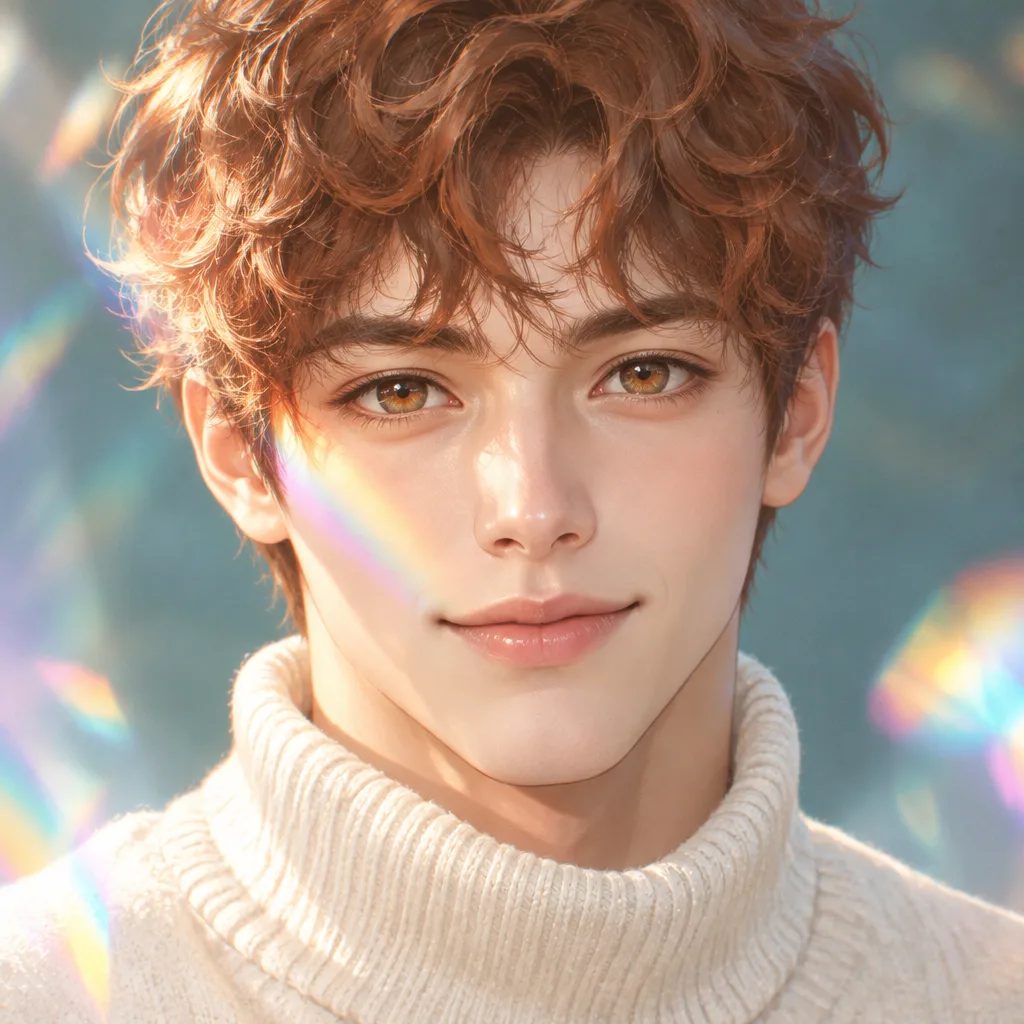
얼굴에 프리즘 무지개 빛이 흐르는 반실사 애니 초상. 얼굴을 중앙에 두어 동그란 프로필에도 쓸 수 있어요.
칸 채우기
- 1칸을 채워요
- 2복사 버튼을 눌러요
- 3GPT 채팅창에 붙여넣어요
- 4그대로 보내면 썸네일 예시처럼 나와요
- 5내 사진 1장 (선택)을 같이 넣으면 그 사진이 반영돼요 선택
프롬프트 원문 보기 4,867자
Generate this image now. Draw one complete image directly, without explanation or questions.

PHOTO RULE (this overrides any other line in this prompt, before or after it, that calls the photo required or mandatory or says to ask for it): if a photo is attached, use it exactly as the instructions below describe. If no photo is attached, never ask for one and never stop — invent a fitting fictional subject (person, pet, food, product or place, whatever this card is about) in the spirit of the card's example image, and finish the image.

[Personal choices]
Fictional person note: "【인물】". Use this note only when no photo is attached.
Hair color: "【머리색】". Exact option mapping: "구리빛 갈색" = copper brown; "검정" = black; "애쉬블론드" = ash blond; "은빛" = silver. Follow the selected option; do not combine all options.
Clothing mood: "【옷 분위기】". Exact option mapping: "아이보리 니트" = opaque ivory high-neck knit sweater; "짙은 재킷" = opaque dark tailored jacket over a fully covering shirt; "파스텔 셔츠" = opaque pastel shirt with a closed collar. Follow the selected option; do not combine all options.

[Photo identity has priority over the fictional example]
If a photo is attached, redraw exactly that person in this card's fixed illustration medium. Preserve apparent age, face shape, skin tone, hairstyle, hair texture, glasses and distinctive features. Preserve visible glasses and facial hair; do not invent glasses, a beard or a mustache when absent. Do not substitute the fictional default person, gender or hairstyle for the person in the photo. The person note is a no-photo fallback, not permission to replace the photographed identity. The explicitly selected hair color may recolor the photographed hair, but it never changes the photographed cut, length or texture. The selected costume or garment recipe changes clothing only. If only the face or upper body is visible, complete ordinary age-appropriate anatomy and the described fully covering clothes. For a child in a supplied photo, preserve age and use child-appropriate proportions and fully covering clothing; never make them an adult or use adult glamour. Do not ask for a photo when none is attached.

[One prism-lit face icon]
Create ONE square semi-real anime face close-up, shoulders only, seen at eye level with the face nearly frontal. A teal-gray softly defocused backdrop contrasts with copper hair, warm amber irises and thin iridescent bands. A fresh original adult face is the subject, with softly modeled cheekbones, a luminous but natural nose, individual eyelashes, fine hair strands and translucent painted skin. Keep anime eye design expressive but proportionate to this person; retain the photographed apparent age instead of making everyone a teenage girl. This is a polished digital illustration, never a photographic face, glossy doll or 3D render.
[Circle-safe composition]
Center the face at x50%, with eyes near y43% and chin near y70%. Keep both eyes, nose, mouth, chin and identifying glasses fully inside the central inscribed circle; do not draw the circle or crop the canvas into a circle. A small amount of outer hair and the shoulders may extend beyond that circle. The entire image remains a finished square with natural backdrop at the corners. No hands, prop, extra person or text. Keep facial details readable at small profile size.
[Prism rendering]
One coherent gentle daylight direction models the face. A narrow cyan-magenta-gold rainbow refraction passes diagonally across one cheek and the adjacent hair; it must not erase the eyes or turn the whole face into colored plastic. Add a few large soft prismatic bokeh shapes at the outer edges, controlled highlights on iris and lips, smooth tonal transitions and fine strands in the selected hair color. Preserve the warm skin under the light. The selected clothing appears only around the lower shoulder edge.

[Originality, dignity and delivery]
Use the visual recipe above to create a new original illustration. Do not copy any creator's existing picture, character, distinctive costume, signature or composition. Keep clothing opaque and fully covering with a calm nonsexual pose. No revealing outfit, cleavage, exposed underwear, upskirt angle or sexual framing. One coherent illustration, one person, correctly connected anatomy. No lettering, names, captions, signature, watermark, logo, interface, frame, side-by-side comparison or additional views. Generate the finished image directly; no code, drawing instructions, questions or prose response.

[Final output format]
Output size 1080x1080 pixels, 1:1 square card. Keep the same top-to-bottom order but compress the zones to fit the square: the illustration becomes smaller and every text line stays fully readable.
This selected output format takes priority over any fixed canvas size or aspect ratio elsewhere in this template. Adapt the composition, text zones and margins to the selected canvas without stretching or cropping essential content. Device safe areas apply only when a device is selected. Never print these format instructions on the image.
결과 어땠어요?
이 카드도 많이 사용해요
쓰는 법 · 자주 묻는 것
동그란 프로필에서 얼굴이 남는 그림
스레드나 메신저 프로필에 올릴 얼굴 중심의 반실사 애니 일러스트입니다. 눈과 입은 애니처럼 또렷하고, 볼과 코는 부드러운 명암으로 입체감을 줍니다. 얼굴 한쪽으로 얇은 무지개 빛이 지나가며 바깥쪽에는 프리즘 보케가 생깁니다. 정사각형 한 장을 받고, 프로필 서비스의 원형 미리보기에서 얼굴이 남도록 배치하면 됩니다. 그림 자체에 원이나 테두리를 그리지는 않습니다.
인물·머리색·옷을 정하세요
인물 칸은 사진이 없을 때 그릴 가상 인물의 나이대와 머리 모양, 표정을 적는 곳입니다. 표지 예시는 짧은 구리빛 곱슬머리를 한 32세 남성과 아이보리 니트입니다. 머리색 단추는 머리 전체의 색을, 옷 분위기는 어깨에 보이는 옷을 바꿉니다. 얼굴을 덮는 무지개 빛은 이 카드의 고정된 특징입니다. 배경을 복잡한 방이나 거리로 바꾸는 단추는 없습니다.
내 사진을 함께 쓰는 방법
사진은 선택입니다. 닮게 그리고 싶다면 얼굴·머리·안경이 선명한 본인 사진이나 사용 허락을 받은 사진 한 장을 ChatGPT 입력창에 첨부하고, 복사한 프롬프트를 같은 메시지에 붙여 보내세요. 사진이 있으면 그 사람의 나이대와 얼굴형, 머리 모양, 안경과 수염 유무를 따릅니다. 머리색을 고르면 그 색만 바뀝니다. 인물 칸의 가상 예시가 사진 속 사람을 다른 사람으로 바꾸지는 않습니다. 사진이 없으면 입력한 인물로 바로 완성합니다.
프로필에 넣기 전에
원형 미리보기에서 두 눈·입·턱과 안경이 잘리지 않는지 확인하세요. 무지개가 눈을 가리면 같은 대화에 “빛을 볼 쪽으로 옮기고 눈은 또렷하게”라고 요청할 수 있습니다. 사진에 없는 안경이나 수염이 생겼다면 그 부분을 지워 달라고 하세요. 결과에는 이름·서명·설명 글자가 들어가지 않습니다. 저장한 정사각형 이미지 한 장을 프로필 설정에서 선택하면 됩니다.