

316겨울 꽃 홍보 포스터 — 서리 내린 꽃 클로즈업 위 가게 신상 · 회원 혜택 안내
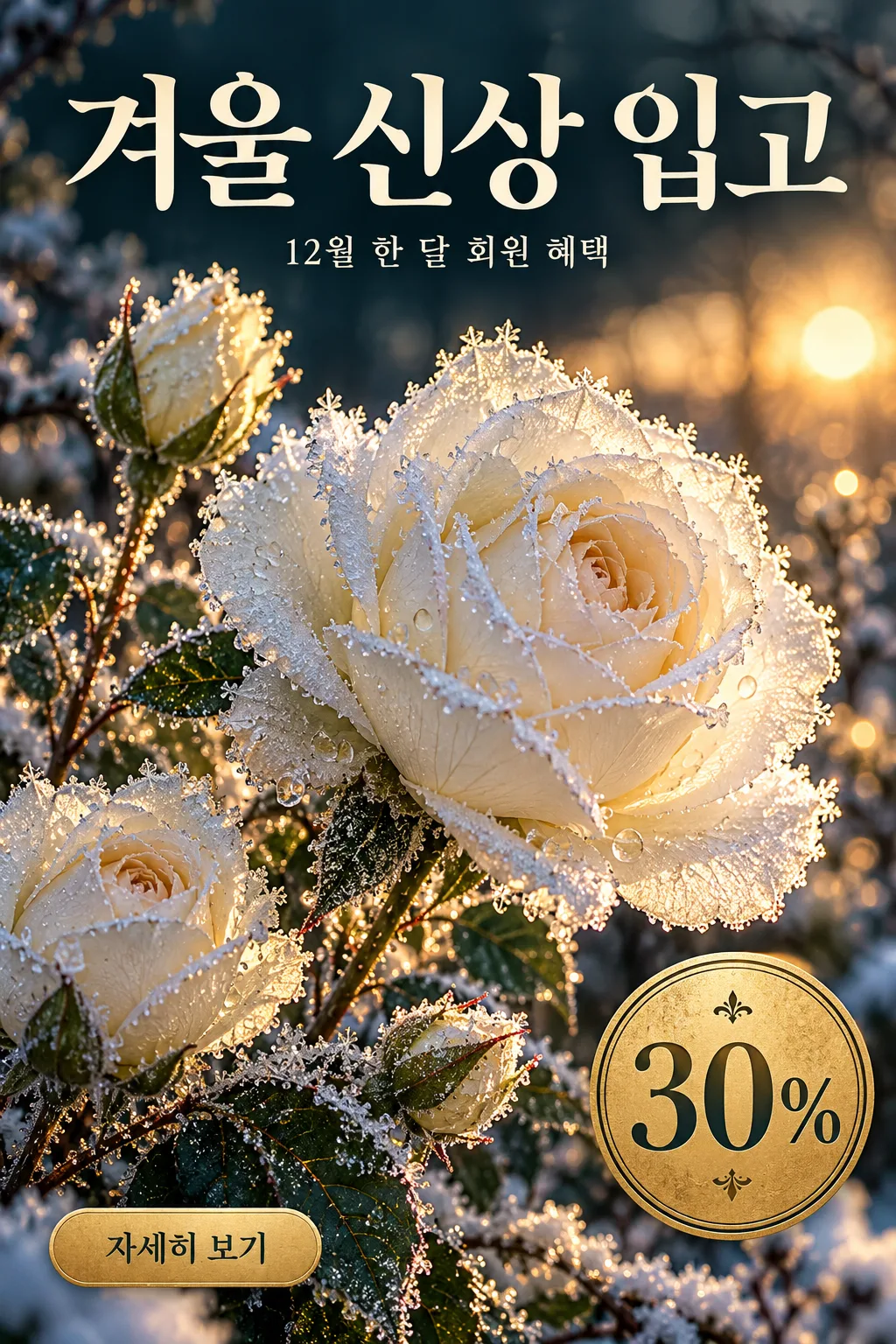
큰 제목과 할인을 적으면 반짝이는 서리 꽃 클로즈업 위에 세리프 제목, 할인 원형 딱지, 작은 버튼이 들어간 겨울 홍보 포스터가 나와요.
받는 것
- 서리 꽃 위 겨울 홍보 포스터 한 장
- 큰 세리프 제목과 작은 문구
- 할인을 적으면 원형 딱지
ChatGPT 무료 OK
칸 채우기
- 1칸을 채워요
- 2복사 버튼을 눌러요
- 3GPT 채팅창에 붙여넣어요
- 4그대로 보내면 썸네일 예시처럼 나와요
- 5카드에 맞는 실제 사진을 같이 넣으면 그 사진이 반영돼요 — 배경 카드는 배경 사진, 인물 · 음식 카드는 그 사진 선택
프롬프트 원문 보기 3,163자
Generate this image now. Draw it directly - do not describe it, explain it, or ask questions.
Output size 1080x1920 pixels, 9:16 portrait story. Keep all text inside the central 80% of the height: compress every zone percentage below into the 10-90% range.
Create one finished winter botanical promotional poster. If no size is supplied, use portrait 2:3.

LARGE TITLE, exact visible text: "【큰 제목】"
If the title line is missing or empty, leave the title area free of text; never invent a headline.

SMALL COPY, exact visible text: "【작은 문구】"
If the small-copy line is missing or empty, omit that text and rebalance the layout; never invent replacement wording.

DISCOUNT, exact visible text: "【할인】"
If the discount line is missing or empty, omit the entire discount badge, its border, and its text; never invent a discount or offer.

BOTANICAL selected: "【꽃】"
Interpret only the selected choice:
- 에델바이스: Frost-covered edelweiss with fuzzy star-shaped white bracts, detailed clustered centers, and cold alpine greenery.
- 동백: Rich red camellia blossoms with layered petals, yellow stamens, glossy dark leaves, and fine frost along petal edges.
- 겨울 장미: Cream-white winter roses with intricately layered petals, frosted edges, dark leaves, and delicate dew crystals.
- 솔방울 · 전나무: Detailed pinecones and fir branches with frosted scales, ice-tipped needles, and richly layered evergreen textures.
If this selection line is missing or empty, use 에델바이스 only.

Create a macro botanical photograph with abundant frost detail, believable plant structure, sparkling ice crystals, shallow depth of field, and warm sunrise bokeh against deep blue-green winter shadows. Let the main botanical subject dominate the center and one side, while retaining calm dark space for the title. Preserve the rich visual density of a premium seasonal retail campaign.

Set the exact title very large near the top in refined cream serif or serif-inspired lettering suitable for its script. Place the exact small copy beneath it when supplied. When a discount is supplied, place its exact text inside a substantial antique-gold circular badge near the lower right, with a fine double rim and clear padding. Do not add words such as "OFF", "UP TO", or "SALE" unless they are included in the supplied discount text.

When small copy is supplied, place that exact copy inside a compact gold pill-shaped visual button near the lower left, using it as the single small-copy placement rather than repeating it beneath the title. If small copy is absent, omit the button entirely. Never invent button text.

Preserve all supplied spelling, punctuation, spacing, and Korean final consonants exactly. Keep text and badge clear of the botanical focal center. No invented prices, claims, extra captions, trademarks, real-person likenesses, existing characters, signatures, watermarks, or surrounding mockup.
The choice names in this prompt are internal labels only; never print them as text.

[Final output format]
Output size 1080x1920 pixels, 9:16 portrait story. Keep all text inside the central 80% of the height: compress every zone percentage below into the 10-90% range.
This selected output format takes priority over any fixed canvas size or aspect ratio elsewhere in this template. Adapt the composition, text zones and margins to the selected canvas without stretching or cropping essential content. Device safe areas apply only when a device is selected. Never print these format instructions on the image.
결과 어땠어요?
같은 분류의 다른 카드
쓰는 법 · 자주 묻는 것
서리 내린 꽃 한 송이로 겨울 행사 알리기
겨울 신상이나 연말 세일, 회원 혜택을 알리는 세로 포스터예요. 서리가 반짝이는 겨울 꽃을 아주 가까이서 찍은 듯한 사진이 화면을 채우고 그 위에 큰 제목이 올라가요. 금색 동그란 할인 딱지와 작은 버튼 모양이 붙어요. 인스타 스토리나 매장 입구에 맞는 길쭉한 9:16 비율이에요. 옷가게, 미용실, 꽃집, 카페처럼 겨울에 분위기 있게 알릴 게 있는 가게에 맞아요. 에델바이스로 만든 시험에서 서리 맺힌 별 모양 꽃과 따뜻한 아침빛 배경이 나왔어요.
큰 제목만 적어도 돼요
「겨울 신상 입고」처럼 제목 하나만 적으면 포스터가 나와요. 작은 문구와 할인은 비우면 그 자리가 빠져요. 할인이 없는 안내라면 할인 칸을 비우세요. 금색 딱지 없이 나와요. 제목을 비우면 글자 자리를 비워 두고 임의의 제목을 지어내지 않아요.
꽃에 따라 가게 분위기가 달라져요
에델바이스는 하얀 꽃잎에 서리가 앉아 차분하고 고급스러워서 화장품이나 옷가게 회원 혜택에 맞아요. 동백은 짙은 초록 잎에 빨간 꽃이라 우리나라 겨울 느낌이 나서 한식집이나 찻집 겨울 메뉴에 어울려요. 겨울 장미는 서리 맺힌 크림빛이 부드러워서 연말 감사 인사나 선물 행사에, 솔방울과 전나무는 크리스마스 분위기가 제일 진해요. 파는 물건의 색과 꽃 색이 싸우지 않는 걸로 고르세요. 시험한 꽃은 에델바이스뿐이에요.
할인 숫자 옆에 조건을 꼭 적으세요
이 카드에서 제일 조심할 곳이에요. 할인 딱지에는 「30%」 숫자만 크게 들어가고 조건은 안 들어가요. 「회원 전용」이나 「선착순 100명」, 「일부 품목 제외」 같은 조건이 있으면 작은 문구 칸에 꼭 같이 적으세요. 숫자만 크게 보이면 손님은 누구나 전 품목을 30% 깎아 주는 줄 알고 와요. 계산대에서 실랑이가 나요. 실제로 하는 행사만 적는 건 당연하고요.
결과에서 볼 것
제목과 할인 숫자가 적은 대로인지 확인하세요. 숫자가 틀리면 큰일이에요. 시험에서는 「겨울 신상 입고」, 「12월 한 달 회원 혜택」, 「30%」가 오탈자 없이 나왔고, 작은 문구는 왼쪽 아래 알약 모양 버튼에 한 번만 들어갔어요. 꽃잎이 글자를 덮지 않았는지도 보세요. 글자가 가려지면 「꽃을 아래로 내려 제목이 가려지지 않게 해 줘」라고 보내 보세요. 이 문장은 시험하지 않았어요.
버튼은 그림이고 파일 크기는 직접 확인하세요
버튼 모양은 그림이라 눌리지 않아요. 스토리에 올릴 땐 링크 스티커를 따로 붙이세요. 같은 입력으로 한 번 더 만들어도 파일 크기가 나아지지 않았으니, 내려받은 파일의 실제 픽셀 크기는 올리기 전에 확인하세요.
행사가 끝나면 내리세요
끝난 할인 포스터가 매장 입구에 계속 붙어 있으면 그것도 오해를 불러요. 스토리는 하이라이트에서 빼고 종이 포스터는 떼세요.
마지막 확인일 · 공개