
項目を入力
- 1項目を入力します
- 2プロンプトをコピーします
- 3GPTのチャットに自分の顔写真1枚とプロンプトを一緒に送ります
- 4写真と文章の両方が入っていることを確認します
プロンプト全文を見る 3,610文字
Generate this image now. Draw it directly - do not describe it, explain it, or ask questions.
A3横、420×297mm、縦横比1.414:1のポスターを1枚作成してください。生成できる最大解像度を使い、印刷用の最終目標は4961×3508ピクセル、300dpiです。文字は紙の端から10mm以上内側に置いてください。

[Purpose]
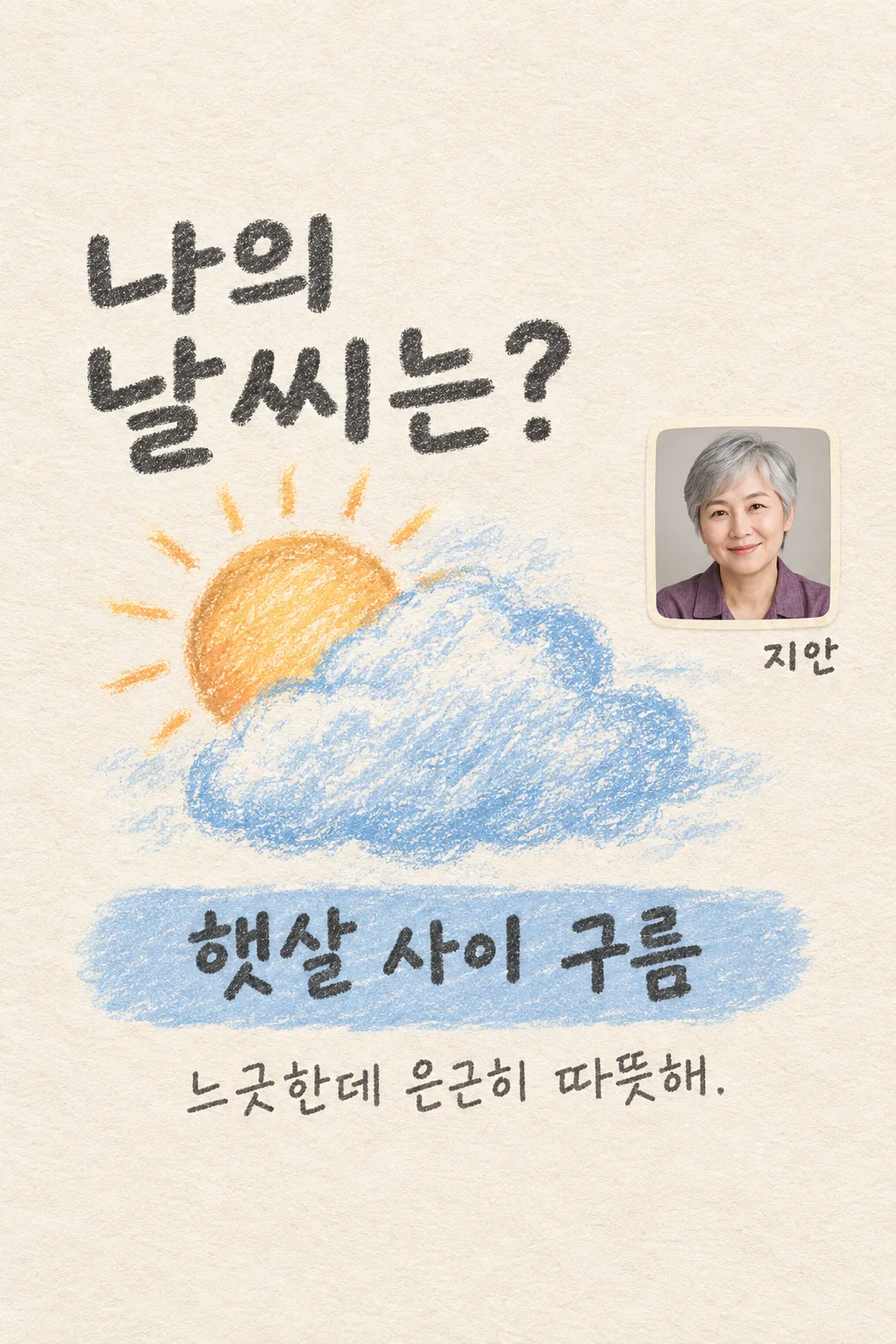
Create one shareable introduction asking "私の天気は?". Weather is a creative metaphor for the user's own description, not a forecast or diagnosis.

[Scene]
Read only "【自分を紹介すると】". Choose one coherent weather scene such as sunshine, sunshine behind a cloud, gentle rain, quiet snow or a breeze. Invent a short Japanese weather name and one comment of at most twenty Japanese characters in the tone "【ひとことの口調】". Never determine behavior, ancestry or mental health from a face. Show one large oil-pastel weather shape rather than answer options.

[Attached photo]
Preserve the attached person's actual face, apparent age, hair, skin color and eyewear in a small rounded-square photographic inset at x68-91%, y34-49%. It identifies the user only. No replacement model.

[Text layout]
Render the exact question "私の天気は?" in two large hand-lettered lines at y15-35 percent. One large weather scene occupies the left/center at y36-63 percent. The small photographic inset stays upper-right at y32-48 percent. Put the weather answer in one blue strip at y66-75 percent and its large pencil comment at y79-84 percent. No field labels.
Optional name only: "【名前】" appears directly below the inset at y48-51 percent. Keep top12 percent and bottom15 percent blank.

[Style]
Fixed ivory toothy paper, powder-blue and apricot oil-pastel marks and graphite outlines. Retain the same palette, photographic inset and answer strip for all results. Weather variation never changes the art style or layout.

[Visual hierarchy]
Question largest, weather shape next, answer clearly readable, comment next and name smallest. Keep open paper between the inset and pastel scene. Draw legible natural Japanese glyphs.

[Lighting and texture]
Dry chalky oil-pastel texture, subtle paper grain and natural photographic inset. No neon, glossy resin or weather-app screenshot.

[Text rules]
Visible text only: question, weather answer, short comment and optional name. Use friendly hand lettering and large pencil handwriting for the comment. No temperatures, dates, percentages, field labels or automatic-choice button text.

[Avoid]
No fortune-telling, facial diagnosis, forecast, multiple panels, brand logo, existing character, extra people, separate files or cropping instructions.

[Single-image delivery]
Deliver exactly one completed raster image, with one fixed medium and one fixed composition. All requested elements belong inside this single canvas. Generate it directly without running code, giving setup instructions, asking follow-up questions, presenting alternatives, or requiring the user to crop or combine files. Do not put the prompt, field names, placeholders, explanations or an advertising wrapper in the artwork. Keep the outer canvas fully finished edge to edge. Respect the selected aspect ratio by adapting spacing only; preserve the same result type and relative visual hierarchy.

[Legibility and factual discipline]
Keep every essential letter within 14-84% of the canvas height and 7-93% of its width. Leave the top 12% and bottom 15% free of important lettering. At 1024x1536, essential ink must stay between y215 and y1290. Use readable dark-on-light or light-on-dark contrast, actual connected letters and natural word spacing. Never fabricate dates, discounts, counts, rewards, statistics, origins, medical effects or business terms. Do not reproduce trademarks, famous people, named fictional characters, franchise imagery, artist signatures, watermarks, device mockups or official app interfaces.
こちらのカードも人気です
使い方・よくある質問
こんなときに
長いプロフィールの代わりに、自分の雰囲気を天気の絵で紹介したいときに使います。大きな質問、小さな自分の顔写真、オイルパステルの天気、答えの帯、短いひとことが一枚にまとまります。ストーリーやThreadsで友達の結果と並べて楽しめます。実際の空模様を当てるカードではありません。穏やかさを雲の間の光にたとえるなど、自分の言葉を元にした創作です。
入力する内容
自分を紹介すると欄には、自分で感じている性格や今日見せたい雰囲気を短く書いてください。例を押してから自分の言葉に直しても使えます。口調の選択で変わるのはひとことの表現だけです。パステルの画風、顔写真の位置、答えの帯は同じままです。名前は任意で、空欄なら写真の横の名前だけ消えます。誕生日や住所、個人的な秘密を書く必要はありません。答えの天気を直接指定する欄はなく、紹介文の違いから別のたとえを作ります。
写真と一緒に送る
自分の顔がはっきり分かる写真を一枚、GPTの入力欄に追加します。この時点では送信しません。入力済みのプロンプトをコピーして同じ欄に貼り付け、写真と文章の両方が入っていることを確認して一度送信します。完成画像を一枚だけ依頼する形式です。コードの実行や画像の切り分けは必要ありません。先に写真だけ送った場合は、文章の最後に上の写真を使うよう一文を足してください。表紙の人物と名前は架空の見本です。
完成後の確認
写真の顔が別人になっていないか、質問と答えが読めるかを見てください。天気の絵は一種類、答えも一つです。顔写真は小さな実写のまま残り、天気だけがパステル画になります。気温、降水確率、予報の日付が追加された場合は、カードの用途から外れています。名前を空欄にしたときに空の枠や項目名が残っていないことも確認してください。
直したいとき
文字の誤りは、置き換えたい文をそのまま引用して依頼してください。顔写真が大きすぎる場合は右上の小さな枠に戻すよう伝えます。最初の一回で一枚が完成する設計で、追加依頼は失敗した箇所を補う方法です。
よくある質問
- 顔から性格を診断しますか? いいえ。自分で書いた紹介文を天気にたとえる遊びです。
- 本当の天気予報ですか? いいえ。現実の天候や気温を調べる情報カードではありません。
- 名前なしでも使えますか? はい。質問、天気、答え、ひとことはそのまま残ります。