
項目を入力
- 1項目を入力します
- 2プロンプトをコピーします
- 3GPTのチャットに貼り付けます
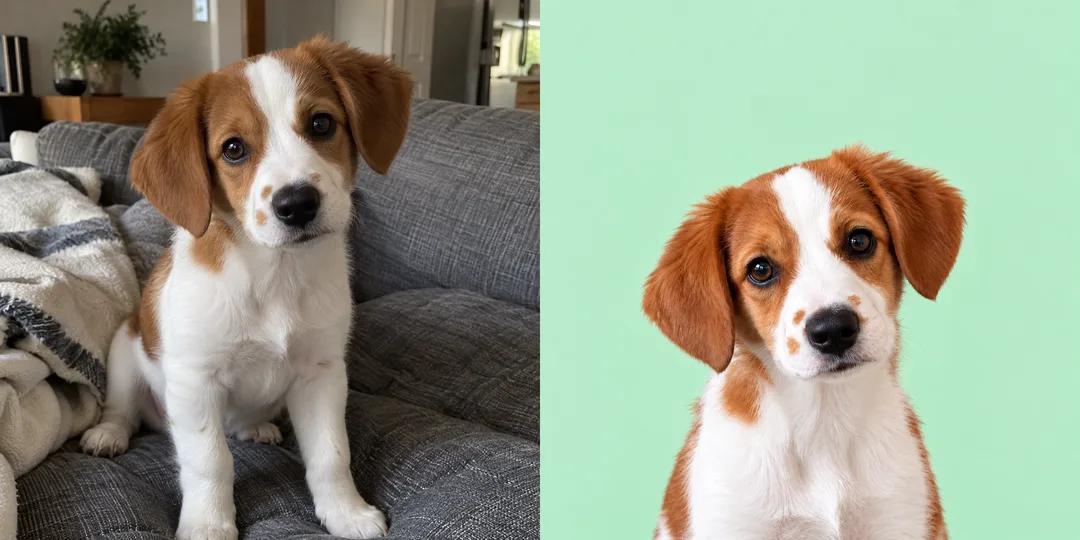
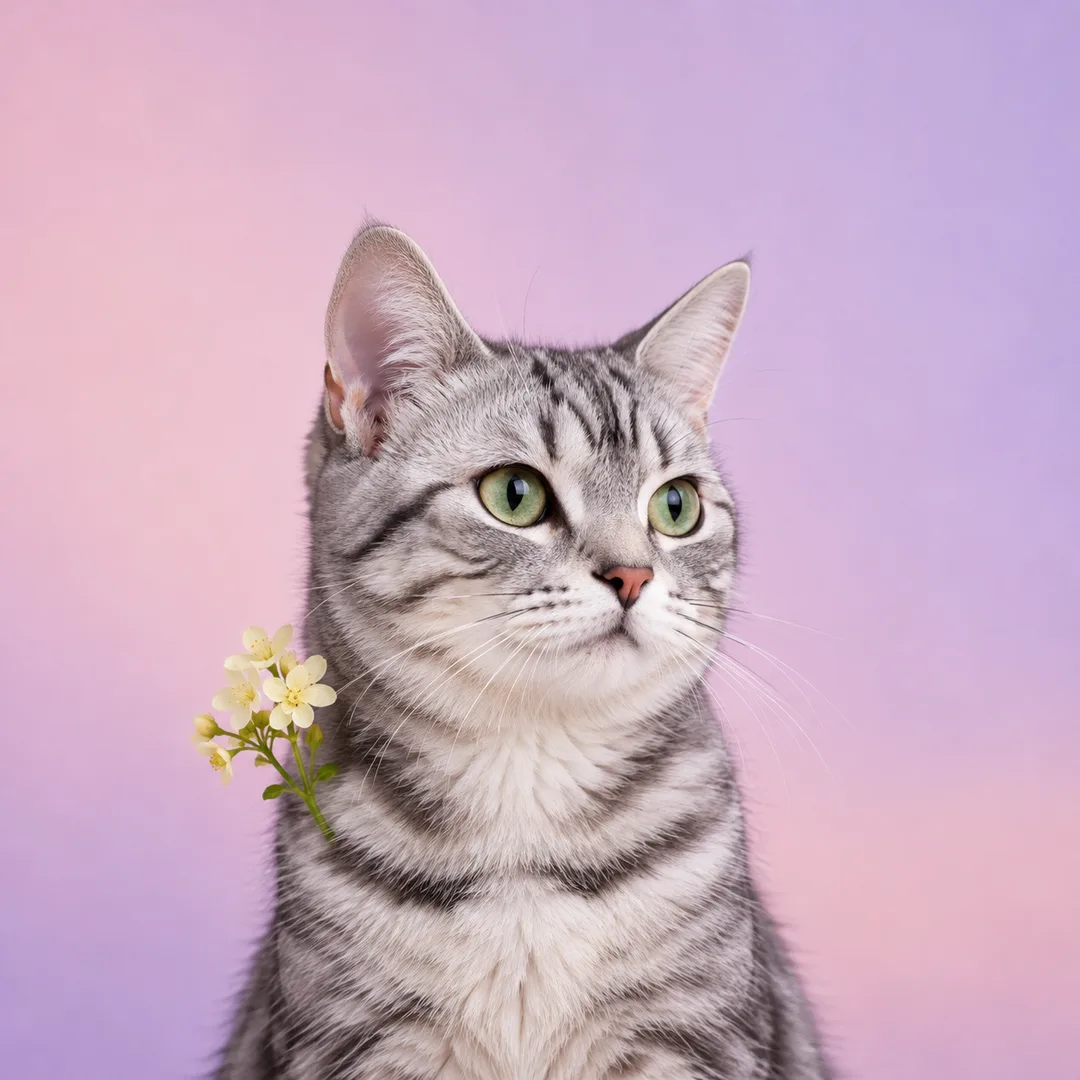
- 4そのまま送ると、サムネイルの例のような画像になります
- 5顔と両耳がはっきり見えるペットの写真1枚をプロンプトと一緒に入れると、その写真が反映されます 任意
プロンプト全文を見る 2,750文字
Generate this image now. Draw it directly - do not describe it, explain it, or ask questions.
出力サイズは1080×1080ピクセル、1:1の正方形にしてください。文字を読みやすく配置してください。
Create ONE full-bleed photographic pet profile portrait. Keep photography, never convert to painting, cartoon, figurine or illustration.
PHOTO RULE: If a photo is attached, use that exact pet. Preserve species, fur color, every visible marking's location and shape, ear silhouette, eye color, nose and muzzle proportions, head tilt and natural expression. Remove household clutter and correct exposure gently without changing identity. If no photo is attached, invent one fictional pet matching the pet description and complete the image without asking.
Pet description: 【ペットの写真】. Use this as context only; an attached photo takes precedence for identity. Never print the description or pet name.
Background: 【背景】. 単色パステル means a seamless mint background. 季節の小物 means a smooth blush-to-lilac pastel gradient. スタジオ means a seamless sky-blue studio background. 空 means a quiet pale-blue sky with soft clouds. Interpret custom background descriptions while keeping the background uncluttered.
Accessory: 【小物】. Empty or なし means no accessory. Add only the selected accessory, kept below or beside the face. Preserve ear visibility and all identifying markings. Never add an unrequested hat, collar, flowers or costume.
Center the face at the canvas center. The complete head, BOTH ears and any accessory must fit inside the central 70% rectangle: x15-85%, y15-85%. Reserve the top quarter as clear background. Aim for x20-80%, y25-75% for a safety margin. Show head and upper chest only, never legs or paws. Zoom out until every ear tip fits. Make the face prominent within this safe area; upper chest can extend to the bottom edge. For 1:1, also keep the complete head and ears inside an imaginary centered circle of diameter 90% of the image. Do not draw that circle or cut out the corners. Fill the entire canvas with the chosen background. Respect the requested aspect ratio, with 1:1 as default.
Use soft natural studio lighting, realistic individual fur strands, coherent anatomy and natural eye reflections. Do not enlarge eyes, shorten muzzle, recolor fur or replace the pet with a generic cute animal. No people, second pet, text, numerals, dates, logo, trademark, watermark, app interface, device mockup, border, comparison panel or labels. Return only one finished photo.

[Final output format]
出力サイズは1080×1080ピクセル、1:1の正方形にしてください。文字を読みやすく配置してください。
This selected output format takes priority over any fixed canvas size or aspect ratio elsewhere in this template. Adapt the composition, text zones and margins to the selected canvas without stretching or cropping essential content. Device safe areas apply only when a device is selected. Never print these format instructions on the image.
結果はどうでしたか?
こちらのカードも人気です
使い方・よくある質問
写真のまま、プロフィール用に
ペットの写真から、丸いプロフィール表示に使える写真を1枚作ります。毛色、模様、耳の形、目の色を残し、背景と光、顔の位置を整えます。イラストに変換するカードではありません。基本の比率は1:1です。
欄の使い方
必須欄は2個です。「ペットの写真」にはHaruなどの名前と特徴を短く書き、画像ファイルは画像AIのメッセージに添付します。「背景」は単色パステル、季節の小物、スタジオ、空から選ぶか、希望の背景を書きます。季節の小物はピンクから紫のグラデーション背景です。実際の飾りは「小物」で指定します。小物は任意で、なし、マフラー、花、サンタ帽から選べます。空欄またはなしなら飾りを追加しません。
写真とプロンプトを一緒に送る
顔と両耳がはっきり写った写真を1枚添付し、同じメッセージにコピーしたプロンプトを貼って送ります。写真がなければ説明をもとに架空のペットを作ります。実際のペットを残すには写真が必要です。人や住所が見える写真は避けてください。
出来上がりを確認
額の模様、鼻の横の斑点、目の色、耳先を元の写真と比べます。丸い表示で耳が触れるときは「同じペットと模様を保ち、頭と小物を少し小さくして中央70%以内に収めて」と修正を頼みます。最初の依頼では写真とプロンプトを一緒に送るだけで、結果が1枚出ます。
よくある質問
名前は表示されますか? 名前はペットを説明する情報として使い、写真に文字は出しません。花で模様が隠れますか? 花は首の横に小さく置き、目、鼻、耳や特徴的な模様を隠さないよう指示します。元の写真がぼけていると模様が変わることがあるので、より鮮明な写真で再度依頼してください。