

157내 사진 구름 위 피규어
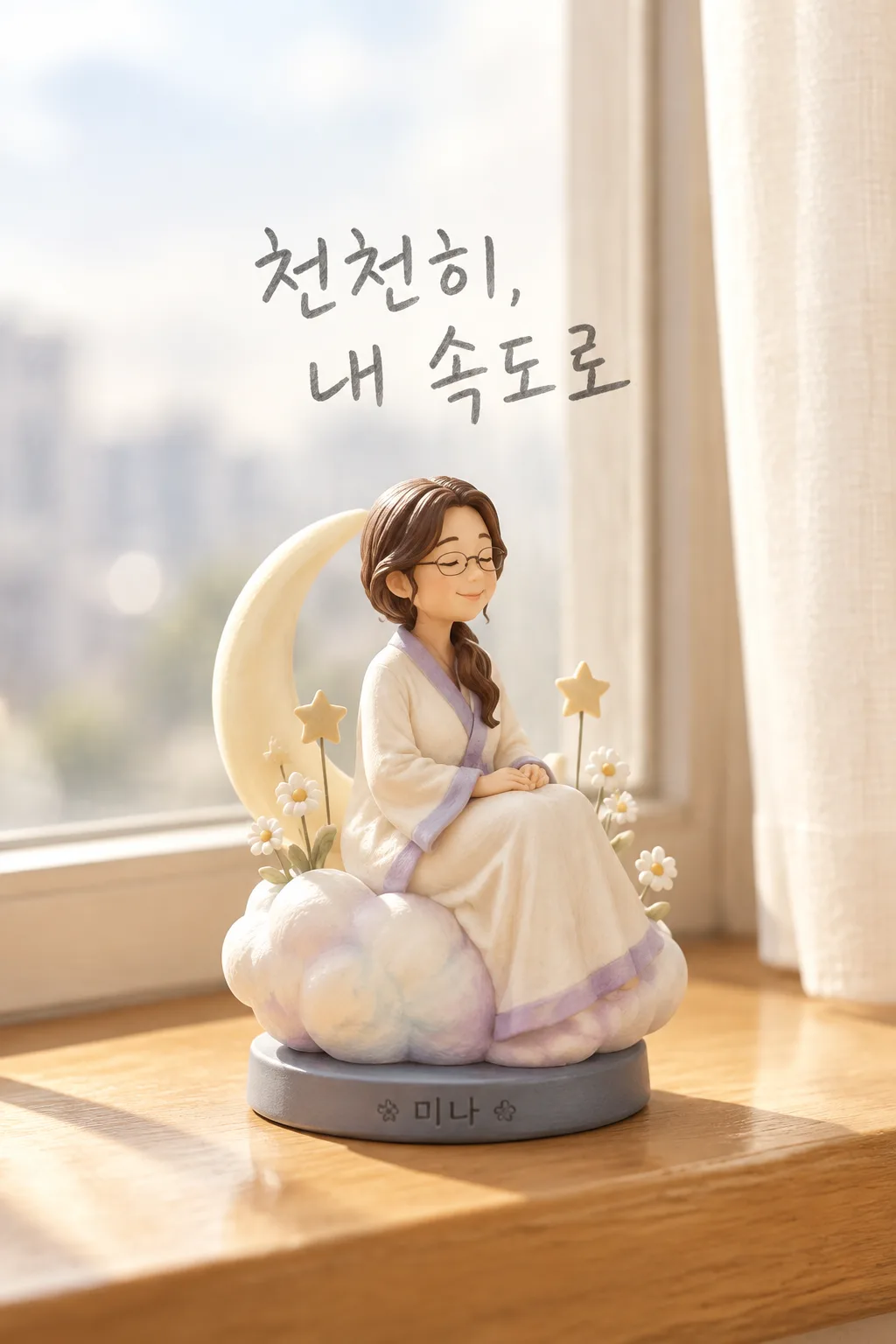
자기 사진을 가진 사람이 구름에 앉은 수채 채색 미니 피규어를 창가 실물 사진처럼 만들어 SNS에 공유해요.
칸 채우기
- 1칸을 채워요
- 2복사 버튼을 눌러요
- 3GPT 채팅창에 붙여넣어요
- 4그대로 보내면 썸네일 예시처럼 나와요
- 5내 사진 1장을 같이 넣으면 그 사진이 반영돼요 선택
프롬프트 원문 보기 3,435자
Create a finished portrait Output exactly one finished 2:3 portrait image, 1024x1536 pixels. Keep all important text inside the central 73% of image height: leave the top 12% and bottom 15% free of essential lettering. photograph of an original personal cloud figurine on a honey-colored wooden windowsill. The organizing sculpture is a CLOUD ALCOVE: a seated person on a thick ivory cloud seat, with a continuous sculpted backdrop rising from that same round slate base behind the person. The backdrop cradles the sitter rather than decorating a distant sky.

PORTRAIT NOTES: 【닮음 단서】
CLOUD EDGE MOTIF: 【구름 가장자리 무늬】
BASE NAME: 【받침대 이름】
PENCIL SENTENCE: 【곁에 둘 한마디】
ALCOVE SHAPE: 【쉼터 뒤판】

Build the entire collectible as solid matte resin with softly brushed watercolor pigmentation: ivory robe, dusty lilac sleeve trim, natural hair, muted slate base. Delicate paint pooling follows sculpted folds; show thickness, contact shadows and the cloud's rounded lobes. The seated figure has a gently simplified original anime-inspired face, relaxed eyes and fully covered folded legs. Keep hands resting quietly in the lap. Translate CLOUD EDGE MOTIF into shallow sculpted relief along the FRONT rim of the cloud seat, with a thin watercolor wash in the recesses. Do not scatter this motif in the background. It should identify this person's little resting place.

Choose the physical backdrop using ALCOVE SHAPE only:
열린 초승달: a tall cream crescent grows from the base behind the sitter, curving up the LEFT side and over the head, with its opening facing RIGHT. The right side remains open air; there is no roof, house or enclosing arch.
구름집 아치: replace the crescent completely with a thick scalloped cloud arch, supported on BOTH left and right sides of the cloud seat, forming a sheltered doorway around the seated figure. The head is visible inside the central opening. The arch encloses the top and both sides; there is no moon.
The two choices must have different outer silhouettes: asymmetrical open crescent versus a bilateral doorway arch. Both remain one cloud figurine on the same base, never an actual person in a room.

If a personal portrait is attached, use its age impression, face shape, hairstyle, complexion and existing glasses or facial hair as the identity reference. The notes supplement it without replacing identity. Without a portrait, use PORTRAIT NOTES to invent an adult and finish without asking. This is an imagined collectible image for personal sharing, not proof of a manufactured product.

Frame the whole sculpture in the middle and lower portion of one real sunlit window scene. Warm daylight from the left, pale curtains out of focus, tangible wooden ledge and coherent small cast shadow. No packaging, handheld toy, comparison panel or paper illustration. Leave clear window space above the sculpture. Write PENCIL SENTENCE once in large dark graphite handwriting in that clear space, within 18–30% height, away from face and backdrop. Engrave BASE NAME once on the front of the slate base, within 77–83% height; if blank leave it plain. No other writing. Leave top and bottom 15% free of lettering. Do not print option names or instructions. Return the complete image directly, no watermark or recognizable brand styling.

[Final output format]
Output exactly one finished 2:3 portrait image, 1024x1536 pixels. Keep all important text inside the central 73% of image height: leave the top 12% and bottom 15% free of essential lettering.
This selected output format takes priority over any fixed canvas size or aspect ratio elsewhere in this template. Adapt the composition, text zones and margins to the selected canvas without stretching or cropping essential content. Device safe areas apply only when a device is selected. Never print these format instructions on the image.
결과 어땠어요?
같은 분류의 다른 카드

쓰는 법 · 자주 묻는 것
창가에 올려 둔 듯한 구름 위 미니 피규어
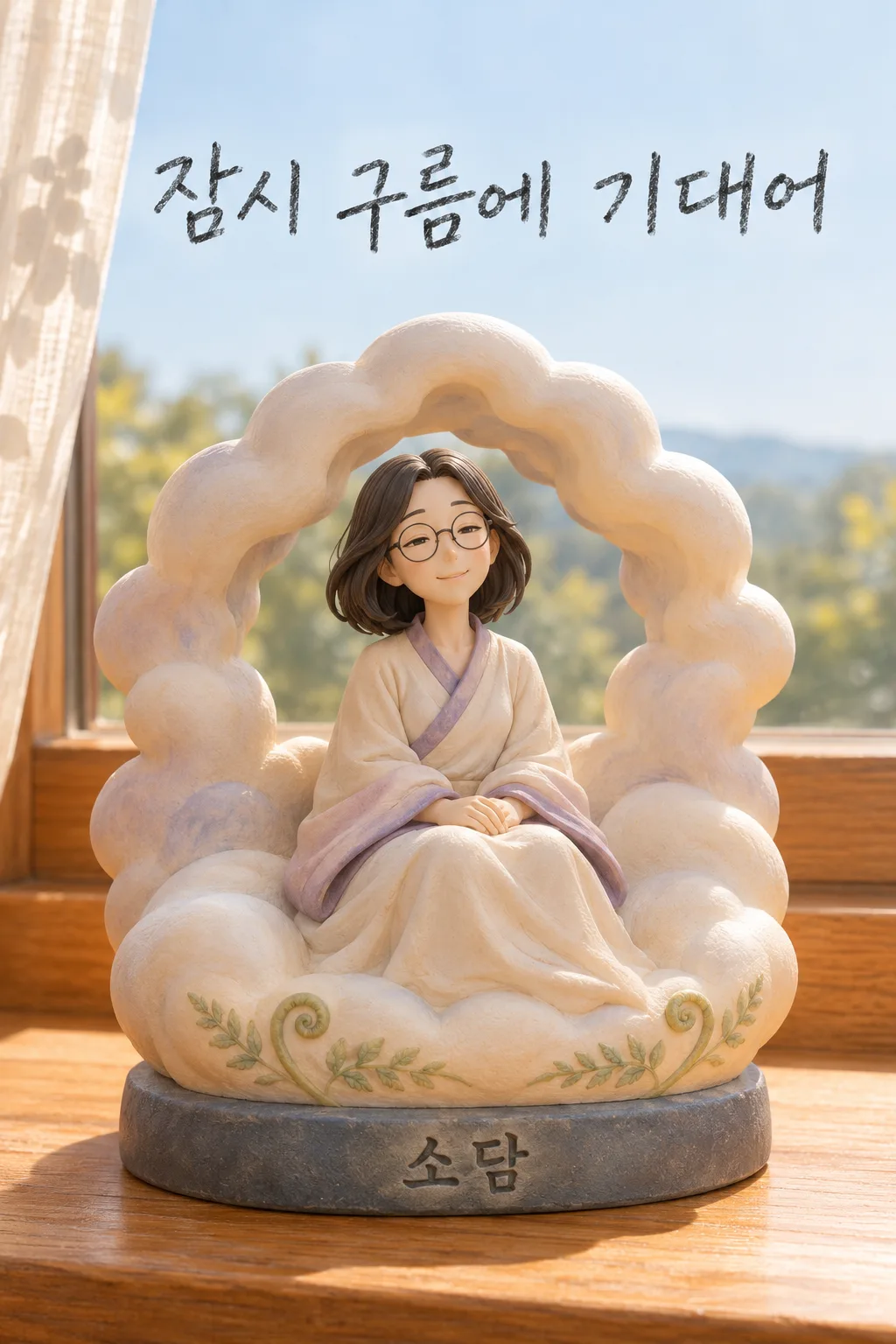
구름에 걸터앉아 쉬는 내 모습을 작은 피규어로 만든 그림이에요. 꿀색 나무 창턱에 올려 놓고 찍은 실물 사진처럼 나와요. 아이보리 옷에 연보라 물감이 번진 듯한 채색이고, 창턱에 그림자가 져서 진짜 물건처럼 보여요. 받침에는 이름이, 위쪽에는 손글씨 한마디가 들어가요. 「소담」과 「잠시 구름에 기대어」로 그려 본 세 장 모두 글자가 읽혔어요. 내 사진을 가진 사람이 SNS에 올릴 용도예요.
구름 앞 테두리에 좋아하는 식물을 새겨요
「구름 가장자리 무늬」에 적은 것이 구름 앞쪽 테두리에 돋을새김으로 들어가요. 「작은 고사리 잎, 둥글게 말린 잎끝」을 넣었더니 잎과 돌돌 말린 새순이 구름에 붙었어요. 창밖에 화분이 놓이는 게 아니라 내가 앉은 구름에 무늬로 새겨져요. 잎 개수와 배열은 그릴 때마다 달랐어요.
열린 초승달과 구름집 아치
「열린 초승달」은 왼쪽에서 솟은 달이 머리 위로 휘어 들고 오른쪽은 트여서 가볍고 시원해요. 「구름집 아치」로 바꾸면 달이 사라지고 양쪽 구름 기둥과 둥근 지붕이 나를 감싸서 더 아늑해요.
글자가 밀리고 얼굴이 어려질 때
손글씨는 정한 자리보다 위로 올라갔고 받침 이름은 더 아래로 내려갔어요. 목록에서 위아래가 잘려 보이면 「위 한마디를 조금 내리고 받침 이름을 올려, 글자 전체가 가운데 18~83% 안에 오게 해 줘」라고 보내 보세요. 38세라고 적어도 어려 보이는 인형 얼굴이 나왔고, 편안히 감은 눈이 뜬 채로 나오기도 했어요. 사진을 넣은 결과는 아직 확인하지 못했어요. 실제 피규어 사진처럼 보여도 만든 그림이라는 점은 올릴 때 밝혀 두세요.
올리기 전에 칸을 한 번 더 보세요
받침대 이름은 선택 칸이라 비워도 되지만, 적으면 받침 아래쪽에 이름이 들어가요. 곁에 둘 한마디는 「잠시 구름에 기대어」처럼 한 줄이 읽기 좋아요. 구름 가장자리 무늬에는 좋아하는 식물을 적고, 닮음 단서에는 나이와 머리, 안경, 얼굴형을 쉼표로 나눠 적어요. 결과가 마음에 들지 않으면 한 칸씩만 바꿔 다시 뽑으세요. 쉼터 뒤판 칸을 바꾸면 구조가 크게 달라지고 나머지 칸은 세부 모양을 바꿔요.
창가 사진 같은 그림이라 SNS에서 실제 수채 피규어를 찍은 것처럼 보이기 쉬워요. 그래서 올릴 때 AI로 만든 그림이라고 적어 두는 편이 안전해요. 구름과 받침, 창턱의 결은 그릴 때마다 조금씩 달라서 같은 설정으로 두세 장을 뽑아 가장 닮은 한 장을 고르면 돼요. 같은 사람이 여러 포즈로 나오는 시리즈를 만드는 용도는 아니에요.
마지막 확인일 · 공개