

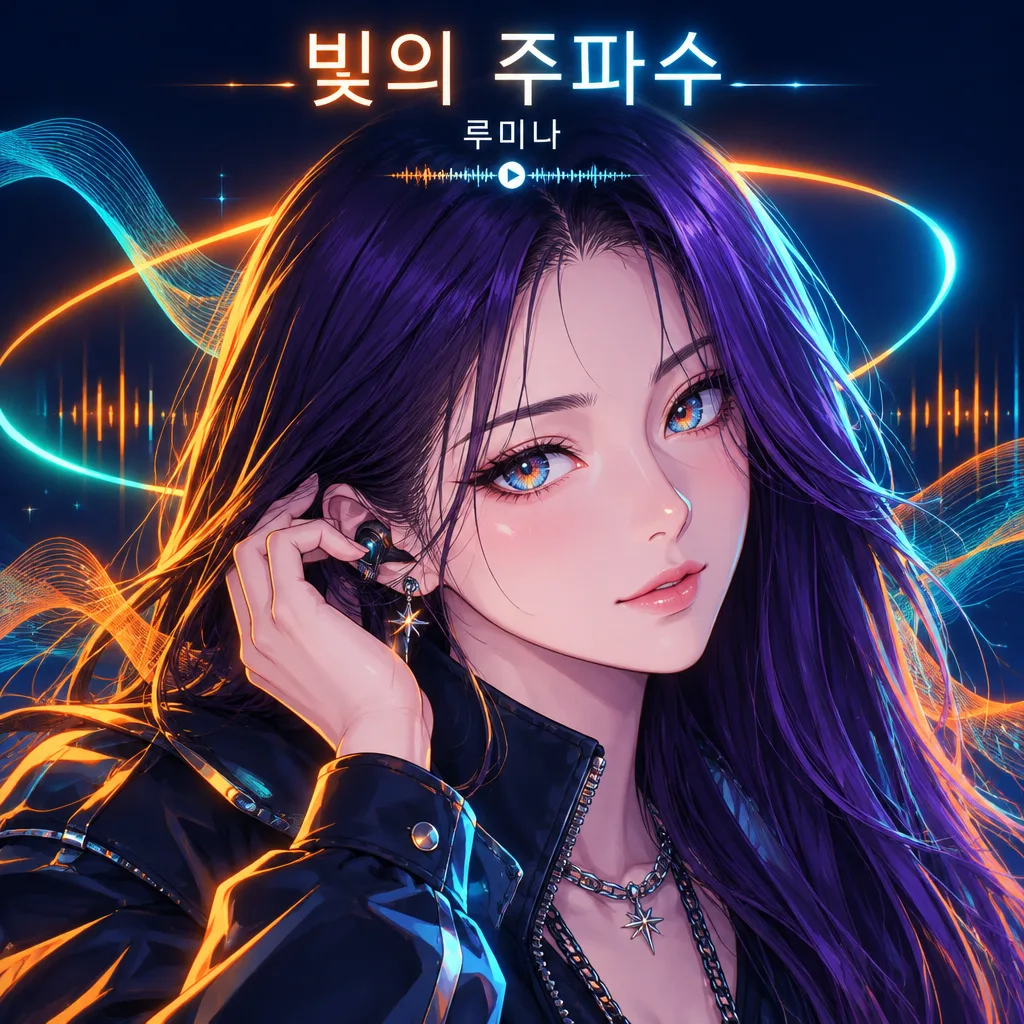
칸 채우기
- 1칸을 채워요
- 2복사 버튼을 눌러요
- 3GPT 채팅창에 붙여넣어요
- 4그대로 보내면 썸네일 예시처럼 나와요
- 5내 사진 1장 (선택)을 같이 넣으면 그 사진이 반영돼요 선택
프롬프트 원문 보기 3,052자
Create a square album cover whose entire composition is built from a luminous sound waveform. The waveform is the load-bearing visual structure: it occupies at least half the image, determines the portrait opening and the direction of empty space. It must never shrink to a decorative equalizer or a thin halo.
Output size 1080x1080 pixels, 1:1 square card. Keep the same top-to-bottom order but compress the zones to fit the square: the illustration becomes smaller and every text line stays fully readable.

INPUT
Track: "【곡 제목】". Artist: "【아티스트명】". Typeset each supplied string exactly once, without translation, substitutions or extra words. Reserve the upper fifth as a calm dark title area: large track title, smaller artist below, both inside a generous trim margin. Keep all luminous lines out of the letterforms.
Adult portrait: "【인물】". Without a photo, invent this adult immediately. An attached adult portrait supplies identity instead: retain age, facial structure, skin tone, hairstyle, glasses and facial hair as present. Never request an attachment.
Wave anchor: "【파형이 지나가는 자리】". 얼굴 뒤 → the main wave passes behind the head; 어깨 높이 → its main axis crosses the shoulder line; 화면 아래 → its main axis sits in the lower third. Face and lettering remain unobstructed.
Sound geometry: "【소리 결】". This choice controls silhouette, not palette:
느리고 깊은 물결 → three to five enormous broad rounded oscillations, deep smooth troughs and slow crests, layered curved ribbons sweeping across the full width; the portrait sits within a trough and follows its curved flow.
빠르고 뾰족한 선 → a full-width broken zigzag spine, sharp triangular peaks, compressed intervals and angular portrait opening; tilt the shoulders with one diagonal peak.
원형으로 퍼지는 충격파 → an off-center pulse origin at the selected anchor, nested expanding circular fronts with strong radial spokes reaching all four edges; open a wedge for the portrait, arrange shoulders along a radius. No horizontal oscillation spine in this mode.

RENDERING
Contemporary anime editorial character art: luminous layered irises, precise fine lashes, mature facial proportions, individually resolved hair strands over clear large locks, thin colored contours, crisp cel shadow shapes with translucent light gradients. Sharp face, intricate collar seams, restrained metal highlights. Head and chest portrait with relaxed hands outside the crop. Dark tailored high collar. Orange and aqua emission over ink navy stays the same for every sound geometry. Wave light catches the hair and collar, with distinct front and back depth. Keep the structure legible as large shapes at thumbnail size.
Finish one flat cover image. Only the supplied track and artist are readable. No existing characters, artist imitation, logos, playback controls, stickers, mockup, signature or watermark. Natural adult anatomy. Return the finished image directly.

[Final output format]
Output size 1080x1080 pixels, 1:1 square card. Keep the same top-to-bottom order but compress the zones to fit the square: the illustration becomes smaller and every text line stays fully readable.
This selected output format takes priority over any fixed canvas size or aspect ratio elsewhere in this template. Adapt the composition, text zones and margins to the selected canvas without stretching or cropping essential content. Device safe areas apply only when a device is selected. Never print these format instructions on the image.
결과 어땠어요?
같은 분류의 다른 카드



쓰는 법 · 자주 묻는 것
파형이 인물의 자리를 정하는 커버
곡 제목, 아티스트 이름, 인물 한 명으로 정사각 앨범 커버를 만드는 카드예요. 장식으로 붙은 이퀄라이저가 아니라, 화면의 절반 이상을 차지하는 큰 소리 파형이 인물과 글자가 앉을 자리를 정해요. 위쪽 오분의 일은 어두운 여백으로 비워 두고 거기에 제목과 아티스트를 앉히는 구도예요. 주황과 아쿠아 빛이 짙은 남색 위에서 번지는 색은 어떤 소리 결을 골라도 그대로예요.
곡 제목과 인물은 이렇게 적어요
곡 제목, 아티스트명, 인물, 파형이 지나가는 자리, 소리 결이 모두 꼭 적을 칸이에요. 시험한 값은 제목 「잠긴 새벽」, 아티스트 「잔류」, 인물 「46세 여성, 구릿빛 짧은 투블록 머리, 짙은 피부, 담담한 시선」, 자리 「어깨 높이」였어요. 인물 칸에는 나이, 머리, 피부, 시선처럼 눈에 보이는 것을 쉼표로 이어 적으면 돼요. 제목과 아티스트는 번역이나 수정 없이 한 번씩만 찍히도록 프롬프트가 짜여 있고, 시험한 세 장 모두 두 글자열이 한 번씩 정확하게 나왔어요.
소리 결 단추가 구도를 통째로 바꿔요
「느리고 깊은 물결」을 고르면 넓은 띠가 양쪽에서 굽어 들어와 어깨 앞을 지나고, 인물은 그 곡선 사이에 놓여요. 인물과 글자는 그대로 두고 「원형으로 퍼지는 충격파」로만 바꾸자 왼쪽 어깨 뒤에 빛의 중심이 생기고 동심원이 가장자리까지 퍼졌어요. 색은 같은데 가로 물결이 방사형으로 바뀌었고, 얼굴도 오른쪽으로 비켜났어요.
자리 단추와 내 사진
「파형이 지나가는 자리」에는 얼굴 뒤, 어깨 높이, 화면 아래 세 자리가 있어요. 얼굴 뒤는 주된 파형이 머리 뒤로, 어깨 높이는 어깨선 위로, 화면 아래는 아래쪽 삼분의 일에 걸리도록 프롬프트에 적혀 있어요. 어느 자리든 얼굴과 글자는 가리지 않는다는 조건이 붙어 있지만, 실제로 시험한 건 어깨 높이뿐이에요. 내 사진을 한 장 붙여 넣으면 사진 속 어른의 얼굴 구조, 머리 모양, 안경과 수염을 그대로 가져오도록 되어 있는데, 사진은 본인 것이거나 쓰도록 허락받은 것만 쓰세요.
해 보니 걸리는 데
예시에 없던 안경이 세 장 모두에 붙었어요. 안경 없는 인물이 필요하면 인물 칸에 「안경 없음」이라고 또렷하게 적어 주세요. 같은 입력으로 두 번 뽑아도 얼굴 각도와 재킷 여밈이 달라서, 한 번 마음에 든 초상을 다시 복제할 수는 없어요. 「얼굴 뒤」나 「화면 아래」 같은 다른 파형 자리, 사진을 첨부했을 때 얼굴이 보존되는지, 빠르고 뾰족한 선 같은 다른 소리 결, 다른 언어 글자는 시험 기록이 없어요.
마지막 확인일 · 공개