

173네온 헤일로 PC 배경
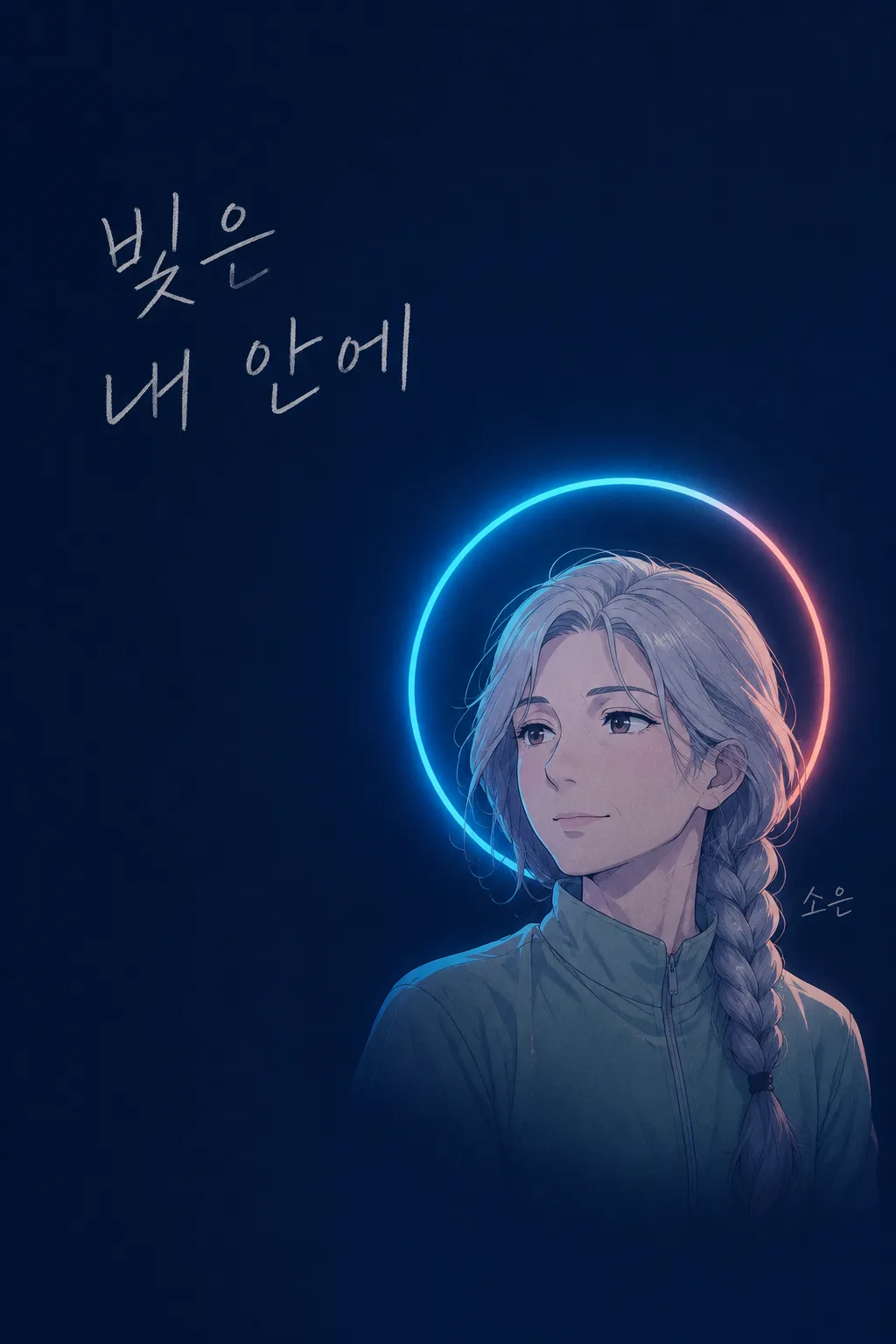
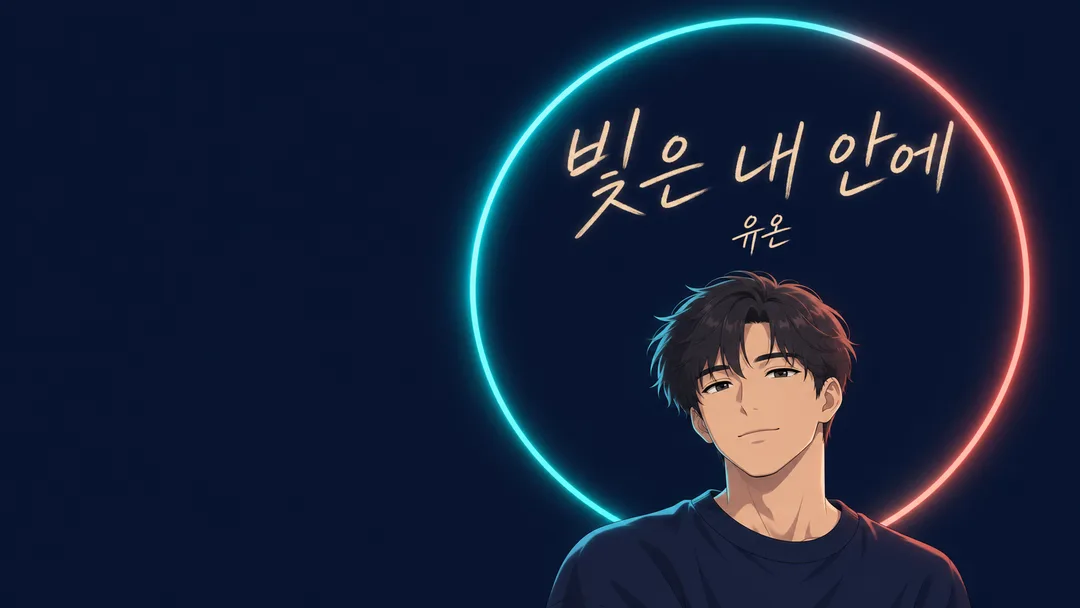
네온 고리 아래에 애니 초상을 두고, 연필 문구를 고리 밖이나 안으로 옮기는 PC 배경을 만들어요.
칸 채우기
- 1칸을 채워요
- 2복사 버튼을 눌러요
- 3GPT 채팅창에 붙여넣어요
- 4그대로 보내면 썸네일 예시처럼 나와요
- 5본인 얼굴·어깨 사진 1장을 같이 넣으면 그 사진이 반영돼요 선택
프롬프트 원문 보기 2,620자
Create one finished personal PC wallpaper, Output size 1920x1080 pixels, 16:9 landscape thumbnail. Adapt the vertical layout below to a wide canvas: place all text as one column in the left 55% of the canvas, keeping the same order and size relationships (the zone percentages describe the order within that column), and place the main illustration in the right 45%. Keep the text large enough to read at thumbnail size.. The device is a NEON AUTOGRAPH ORBIT: an original anime bust anchored to the lower rim of a cyan-and-coral circular light ring, with a pencil sentence beside the orbit or enclosed in its upper interior.
PORTRAIT: Translate an attached portrait into clean original anime linework and restrained cel shading, preserving face shape, apparent age, hair and visible clothing. Without a photo, invent a fictional adult with short dark hair and a navy crewneck and finish without questions. One person, head and connected shoulders, lower right; the face stays below the ring center. No existing character or artist imitation.
ORBIT NOTE: "【연필 한마디】". Copy exactly once in large pale warm pencil strokes with gentle grain, never glowing type. Feeling: 【밤의 다짐】; use only for the calm expression. Signature: "【궤도 서명】"; if supplied place once in smaller pencil below the sentence; otherwise omit. No extra words.
NOTE CONSTRUCTION: 【빛과 문구】. Follow only the selected arrangement:
빛 옆에 쓰기 = circle and bust wholly in the RIGHT half. The sentence is a separate large handwritten block in the upper LEFT, entirely outside the circle. A generous dark gap separates letters and ring. The interior above the head is empty navy.
빛 안에 쓰기 = enlarge the ring into a circular enclosure across upper-right and center. Put the WHOLE sentence and signature INSIDE the ring above the head. The portrait overlaps its lower rim as the base of the enclosed autograph. Leave the LEFT half without lettering. No outside text block.
This changes outside-versus-enclosed composition, not palette. The circular path is uninterrupted except behind the bust; no second ring or oval tunnel.
DESKTOP FIELD: continuous deep navy with quiet lower-left icon space; no stars, skyline, props or interface. Cyan light with a restrained coral transition and soft bloom, delicate portrait rim light and natural skin tone. Inset all essential content from edges. Extend the navy for wide screens; recompose the orbit for tall ratios without cropping letters or ring. Output the flat wallpaper itself, no monitor, collage, border, watermark or explanation. Check exact sentence and selected inside/outside placement. Never claim unverified resolution.

[Final output format]
Output size 1920x1080 pixels, 16:9 landscape thumbnail. Adapt the vertical layout below to a wide canvas: place all text as one column in the left 55% of the canvas, keeping the same order and size relationships (the zone percentages describe the order within that column), and place the main illustration in the right 45%. Keep the text large enough to read at thumbnail size.
This selected output format takes priority over any fixed canvas size or aspect ratio elsewhere in this template. Adapt the composition, text zones and margins to the selected canvas without stretching or cropping essential content. Device safe areas apply only when a device is selected. Never print these format instructions on the image.
결과 어땠어요?
같은 분류의 다른 카드
쓰는 법 · 자주 묻는 것
어두운 화면에 네온 고리 하나, 그 아래 나
PC 바탕화면용 그림이에요. 캄캄한 배경에 청록과 코럴빛 네온 고리가 떠 있고, 그 아래 오른쪽에 애니풍으로 그린 내 얼굴과 어깨가 있어요. 한마디는 연필 글씨로 적히고, 빛나는 건 고리뿐이에요. 「빛은 내 안에」와 서명 「유온」으로 그려 보니 글씨는 반짝이지 않고 종이에 쓴 듯한 연필 질감이었어요. 모니터 바탕화면이나 노트북 배경을 나만의 한 장으로 바꾸고 싶은 사람에게 맞아요.
글씨를 빛 옆에 쓸지, 빛 안에 쓸지
「빛 옆에 쓰기」는 왼쪽에 글씨, 오른쪽에 빈 고리와 초상이 놓여 화면이 좌우로 나뉘어요. 바탕화면 아이콘을 왼쪽에 두는 사람은 글씨와 겹칠 수 있어요. 「빛 안에 쓰기」로 바꾸면 글씨와 서명이 머리 위 고리 속으로 들어가고 왼쪽이 통째로 비어서 고리가 글과 나를 함께 감싸요. 아이콘을 둘 자리가 넓어지니 아이콘이 많은 사람은 이쪽이 편해요.
한마디와 다짐은 쓰임이 달라요
칸이 둘인 게 헷갈릴 수 있어요. 「연필 한마디」는 그림에 실제로 적히는 글이고, 「밤의 다짐」은 그림의 분위기를 잡는 데만 쓰여요. 다짐 칸에 쓴 문장이 그림에 찍히지는 않아요. 긴 속마음은 다짐에, 화면에 보일 짧은 말은 한마디에 적으세요. 서명 칸은 선택이라 비워도 그림이 나와요.
고리가 큰 데는 이유가 있어요
고리는 머리에 딱 맞는 후광보다 훨씬 커요. 위쪽을 비워 둬야 글씨가 그 안에 들어갈 수 있기 때문이에요. 그래서 그림에 보일 말은 짧아야 해요. 긴 문장을 넣으면 고리 안에서 글자가 작아지거나 줄이 꺾일 수 있으니 한 줄로 읽히는 길이로 적으세요.
얼굴이 크고 글씨가 가장자리에 붙어요
작은 초상으로 주문했는데 세 장 모두 얼굴과 어깨가 오른쪽 아래를 크게 차지했어요. 고리 위쪽은 화면 끝에 가깝고, 옆에 쓴 글씨는 왼쪽 끝에 붙어 나왔어요. 바탕화면을 「채우기」로 걸면 잘릴 수 있으니 「고리와 글씨가 모두 보이도록 여백을 더 넓혀 줘」라고 보내 보세요. 이 요청으로 잘 고쳐지는지는 우리도 아직 해 보지 않았어요.
해상도와 세로 비율
우리가 받은 그림은 1672×941이었어요. 풀HD보다 조금 작아서 4K 모니터에서는 흐려 보일 수 있어요. 얼굴은 얼굴과 어깨가 나온 사진을 같이 넣어야 나를 닮아요. 위 결과는 사진 없이 그린 것이고, 세로 2:3 비율은 아직 뽑아 보지 않았어요.
칸을 짧게 채우고 두 판을 비교해요
연필 한마디에는 「빛은 내 안에」처럼 한 줄을, 궤도 서명에는 「유온」처럼 짧은 이름을 적으세요. 같은 내용으로 빛 옆판과 빛 안판을 둘 다 뽑아 보고, 내 바탕화면 아이콘이 어디에 모이는지 보고 고르면 돼요. 두 판 모두 연필 글씨는 빛나지 않고 고리만 빛나는 건 같아요. 올리기 전에 글자가 화면 가장자리에 붙지 않았는지 한 번 확인하세요.
마지막 확인일 · 공개