

칸 채우기
- 1칸을 채워요
- 2복사 버튼을 눌러요
- 3GPT 채팅창에 붙여넣어요
- 4그대로 보내면 썸네일 예시처럼 나와요
- 5카드에 맞는 실제 사진을 같이 넣으면 그 사진이 반영돼요 — 배경 카드는 배경 사진, 인물 · 음식 카드는 그 사진 선택
직접 해 봤어요
- 시험일
- 2026-11-01
- 도구
- 내장 image_gen (API 스크립트 사용 안 함)
- 결과
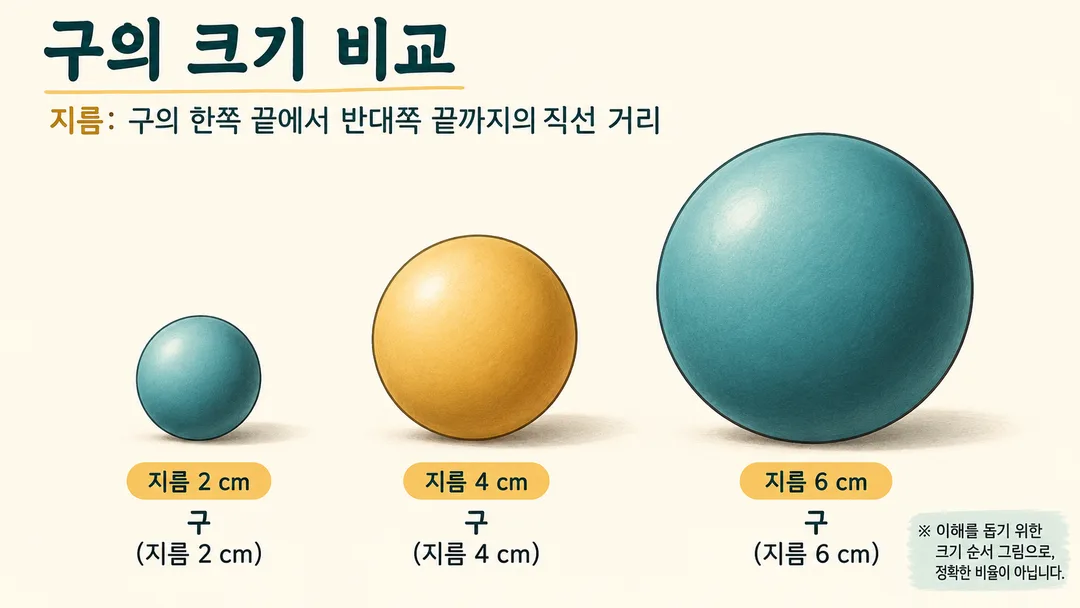
- 통과 (크기 순서 비교라는 수정된 약속 기준)
- 지켜진 것
- 구 3개가 왼쪽부터 작은 순서로 온전히 보인다. 지름 정의, 구 이름, 2·4·6 cm가 올바르고 글자 잘림·누락·틀림이 없다. 크림색 도감 분위기이며 장식 구가 없다. 정확한 비율이 아닌 크기 순서 그림이라는 안내가 읽힌다.
- 안 된 것
- 정확한 지름 1:2:3은 보장하지 않는다. 이는 해결됐다고 주장하지 않으며 카드의 약속에서 제외했다. 치수 라벨이 반복되지만 오류나 누락은 없다.
- 이렇게 하면 나아요
- 크기 순서 설명용으로 사용하고 정확한 축척이 필요한 도해에는 사용하지 않는다. 실물 수치는 같은 정의의 자료로 별도 확인한다.
프롬프트 원문 보기 2,180자
Generate one finished size-comparison infographic image.
Canvas: Output size 1920x1080 pixels, 16:9 landscape thumbnail. Adapt the vertical layout below to a wide canvas: place all text as one column in the left 55% of the canvas, keeping the same order and size relationships (the zone percentages describe the order within that column), and place the main illustration in the right 45%. Keep the text large enough to read at thumbnail size.. Default: 16:9.
Subject: 【주제】. Number of objects: 【개수】. Atmosphere: 【분위기】.
Show the requested objects in one clear left-to-right lineup, smallest to largest, on a common baseline. Make the size order obvious, keep every object complete and separate, and preserve its natural shape. Use only the requested number of objects, with no decorative specimens. Blank fields use spheres with diameters 2, 4, 6 cm, count 3, and field guide. For counts 4 and 5, extend the default diameters to 8 and 10 cm.
This is a visual comparison of size order, not an exact scale diagram. Do not claim exact ratios or add a graduated ruler. Include a short visible note in Korean meaning “Illustrative size order; not to scale.” Numeric labels describe the subjects, not measured lengths on the image.
Use one measurement definition throughout, such as diameter or height. For real subjects use confirmed measurements from authoritative sources with consistent definitions; do not invent values. If they cannot be verified, use the default geometric spheres instead. User-defined geometric dimensions need no lookup.
Miniature: tactile matte models with warm light. Field guide: clean flat illustrations, cream background, fine contours, teal and ochre. Dark: dark background with subtle rim light. Apply only the selected style.
All visible writing must be Korean. Add a short title, the measurement definition, and one name and dimension label below each object. Keep text readable, well spaced and fully inside the canvas. For portrait canvases keep the same single lineup with the title above. No brands, existing characters, real people, signatures or watermarks.
Check names, digits, units, object count and ascending order. Return only the finished image.

[Final output format]
Output size 1920x1080 pixels, 16:9 landscape thumbnail. Adapt the vertical layout below to a wide canvas: place all text as one column in the left 55% of the canvas, keeping the same order and size relationships (the zone percentages describe the order within that column), and place the main illustration in the right 45%. Keep the text large enough to read at thumbnail size.
This selected output format takes priority over any fixed canvas size or aspect ratio elsewhere in this template. Adapt the composition, text zones and margins to the selected canvas without stretching or cropping essential content. Device safe areas apply only when a device is selected. Never print these format instructions on the image.
결과 어땠어요?
이 카드도 많이 사용해요
쓰는 법 · 자주 묻는 것
크기 순서를 한눈에
작은 대상부터 큰 대상까지 한 줄로 보여 주는 비교 그림을 만들어요. 이름과 치수를 함께 붙이지만, 그림의 정확한 배율을 보장하지 않아요. 정밀한 축척이 필요한 학습자료에는 쓰지 마세요.
세 칸 채우기
주제에는 비교할 대상과 기준을 적어요. 개수는 3, 4, 5 중, 분위기는 미니어처·도감·다크 중 골라요. 예시는 지름 2, 4, 6 cm인 구 / 3 / 도감이에요. 기본은 16:9이며 사진 입력은 받지 않아요.
공유 전 확인
이름·숫자·단위가 맞고 대상이 빠짐없이 작은 순서로 보이는지 확인하세요. 실물 수치는 같은 기준의 공신력 있는 자료로 확인하세요. 틀린 글자는 정확한 내용으로 다시 요청하세요. 외부 서비스의 요금과 이용 조건은 해당 서비스에서 확인하세요.