
All · Wallpapers · Phone wallpapers
143Girl on the Clouds Wallpaper
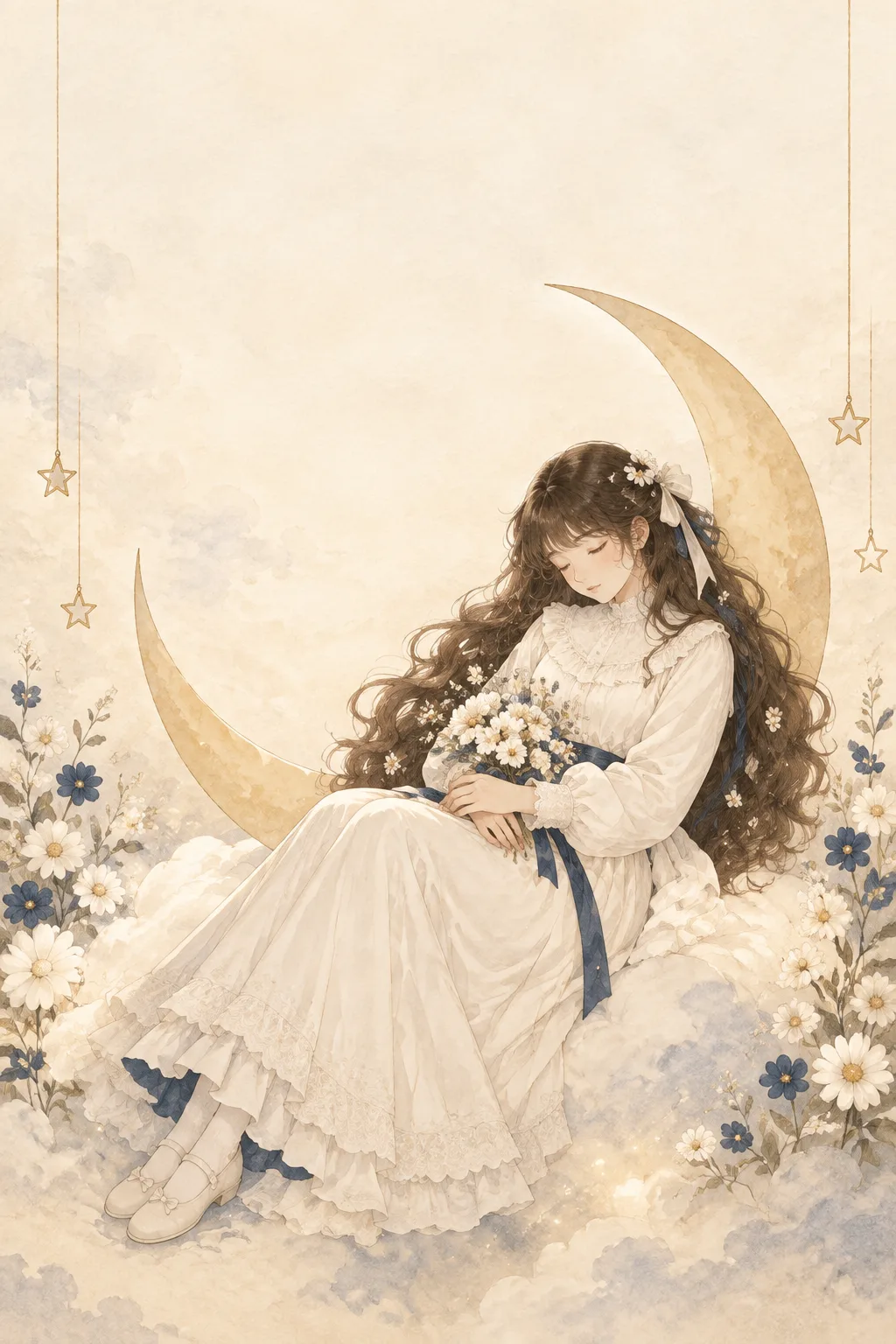
Choose hair, ribbon accents and one prop for a wordless watercolor anime girl resting on ivory clouds.
Fill in the fields
- 1Fill in the fields
- 2Copy the prompt
- 3Paste it into a GPT chat
- 4To use a photo, upload it together with the prompt Optional
Full prompt 3,274 characters
Generate this image now. Draw one complete image directly, without explanation, questions, captions or a prompt response.
[One fixed G22 wallpaper]
A flat edge-to-edge 9:16 portrait phone wallpaper, ideally 1080x1920. NO TEXT anywhere. One peaceful young adult woman rests on an ivory cloud with a crescent and hanging stars. Use an original watercolor anime illustration with ivory and sepia dominant, slate cloud shadows, small navy accents, luminous cream backlight and delicate matte paper grain. Layer soft transparent watercolor washes over fine pencil contours; retain gently detailed flowers, hair strands and lace. No photographic cosplay, figurine, glossy 3D, sticker sheet, comic panels, neon or phone mockup.
[Personal colors within that fixed palette]
Hair color: "【Hair color】". Apply it only to her long voluminous flowing waves, retaining warm subdued highlights, small white daisies woven into the hair and a soft ribbon.
Dress accent color: "【Dress accent color】". Keep the main fabric ivory; apply this color only to ribbons, small waist details and a narrow underlayer. Retain a few small navy-blue flowers in the environment even if the selected dress accents are a different color. The main sky and clouds must remain ivory/sepia rather than becoming saturated with the input color.
[Face and ordinary dress]
Her eyes are closed, cheeks relaxed, lips at rest and head tilted very gently toward her lap. Draw one adult, with natural quiet anatomy and correctly joined hands. She wears a plain fully covering long ivory dress with a high neckline, long sleeves, opaque bodice and delicate lace/frill borders. The long skirt covers her legs; closed ribbon shoes and opaque stockings may peek out quietly. Keep the dress modest and everyday: no chest emphasis, cleavage, bare-thigh emphasis, transparent fabric, lingerie or sensual posing.
[Selected prop in the same cloud scene]
Prop: "【Prop】". Choose only the corresponding focal prop. Crescent: she leans gently on the inner curve of the large pale-gold crescent behind her. Bouquet: her hands cradle one small bouquet of white daisies and ivory flowers in her lap. Star: one hand holds a thin gold thread carrying a single small outline star below it. Do not combine all three hand props. In every option, preserve the large background crescent and a few hanging stars at the outer sides as G22 scenery; the selected prop only determines the focal action. Keep her eyes closed and posture restful.
[Quiet clock-safe composition]
Leave the entire top 0-28% as pale, low-detail ivory sky: no face, moon tip, large flowers, star cluster or text there. Place the girl's face near 54-62% height, her body and cloud seat within the lower 48-89%, and the crescent behind her below the clock zone. Let white flowers and a few navy blossoms frame the lower side edges; avoid a dense central obstruction. Small outline stars hang on fine gold threads along the sides below 30%; sparse warm light dust glows near the cloud seat, never as a noisy glitter overlay. Keep bottom 92-100% as gentle low-detail cloud wash for phone controls. One coherent scene with generous breathing room, no lettering, signature, logo, watermark, screenshot UI, decorative title or extra person. Return exactly one finished wallpaper.
You may also like
How to use it · FAQ
A quiet wallpaper without words
Use this card if you prefer a restful picture behind your lock-screen notifications. It creates one watercolor anime scene of a peaceful girl seated on ivory clouds, with a pale crescent, hanging stars and small points of warm light. The G22 treatment fixes the ivory and sepia base, slate shadows, white flowers and restrained navy accents. This result has no quotation, name, signature or other lettering, leaving the illustration to carry the mood.
Two colors and one focal prop
Hair color changes only her flowing waves. You can tap an example and edit it to describe your preferred shade. Dress accent color applies to ribbons and small details; the main dress stays ivory. The Prop options select one restful action: leaning against the crescent, cradling a white bouquet in her lap, or holding the fine thread of a small hanging star. The background crescent and a few hanging stars remain part of the scene in every option. Selecting a bouquet or star does not add all three hand props at once.
Look for calm expression and ordinary clothing
The girl should have closed eyes and a relaxed face. Her dress has a high neckline, long sleeves, an opaque bodice and a long skirt, with delicate lace and frill edges. It should look like modest, ordinary clothing without emphasis on the chest or bare legs. Check that the face retains soft anime detail, rather than becoming an indistinct wash or a glossy figurine. Her arms and hands should connect naturally to the chosen prop and her cloud-supported posture should feel comfortable.
Check the phone layout
The upper sky is deliberately spacious for the clock, while the face and crescent sit below that zone. Sparse light dust belongs near the clouds rather than filling every empty area. Preview the picture on your actual lock screen to ensure notifications do not cover the face. If the dress becomes entirely dark, ask in the same conversation to return the fabric to ivory and apply the accent color only to the ribbons. If lettering appears, request removal of all text and signatures while preserving the scene. For an awkward hand, name the selected prop and request only that hand correction. Save the finished image directly to your phone. No photograph or reference upload is needed, and each use produces a single wallpaper.