
項目を入力
- 1項目を入力します
- 2プロンプトをコピーします
- 3GPTのチャットに貼り付けます
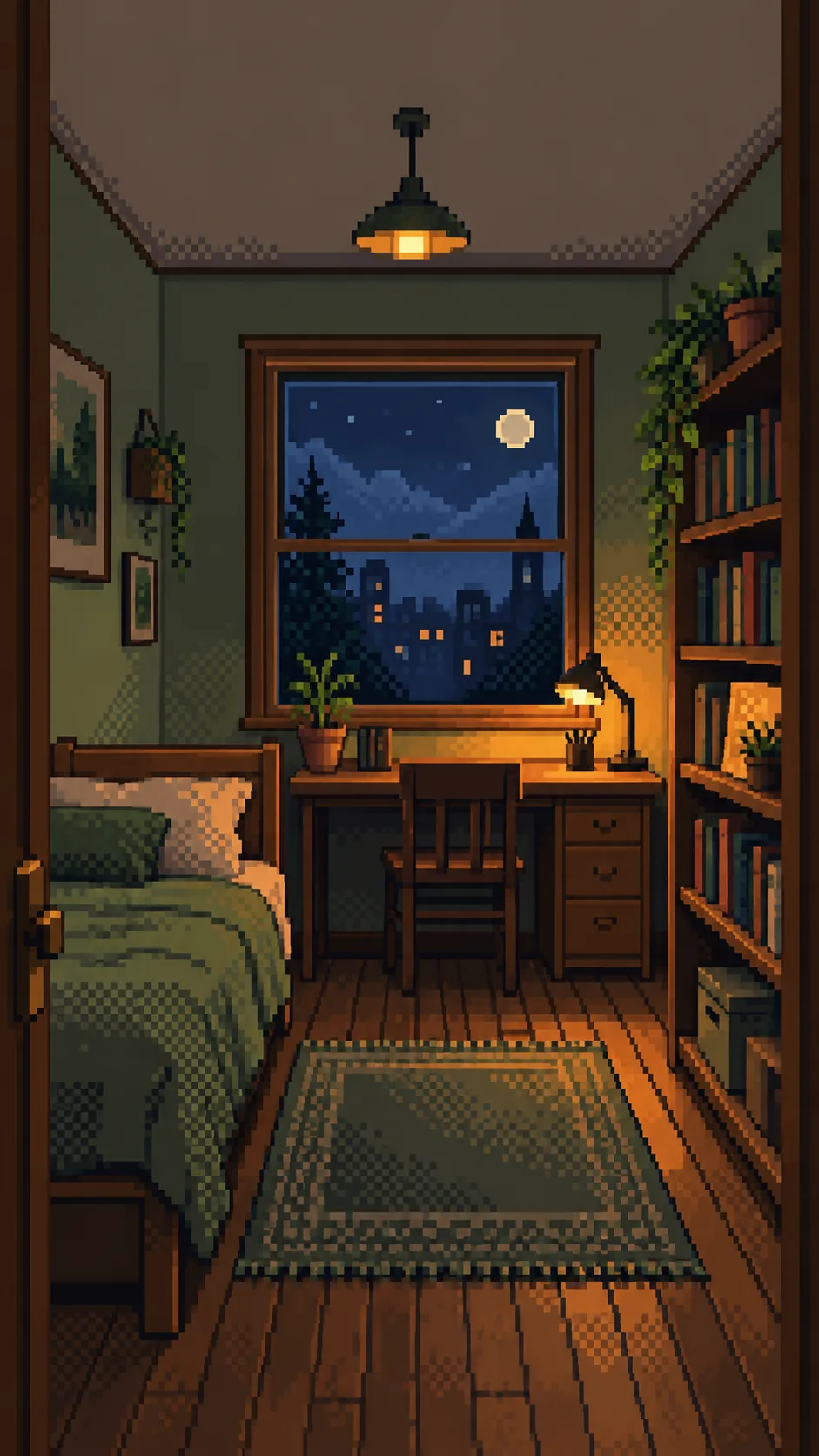
- 4そのまま送ると、サムネイルの例のような画像になります
- 5部屋の写真1枚(なくても利用可能)をプロンプトと一緒に入れると、その写真が反映されます 任意
プロンプト全文を見る 4,302文字
Generate exactly ONE finished image now. Draw directly with image generation; do not ask questions, run code, provide instructions instead of art, or require cropping or assembly.
出力サイズは1080×1920ピクセル、9:16の縦型にしてください。文字は中央の安全な範囲に収めてください。
OUTPUT: one full-bleed cozy pixel art room wallpaper, no words, no frame, no comparison, no phone mockup. Use the selected canvas ratio; 9:16 is recommended for phones. Preserve the same style and room in every ratio.

INPUTS:
Arrangement: "【部屋の配置】"
Light and weather: "【光と天気】"
Accent color: "【アクセントカラー】"
Objects to keep: "【残したい小物】"

PHOTO RULE: A photo is optional. If attached, repaint that single room entirely as pixel art. Preserve its viewpoint, major furniture silhouettes, window count and shape, door, bed, desk, shelving and their spatial relationships. Photo geometry takes priority over the Arrangement field. Do not move, duplicate, replace or add furniture. Highlight listed objects only if they are actually visible in the photo. Preserve photographed object clusters and recognizable materials. Simplify clutter into pixel clusters without redesigning the room. Remove readable private documents, faces, logos and tiny book/screen text into abstract color marks. Never reproduce a real character or branded artwork.
Without a photo, finish a fictional room from Arrangement and Objects to keep. If Arrangement is empty, use a narrow bed on the left wall, one rectangular window on the back wall, wooden desk directly below it and bookcase on the right wall. If Objects to keep is also empty, include one small desk lamp and one small plant on the bookcase. Never ask for a photo.

LIGHT: Apply the supplied light/weather without changing geometry. Morning sun means gentle warm daylight; sunset means peach window light; night desk lamp means an amber existing lamp against a dim blue window; rainy evening means cool rainy window light and warm existing interior light. Empty light uses night desk lamp. With a photo, do not add a lamp that is absent; use warm ambient indoor light instead. Preserve the visible outside view and alter only its light/weather, without invented landmarks.
COLOR: Apply the supplied accent to bedding and small existing accents only; preserve furniture materials and do not recolor the whole room. Empty accent uses sage green. Keep clear separation of cool ambient shadows and restrained warm highlights.

STYLE: Redraw from scratch as unmistakable low-resolution 2D pixel art, on a single logical canvas about 192 pixels wide (160-240 acceptable). Enlarge square pixels with hard nearest-neighbor edges. Use only 16-32 total palette colors, flat color clusters, strongly stair-stepped silhouettes and visible checkerboard dithering for light transitions. Each logical pixel is a clearly visible solid square. No subpixel details, anti-aliasing, soft gradients, blur, photographic textures, realistic wood grain, fabric fibers, ray tracing or smooth 3D shading. A photo is geometry reference ONLY: never retain its photographic surfaces or merely tint/pixel-filter the photo. Rebuild every surface, including ceiling, bedding, rug, plants and window view, as simplified hand-placed pixel clusters. Keep grounded furniture and consistent openings.
COMPOSITION: The room fills every edge. Upper roughly 20% is a calm low-detail wall/ceiling zone for a phone clock; never draw the clock or blank margins. Maintain recognizable furniture across the middle and lower canvas. Fit the photographed visible furniture without stretching or cropping key anchors; extend only plain wall, ceiling and floor when needed for the ratio. Do not invent unseen furniture, extra windows, rooms or a new camera view.
FINAL CHECK: Compare window count and left/right furniture relationships with the photo or Arrangement, check for duplicate objects and consistent pixel edges. No people, pets, letters, digits, captions, logos, watermark, existing character, arrows or UI. Return only the single completed wallpaper.

[Final output format]
出力サイズは1080×1920ピクセル、9:16の縦型にしてください。文字は中央の安全な範囲に収めてください。
This selected output format takes priority over any fixed canvas size or aspect ratio elsewhere in this template. Adapt the composition, text zones and margins to the selected canvas without stretching or cropping essential content. Device safe areas apply only when a device is selected. Never print these format instructions on the image.
結果はどうでしたか?
こちらのカードも人気です

使い方・よくある質問
いつもの部屋をスマホに
見慣れた窓と家具を、くっきりした四角いピクセルで描き直す壁紙です。共通の比率ボタンで9:16を選ぶとスマホ向けになります。一覧の表紙は2:3の例です。上部は壁や天井の静かな色面にして、時計が重なる場所の細かな模様を抑えます。
欄の使い方
必須の欄はありません。部屋の配置は写真がない場合の家具の位置です。写真がある場合は写真の配置を優先します。光と天気は照明と窓の外の天気だけを変え、空欄なら夜のデスクライトになります。アクセントカラーは寝具と小さな小物に適用し、空欄ならセージグリーンです。残したい小物は写真に写った物だけを強調し、写っていない物は足しません。写真がない場合は記入した物を描き、小物も空欄なら小さなライトと鉢植えを使います。配置が空欄なら、左にベッド、奥の窓の下に机、右に本棚の仮想の部屋になります。
写真と一緒に一度送信
一つの部屋の窓と主な家具が見える写真を画像AIに添付し、同じメッセージに完成したプロンプトを貼り付けて一度送ります。写真なしでも使えます。画像機能、料金、利用規約は利用するサービスで確認してください。
完成後の確認
窓の数、ベッドと机の左右、本棚の位置を元の写真と照合します。ピクセルの輪郭、床に接する家具の脚、椅子の重複も確認してください。必要なら「窓の下の机はそのまま、ベッドだけ元の写真の左側に戻して」のように一部分を指定して修正できます。修正は任意で、最初の送信から完成画像1枚を受け取る構成です。
作例とよくある質問
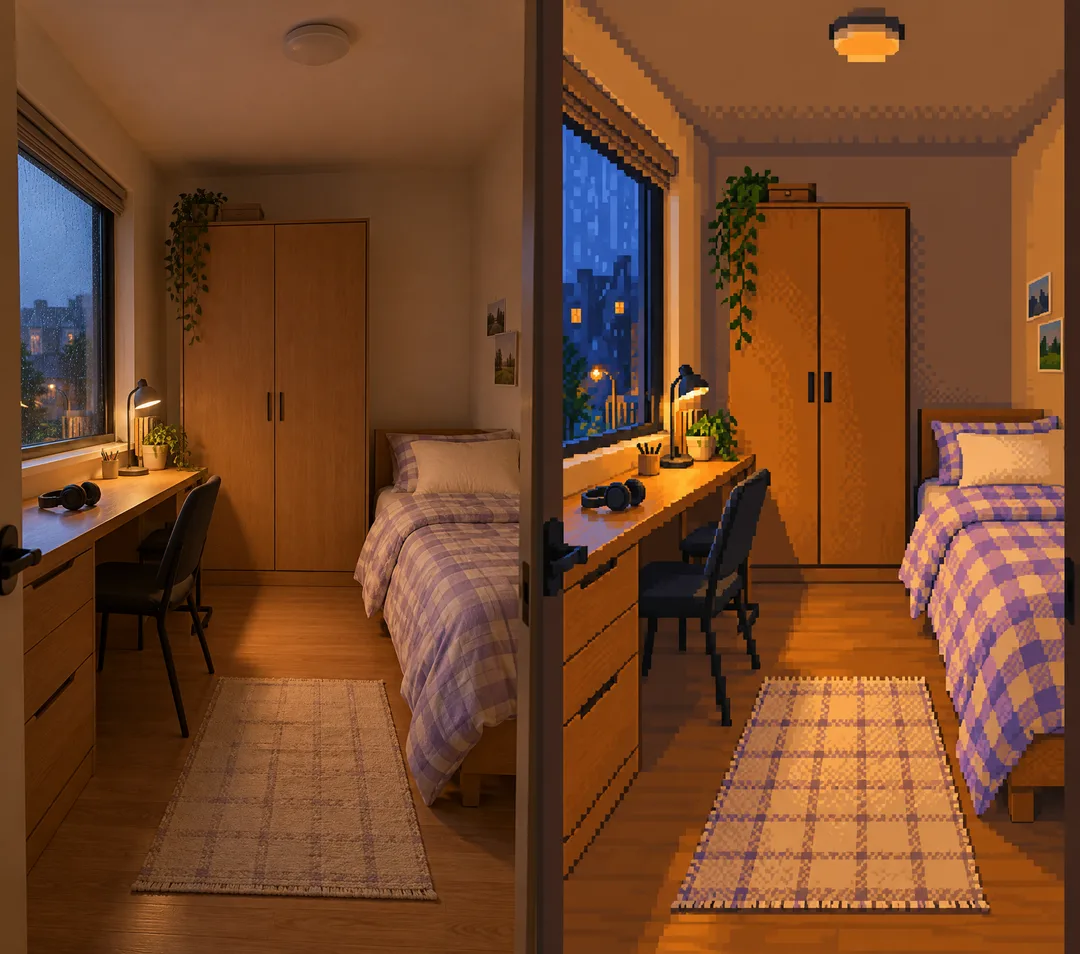
最初の作例は写真なしの仮想の部屋で、基本の配置、夜のライト、セージグリーン、小さなライトと鉢植えを使っています。二つ目は説明用に生成した写真と変換結果です。左の窓と長い机、右のベッド、奥のクローゼットを残し、雨の夕方とラベンダー色を適用しています。比較画像は説明用で、プロンプトが返すのは完成した絵1枚です。
文字は入りますか? 文字のない壁紙です。本や画面の文字は抽象的な色のかたまりにします。写真にない部分は? 比率に合わせて壁・天井・床だけを自然につなぎ、家具や別の部屋は追加しません。解像度は固定ですか? 比率を指定するカードで、実際の画像寸法は画像AIの出力によります。