
All · Wallpapers · Cute
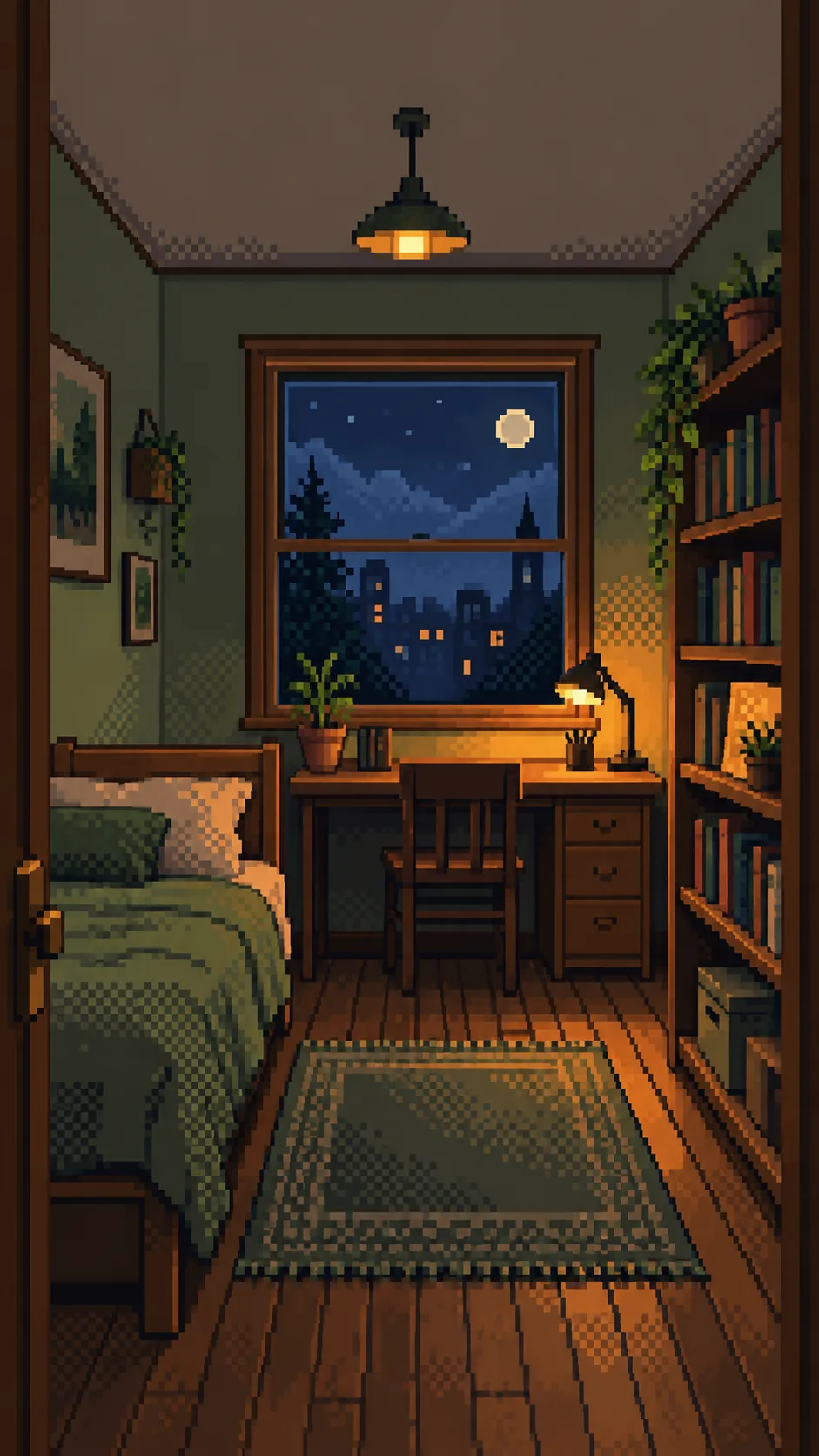
356My Room Pixel Art Wallpaper
Keep your window and furniture arrangement in a cozy pixel art phone wallpaper.
ChatGPT Free OK
Fill in the fields
- 1Fill in the fields
- 2Copy the prompt
- 3Paste it into a GPT chat
- 4Send it as is and you get an image like the thumbnail example
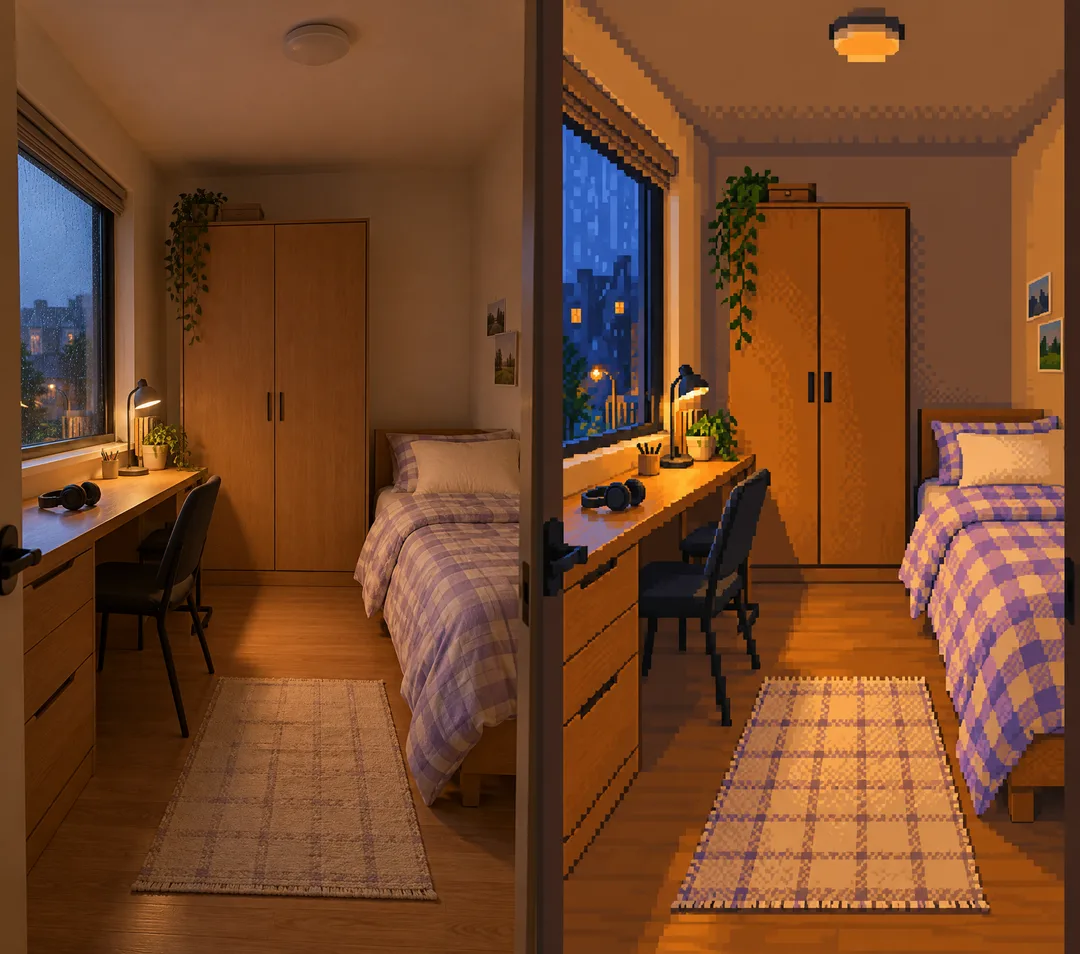
- 5Attach One room photo (optional) with the prompt and your photo is used in the result Optional
Full prompt 4,339 characters
Generate exactly ONE finished image now. Draw directly with image generation; do not ask questions, run code, provide instructions instead of art, or require cropping or assembly.
Output size 1080x1920 pixels, 9:16 portrait story. Keep all text inside the central 80% of the height.
OUTPUT: one full-bleed cozy pixel art room wallpaper, no words, no frame, no comparison, no phone mockup. Use the selected canvas ratio; 9:16 is recommended for phones. Preserve the same style and room in every ratio.

INPUTS:
Arrangement: "【Room arrangement】"
Light and weather: "【Light and weather】"
Accent color: "【Accent color】"
Objects to keep: "【Objects to keep】"

PHOTO RULE: A photo is optional. If attached, repaint that single room entirely as pixel art. Preserve its viewpoint, major furniture silhouettes, window count and shape, door, bed, desk, shelving and their spatial relationships. Photo geometry takes priority over the Arrangement field. Do not move, duplicate, replace or add furniture. Highlight listed objects only if they are actually visible in the photo. Preserve photographed object clusters and recognizable materials. Simplify clutter into pixel clusters without redesigning the room. Remove readable private documents, faces, logos and tiny book/screen text into abstract color marks. Never reproduce a real character or branded artwork.
Without a photo, finish a fictional room from Arrangement and Objects to keep. If Arrangement is empty, use a narrow bed on the left wall, one rectangular window on the back wall, wooden desk directly below it and bookcase on the right wall. If Objects to keep is also empty, include one small desk lamp and one small plant on the bookcase. Never ask for a photo.

LIGHT: Apply the supplied light/weather without changing geometry. Morning sun means gentle warm daylight; sunset means peach window light; night desk lamp means an amber existing lamp against a dim blue window; rainy evening means cool rainy window light and warm existing interior light. Empty light uses night desk lamp. With a photo, do not add a lamp that is absent; use warm ambient indoor light instead. Preserve the visible outside view and alter only its light/weather, without invented landmarks.
COLOR: Apply the supplied accent to bedding and small existing accents only; preserve furniture materials and do not recolor the whole room. Empty accent uses sage green. Keep clear separation of cool ambient shadows and restrained warm highlights.

STYLE: Redraw from scratch as unmistakable low-resolution 2D pixel art, on a single logical canvas about 192 pixels wide (160-240 acceptable). Enlarge square pixels with hard nearest-neighbor edges. Use only 16-32 total palette colors, flat color clusters, strongly stair-stepped silhouettes and visible checkerboard dithering for light transitions. Each logical pixel is a clearly visible solid square. No subpixel details, anti-aliasing, soft gradients, blur, photographic textures, realistic wood grain, fabric fibers, ray tracing or smooth 3D shading. A photo is geometry reference ONLY: never retain its photographic surfaces or merely tint/pixel-filter the photo. Rebuild every surface, including ceiling, bedding, rug, plants and window view, as simplified hand-placed pixel clusters. Keep grounded furniture and consistent openings.
COMPOSITION: The room fills every edge. Upper roughly 20% is a calm low-detail wall/ceiling zone for a phone clock; never draw the clock or blank margins. Maintain recognizable furniture across the middle and lower canvas. Fit the photographed visible furniture without stretching or cropping key anchors; extend only plain wall, ceiling and floor when needed for the ratio. Do not invent unseen furniture, extra windows, rooms or a new camera view.
FINAL CHECK: Compare window count and left/right furniture relationships with the photo or Arrangement, check for duplicate objects and consistent pixel edges. No people, pets, letters, digits, captions, logos, watermark, existing character, arrows or UI. Return only the single completed wallpaper.

[Final output format]
Output size 1080x1920 pixels, 9:16 portrait story. Keep all text inside the central 80% of the height.
This selected output format takes priority over any fixed canvas size or aspect ratio elsewhere in this template. Adapt the composition, text zones and margins to the selected canvas without stretching or cropping essential content. Device safe areas apply only when a device is selected. Never print these format instructions on the image.
How did it turn out?
You may also like
- 344Tiny worlds inside objects — a village in a teacup, glass jar or walnut shell
- 334Forest spirit fantasy — meet a glowing stag or wolf spirit in a night forest

- 328Cinematic winter animal portrait — a fox, snow leopard or your dog in a coat on snowy mountains

- 322Retrofuturism collage — cut-out astronauts and race cars with planets and orbits

- 310Bookish dreamscape wallpaper — bookshelf canyons, a sea over an open book, glowing lanterns
- 304Romantic dreamscape wallpaper — music, flowers and waves swirling on black

How to use it · FAQ
A familiar room on your phone
Create one crisp pixel art wallpaper that keeps your room recognizable. Choose 9:16 in the shared ratio controls for a phone. The list cover is a 2:3 example. The upper area uses calm wall and ceiling colors so a phone clock has room without adding a blank border.
Fill the fields
There are no required fields. Room arrangement describes furniture positions when no photo is attached. With a photo, its arrangement takes priority. Light and weather changes illumination and weather only; an empty value uses Night desk lamp. Accent color affects bedding and small accents; an empty value uses Sage green. Objects to keep highlights visible objects in a photo without adding missing objects. Without a photo, listed objects are drawn; an empty value supplies a small lamp and plant. An empty arrangement uses the first example's default room: left bed, back window and desk, right bookcase.
Attach and send once
Attach one photo showing a single room and its main furniture to an image AI, paste the completed prompt in the same message, and send once. A photo is optional. Check image availability, pricing and terms with the service you use.
Check the result
Compare window count, bed and desk positions, and shelving against the photo. Look for distinct square pixels, grounded furniture legs and no duplicate chairs. If necessary, request one correction such as “Keep the desk under the window and restore the bed to the left.” An optional correction is separate from the initial complete image.
Examples and questions
The first example is a photo-free fictional room with the default arrangement, night lamplight, sage accents, a small lamp and plant. The second is a generated demonstration photo and its transformation: left window and long desk, right bed and back wardrobe, rainy evening and lavender accents. The comparison is explanatory; the prompt returns only the finished art.
Does it add words? No. Book titles and screen text become abstract color marks. What happens outside the photo? Only plain wall, ceiling and floor continue as needed for the ratio; no extra furniture or rooms are invented. Is the pixel resolution fixed? The card specifies composition and ratio; actual output dimensions depend on the image AI.