
전체 · 배경화면 · 귀여운
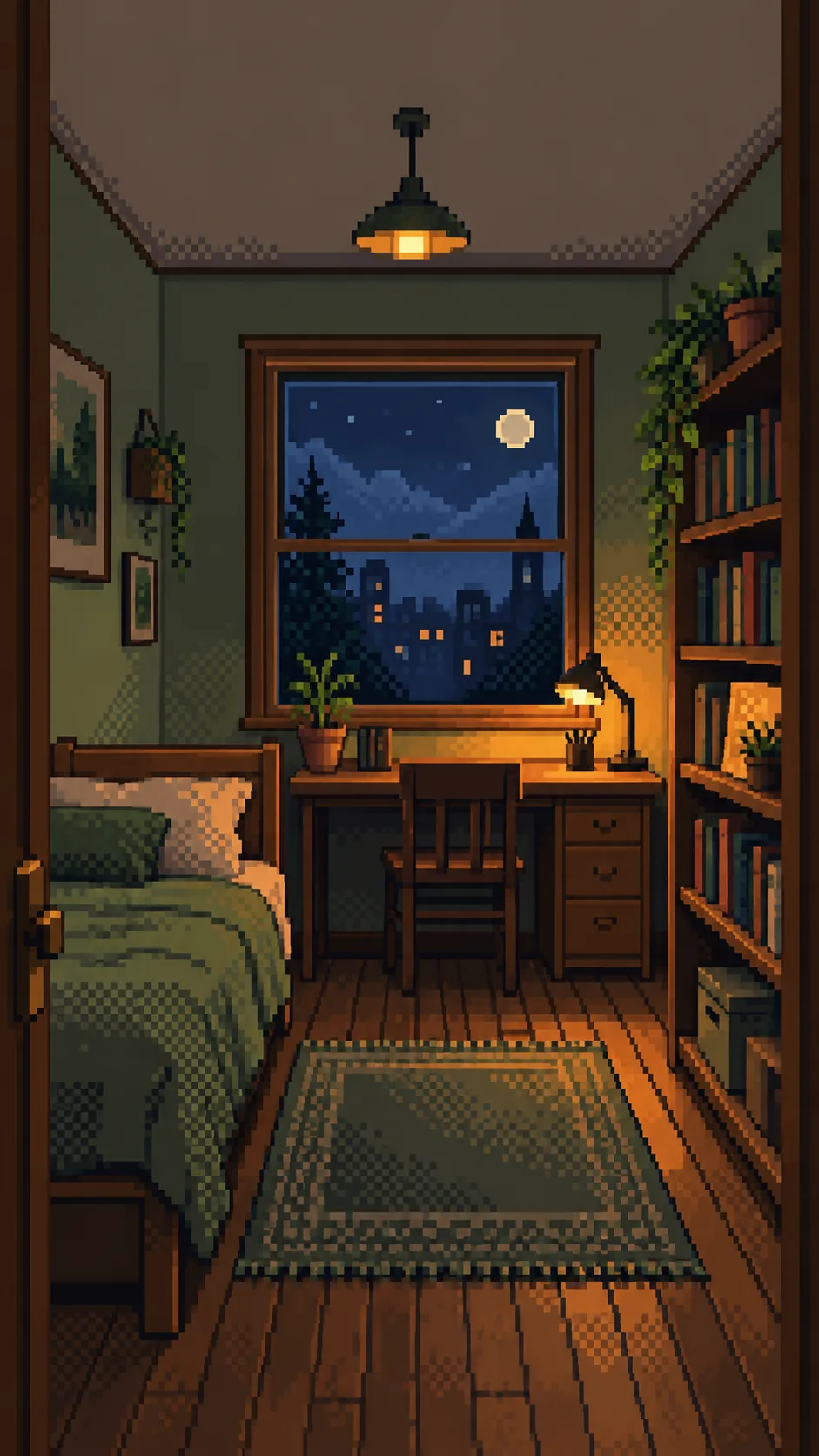
356내 방 픽셀 아트 배경화면
내 방의 창과 가구 배치를 남겨 아늑한 픽셀 아트 폰 배경화면으로 바꿔요.
ChatGPT 무료 OK
칸 채우기
- 1칸을 채워요
- 2복사 버튼을 눌러요
- 3GPT 채팅창에 붙여넣어요
- 4그대로 보내면 썸네일 예시처럼 나와요
- 5내 방 사진 1장 (없어도 가능)을 같이 넣으면 그 사진이 반영돼요 선택
프롬프트 원문 보기 4,294자
Generate exactly ONE finished image now. Draw directly with image generation; do not ask questions, run code, provide instructions instead of art, or require cropping or assembly.
Output size 1080x1920 pixels, 9:16 portrait story. Keep all text inside the central 80% of the height: compress every zone percentage below into the 10-90% range.
OUTPUT: one full-bleed cozy pixel art room wallpaper, no words, no frame, no comparison, no phone mockup. Use the selected canvas ratio; 9:16 is recommended for phones. Preserve the same style and room in every ratio.

INPUTS:
Arrangement: "【방 배치】"
Light and weather: "【빛과 날씨】"
Accent color: "【포인트 색】"
Objects to keep: "【남길 소품】"

PHOTO RULE: A photo is optional. If attached, repaint that single room entirely as pixel art. Preserve its viewpoint, major furniture silhouettes, window count and shape, door, bed, desk, shelving and their spatial relationships. Photo geometry takes priority over the Arrangement field. Do not move, duplicate, replace or add furniture. Highlight listed objects only if they are actually visible in the photo. Preserve photographed object clusters and recognizable materials. Simplify clutter into pixel clusters without redesigning the room. Remove readable private documents, faces, logos and tiny book/screen text into abstract color marks. Never reproduce a real character or branded artwork.
Without a photo, finish a fictional room from Arrangement and Objects to keep. If Arrangement is empty, use a narrow bed on the left wall, one rectangular window on the back wall, wooden desk directly below it and bookcase on the right wall. If Objects to keep is also empty, include one small desk lamp and one small plant on the bookcase. Never ask for a photo.

LIGHT: Apply the supplied light/weather without changing geometry. Morning sun means gentle warm daylight; sunset means peach window light; night desk lamp means an amber existing lamp against a dim blue window; rainy evening means cool rainy window light and warm existing interior light. Empty light uses night desk lamp. With a photo, do not add a lamp that is absent; use warm ambient indoor light instead. Preserve the visible outside view and alter only its light/weather, without invented landmarks.
COLOR: Apply the supplied accent to bedding and small existing accents only; preserve furniture materials and do not recolor the whole room. Empty accent uses sage green. Keep clear separation of cool ambient shadows and restrained warm highlights.

STYLE: Redraw from scratch as unmistakable low-resolution 2D pixel art, on a single logical canvas about 192 pixels wide (160-240 acceptable). Enlarge square pixels with hard nearest-neighbor edges. Use only 16-32 total palette colors, flat color clusters, strongly stair-stepped silhouettes and visible checkerboard dithering for light transitions. Each logical pixel is a clearly visible solid square. No subpixel details, anti-aliasing, soft gradients, blur, photographic textures, realistic wood grain, fabric fibers, ray tracing or smooth 3D shading. A photo is geometry reference ONLY: never retain its photographic surfaces or merely tint/pixel-filter the photo. Rebuild every surface, including ceiling, bedding, rug, plants and window view, as simplified hand-placed pixel clusters. Keep grounded furniture and consistent openings.
COMPOSITION: The room fills every edge. Upper roughly 20% is a calm low-detail wall/ceiling zone for a phone clock; never draw the clock or blank margins. Maintain recognizable furniture across the middle and lower canvas. Fit the photographed visible furniture without stretching or cropping key anchors; extend only plain wall, ceiling and floor when needed for the ratio. Do not invent unseen furniture, extra windows, rooms or a new camera view.
FINAL CHECK: Compare window count and left/right furniture relationships with the photo or Arrangement, check for duplicate objects and consistent pixel edges. No people, pets, letters, digits, captions, logos, watermark, existing character, arrows or UI. Return only the single completed wallpaper.

[Final output format]
Output size 1080x1920 pixels, 9:16 portrait story. Keep all text inside the central 80% of the height: compress every zone percentage below into the 10-90% range.
This selected output format takes priority over any fixed canvas size or aspect ratio elsewhere in this template. Adapt the composition, text zones and margins to the selected canvas without stretching or cropping essential content. Device safe areas apply only when a device is selected. Never print these format instructions on the image.
결과 어땠어요?
이 카드도 많이 사용해요
- 344물건 속 작은 세계 — 찻잔 · 유리병 · 호두껍데기 안의 마을
- 334숲속 정령 판타지 — 밤 숲에서 빛나는 사슴 · 늑대 정령과 마주한 나 (영화 같은 배경화면)
- 328겨울 동물 시네마틱 초상 — 털 코트를 두른 여우 · 눈표범 · 우리 강아지가 눈 덮인 산에
- 322레트로 퓨처리즘 콜라주 — 옛 우주인 · 경주차를 오려 붙인 행성 궤도 포스터 · 배경화면
- 310책 속 꿈 풍경 배경화면 — 거대한 서가 협곡 · 책 위의 바다 · 등불 켜진 초현실 그림
- 304몽환 로맨틱 일러스트 배경화면 — 음악 · 꽃 · 물결이 소용돌이치는 검은 배경 그림

쓰는 법 · 자주 묻는 것
내 공간을 폰에 담아요
침대와 창문이 익숙한 내 방을 선명한 사각 픽셀로 다시 그리는 카드예요. 손채색 그림이나 방 꾸미기 설계 대신, 한 공간을 채우는 픽셀 아트 배경화면 한 장을 만듭니다. 위쪽은 벽과 천장의 조용한 색면으로 남겨 폰 시계와 겹치는 복잡한 소품을 줄여요. 폰 배경에는 공통 비율 단추에서 9:16을 고르세요. 목록 표지는 2:3 예시이며 어느 비율이든 같은 그림체와 방 배치를 유지합니다.
칸은 이렇게 채워요
꼭 채울 칸은 없어요. 방 배치는 사진이 없을 때 공간을 구성하는 재료입니다. ‘왼쪽 침대, 뒤쪽 창 아래 책상, 오른쪽 책장’처럼 가구 사이의 위치를 적으면 됩니다. 사진을 첨부하면 사진의 구조가 이 칸보다 우선하고, 이 칸으로 가구를 옮기지 않아요. 빛과 날씨는 창밖과 실내 조명만 바꾸며 비우면 밤 스탠드 불빛을 씁니다. 포인트 색은 침구와 작은 소품에 적용하며 비우면 세이지 그린이 됩니다. 남길 소품에는 눈에 띄게 남기고 싶은 물건을 적어요. 사진이 있으면 실제 보이는 소품만 강조하고 없는 물건은 추가하지 않습니다. 사진 없이 소품도 비우면 스탠드와 작은 화분을 그려요. 방 배치를 비우면 첫 예시의 기본 배치로 완성합니다.
사진 넣는 법
한 방의 창문과 주요 가구가 함께 보이는 사진 한 장을 그림 AI에 첨부하고, 같은 메시지에 완성된 프롬프트를 붙여 넣어 한 번 보내세요. 사진 없이도 칸 값으로 바로 만들 수 있어요. 주소나 서류, 얼굴이 크게 보이는 사진보다 공간 중심 사진이 잘 맞습니다. 외부 서비스의 이미지 기능, 요금과 약관은 해당 서비스에서 확인하세요.
결과 확인과 수정
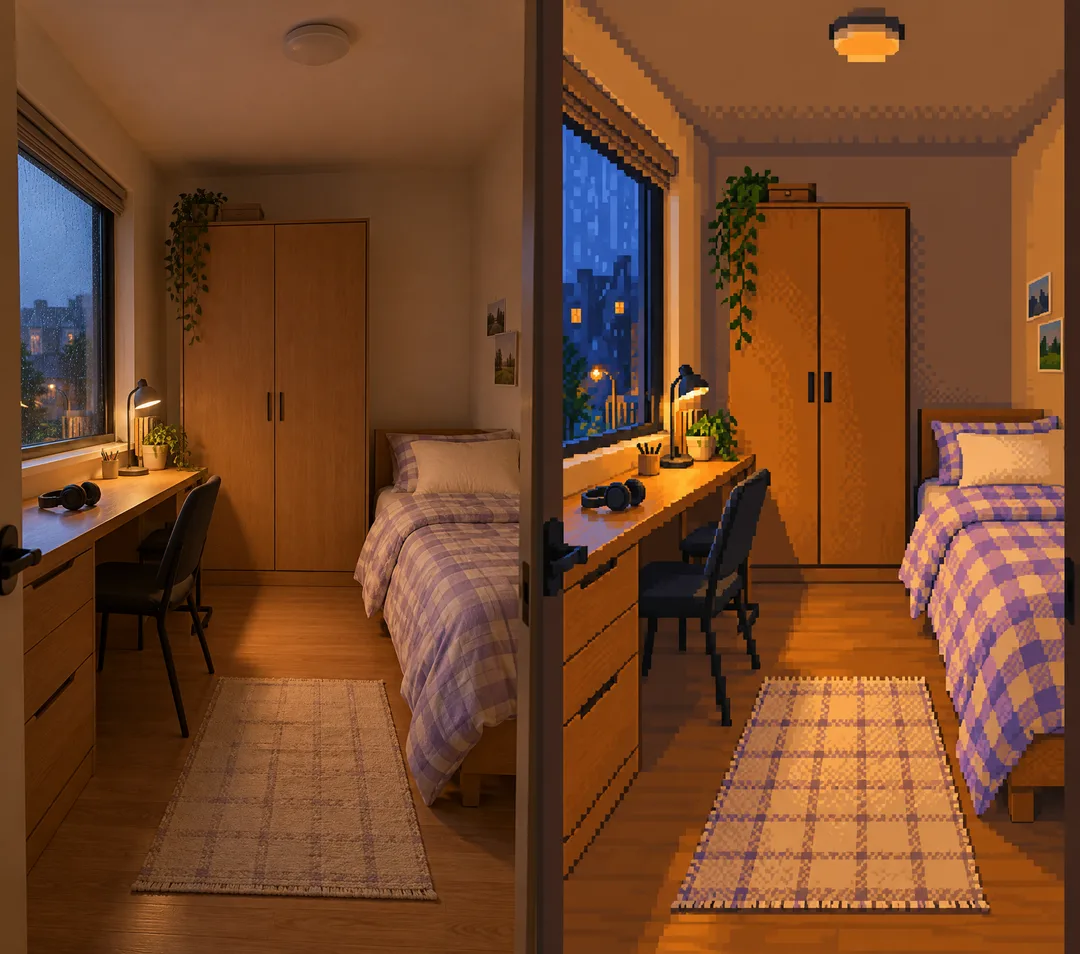
원본과 결과를 나란히 보고 창문 개수, 침대와 책상의 좌우, 책장 위치를 먼저 확인하세요. 픽셀이 또렷한지, 의자가 복제되지 않았는지, 가구 다리가 바닥에 닿는지도 봅니다. 위쪽은 비어 있는 흰 테두리가 아니라 방의 벽과 천장이 이어져야 해요. 배치가 틀리면 ‘창 아래 책상은 그대로 두고 침대만 원본처럼 왼쪽으로’처럼 한 부분을 지정해 수정하세요. 사진 질감이 남으면 ‘가로 약 192픽셀의 큰 격자, 16~32색, 계단식 윤곽과 체크 디더링으로 모든 표면을 다시 그려 주세요’라고 요청하세요. 수정은 선택이며 첫 요청부터 완성 그림 한 장을 받는 구성입니다.
예시와 자주 묻는 것
첫 예시는 사진 없이 기본 방 배치·밤 스탠드 불빛·세이지 그린·작은 스탠드와 화분으로 만든 순수 결과예요. 둘째 예시는 시연용으로 생성한 방 사진의 원본→픽셀 변환을 보여 줍니다. 왼쪽 창과 긴 책상, 오른쪽 침대, 뒤쪽 옷장을 남기고 비 오는 저녁과 라벤더 색을 적용했어요. 비교판은 설명용이며 실제 프롬프트는 비교판 대신 결과 한 장만 출력합니다.
글자를 넣나요? 글자 없는 배경화면입니다. 책 제목이나 화면 문자는 읽히지 않는 색 덩어리로 바꿔요. 사진에서 안 보이는 곳도 그리나요? 비율을 맞출 때 벽·천장·바닥만 자연스럽게 이어 그리고 새 가구나 다른 방은 만들지 않아요. 픽셀 수가 고정인가요? 비율을 지정하는 카드이며 실제 파일 크기는 이용하는 그림 AI의 출력에 따라 달라요.