

596家族の映画ポスター
家族の顔を保ちながら、希望のタイトルと公開日を載せた冒険映画ポスターを作ります。
受け取れるもの
- 家族映画のポスター一枚
- タイトルと任意の公開日
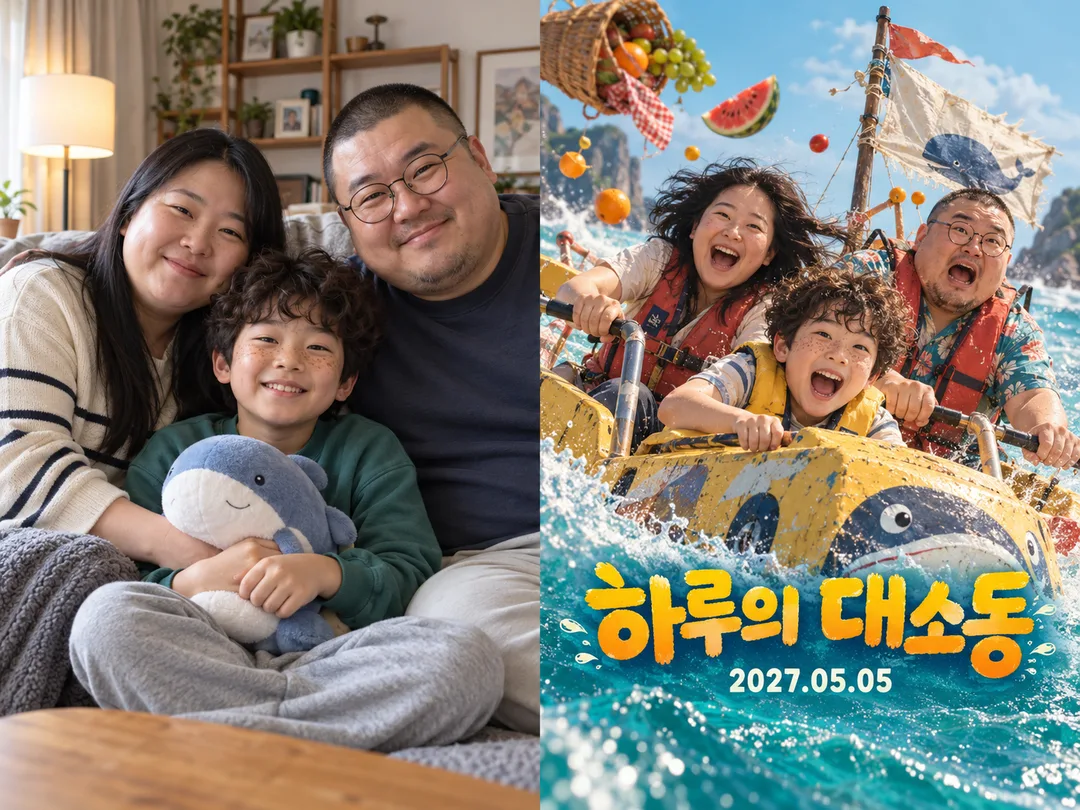
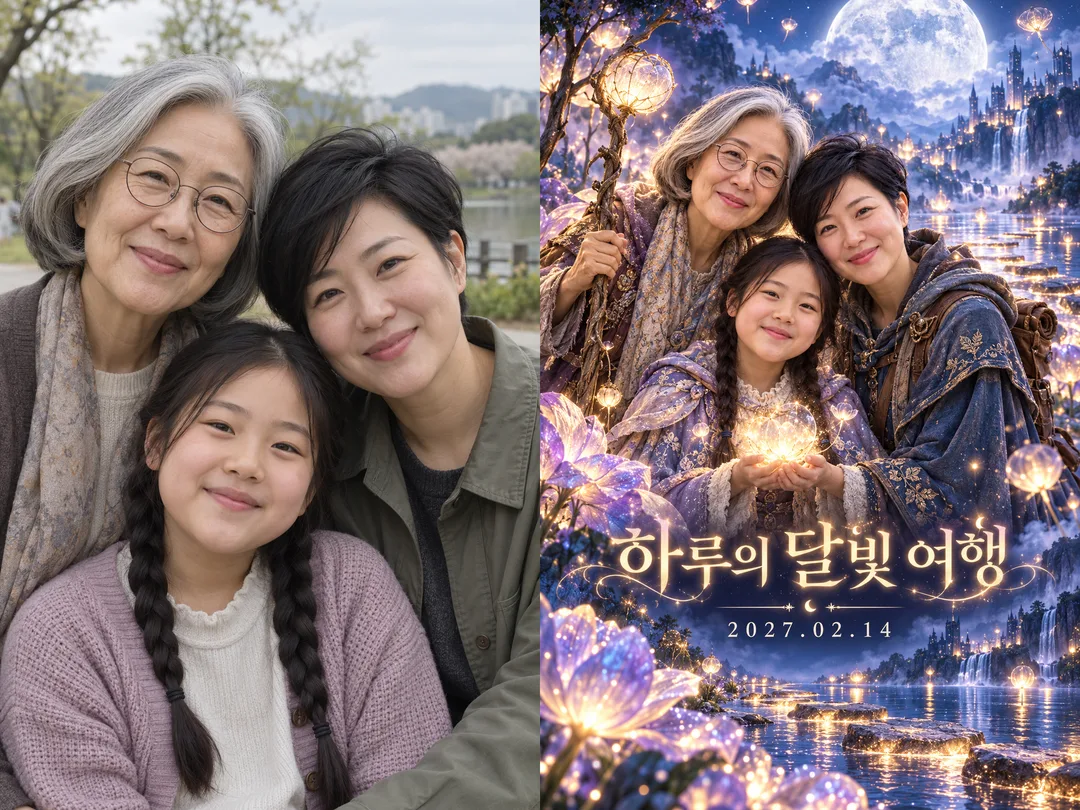
項目を入力
- 1項目を入力します
- 2コピーを押します
- 3GPTのチャットに貼り付けます
- 4そのまま送ると、サムネイルの例のような画像になります
- 5カードに合う実際の写真を一緒に入れると反映されます。背景カードなら背景の写真、人物・料理カードならその写真 任意
実際に試しました
- 試験日
- 2026-10-29
- ツール
- ChatGPT画像モデル(コデックス経由で実行)— フリートラットChatGPTとのモデル同一性及び制限の違いはこの試験では確認できていません
- 結果
- 合格
- できたこと
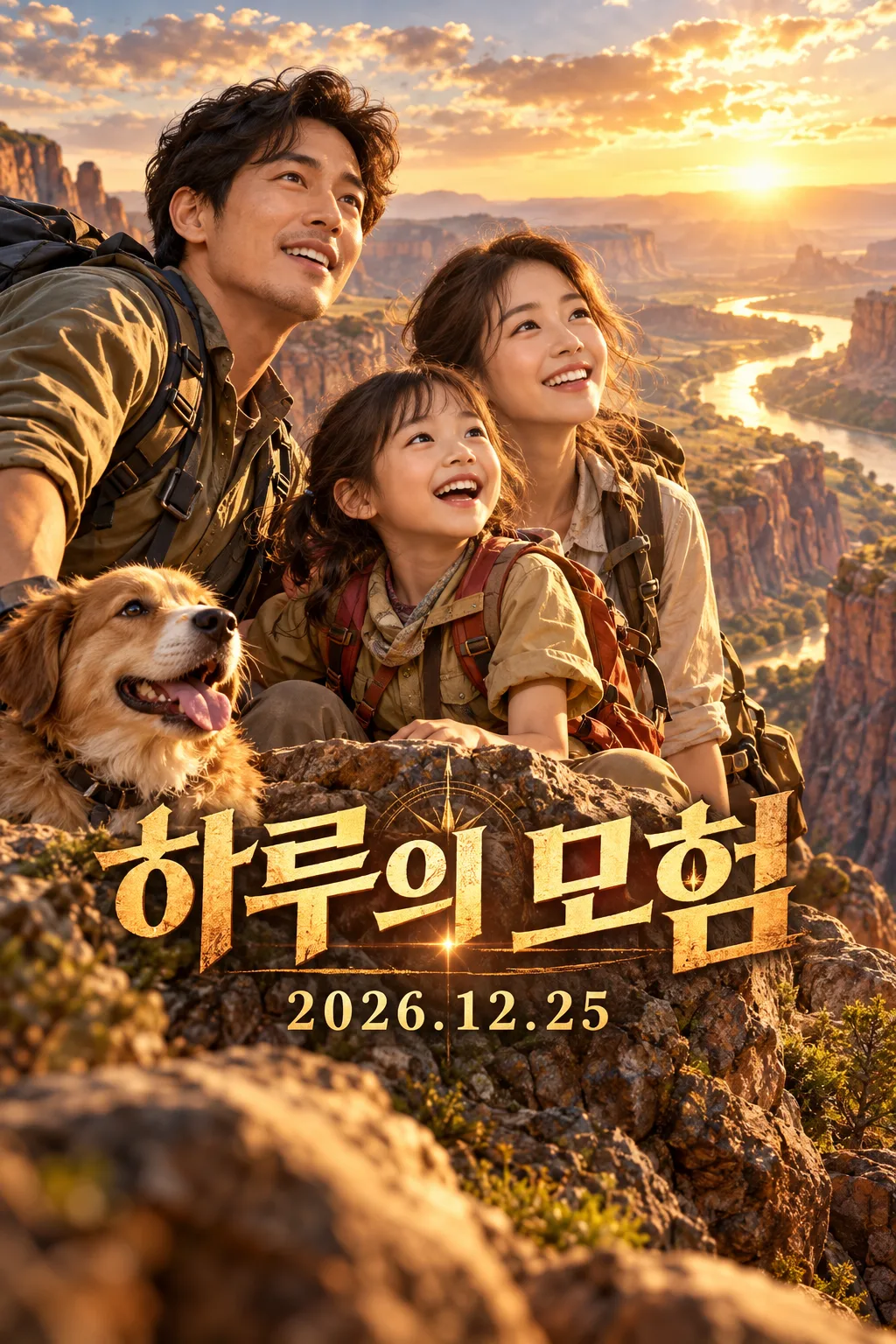
- 最終修正版では「하루의 모험」と「2026.12.25」の文字・数字・句読点が一致しました。2人の仮想大人と1人の子供の顔が隠れず、黄金の峡谷の写真のような映画ポスターが1枚に生成されました。1024×1536の2:3で枠線がなく、画面を埋めています。タイトル中心約66%、日付中心約75%、文字全体が上端12%と下端20%を避けています。見える手に明確な重複や融合はありません。追加の役名・クレジット・ロゴ・ウォーターマークはありません。
- できなかったこと
- 最終試験の組み合わせではありませんでした。原文の2回は日付の下端が約84%・82.6%であり、指定の82%から逸脱しました。修正1の2回はタイトルの上端が約58%・60%であり、指定の62%より上に出ていました。写真を添付しなかったため、実際の家族写真の同一顔の維持、コメディ・ファンタジー、他のタイトルや日付は確認できませんでした。最終結果には指示していない犬が1匹一緒に生成されました。
- 改善のヒント
- 同じ例示値でバッチ文章のみを修正して再試験した際、日付が下端に貼り付く問題は解消されました。現在のコピー本文に修正が反映されています。他のタイトルや写真でも同じ結果が保証されるわけではないので、完成後に文字や顔を拡大して確認してください。
プロンプト全文を見る 2,987文字
Generate this image now. Draw it directly, without explanations or follow-up questions.
完成した2:3の縦型画像を1枚、1024×1536ピクセルで出力してください。重要な文字は上12%と下15%に置かないでください。
Create one premium full-bleed cinematic photographic family adventure movie poster. Default portrait ratio is 2:3. Never output a collage, comparison, mockup or multiple versions.
PHOTO RULE: 【写真】 If a photo is attached, preserve ALL family members, their recognizable facial structures, ages, skin characteristics, hairstyles, glasses and natural body proportions. Change the setting, costumes, pose and light, while keeping faces clear and recognizable. Do not add, omit, duplicate or replace family members. If no photo is attached, invent a distinctive fictional family of three, unlike any public figure, and finish without asking for a photo.
TITLE AND RELEASE DATE: "【タイトル】"
Treat the first line as the title and an optional second line as the release date. Reproduce supplied text character for character, including script, spelling, digits and punctuation. Do not translate or correct user text, compute weekdays, invent a date, or add a release label. If only a title is supplied, omit the entire date line. If empty, use "Haruの冒険" as the title with no date.
GENRE: "【ジャンル】". 冒険: warm golden canyon expedition, sweeping landscape and courageous joyful expressions. コメディ: turquoise sunny seaside expedition, playful picnic mishap and lively comic expressions. ファンタジー: indigo moonlit lake, luminous oversized flowers and magical stepping stones. Empty genre defaults to 冒険. Keep the same premium photographic theatrical finish; genre changes the story, palette and lighting.
Make a layered cinematic composition with large unobstructed family faces in the middle, a convincing original adventure setting and integrated bold title typography. Place the large title in the lower-middle area, with its visual center around 66 percent of canvas height, and the smaller, readable date centered around 75 percent height. These percentages describe line centers, not the outer edges of large lettering. Keep every part of both text lines, including decorative strokes, below the top 12 percent and above the bottom 20 percent. Keep the bottom 20 percent scenery only. Fill the entire canvas edge to edge.
Only print the supplied title and optional date. No extra cast names, credits, slogans, genre labels, logos, watermarks, recognizable brands, existing characters, celebrity likenesses, existing movie compositions or named artist styles. Use original fictional costume and prop designs. Before finishing, compare every title character and date digit with the input and check each face, person count and hand anatomy.

[Final output format]
完成した2:3の縦型画像を1枚、1024×1536ピクセルで出力してください。重要な文字は上12%と下15%に置かないでください。
This selected output format takes priority over any fixed canvas size or aspect ratio elsewhere in this template. Adapt the composition, text zones and margins to the selected canvas without stretching or cropping essential content. Device safe areas apply only when a device is selected. Never print these format instructions on the image.
結果はどうでしたか?
こちらのカードも人気です

使い方・よくある質問
家族写真を冒険映画の一場面に
旅行の記念や部屋に飾るための、写真のような映画ポスターを一枚作ります。冒険は黄金色の峡谷、コメディは明るい海辺の騒動、ファンタジーは月明かりの湖です。人物の顔を保ちながら、物語、光、色合いを変えます。比較画像ではなく、完成したポスター一枚が出力されます。
各欄の使い方
必須欄はタイトル一つです。一行目に映画のタイトル、公開日も載せる場合は二行目に希望の日付を記入してください。例は「Haruの冒険」と「2026.12.25」です。文字や数字、句読点は翻訳も日付変換もせず、そのまま表示します。二行目を省くと日付の行全体が消えます。写真欄は添付の有無を指定する欄なので、実際の家族写真もコピーしたプロンプトと一緒に画像生成ツールへ添付してください。全員の顔が見える写真を使います。添付がなければ架空の家族を生成します。ジャンルは冒険、コメディ、ファンタジーから選び、空欄なら冒険です。
生成後の確認
完成したプロンプトを画像生成ツールに一度貼り付けます。基本は縦2:3で、共通のサイズ選択から変更できます。タイトルと日付を拡大して一文字ずつ照合し、家族の人数、眼鏡、髪形、顔の特徴も比べてください。誤字があれば正しい原文を指定して再生成します。公開する際は本人、子どもの場合は保護者の同意も確認してください。実在ブランドや既存の映画キャラクターを使わず、外部サービスの料金と利用規約は各サービスで確認してください。