
項目を入力
- 1項目を入力します
- 2コピーを押します
- 3GPTのチャットに貼り付けます
- 4写真を使う場合は写真とプロンプトを一緒に送ります 任意
プロンプト全文を見る 4,593文字
Generate this image now. Draw it directly - do not describe it, explain it, or ask questions.
A3横、420×297mm、縦横比1.414:1のポスターを1枚作成してください。生成できる最大解像度を使い、印刷用の最終目標は4961×3508ピクセル、300dpiです。文字は紙の端から10mm以上内側に置いてください。

[Purpose]
Draw ONE finished Japanese social-battery meme as a fixed two-column comparison on a single canvas. It is a self-reported joke about the energy before and after meeting people, ready to post to Instagram Stories or Threads. Show the exact energy numbers the user supplies. It is not a medical measurement, a mental-health diagnosis, a personality test or a productivity score. Produce the image directly. No code, questions, multiple cards, follow-up message, animation or cutting the image into halves.

[Input and numbers]
Before meeting people: "【会う前の残量】".
After returning: "【帰宅後の残量】".
Both values represent an integer percent from 0 to 100. Accept a value with or without the percent sign and render a single percent sign after its number. Do not silently replace the user's numbers, calculate an invented loss percentage or claim the values were measured by GPT. If the later number is higher, show that higher fill honestly; social contact may recharge the person. Clamp a clearly out-of-range number to the nearest boundary solely so the gauge remains valid; never add a warning paragraph outside the result.
Optional context, printed as one short line under the title only: "【今日の場面】".
If that optional line is absent, omit the context and do not invent a meeting, employer, person or event.

[Scene and fixed composition]
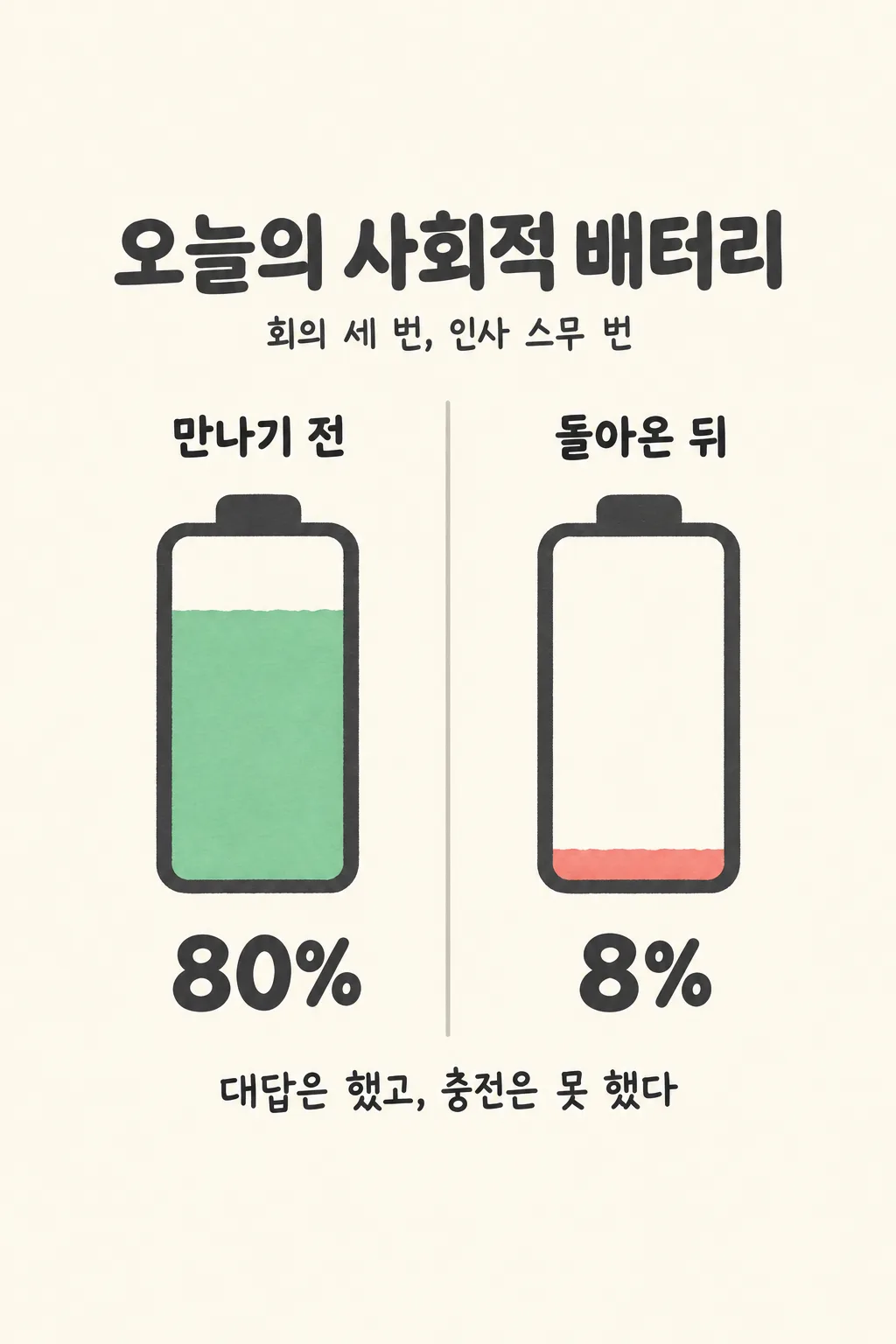
One soft cream page split into two equal columns by one thin warm-gray vertical line. In the left column place ONE large simple upright battery with rounded dark charcoal outline, a centered top terminal and mint-green fill. In the right column place ONE battery of exactly the same size and structure with muted coral fill. Both gauge interiors fill from the bottom to the supplied percentage of usable inner height, leaving the rest cream. Never draw crossed segments, decorative extra gauges, a phone screen, app UI, character or third stage. Slight hand-cut paper edges on the fill make it a friendly graphic, while the container and numerical proportions remain precise.

[Text layout]
The only exact fixed strings are "今日の社交バッテリー", "会う前" and "帰宅後". Put the large single-line title entirely between 16–22% height. If context is supplied, set its short line at 23–27%. Column labels occupy 30–34%, above each corresponding battery. The batteries fit at 36–67% and numbers at 69–76%. Render the two numbers large enough to read at catalog size. At 80–83% add one witty original Japanese sentence responding to the two entered values and the context, or print the entered sentence exactly.
Sentence input: "【最後のひとこと】".
When the sentence input is "おまかせ", invent at most twenty-two Japanese characters and never print the control instruction. Do not repeat the two percentages or explain the gauge; the joke supplies a little personal voice. Do not add a title to the sentence or a speech bubble.

[Style and hierarchy]
Friendly flat paper graphic with thick restrained charcoal outlines, cream, mint and coral. No photorealism, neon, 3D render or dramatic flames. Read title, equal before/after columns and numbers, then one sentence. Keep the columns aligned and leave enough inner white space that an eight-percent fill looks visibly smaller than an eighty-percent fill. The numeric text must match the fill; the fill starts at the bottom, not the top. There are no rating stars or diagnostic indicators.

[Text rules]
Spell every Japanese word correctly. Render field labels neither as captions nor as a list. No name, avatar, brand logo, URL, watermark, fabricated measurement time, health claim, platform icons or unwanted extra text. Keep the top 12% and bottom 15% free of important lettering; all visible words stay inside 16–83%. For a 1024x1536 output, put no text above y=200 or below y=1290. Return only the single completed comparison image.

[Gauge geometry is mandatory]
Make each battery interior a straight-sided area approximately 400 pixels high on the 1024x1536 canvas, top y=610, bottom y=1010. The solid color height is 400 multiplied by the supplied percentage divided by 100. An 80-percent fill is approximately 320 pixels tall; an 8-percent fill is approximately 32 pixels tall, a very thin sliver. Keep the white area above this horizontal fill boundary empty. Do not enlarge a low fill for decorative reasons. Fill color touches the same bottom interior line in both containers. Scale these proportions for other output resolutions. The title may be one wide line if it remains readable; the two battery columns stay fixed.
こちらのカードも人気です


使い方・よくある質問
こんなときに
会議や集まりのあと、「自分の元気はこうなった」と一枚で伝えたいときに使います。同じ大きさの電池が左右に並び、入力した残量と短いひとことが出ます。InstagramのストーリーやThreadsにそのまま投稿できます。親友と会って逆に元気になった日にも使えます。健康や性格を検査するものではなく、自分の気分を表す遊びです。
数字と場面の入力
残量は0から100までの整数で書きます。正確な測定値ではなく、自分が感じる程度で大丈夫です。パーセント記号は数字のあとに一つだけ付きます。80と8なら、左の電池は多く、右は下のほうに少しだけ色が入ります。帰宅後の数字が大きい場合も、そのまま描きます。今日の場面には公開してよい内容を一行で書き、不要なら空欄にしてください。
ひとことと送信
言葉が浮かばなければ「おまかせ」を選びます。GPTが数字と場面に合った短い言葉を作ります。自分で書いた場合は、その文をそのまま使います。人を名指しするより、自分の状態を表す一言が向いています。写真は必要ありません。完成したプロンプトをGPTの入力欄に一度貼って送るだけで、左右を含む一枚ができます。別々の電池を作って切り貼りする手順はありません。
出来上がりの確認
二つの電池が同じ高さで、色が下から入力した割合だけ入っているか確かめます。8%なのに半分以上色が入っていたら、数字が正しくても図が間違っています。余計な損失率や医学的な説明が増えていないか、上下の余白に重要な文字がないかも確認します。間違えた場合は記号なしの整数に整理し、正しい充電量を原文の最後に指定して全体を作り直してください。
よくある質問
- 本当の元気を測定しますか? いいえ。自分で感じた残量を絵にします。
- 写真は必要ですか? 必要ありません。
- 帰宅後のほうが高くてもいいですか? はい。充電できた日も正しく表示します。