

588아르누보 꽃 장식 초상
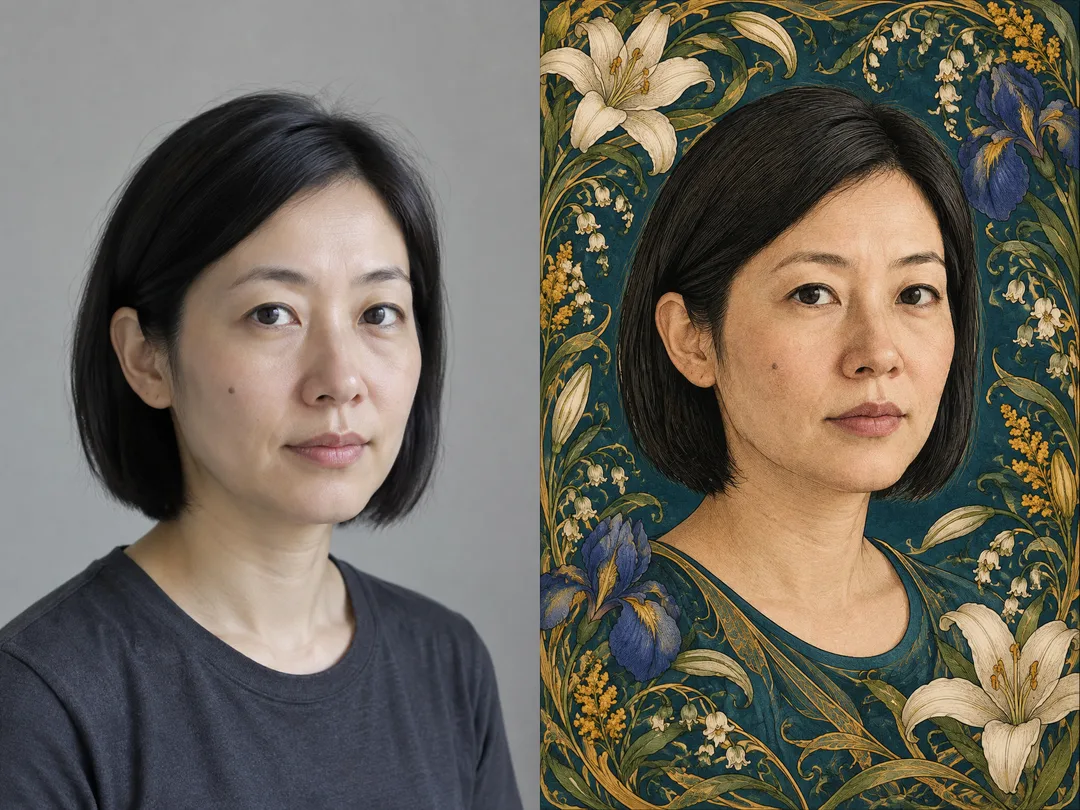
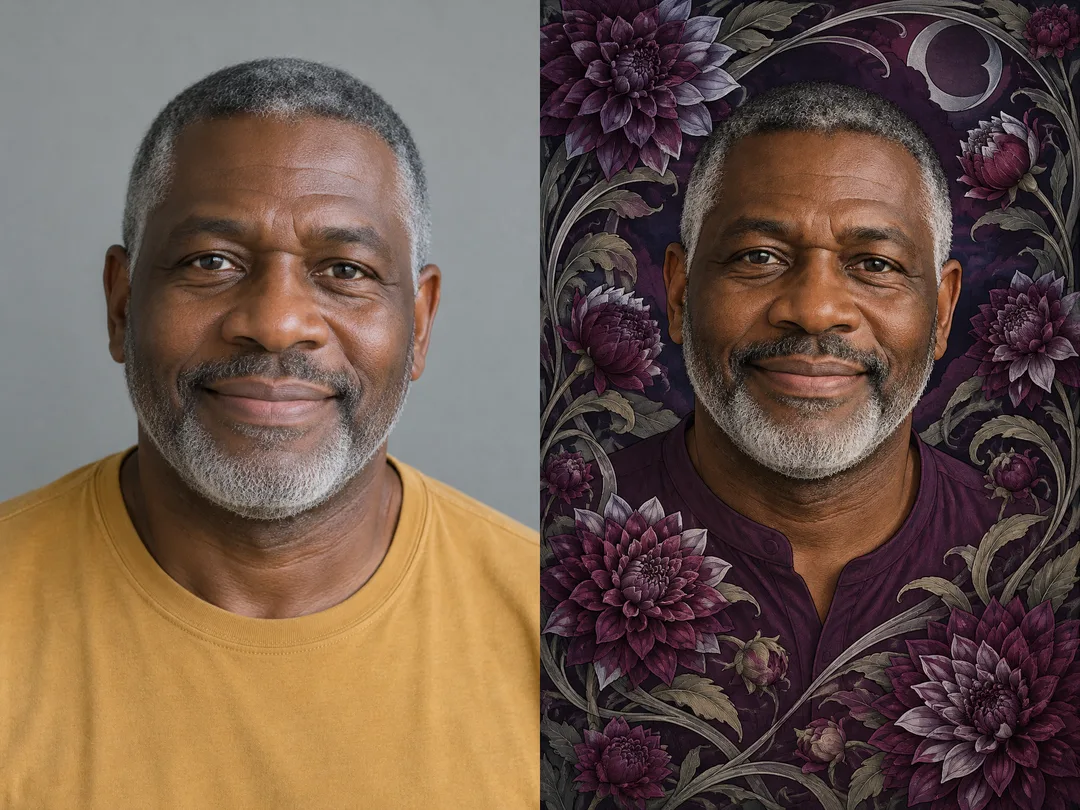
내 얼굴 특징을 살리고 꽃 테두리와 곡선으로 채우는 장식 초상이에요.
받는 것
- 꽃과 곡선이 둘러싼 장식 초상 한 장
- 사진 속 얼굴 특징을 살린 일러스트
- 글자 없는 세로 화면
ChatGPT 무료 OK
칸 채우기
- 1칸을 채워요
- 2복사 버튼을 눌러요
- 3GPT 채팅창에 붙여넣어요
- 4그대로 보내면 썸네일 예시처럼 나와요
- 5얼굴이 선명한 인물 사진 한 장 (선택)을 같이 넣으면 그 사진이 반영돼요 선택
프롬프트 원문 보기 2,315자
Generate this image now.
Output exactly one finished 2:3 portrait image, 1024x1536 pixels. Keep all important text inside the central 73% of image height: leave the top 12% and bottom 15% free of essential lettering.

Generate exactly one finished Art Nouveau floral portrait illustration, edge to edge. One coherent technique: elegant ink contours, softly modeled matte colors, engraved botanical detail, restrained paper grain and flowing whiplash curves. Large head-and-shoulders portrait inside a densely crafted asymmetric floral border. Flowers vary naturally in scale and orientation, with believable petals and leaves. Stems weave around shoulders and canvas edges, never across eyes, nose or mouth. No blank margins, paper mockup or surrounding frame. Do not imitate a particular artist or existing artwork.
PHOTO RULE: If a photo is attached, transform that exact person. Preserve eye spacing, nose, jawline, skin tone, age, hairline, hairstyle, distinguishing marks, head direction and expression. Do not beautify, lighten skin or replace the face with a generic face. Use one main person. Without a photo, finish with an original fictional adult with no deliberate resemblance to any real public figure; never ask for a photo. An empty person description defaults to an original adult with short curly hair. An attached photo takes priority over the description for identity.
Palette changes background, clothes and ornament while preserving natural skin tone. Flower changes only the border species. Keep the same illustration technique for all choices. Output only the finished image, without letters, numbers, titles, labels, logos, signatures, watermarks, branded accessories or celebrity likenesses. Never print input values as text.
Person description: 【사진】
Palette: 【색】
산호색과 크림: warm coral and cream, muted copper accents
청록색과 금색: deep teal and antique gold, calm jewel tones
자주색과 은색: deep plum and silver, dramatic nocturnal tones
Default palette: 산호색과 크림.
Flower: 【꽃】
목련: magnolia, broad overlapping petals
아이리스: iris, upright standards and arching falls
달리아: dahlia, layered radiating petals
Default flower: 목련.

[Final output format]
Output exactly one finished 2:3 portrait image, 1024x1536 pixels. Keep all important text inside the central 73% of image height: leave the top 12% and bottom 15% free of essential lettering.
This selected output format takes priority over any fixed canvas size or aspect ratio elsewhere in this template. Adapt the composition, text zones and margins to the selected canvas without stretching or cropping essential content. Device safe areas apply only when a device is selected. Never print these format instructions on the image.
결과 어땠어요?
이 카드도 많이 사용해요
쓰는 법 · 자주 묻는 것
내 사진을 꽃과 유려한 곡선이 둘러싼 아르누보 장식 초상으로 바꾸는 카드예요. 프로필 그림이나 개인 소장용 초상에 어울려요. 얼굴은 크게 남기고 꽃 테두리는 어깨와 화면 가장자리를 채워 작은 화면에서도 인물이 먼저 보여요.
사진, 색, 꽃은 모두 선택 칸이에요. 사진 칸에는 인물 특징을 짧게 적고, 얼굴이 선명한 사진 한 장을 그림 AI 입력창에 첨부하세요. 복사한 프롬프트를 같은 입력창에 붙여넣은 뒤 함께 보내면 돼요. 사진 칸의 글만으로 파일이 전달되지는 않아요. 사진을 첨부하지 않으면 특정 실존 인물을 의도적으로 닮게 하지 않은 가상 성인을 그려요. 설명도 비우면 짧은 곱슬머리의 가상 성인이 기본이에요.
색은 배경, 옷, 장식의 배색을 바꾸며 피부색은 남겨요. 비우면 산호색과 크림이에요. 꽃은 테두리의 꽃 종류를 바꾸고, 비우면 목련이에요. 청록색과 금색에 아이리스를 고르면 차분한 느낌, 자주색과 은색에 달리아를 고르면 짙고 화려한 느낌이에요. 그림체는 한 가지로 유지돼요. 공통 크기는 기본 2:3이에요.
완성되면 눈 사이 간격, 코와 턱선, 머리선과 점을 원본과 비교하세요. 얼굴이 달라졌다면 더 선명한 사진을 쓰고 보존할 특징을 사진 칸에 적어 다시 보내세요. 꽃이 눈을 가리지 않는지, 가장자리가 비지 않았는지도 확인하세요. 한 번 보내면 완성 그림 한 장을 받으며 글자와 이름은 그림에 넣지 않아요.
목록 표지는 사진 없이 만드는 별도 결과예요. 비교 예시는 서로 다른 가상 성인 하루의 원본 사진과 변환 결과를 보여주는 구성이에요. 왼쪽은 원본, 오른쪽은 결과예요. 본인 사진이나 사용 허락을 받은 사진을 쓰세요. 외부 그림 서비스의 요금과 이용 조건은 해당 서비스에서 확인하세요.