
칸 채우기
- 1칸을 채워요
- 2복사 버튼을 눌러요
- 3GPT 채팅창에 붙여넣어요
- 4그대로 보내면 썸네일 예시처럼 나와요
- 5내 사진 1장 (선택)을 같이 넣으면 그 사진이 반영돼요 선택
프롬프트 원문 보기 3,771자
Generate this image now. Draw it directly; return exactly ONE finished image, without explanations or questions.
Output exactly one finished 2:3 portrait image, 1024x1536 pixels. Keep all important text inside the central 73% of image height: leave the top 12% and bottom 15% free of essential lettering.
Create an original full-bleed retro cel-shaded pop illustration. Use the requested aspect ratio; default to portrait 2:3. One continuous scene, no collage, comparison panel, frame, paper mockup, caption, signature or watermark.

SCENE: "【장면】"
DETAILS TO KEEP: "【꼭 살릴 것】"
SMALL DETAILS: "【작은 디테일】"

PHOTO RULE: If one photo is attached, it is the factual source. Preserve its camera viewpoint, framing, perspective, object positions, relative sizes, object count and recognizable silhouettes. Preserve faces, clothing and architectural features if visible. The details-to-keep field has priority. Change only the drawing style, surface colors and rendering of existing light into graphic shadows. Do not add props, flowers, people or buildings mentioned in the scene or small-details fields if absent from the photo. Do not move objects to make a prettier composition. Preserve distinct objects even when their colors are remapped. Remove third-party lettering and logos, leaving the underlying object shape intact. Do not print any field value as text.
If no photo is attached, do not ask for one: build a fictional scene from SCENE and DETAILS TO KEEP; use SMALL DETAILS only when nonempty. If SCENE is empty, draw a Haru Coffee interior: a pink cup on an ivory counter, a teal espresso machine behind it, an orange pastry on a plate and leafy branches outside the window. If DETAILS TO KEEP is empty, preserve all major subjects and their arrangement. If SMALL DETAILS is empty, add no extra props; develop existing shapes with clean contours, highlights and shadow facets.

FIXED STYLE: Bold dark-navy ink outlines with varied confident line weight. Dominant solid turquoise and teal planes, unmistakable salmon-pink and burnt-orange accents, small ivory highlights and deep navy shadows. Preserve subject identity while remapping surface colors to this fixed palette. Use two or three flat tones per object with crisp hard-edged shadow shapes aligned with the visible light source; without a photo use directional afternoon light. Show glass and metal using bounded graphic highlight shapes, not smooth reflections. Distinct foreground, midground and background; carefully drawn handles, rims, seams, leaf silhouettes and architecture where present. Redraw every surface as unmistakably flat 2D illustration with only two or three uniform color planes per object. Use thick dark-navy contours and bounded polygonal shadows. Eliminate all photographic texture, wood grain, plaster grain, blur and realistic reflections; simplify those into clean solid shapes. Enough specific detail for a polished editorial illustration, balanced with large readable color blocks. Fill the canvas edge to edge, with an immediately legible main subject. Keep the same composition as the photo; for text-only input compose the requested objects clearly and prominently.

Avoid soft gradients, airbrush glow, watercolor, oil paint, film grain, photographic textures, 3D gloss, neon night streets, abstract wave ribbons, existing characters and recognizable artist imitations. Do not copy any reference artwork. No readable text, letters, numbers, shop signs, logos or labels anywhere. Check object counts and placement against the photo before finishing. Output only the single finished illustration.

[Final output format]
Output exactly one finished 2:3 portrait image, 1024x1536 pixels. Keep all important text inside the central 73% of image height: leave the top 12% and bottom 15% free of essential lettering.
This selected output format takes priority over any fixed canvas size or aspect ratio elsewhere in this template. Adapt the composition, text zones and margins to the selected canvas without stretching or cropping essential content. Device safe areas apply only when a device is selected. Never print these format instructions on the image.
결과 어땠어요?
이 카드도 많이 사용해요
쓰는 법 · 자주 묻는 것
내 사진을 또렷한 색면으로
하루커피 창가, 직접 만든 음료, 정리한 방, 여행 중 찍은 골목을 굵은 잉크 선과 또렷한 그림자가 있는 팝 일러스트로 바꿉니다. 청록 바탕에 분홍·주황 포인트가 들어가는 한 가지 그림체입니다. 카페 SNS에 올릴 장면, 휴대폰 배경화면, 프로필 그림으로 쓸 수 있습니다. 사진을 넣으면 물건의 위치와 구도를 남기며, 사진 없이 장면을 적으면 가상의 일러스트 한 장을 만듭니다. 색과 그림체를 고르는 단추는 없습니다.
칸은 이렇게 채우세요
꼭 칸은 장면 1개입니다. 「하루커피 창가의 둥근 탁자와 아이스라테」처럼 장소와 주인공을 함께 적으세요. 꼭 살릴 것에는 왼쪽 의자, 오른쪽 창문, 컵 손잡이처럼 바뀌면 안 되는 위치나 특징을 적습니다. 비우면 주요 대상과 전체 배치를 유지합니다. 작은 디테일은 얼음 윤곽이나 잎 모양처럼 눈여겨볼 부분입니다. 비우면 소품을 추가하지 않고 기존 물건의 선과 그림자만 다듬습니다. 사진이 있을 때는 사진이 우선이므로 글에만 적힌 새 소품은 추가하지 않습니다. 화면 비율은 공통 비율 단추에서 정하세요.
사진과 함께 보내는 법
사용할 권한이 있는 사진 한 장을 그림 AI의 입력창에 첨부하고, 채운 프롬프트를 같은 입력창에 붙여 한 번 보내세요. 사진 없이 만들려면 프롬프트만 보내면 됩니다. 가게 이름은 장면을 설명하는 값이며 간판 글자로 찍히지 않습니다. 이 카드는 문구·가격·로고가 없는 그림 한 장을 만듭니다. 외부 서비스의 요금과 이용 조건은 해당 서비스에서 확인하세요.
결과에서 확인할 것
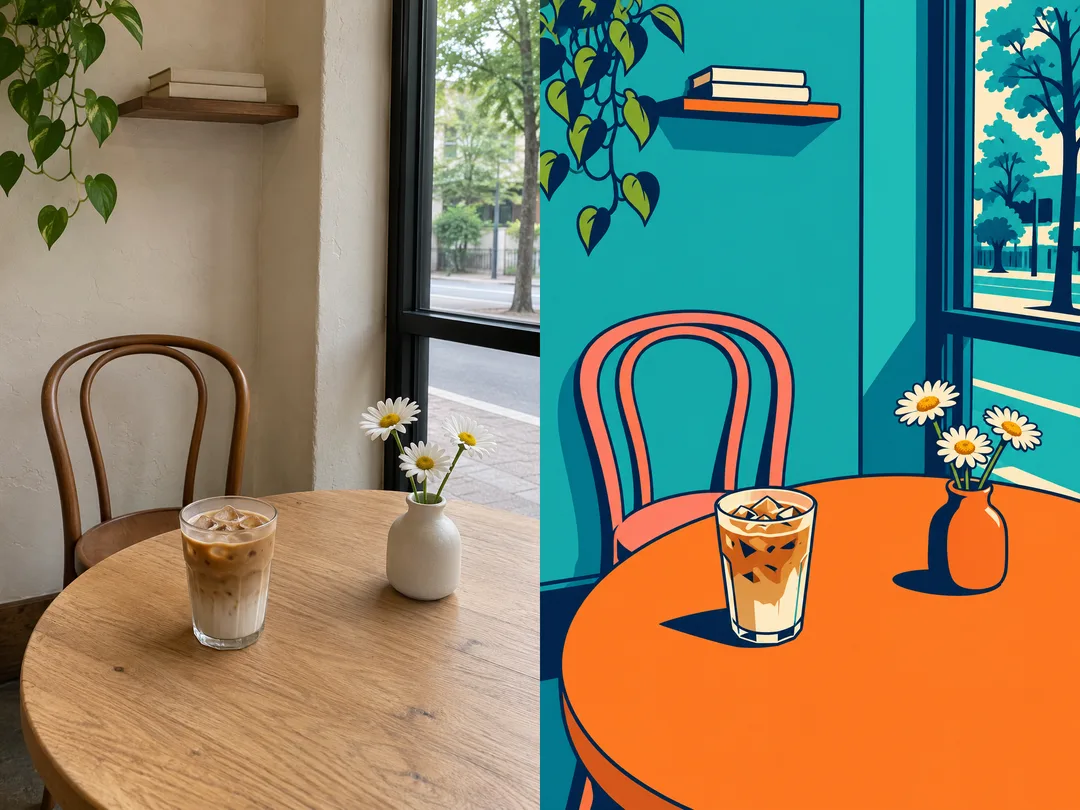
원본과 나란히 보며 의자와 창문 위치, 컵·꽃병의 수, 손잡이와 주요 모양을 확인하세요. 사진의 색은 고정 팔레트로 바뀌지만 배치와 대상은 알아볼 수 있어야 합니다. 색면 경계와 그림자가 선명하고 청록·분홍·주황이 한눈에 보이는지도 살펴보세요. 물건이 바뀌었다면 꼭 살릴 것에 정확한 위치와 개수를 더해 같은 사진으로 다시 보내세요. 흐릿한 그라데이션이나 실사 질감이 강하면 납작한 2~3단계 명암과 굵은 선을 유지하도록 요청하세요.
예시와 자주 묻는 것
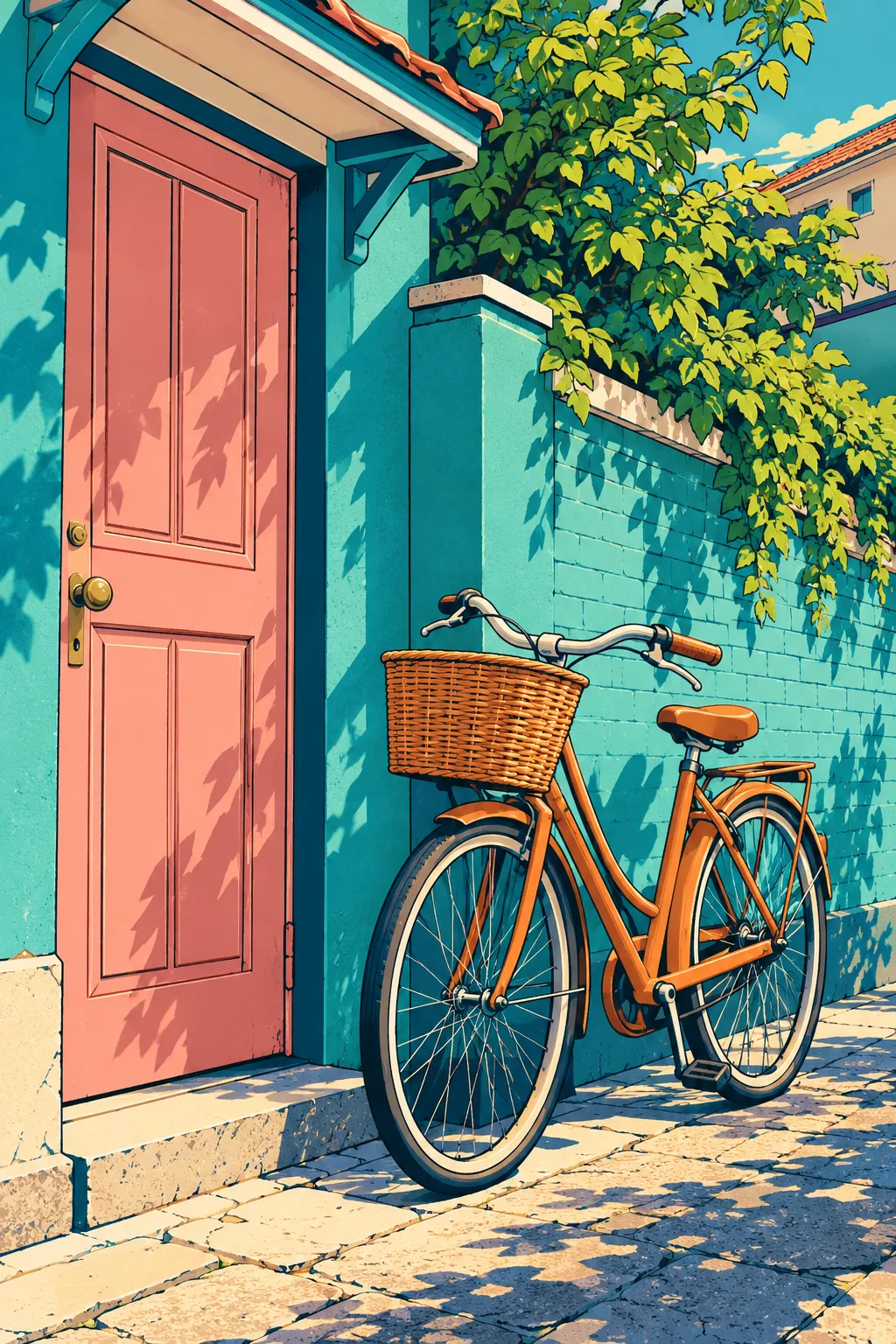
첫 비교판의 왼쪽은 내장 이미지 생성으로 만든 가상 원본 사진이고 오른쪽은 그 사진을 변환한 결과입니다. 실물 손님 사진이 아닙니다. 베이지 벽과 나무 의자가 청록 벽과 분홍 의자로 바뀝니다. 오른쪽 창문, 왼쪽 라테, 오른쪽 꽃병, 데이지 세 송이와 선반의 쌓인 책 두 권은 같은 위치에 남습니다. 두 번째는 사진 없이 글로 만든 자전거와 집 장면입니다. 표지는 별도로 만든 커피바 그림입니다. 결과 그림은 후보정하지 않았습니다.
사진이 꼭 필요한가요? 아니요. 글만으로도 같은 그림체가 나옵니다. 내 가게나 방을 알아볼 수 있게 하려면 사진을 함께 넣으세요. 원래 색이 그대로인가요? 아니요. 배치를 살리고 색은 청록 중심으로 바꿉니다. 비교판도 출력되나요? 아니요. 사용자는 순수 결과 한 장을 받습니다. 간판을 쓸 수 있나요? 이 카드는 글자가 없는 그림으로 고정되어 있습니다.