
All · Comics & illustration · Scenery
370Cel-Shaded Pop Illustration
Keep the arrangement in your photo and turn it into one bold teal, pink and orange illustration.
Fill in the fields
- 1Fill in the fields
- 2Copy the prompt
- 3Paste it into a GPT chat
- 4Send it as is and you get an image like the thumbnail example
- 5Attach a real photo that fits the card and it is used in the result: a background photo for background cards, a person or food photo for those cards Optional
Full prompt 3,794 characters
Generate this image now. Draw it directly; return exactly ONE finished image, without explanations or questions.
Output exactly one finished 2:3 portrait image, 1024x1536 pixels. Leave the top 12% and bottom 15% free of essential text.
Create an original full-bleed retro cel-shaded pop illustration. Use the requested aspect ratio; default to portrait 2:3. One continuous scene, no collage, comparison panel, frame, paper mockup, caption, signature or watermark.

SCENE: "【Scene】"
DETAILS TO KEEP: "【Details to keep】"
SMALL DETAILS: "【Small details】"

PHOTO RULE: If one photo is attached, it is the factual source. Preserve its camera viewpoint, framing, perspective, object positions, relative sizes, object count and recognizable silhouettes. Preserve faces, clothing and architectural features if visible. The details-to-keep field has priority. Change only the drawing style, surface colors and rendering of existing light into graphic shadows. Do not add props, flowers, people or buildings mentioned in the scene or small-details fields if absent from the photo. Do not move objects to make a prettier composition. Preserve distinct objects even when their colors are remapped. Remove third-party lettering and logos, leaving the underlying object shape intact. Do not print any field value as text.
If no photo is attached, do not ask for one: build a fictional scene from SCENE and DETAILS TO KEEP; use SMALL DETAILS only when nonempty. If SCENE is empty, draw a Haru Coffee interior: a pink cup on an ivory counter, a teal espresso machine behind it, an orange pastry on a plate and leafy branches outside the window. If DETAILS TO KEEP is empty, preserve all major subjects and their arrangement. If SMALL DETAILS is empty, add no extra props; develop existing shapes with clean contours, highlights and shadow facets.

FIXED STYLE: Bold dark-navy ink outlines with varied confident line weight. Dominant solid turquoise and teal planes, unmistakable salmon-pink and burnt-orange accents, small ivory highlights and deep navy shadows. Preserve subject identity while remapping surface colors to this fixed palette. Use two or three flat tones per object with crisp hard-edged shadow shapes aligned with the visible light source; without a photo use directional afternoon light. Show glass and metal using bounded graphic highlight shapes, not smooth reflections. Distinct foreground, midground and background; carefully drawn handles, rims, seams, leaf silhouettes and architecture where present. Redraw every surface as unmistakably flat 2D illustration with only two or three uniform color planes per object. Use thick dark-navy contours and bounded polygonal shadows. Eliminate all photographic texture, wood grain, plaster grain, blur and realistic reflections; simplify those into clean solid shapes. Enough specific detail for a polished editorial illustration, balanced with large readable color blocks. Fill the canvas edge to edge, with an immediately legible main subject. Keep the same composition as the photo; for text-only input compose the requested objects clearly and prominently.

Avoid soft gradients, airbrush glow, watercolor, oil paint, film grain, photographic textures, 3D gloss, neon night streets, abstract wave ribbons, existing characters and recognizable artist imitations. Do not copy any reference artwork. No readable text, letters, numbers, shop signs, logos or labels anywhere. Check object counts and placement against the photo before finishing. Output only the single finished illustration.

[Final output format]
Output exactly one finished 2:3 portrait image, 1024x1536 pixels. Leave the top 12% and bottom 15% free of essential text.
This selected output format takes priority over any fixed canvas size or aspect ratio elsewhere in this template. Adapt the composition, text zones and margins to the selected canvas without stretching or cropping essential content. Device safe areas apply only when a device is selected. Never print these format instructions on the image.
How did it turn out?
You may also like

How to use it · FAQ
Turn a familiar scene into crisp color blocks
Restyle your coffee shop, drink, room or travel photo as one retro pop illustration with bold ink contours and hard-edged shadows. The look always uses dominant teal with pink and orange accents. Use the finished image for a cafe social post, wallpaper or profile picture. With a photo, the composition and object arrangement stay recognizable. Without a photo, your scene description produces a fictional illustration. There is no palette or style selector.
Fill the three fields
Only Scene is required: try “A round table and iced latte by the window at Haru Coffee.” Details to keep identifies positions, counts or distinctive shapes that must remain, such as the chair on the left and window on the right. Leave it empty to preserve all main objects and the overall arrangement. Small details highlights ice shapes, leaves or similar visible details. Leave it empty to refine existing contours and shadows without adding props. When a photo is attached, the photo takes priority; objects mentioned only in the text are not added. Choose the aspect ratio with the shared ratio buttons.
Send once with your photo
Attach one photo you have permission to use in your image AI’s message box, paste the completed prompt in the same message and send once. To work from text, send just the prompt. A shop name describes the scene and is never printed on a sign. The output is one illustration with no captions, prices or logos. Check the external service’s own fees and terms.
Check the result
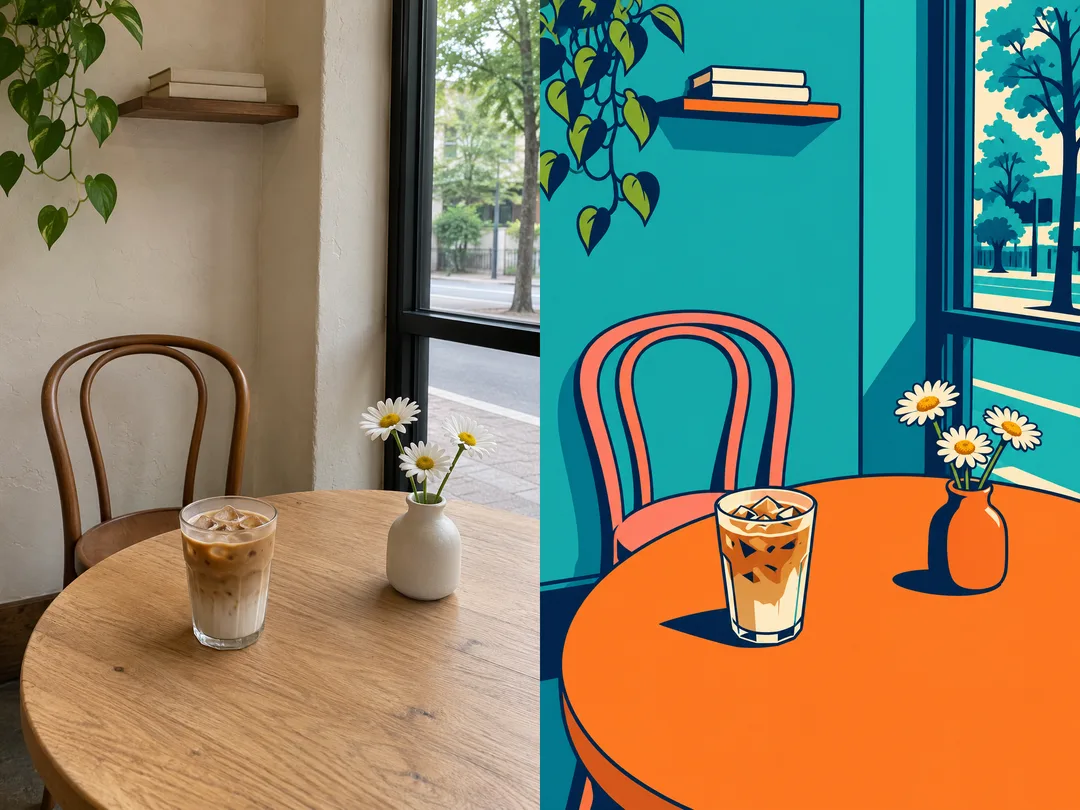
Compare chair and window positions, cup and vase counts, handles and recognizable silhouettes against the photo. Colors change to the fixed palette, but the objects and framing should remain recognizable. Look for crisp flat shadows and a clear teal, pink and orange identity. If an object changes, specify its exact position and count in Details to keep and resend with the same photo. If the image becomes soft or photographic, request bold contours and two or three flat shadow tones.
Examples and questions
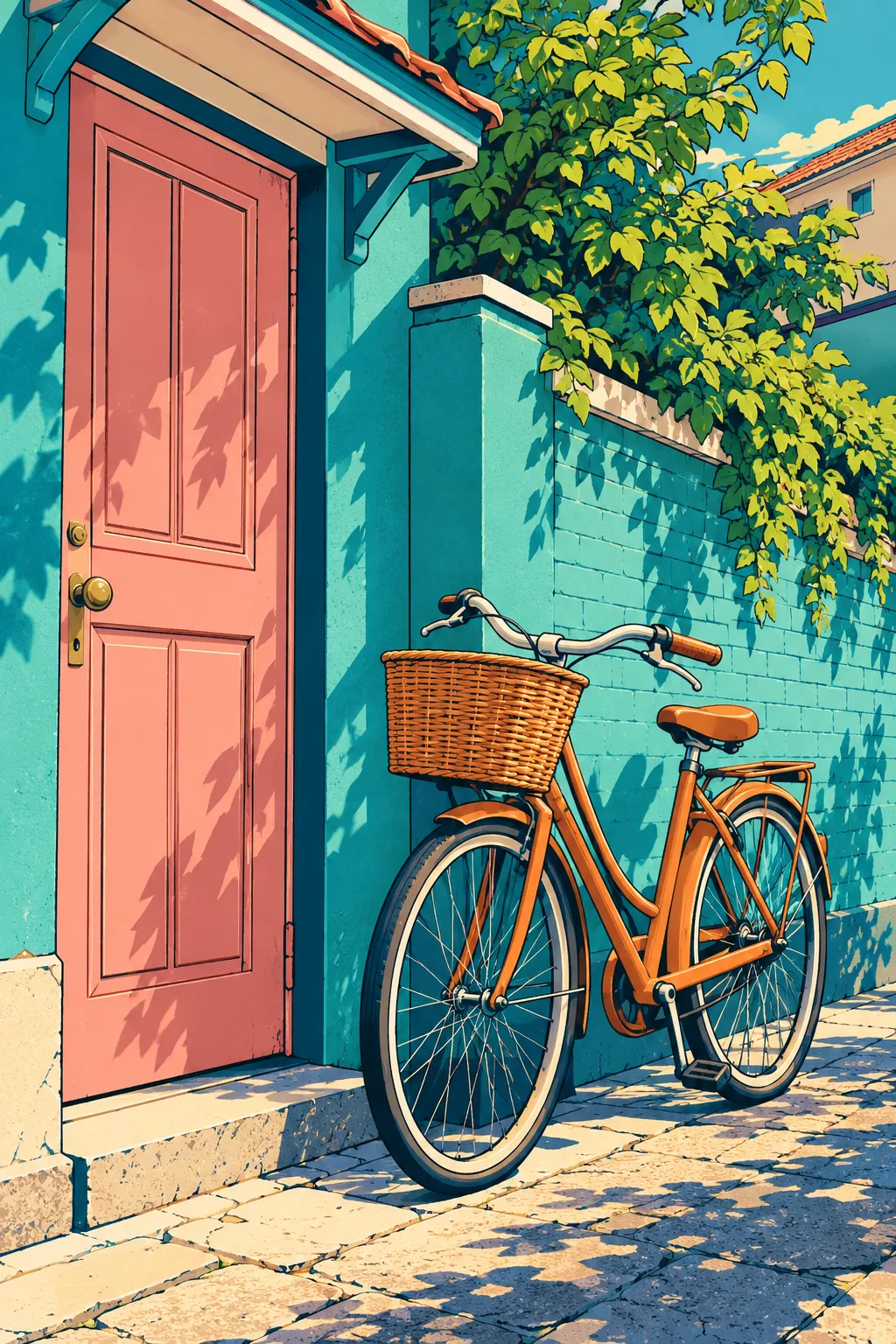
The left side of the comparison is a fictional source photograph made with built-in image generation; the right is its illustrated transformation. It is not a customer photograph. The beige wall and wooden chair become teal and pink. Compare the unchanged right-hand window, latte on the left, vase on the right, three daisies and two stacked books on the shelf. The second example is a house and bicycle generated from text. The coffee-bar cover was created separately. Result images have no postprocessing.
Is a photo required? No; text alone uses the same drawing style. Attach a photo to retain your own place. Are original colors preserved? No; placement is preserved while colors are remapped to teal-led tones. Will I receive a comparison? No; you receive one pure result image. Can I keep lettering on a sign? This card produces artwork without readable text.