
전체 · 광고/포스터 · 할인·행사 · 명절·기념일
040수능 끝 할인 이벤트
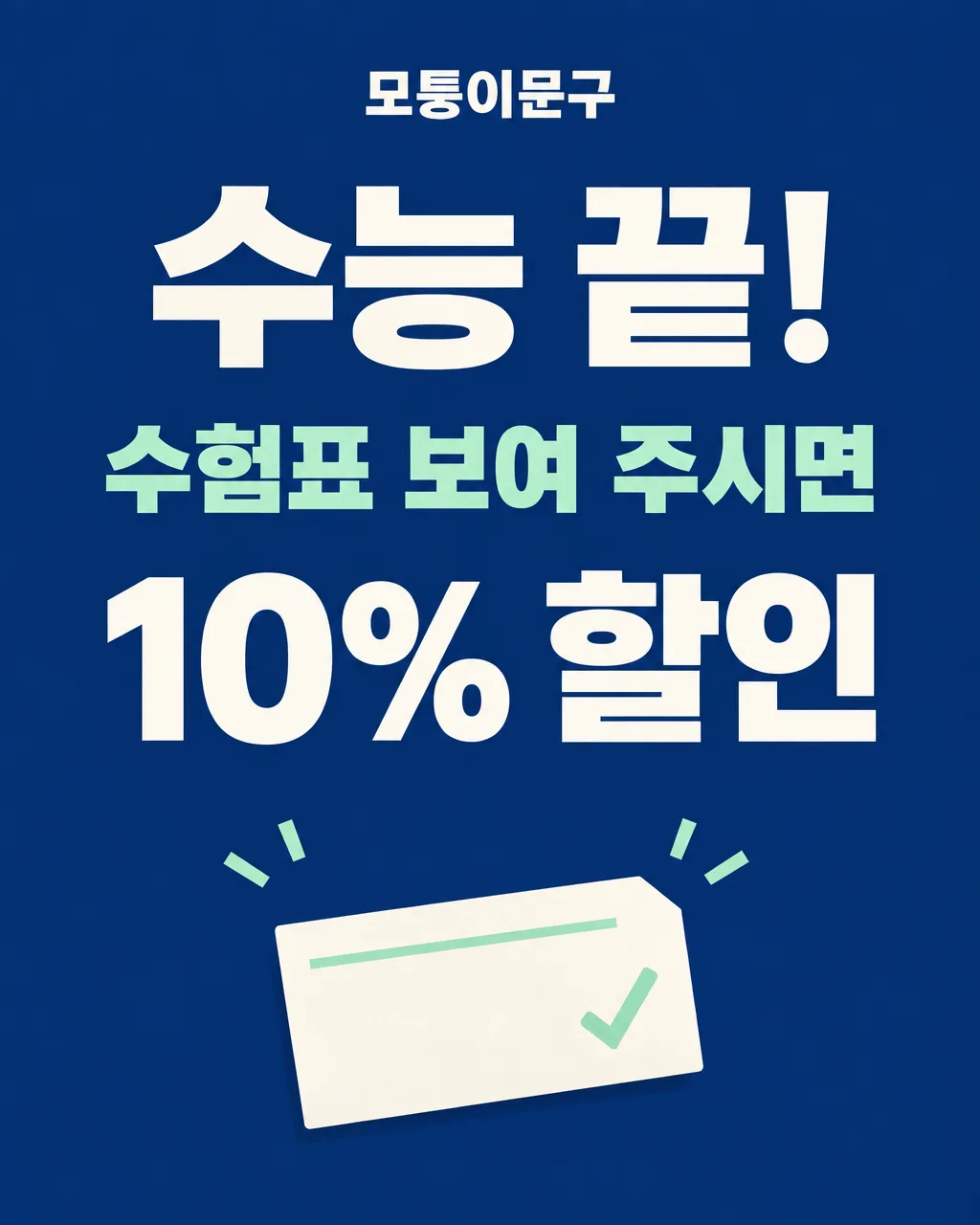
수험표를 가져온 손님에게 제공하는 할인 혜택을 가게 출입문에 알리는 포스터
칸 채우기
- 1칸을 채워요
- 2복사 버튼을 눌러요
- 3GPT 채팅창에 붙여넣어요
- 4제품·인물 사진을 쓰려면 사진과 프롬프트를 둘 다 넣은 뒤에 보내요 선택
프롬프트 원문 보기 5,195자
Generate this image now. Draw it directly - do not describe it, explain it, or ask questions.
Output size 2480x3508 pixels, A4 portrait, 300dpi, print-ready poster.

[Purpose]
Create one finished Korean post-CSAT discount poster for the real shop "【가게 이름】". It is a commercial notice for customers who show their CSAT admission ticket after the exam, suitable for A4 printing on a shop door or cashier counter. Its job is to tell passersby that a ticket brings the benefit the shop owner entered. It is not a cheering card, a message addressed to an individual student, a countdown to exam day, or an invitation to sit the exam. Draw the finished artwork alone, with no room mockup or frame.

[Scene]
Build a crisp modern neighborhood-shop poster with a deep ink-blue background, one pale mint accent, and warm white lettering. Place an original, simplified paper-ticket motif behind the bottom third: a blank off-white rectangle with a single small cut corner, one narrow mint line, and a checkmark drawn as a graphic shape. It must be clearly a generic visual hint of a ticket, not a replica of an official 수험표; include no photograph, name, birth date, candidate number, school name, institution seal, QR code, barcode, or official emblem. Add two or three restrained confetti strokes above the ticket to mark the end of the exam, but keep them far from the copy. Leave the broad middle zone flat and empty for the actual benefit. The graphic must work for a cafe, bookstore, stationery store, salon, or other neighborhood business without showing a specific food or product.

[Attached photo]
No photograph is needed. If an image is attached, do not copy an actual exam admission ticket, identification data, face, official mark, shop logo, or product packaging from it. Ignore such details and use the generic ticket motif. Do not search for or imitate an identifiable person's ticket. The owner's exact written shop name and benefit are the only personal and commercial specifics to show.

[Text layout]
Render these Korean strings in this order, all horizontally and clearly, with ample print margins:
- 6-12%: "【가게 이름】" in modest bold Korean sans-serif, warm white, centered.
- 16-30%: "수능 끝!" in the largest, heavy warm-white Korean lettering, centered.
- 31-40%: "수험표 보여 주시면" in bold pale-mint Korean lettering, centered; this is the fixed condition supplied by the purpose of this card.
- 45-64%: "【혜택】" in large heavy Korean sans-serif, warm white, centered, with a maximum of two balanced lines; preserve the owner's exact input and all numbers.
- 68-88%: the generic blank ticket illustration and a few small confetti marks, clearly separate from every letter.
The benefit displayed at 45-64% must come from the owner's value, not from this paragraph.

[Style]
Contemporary Korean shop promotion, confident and readable from a few steps away. The palette is ink blue, warm white, and a small mint accent. Typography has the authority of a simple sale poster rather than the sentimental handwriting of a student encouragement card. Keep the information path short: exam over, ticket condition, actual benefit, shop name. Make the ticket a flat original graphic, not an AI photograph or a copy of an official government document. The design should retain its hierarchy when the site chooses a narrower social aspect ratio.

[Visual hierarchy]
First read: "수능 끝!". Second read: the entered benefit. Third read: "수험표 보여 주시면". Fourth read: shop name and the quiet ticket symbol. The benefit is the answer to what a visitor receives, so it must remain at least as prominent as the condition line. If the benefit is long, allow two lines and reduce only enough to retain legibility; never shorten or paraphrase it. All essential text stays within a central safe zone and at least 7% from the edges for A4 printing.

[Lighting and texture]
Use flat, even print-style color. A faint uncoated-paper texture on the blue background is acceptable, but do not dirty Korean letter strokes. No neon, glitter, glass, chrome, raised plastic type, dramatic spotlight, or floating photoreal ticket. The paper motif may show a tiny natural fold or soft contact shadow, but should still read as an original simple illustration.

[Text rules]
Only draw the Korean text described in [Text layout]. Preserve the entered shop name and benefit exactly, including spacing, digits, won sign, and percent sign. Check every Korean syllable and numerical value before finalizing. Do not add the current year, exam date, weekday, event period, expiry, receipt requirement, minimum purchase, per-person limit, selected items, phone number, URL, brand, official institution, or any participation instruction the owner did not enter. Never turn the ticket motif into a readable document.

[Avoid]
encouragement quotes; D-day counter; motivational card layout; fabricated discount rates or prices; invented expiry; additional eligibility conditions; fake official admission ticket; personal data; school or education-office seals; official exam logo; QR codes; barcodes; unrelated products or food; English text; misspelled Korean; dense tiny writing; overlapping headline and benefit; benefit inside a ticket; gradients behind text; price stickers; multiple panels; frames; watermarks
이 카드도 많이 사용해요

쓰는 법 · 자주 묻는 것
이런 때 쓰세요
수능이 끝난 뒤 수험표를 가져온 손님에게 할인 혜택을 알릴 때 쓰는 가게용 포스터예요. 출입문이나 계산대 옆에 A4로 붙이면 손님이 「수험표를 보여주면 어떤 할인을 받는지」 바로 읽을 수 있습니다. 기존 수능 응원 카드는 시험을 앞둔 사람에게 보내는 격려 이미지입니다. 이 카드는 시험이 끝난 뒤 가게가 실제로 제공하는 혜택을 알리는 한 장의 광고라서, 응원 문구와 디데이를 넣지 않았습니다.
칸 채우는 법
- 가게 이름: 간판과 같은 이름을 입력해 주세요. 업종 선택 버튼은 없으므로 카페, 서점, 문구점, 미용실 등 매장 종류와 관계없이 이름을 적을 수 있습니다.
- 혜택: 실제로 제공하는 할인만 적으세요. 수험표 조건은 그림에 따로 나오므로 이 칸에는 「10% 할인」처럼 혜택만 간결하게 적어도 됩니다.
사진을 넣고 싶을 때
이 포스터는 음식이나 특정 상품 사진 없이도 쓸 수 있도록 수험표를 연상시키는 단순한 그림으로 만들었습니다. 실제 수험표 사진을 올릴 필요가 없습니다. 수험표에는 이름과 수험번호 등 개인정보가 있을 수 있으니 사진을 올려 포스터 소재로 쓰지 마세요. 가게 사진을 꼭 더하고 싶다면 다른 상품 사진 중심 포스터를 고르는 편이 좋습니다.
그림이 나오면 꼭 볼 것
가게 이름과 혜택의 할인율, 금액, 퍼센트 기호를 한 글자씩 확인하세요. 그림 속 종이가 실제 수험표처럼 이름, 번호, 학교나 기관 문장을 담고 있으면 다시 그려 달라고 하세요. 게시 전에는 매장에서 정한 할인 대상과 현장 안내가 그림의 문장과 일치하는지 확인해야 합니다.
틀린 곳 고치는 법
같은 GPT 대화에서 한 군데씩 지정해 고치세요. 예를 들어 「혜택을 수험표 지참 시 10% 할인으로 고쳐줘. 다른 글자와 그림은 그대로」라고 적을 수 있습니다. 숫자가 반복해서 틀리면 새 대화에 처음 프롬프트를 다시 붙여 넣고 할인 숫자를 더 크게 써 달라고 하세요.
자주 묻는 것
- 할인 기간을 자동으로 넣어 주나요? 아니요. 가게가 입력하지 않은 시작일이나 종료일은 만들지 않도록 지시했습니다.
- 실제 수험표 사진이 필요한가요? 필요하지 않습니다. 개인 정보가 없는 단순한 티켓 모양만 장식으로 그립니다.
- 수험표를 가져온 손님에게만 적용되나요? 카드의 기본 조건은 수험표를 보여주는 것입니다. 그 밖의 조건이 있다면 실제 운영 문구를 혜택 칸에 정확히 적고, 출력 전에 매장 안내와 맞는지 확인해 주세요.