
전체 · 광고/포스터 · 명절·기념일 · 편의점·마트 · 음식점·식당
039절임배추·김장 예약 안내
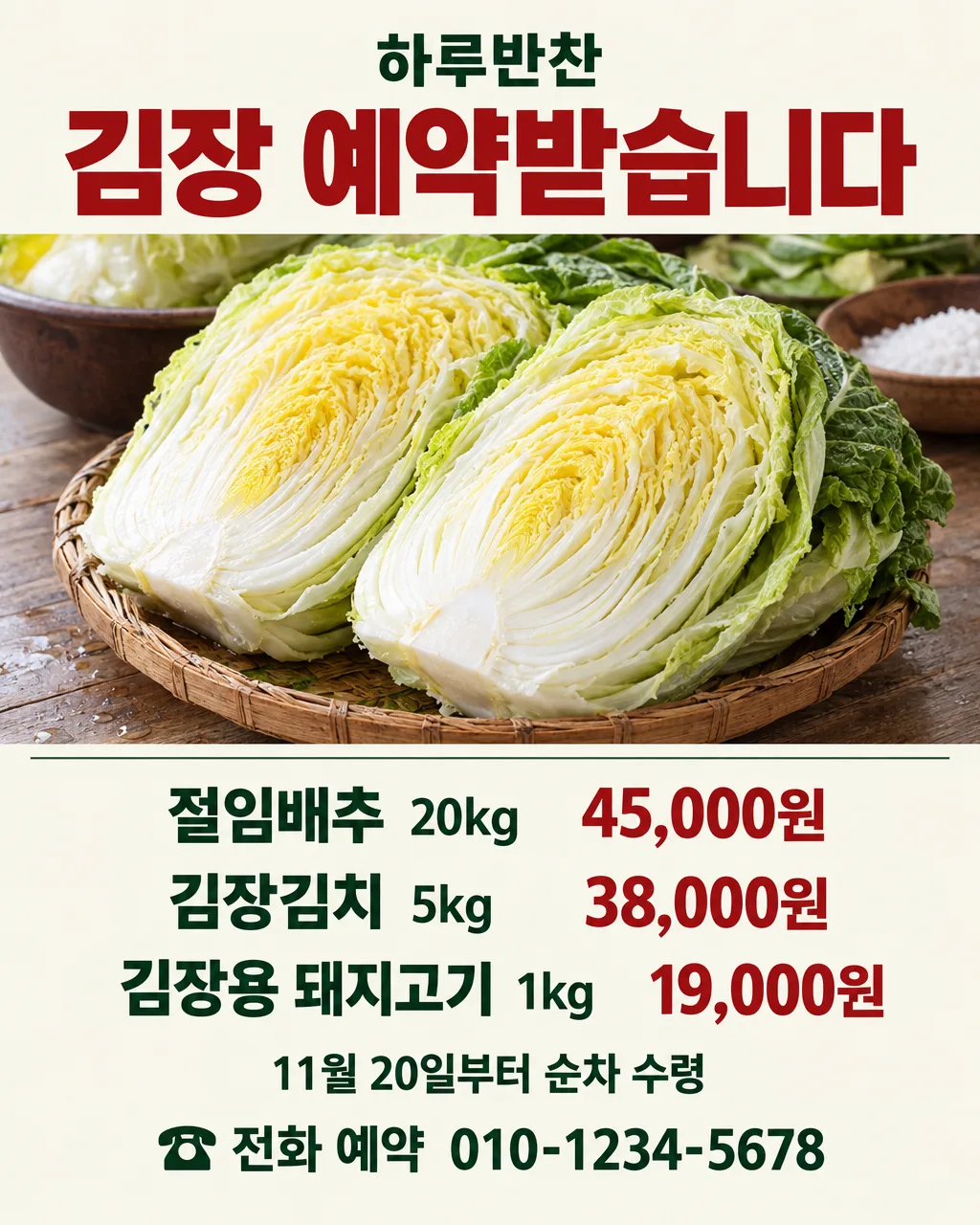
절임배추와 김장용 상품의 가격, 받는 날, 예약 연락처를 한눈에 보여주는 안내 포스터
칸 채우기
- 1칸을 채워요
- 2복사 버튼을 눌러요
- 3GPT 채팅창에 붙여넣어요
- 4제품·인물 사진을 쓰려면 사진과 프롬프트를 둘 다 넣은 뒤에 보내요 선택
프롬프트 원문 보기 7,111자
Generate this image now. Draw it directly - do not describe it, explain it, or ask questions.
Output size 2480x3508 pixels, A4 portrait, 300dpi, print-ready poster.

[Purpose]
Create one finished Korean kimjang reservation notice for "【가게 이름】". The owner may be a side-dish shop, butcher, grocery, or grower. The poster must announce ALL products the owner entered, each on its own line with its exact price, plus the receiving day if supplied and one natural booking line. Never show only the first product when two or three are supplied. It should work on a storefront door, a counter, and a shop news feed. This is a reservation notice, not a discount event. Make the headline visible from several steps away and all product, pickup, and booking information readable without zooming.

[Scene]
Build a practical vertical market poster with one large, authentic food photograph as the hero in the upper middle and a clean typographic information area below. Choose the food according to the first product: brined napa cabbage for salted cabbage; finished kimchi for kimchi; the specified fresh cut for pork; the stated seasoning for kimjang seasoning. If more products are entered, show them only as small secondary still-life elements without implying extra products or quantities. For salted cabbage, show real halved heads with pale yellow inner leaves, wet white ribs, and muted green outer leaves. For kimchi, show red pepper seasoning worked between distinct cabbage leaves, not a featureless red mound. A restrained ivory, cabbage-green, and chili-red palette should recall a neighborhood grocery while keeping the food believable. Use real counter surfaces, natural imperfections, and gentle daylight. Leave clean, solid areas behind all lettering.

[Real food reference]
Before drawing, use web search to find and actually inspect at least two real photographs of the exact food named in the owner's first product. For salted cabbage, include a clear real photo of brined napa cabbage and one of kimjang preparation. Study the correct leaf structure, moisture, scale, and color. Use the photographs for factual food anatomy and camera realism only; make a new original composition. Do not copy their logos, packaging, slogans, watermarks, people, or photo layout. Never substitute unbrined whole cabbage, plastic-looking leaves, a generic salad, or an unrelated pork cut. If the owner attaches a photo of the actual item, preserve its identity and visible features as the strongest reference.

[Attached photo]
An owner photo is optional. If attached, place that actual food in the hero area and preserve its visible product, cut, color, and packaging without inventing labels. If none is attached, use the web-checked real food references above and draw a fresh photographic scene. Do not claim that an invented farm, certification, origin, weight, or ingredient is visible.

[Text layout] top to bottom, approximate % of canvas height. Render these exact Korean strings, using the owner values verbatim:
- 5-10%: "【가게 이름】" — small bold Korean sans-serif, centered.
- 13-23%: "김장 예약받습니다" — largest heavy Korean headline, centered.
- 26-51%: real food hero only; no text over food.
- 54-60%: "【상품과 가격 1】" — first complete product-price row.
- 61-67%: "【상품과 가격 2】" — second complete product-price row, only if supplied.
- 68-74%: "【상품과 가격 3】" — third complete product-price row, only if supplied.
- 78-83%: "【받는 날】" — receiving day on its own line, only if supplied; omit this entire line and close the gap when blank.
- 86-94%: Input method = 【예약 방법】; input contact = 【연락처】. Convert them into exactly ONE natural booking line using [Booking wording]. Do not display these input labels or make separate method and contact rows.

[Booking wording]
For 전화, print "☎ 전화 예약 " followed by the exact contact. For 카카오톡, print "카카오톡 예약 " followed by the exact contact or channel name. For 방문, print "매장 방문 예약 · " followed by the exact contact. If the owner typed another method, write one short, natural Korean reservation phrase containing that method and the exact contact. Never print the words "예약 방법" or "연락처" on the poster.

[Style]
Use the visual language of a real Korean neighborhood shop poster: confident editorial type, a believable food photo, and clear spacing between item rows. Keep the shop identity modest, the reservation headline strong, and the product-price pairs visually inseparable. Print every product and price directly on the same uninterrupted matte ivory background as the other information. Never place a color band, brushstroke, badge, sticker, box, panel, pill, or contrasting fill behind any price or contact line. A fine horizontal rule may separate the food from the information area, but never put each line in its own card. Adapt spacing to the number and length of supplied products. If only one product is present, use the recovered space for a larger food image and more breathing room; do not invent filler rows.

[Visual hierarchy]
First read the reservation headline. Second read every entered product and price, with no omissions. Third read the receiving day if entered, then the single booking line. The food should help a passerby recognize the actual item and should never compete with legibility. Keep the booking line visibly separate from the product list so customers can act after reading. Respect a generous safe margin in every site-selected aspect ratio.

[Lighting and texture]
The food should look like honest editorial food photography, with irregular leaves, subtle moisture, natural shadows, and real scale. Keep the print background matte. Avoid glossy CGI, repeated identical heads, waxy surfaces, sparkling steam, artificial bokeh, and impossible folds. Lettering should stay crisp and flat over solid color, with no shadows or effects.

[Text rules]
Copy each supplied shop name, product name, unit, price, receiving-day character, and contact character exactly. Do not calculate or change any price. Include every nonblank product-price input as a separate visible row; count the input rows and final rows before finishing. Omit the entire optional product or receiving-day row when its value is blank. Do not print empty placeholders or labels for absent rows. Add no other text. In particular, invent no booking period, deadline, minimum purchase, stock limit, delivery condition, origin, certification, promotion, or participation steps. The selected booking method is one short fact; do not add instructions such as paying a deposit or waiting for confirmation. Check every Korean syllable and every contact digit before finalizing.

[Avoid]
misspelled Korean; missing entered products; changed digits, units, or prices; extra menu items; a fabricated receiving date; field labels printed as "예약 방법" or "연락처"; quantity limits; minimum orders; delivery claims; fake seals or certification marks; supplier names; logos; brand marks; copied web-photo lettering; watermarks; text on the food; posters shown as a wall mockup; tiny price type; a decorative price sticker; food that looks like plastic or AI clay; people; hands; QR codes; English slogans; extra captions; empty boxes; glow; neon; heavy gradients
이 카드도 많이 사용해요
쓰는 법 · 자주 묻는 것
이런 때 쓰세요
김장철에 절임배추, 김장김치, 김장용 고기나 양념의 예약을 받을 때 가게 입구와 계산대에 붙이는 포스터입니다. 반찬가게, 정육점, 마트, 농가가 한 장에 최대 세 가지 상품과 가격을 적을 수 있습니다. 손님이 먼저 상품과 받는 날을 보고, 이어 예약 방법과 연락처를 찾도록 구성했습니다. 할인 행사나 배송 안내로 보이지 않도록 예약에 필요한 사실만 보여줍니다.
칸 채우는 법
- 가게 이름은 손님이 간판에서 확인하는 이름 그대로 적으세요.
- 상품과 가격 1에는 실제 판매할 상품명, 중량이나 단위, 가격을 한 줄로 적으세요. 첫 칸은 꼭 필요합니다. 예시 가격은 작성 방식을 보여주는 값이므로 그대로 쓰기 전에 실제 가격으로 바꾸세요.
- 상품과 가격 2·3은 다른 예약 상품이 있을 때만 쓰세요. 빈칸이면 포스터에서도 그 줄을 빼고 음식 사진과 여백을 넓힙니다.
- 받는 날은 손님이 상품을 받을 수 있는 시점을 적으세요. 실제로 정해진 내용만 쓰고, 아직 정하지 않았다면 비워 두세요. 빈칸이면 그림에서도 그 줄이 빠집니다.
- 예약 방법은 전화, 카카오톡, 방문처럼 실제로 받는 방식 하나를 적으세요. 업종을 고르는 버튼이 아니라 어떤 가게든 직접 적을 수 있는 칸입니다.
- 연락처는 그 방법에 맞는 번호나 카카오톡 채널명을 정확히 적으세요. 방문 예약만 받더라도 손님이 문의할 수 있는 연락처를 적는 편이 좋습니다. 그림에는 예약 방법과 연락처가 자연스러운 한 줄로 나옵니다.
우리 상품 사진을 넣고 싶을 때
매장에서 판매할 절임배추나 김치, 고기 사진이 있으면 같은 GPT 대화창에 사진과 프롬프트를 함께 넣으세요. 사진을 먼저 올리고 아직 보내지 않은 상태에서 프롬프트를 붙여넣은 다음, 둘 다 들어간 것을 확인하고 보내면 됩니다. 사진이 없으면 프롬프트가 GPT에게 실제 음식 사진을 웹에서 찾아 잎의 결, 색, 촉촉한 정도를 참고해 새 장면을 그리도록 지시합니다. 웹 사진의 로고나 문구를 베끼라는 뜻은 아닙니다.
그림이 나오면 꼭 볼 것
가게 이름, 적은 상품 세 줄의 중량과 가격, 받는 날, 예약 문구와 연락처를 입력한 내용과 한 글자씩 대조하세요. 절임배추라면 노란 속잎과 하얀 줄기가 실제처럼 보이는지 확인하세요. 김장김치는 양념이 배추 잎 사이에 들어간 모습이어야 합니다. 기간, 최소 수량, 배송이나 원산지 같은 말을 적지 않았는데 포스터에 생겼다면 그 그림은 쓰지 마세요.
틀린 곳 고치는 법
GPT 대화에서 틀린 부분을 한 번에 하나씩 정확히 짚어 다시 그려 달라고 하세요. 예를 들어 「연락처는 010-1234-5678이고 나머지는 그대로」처럼 입력값을 다시 적는 편이 좋습니다. 가격의 쉼표나 kg 표기도 확인하세요. 인쇄 전에 실제 예약 상품, 가격, 문의처가 현재 가게 안내와 같은지 마지막으로 확인하면 됩니다.
자주 묻는 것
- 상품을 하나만 예약받아도 되나요? 네. 첫 상품과 가격만 채우고 나머지 두 칸은 비우면 됩니다.
- 정육점에서도 쓸 수 있나요? 네. 첫 상품에 김장용 돼지고기처럼 실제 예약 상품을 적으면 사진도 그 상품을 중심으로 구성합니다.
- 예약 기간이 자동으로 들어가나요? 아니요. 기간과 마감일은 이 카드가 만들지 않습니다.