
칸 채우기
- 1칸을 채워요
- 2복사 버튼을 눌러요
- 3GPT 채팅창에 붙여넣어요
- 4그대로 보내면 썸네일 예시처럼 나와요
- 5내 사진을 같이 넣으면 그 사진이 반영돼요 선택
프롬프트 원문 보기 3,944자
Generate this image now. Return exactly ONE finished edge-to-edge photorealistic graduation profile photograph, not a comparison or collage. No explanation or questions. Canvas ratio Output exactly one finished 2:3 portrait image, 1024x1536 pixels. Keep all important text inside the central 73% of image height: leave the top 12% and bottom 15% free of essential lettering.; default 2:3 if empty. Waist-up eye-level composition with the complete mortarboard inside the frame, modest headroom, prominent face and background extending to all edges.

PHOTO RULE: Photo setting "【내 사진】"; empty means 첨부 사진 사용. If 첨부 사진 사용 and one photo is attached, use it as the sole identity reference. If no photo is attached, never stop or ask for one: invent a unique fictional adult named Haru who does not resemble a celebrity or identifiable real person. If 가상 인물 하루 is selected, invent that fictional adult even if a photo is attached. This card is for a solo portrait; with a group reference use only the largest, clearest foreground adult, never blend faces or add another person.

Identity overrides all styling. Preserve exact facial proportions, eyes, eyebrows, eyelids, nose, lips, jaw, ears, skin tone, apparent age, moles, freckles, wrinkles, facial hair and natural asymmetry. Preserve the original gaze, expression, head angle, hairline, hairstyle, hair length, color, texture and glasses shape. No face replacement, beauty filter, reshaping, whitening, de-aging, new makeup, hair straightening or glasses removal. Change only clothing, background, coherent soft light, and add the cap and optional bouquet. The cap may cover only the crown of the hair; keep visible fringe, side hair and hair length unchanged. Unclear facial details remain unobtrusive rather than invented.

Gown color "【가운 색】"; empty means 네이비. 네이비 = navy; 검정 = black; 버건디 = burgundy; 짙은 초록 = deep forest green. Use a plain woven graduation gown and a matching square mortarboard with a restrained gold tassel beside the head, never across eyes, glasses or face. No school name, real school crest, seal, logo, branded embroidery or diploma. All clothing and props are generic fictional designs, never imitate an identifiable institution or branded product.

Background "【배경】"; empty means 캠퍼스 잔디. Use exactly one scene:
- 캠퍼스 잔디: softly blurred green lawn and anonymous campus-like architecture in gentle spring daylight, no identifiable institution or signs.
- 스튜디오 단색: seamless muted warm gray studio backdrop and soft diffused portrait light, no furniture or props.
- 벚꽃길: anonymous spring cherry blossom path with pale pink flowers and greenery softly blurred, no signs or recognizable location.
- 도서관: generic library with softly blurred shelves, warm window light, no readable titles, labels or logos.
Keep every scene photographic, softly out of focus and subordinate to the person's face. Do not depict a specific school's campus.

Bouquet setting "【꽃다발 유무】"; empty means 있음. 있음 = one modest bouquet of seasonal flowers in plain unprinted paper, held below the chest without hiding the face or glasses; make the hands and fingers anatomically coherent. 없음 = no flowers, bouquet, wrapping or floral props anywhere; hands rest naturally below chest. Do not duplicate hands or invent extra fingers.

Natural skin texture, crisp eyes, authentic textile folds, realistic glasses and coherent soft light; no plastic skin or excessive glow. No text at all, including Haru, school names, dates, congratulations, labels or verification notes. No logo, watermark, border, paper mockup, duplicate subject or extra limbs. Finish the single photograph directly; no code, cropping or post-processing required. This is a creative portrait, not evidence of attendance or an official graduation record.

[Final output format]
Output exactly one finished 2:3 portrait image, 1024x1536 pixels. Keep all important text inside the central 73% of image height: leave the top 12% and bottom 15% free of essential lettering.
This selected output format takes priority over any fixed canvas size or aspect ratio elsewhere in this template. Adapt the composition, text zones and margins to the selected canvas without stretching or cropping essential content. Device safe areas apply only when a device is selected. Never print these format instructions on the image.
결과 어땠어요?
이 카드도 많이 사용해요

쓰는 법 · 자주 묻는 것
놓친 졸업 사진을 내 얼굴로
졸업식 때 사진을 남기지 못했거나 예전 사진을 다시 찍고 싶은 사람을 위한 학사모 프로필 카드입니다. 2월 졸업 시즌을 앞두고 미리 준비하거나 기념 프로필로 쓸 수 있습니다. 일상 사진의 얼굴·머리·안경을 기준으로 학사모와 가운, 배경을 바꾼 실사 사진 한 장을 요청합니다. 학교 이름이나 실제 학교 문장·로고는 넣지 않으며 특정 학교를 졸업했다는 증명 용도로 쓰는 사진은 아닙니다.
네 칸으로 정하는 촬영 준비
꼭 칸은 가운 색·배경·꽃다발 유무 3개입니다. 내 사진 칸은 선택이며 「첨부 사진 사용」을 고르고, 사진 첨부가 가능한 그림 AI에 선명한 원본 한 장과 완성한 프롬프트를 함께 보내세요. 이 칸에 파일명이나 사진 경로를 적는 것으로 첨부가 되지는 않습니다. 얼굴과 평소 머리, 안경이 잘 보이는 혼자 나온 사진이 좋습니다. 단체사진이면 가장 크고 선명한 앞쪽 성인 한 명을 쓰므로, 원하는 사람이 혼자 나온 사진으로 바꾸는 편이 정확합니다.
내 사진 칸을 비우면 첨부 사진을 사용합니다. 사진을 첨부하지 않았거나 「가상 인물 하루」를 골랐다면 가상 성인 하루의 사진이 나옵니다. 가상 인물을 선택하면 첨부 사진을 얼굴 기준으로 사용하지 않습니다. 가운 색은 네이비·검정·버건디·짙은 초록 중 고르며 비우면 네이비입니다. 학사모는 가운과 같은 색이고 금색 술은 얼굴 옆으로 내려옵니다. 실제 학교 색상이나 문장을 자동으로 찾아 넣지 않습니다.
배경은 캠퍼스 잔디·스튜디오 단색·벚꽃길·도서관입니다. 비우면 캠퍼스 잔디를 사용합니다. 단색은 차분한 회색, 벚꽃길은 분홍 꽃과 초록, 도서관은 흐린 책장과 창가 빛으로 달라집니다. 벚꽃길은 실제 촬영일과 관계없이 봄 분위기를 만드는 선택지입니다. 꽃다발 유무는 있음·없음이며 비우면 있음입니다. 꽃다발은 가슴 아래에 놓이고, 없음을 고르면 꽃과 포장지를 모두 빼요. 비율은 공통 화면에서 정하며 학사모부터 손까지 담는 2:3을 권합니다.
예시에서 확인할 변화
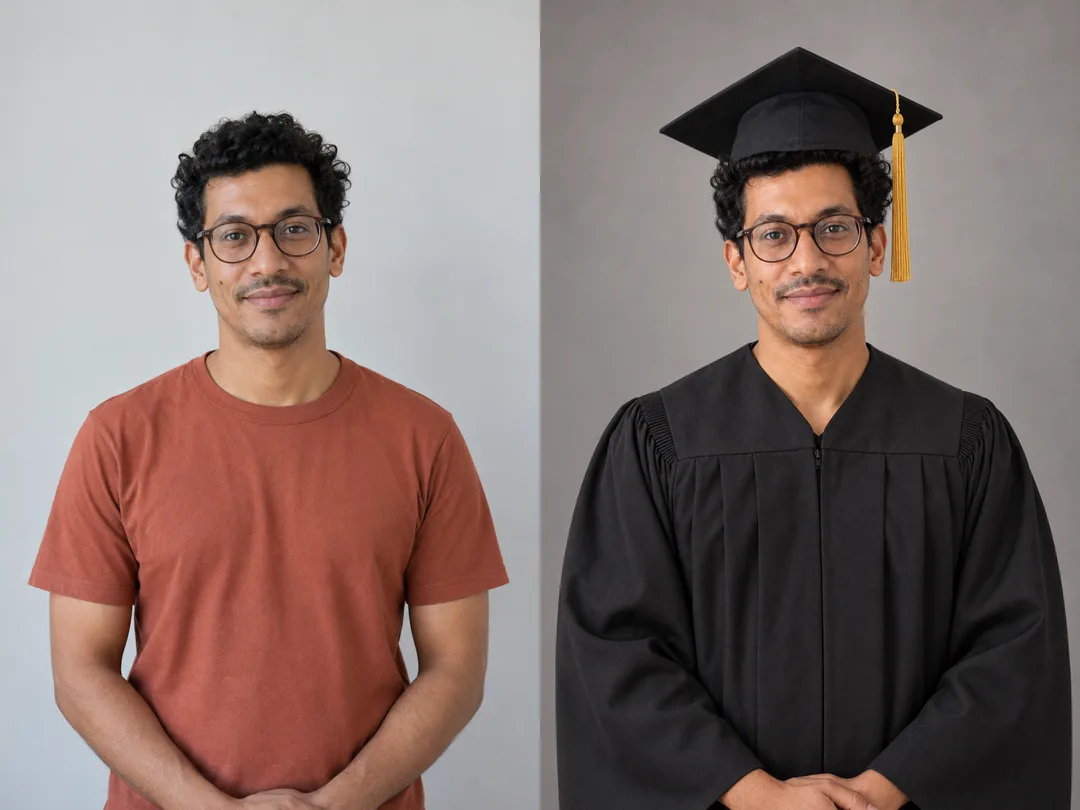
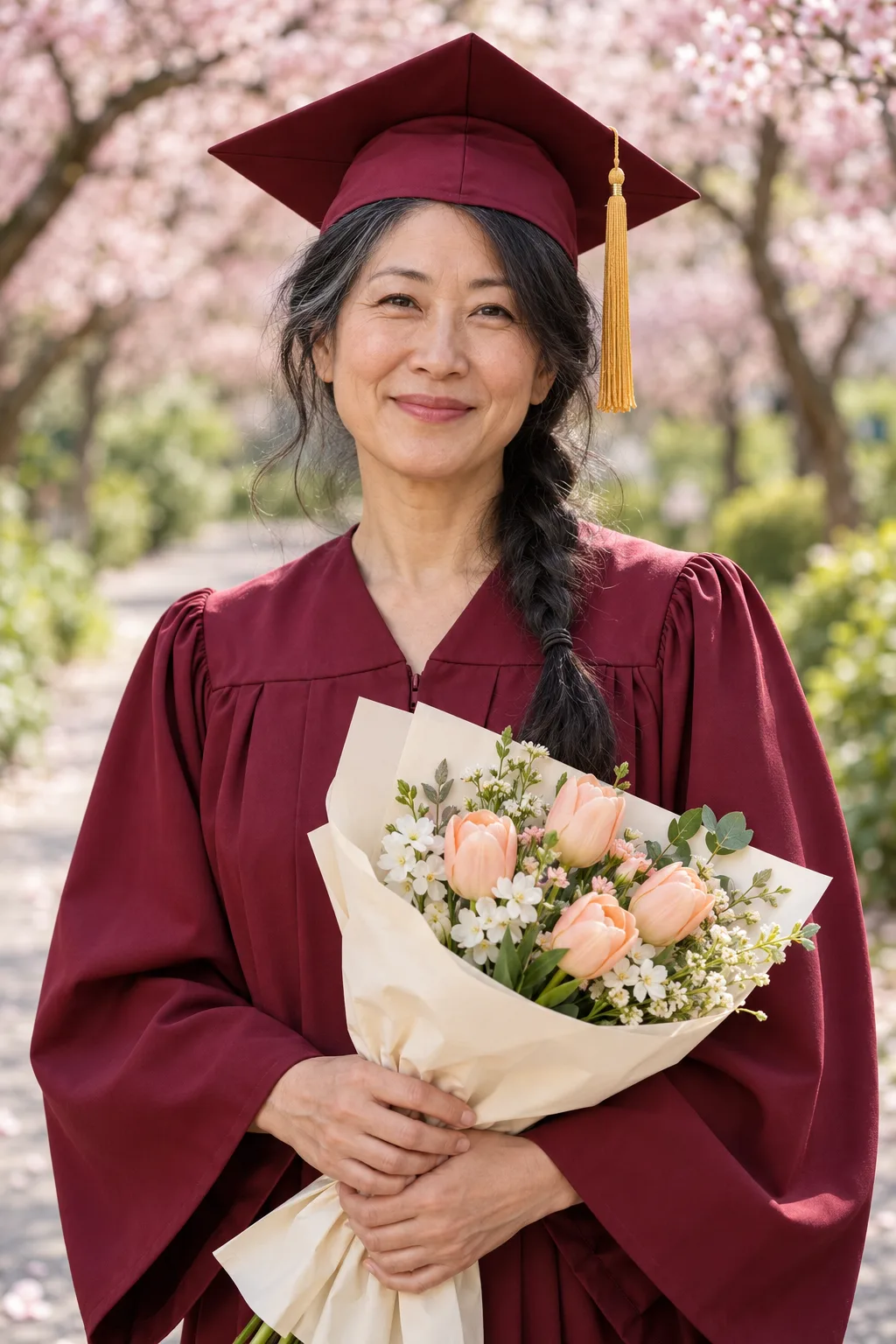
목록 표지는 긴 웨이브 머리의 별도 가상 인물이 네이비 가운을 입고 캠퍼스 잔디에서 꽃다발을 든 순수 결과입니다. 예시 1은 안경과 곱슬머리가 있는 가상 인물 하루의 일상 사진 → 검정 가운·스튜디오 단색·꽃다발 없음 결과입니다. 예시 2는 다른 가상 인물이 버건디 가운·벚꽃길·꽃다발 있음으로 나온 순수 결과입니다. 비교판 안의 결과를 갤러리에 따로 반복하지 않습니다. 예시 이름은 설명에서만 쓰고 사진 안에는 글자를 넣지 않습니다.
저장 전 얼굴과 학사모를 확인하세요
원본과 눈매·코·입·턱선·점·안경테를 나란히 비교하세요. 학사모가 정수리를 덮는 것은 자연스럽지만 앞머리와 옆머리를 바꾸거나 길이를 줄이면 다시 생성해야 합니다. 얼굴이 달라지면 원본을 다시 첨부하고 「얼굴·앞머리·옆머리·안경은 원본 그대로, 학사모와 가운·배경만 바꿔 주세요」라고 요청하세요. 손가락이 겹치거나 꽃이 얼굴을 가리면 꽃다발을 가슴 아래로 낮춰 다시 생성합니다. 표지와 예시는 색 보정 없이 생성된 사진을 사용하며 비교판만 두 장을 붙였습니다.
자주 묻는 것
- 안경을 벗기거나 피부를 어려 보이게 하나요? 안경과 나이, 피부 특징을 유지하도록 요청합니다.
- 우리 학교 로고를 넣을 수 있나요? 이 카드는 학교 이름·실제 학교 문장·로고를 출력하지 않습니다.
- 사진 사용 전에 무엇을 확인하나요? 본인 사진 또는 사용과 공개에 동의받은 사진을 쓰세요. 외부 서비스의 이용 조건은 해당 서비스에서 확인하세요.