
All · Comics & illustration · People
388Graduation Cap Profile from Your Photo
Keep your face, hair and glasses while adding a graduation cap, gown and your chosen setting.
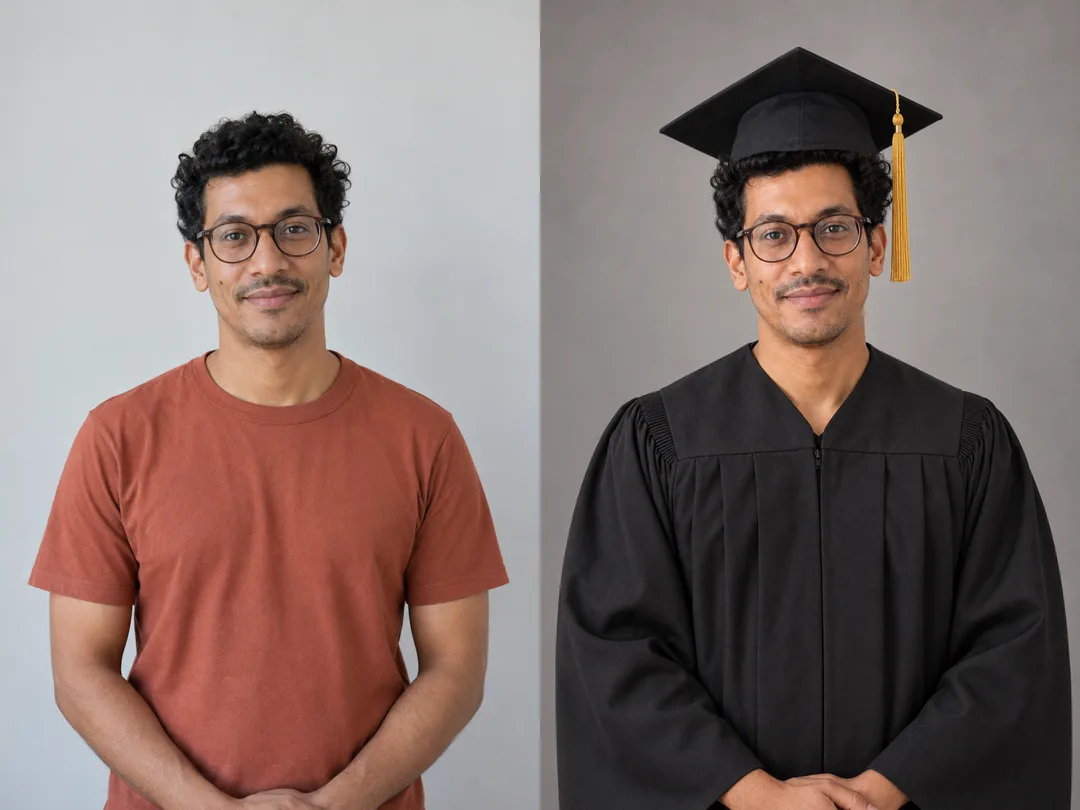
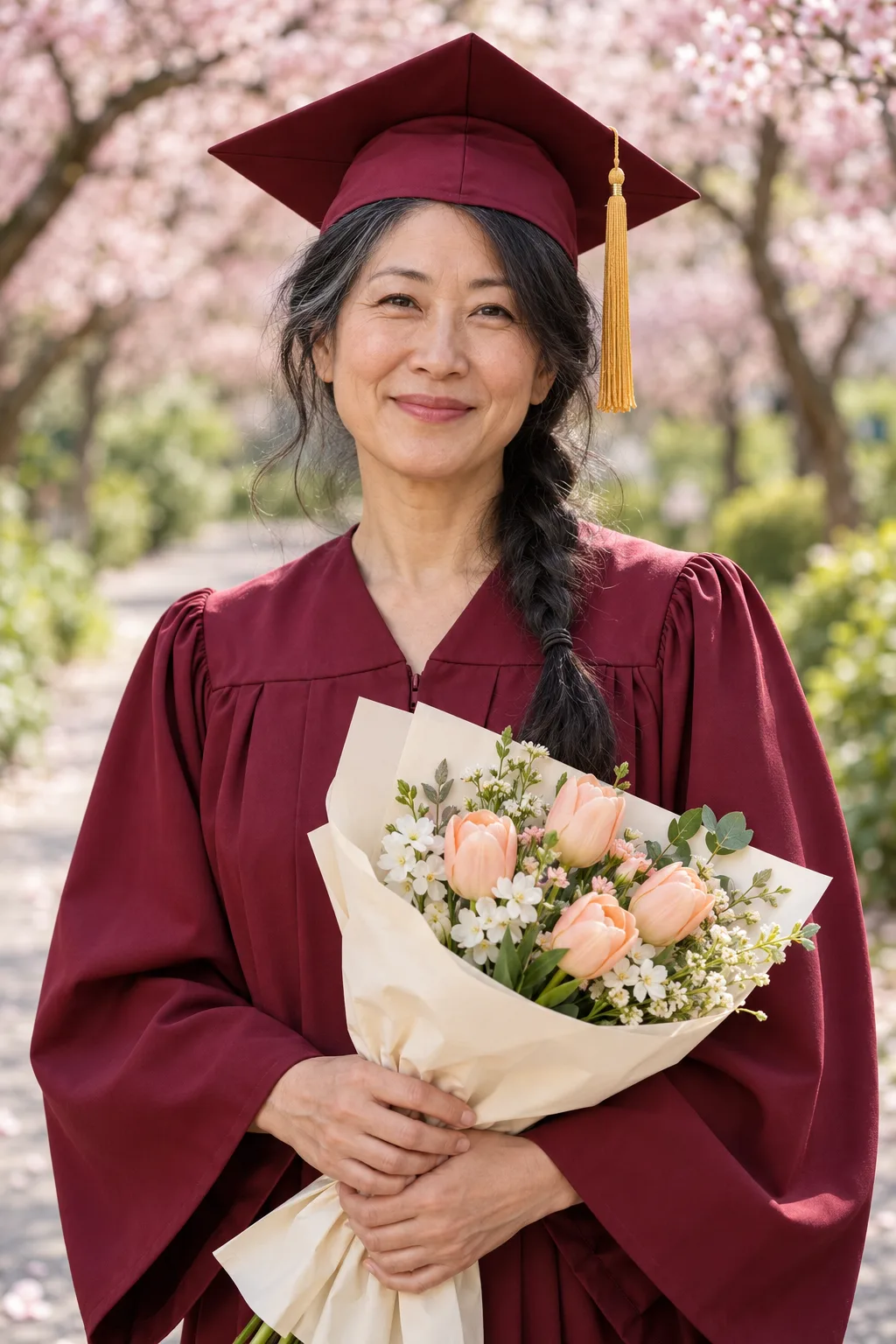
Fill in the fields
- 1Fill in the fields
- 2Copy the prompt
- 3Paste it into a GPT chat
- 4Send it as is and you get an image like the thumbnail example
- 5Attach Your photo with the prompt and your photo is used in the result Optional
Full prompt 4,047 characters
Generate this image now. Return exactly ONE finished edge-to-edge photorealistic graduation profile photograph, not a comparison or collage. No explanation or questions. Canvas ratio Output exactly one finished 2:3 portrait image, 1024x1536 pixels. Leave the top 12% and bottom 15% free of essential text.; default 2:3 if empty. Waist-up eye-level composition with the complete mortarboard inside the frame, modest headroom, prominent face and background extending to all edges.

PHOTO RULE: Photo setting "【Your photo】"; empty means Use attached photo. If Use attached photo and one photo is attached, use it as the sole identity reference. If no photo is attached, never stop or ask for one: invent a unique fictional adult named Haru who does not resemble a celebrity or identifiable real person. If Fictional Haru is selected, invent that fictional adult even if a photo is attached. This card is for a solo portrait; with a group reference use only the largest, clearest foreground adult, never blend faces or add another person.

Identity overrides all styling. Preserve exact facial proportions, eyes, eyebrows, eyelids, nose, lips, jaw, ears, skin tone, apparent age, moles, freckles, wrinkles, facial hair and natural asymmetry. Preserve the original gaze, expression, head angle, hairline, hairstyle, hair length, color, texture and glasses shape. No face replacement, beauty filter, reshaping, whitening, de-aging, new makeup, hair straightening or glasses removal. Change only clothing, background, coherent soft light, and add the cap and optional bouquet. The cap may cover only the crown of the hair; keep visible fringe, side hair and hair length unchanged. Unclear facial details remain unobtrusive rather than invented.

Gown color "【Gown color】"; empty means Navy. Navy = navy; Black = black; Burgundy = burgundy; Deep green = deep forest green. Use a plain woven graduation gown and a matching square mortarboard with a restrained gold tassel beside the head, never across eyes, glasses or face. No school name, real school crest, seal, logo, branded embroidery or diploma. All clothing and props are generic fictional designs, never imitate an identifiable institution or branded product.

Background "【Background】"; empty means Campus lawn. Use exactly one scene:
- Campus lawn: softly blurred green lawn and anonymous campus-like architecture in gentle spring daylight, no identifiable institution or signs.
- Plain studio: seamless muted warm gray studio backdrop and soft diffused portrait light, no furniture or props.
- Cherry blossom path: anonymous spring cherry blossom path with pale pink flowers and greenery softly blurred, no signs or recognizable location.
- Library: generic library with softly blurred shelves, warm window light, no readable titles, labels or logos.
Keep every scene photographic, softly out of focus and subordinate to the person's face. Do not depict a specific school's campus.

Bouquet setting "【Bouquet】"; empty means Yes. Yes = one modest bouquet of seasonal flowers in plain unprinted paper, held below the chest without hiding the face or glasses; make the hands and fingers anatomically coherent. No = no flowers, bouquet, wrapping or floral props anywhere; hands rest naturally below chest. Do not duplicate hands or invent extra fingers.

Natural skin texture, crisp eyes, authentic textile folds, realistic glasses and coherent soft light; no plastic skin or excessive glow. No text at all, including Haru, school names, dates, congratulations, labels or verification notes. No logo, watermark, border, paper mockup, duplicate subject or extra limbs. Finish the single photograph directly; no code, cropping or post-processing required. This is a creative portrait, not evidence of attendance or an official graduation record.

[Final output format]
Output exactly one finished 2:3 portrait image, 1024x1536 pixels. Leave the top 12% and bottom 15% free of essential text.
This selected output format takes priority over any fixed canvas size or aspect ratio elsewhere in this template. Adapt the composition, text zones and margins to the selected canvas without stretching or cropping essential content. Device safe areas apply only when a device is selected. Never print these format instructions on the image.
How did it turn out?
You may also like
- 393Lunar New Year money envelope — one printable unfolded minhwa template
- 384If I Launched as a Game Character
- 383Pet guardian partner — you and your pet in a gold-lettered wallpaper
- 382Moonlit Water Orb Ritual
- 376Child's drawing to a 3D character — keep every wonky detail
- 373Christmas Profile from Your Photo

How to use it · FAQ
A graduation portrait that still looks like you
Use this card if you missed your graduation photos, want to revisit an older portrait, or are preparing a profile for graduation season. It requests one realistic photograph with a cap and gown while preserving the face, hair and glasses in your everyday photo. It does not add school names, real school crests or logos, and is not proof of graduation.
Choose the four fields
There are three required fields: Gown color, Background and Bouquet. Your photo is optional. Choose Use attached photo and send a clear original photograph together with the completed prompt to an image AI that accepts attachments. Typing a filename or path into the field does not attach the image. A solo photograph with clearly visible eyes, normal hair and glasses is best. A group reference uses the largest, clearest foreground adult; use a solo photo to avoid choosing the wrong person.
An empty Your photo field means Use attached photo. Without an attachment, the prompt creates a fictional adult called Haru. Fictional Haru creates a fictional adult even when a photo is attached. Choose Navy, Black, Burgundy or Deep green for the gown; an empty field means Navy. The matching cap has a gold tassel beside the head. The prompt does not retrieve an actual school's colors or insignia.
Choose Campus lawn, Plain studio, Cherry blossom path or Library for the background; empty means Campus lawn. Studio uses a muted warm gray backdrop, the blossom path uses soft pink flowers and greenery, and the library uses blurred shelves and window light. The blossom path is a spring creative setting, regardless of the actual date. Bouquet Yes adds flowers below the chest; No removes flowers and wrapping entirely. Empty means Yes. Choose the canvas ratio in the shared controls; 2:3 leaves room for the complete cap and hands.
What the examples show
The separate cover shows a fictional adult with long wavy hair, a navy gown, campus lawn and a bouquet. Example 1 pairs fictional Haru's curly-haired, glasses-wearing casual portrait with a black gown, plain studio and no bouquet. Example 2 shows a different fictional adult in a burgundy gown on a cherry blossom path with flowers. The result inside the comparison is not repeated as another gallery image. Names appear only in this guide, never on the photographs. The generated photographs are unretouched; only the comparison joins two images.
Check before saving
Compare eyes, nose, lips, jaw, moles and glasses with the original. The cap covers the crown naturally, but should not change the fringe, side hair or hair length. If the face changes, attach the original again and request that the face, visible hair and glasses remain unchanged while only the cap, gown and background change. If fingers overlap or flowers hide the face, regenerate with the bouquet below the chest.
- Will it remove glasses or make me younger? The prompt preserves glasses, apparent age and natural skin details.
- Can it add my school's crest? This card excludes school names, real crests and logos.
- Which photos may I use? Use your own photo or a photo whose subject has agreed to its use and publication. Check the external service's terms separately.