

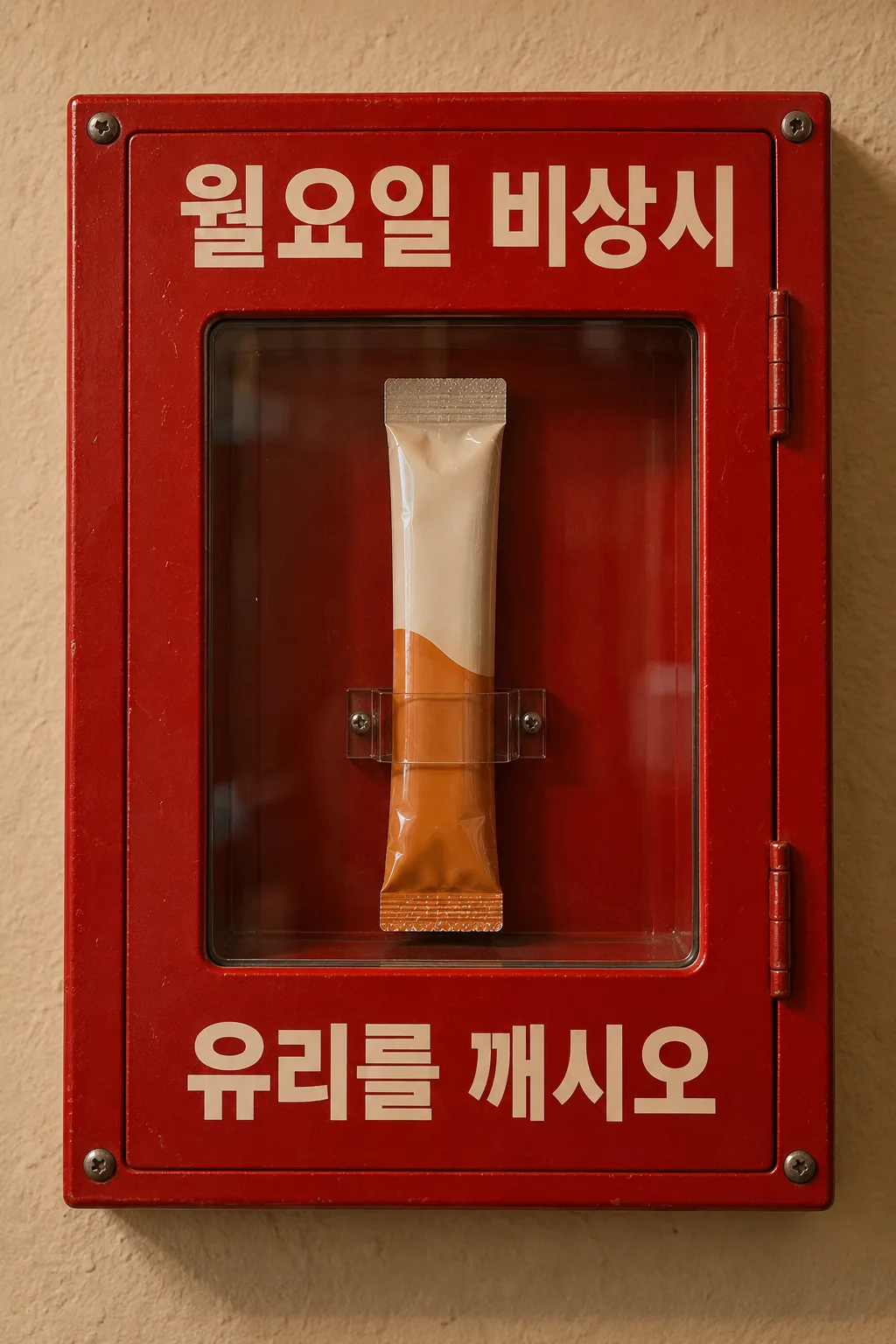
311비상시 유리를 깨시오 밈 — 빨간 비상 상자 속 나만의 구원템 사진
빨간 비상함에 구원템을 넣고, 구원 완료를 누르면 유리문이 받침으로 내려와 물건과 사용 후 쪽지를 보여 주는 밈 사진이에요.
받는 것
- 비상 상황과 구원템을 짝지은 빨간 비상함 사진
- 대기 중에는 닫힌 유리 안, 구원 완료에는 내려온 유리문 위 물건
- 빈 상자 안에 나타나는 사용 후 쪽지
ChatGPT 무료 OK
칸 채우기
- 1칸을 채워요
- 2복사 버튼을 눌러요
- 3GPT 채팅창에 붙여넣어요
- 4그대로 보내면 썸네일 예시처럼 나와요
- 5카드에 맞는 실제 사진을 같이 넣으면 그 사진이 반영돼요 — 배경 카드는 배경 사진, 인물 · 음식 카드는 그 사진 선택
프롬프트 원문 보기 3,425자
Make a photorealistic red emergency-cabinet meme, one physical wall-mounted cabinet in a single photograph. Deliver the image, not instructions. Output size 1080x1350 pixels, 4:5 portrait, Instagram standard.
Default canvas is portrait 4:5.

EMERGENCY HEADER: "【위 라벨】"
RESCUE ITEM: 【구원템 생김새】
LOWER INSCRIPTION: "【아래 글자】"
AFTER-USE NOTE: "【사용 후 쪽지】"
RESCUE MOMENT: 【구원 시점】

The joke is a personal rescue item taking the place of emergency equipment. The physical mechanism is a bottom-hinged glass front that becomes a serving shelf after rescue. A serious red enamel cabinet and an ordinary comforting item must feel amusingly mismatched. Never turn this into a graphic poster or a toy box.

Construct a deep rectangular red steel wall cabinet with a fixed solid red header and fixed solid red footer surrounding a glazed central door. The door has a red metal perimeter and a horizontal hinge at its bottom. An interior shelf holds the rescue item when closed. Warm beige plaster wall, softly directional daylight, believable screws, metal thickness and wall shadows. View from slightly above and to one side, far enough away to include the entire door even when lowered. Real food and glass textures, restrained reflections, no illustration or plastic CGI appearance.

Only the selected RESCUE MOMENT determines the construction:
- 대기 중: the glazed door is UPRIGHT and CLOSED across the cabinet opening. The rescue item sits on the interior shelf, visibly behind this intact vertical glass. There is no projecting tray and no paper note anywhere. Keep the item recognizable through the glass.
- 구원 완료: the entire glazed door is folded DOWN into a HORIZONTAL shelf projecting from the cabinet's lower hinge. Two short side support chains hold this shelf level. The rescue item now rests OUTSIDE the empty cabinet on this lowered glass door. There is no second item inside. In the vacated interior, a small cream paper note is clipped to the back wall with AFTER-USE NOTE printed on it. Show both the empty cavity and the projecting shelf in the same photograph. No vertical glass covers the cavity. The glass remains intact; this is an opened cabinet, not shattered glass.
If the moment is missing, use 대기 중.

RESCUE ITEM is a shape/material description, not printed text. Depict a single coherent serving or unit from that description, without branded packaging. If missing, use an unmarked iced coffee in a clear cup. The header and lower inscription stay attached to the fixed red body in both states; they never rotate onto the shelf. Print EMERGENCY HEADER once in large cream block letters at the top and LOWER INSCRIPTION once on the fixed footer. Render supplied wording exactly, with generous margins. Empty header means no header lettering; empty lower inscription means "BREAK GLASS". Only the open state prints AFTER-USE NOTE, and an empty note means blank paper. Never print the state names, object description or field keys. No invented captions, logos, trademarks, people, hands, safety certification marks or watermarks. This is one continuous staged meme photograph, never before-and-after panels.

[Final output format]
Output size 1080x1350 pixels, 4:5 portrait, Instagram standard.
This selected output format takes priority over any fixed canvas size or aspect ratio elsewhere in this template. Adapt the composition, text zones and margins to the selected canvas without stretching or cropping essential content. Device safe areas apply only when a device is selected. Never print these format instructions on the image.
결과 어땠어요?
같은 분류의 다른 카드
쓰는 법 · 자주 묻는 것
커피가 유리 밖으로 나오자 쪽지가 보였어요
「마감 직전 비상시」와 아이스커피를 넣고 두 번 만들었어요. 두 장 모두 컵이 닫힌 유리 안에 놓였고, 위에는 「마감 직전 비상시」, 아래에는 「유리를 깨시오」가 찍혔어요. 「사용 후 쪽지」도 입력했지만 대기 중에는 종이가 나오지 않았어요.
「구원 시점」만 「구원 완료」로 바꾸자 유리문이 앞으로 내려와 받침이 됐어요. 양옆 사슬이 문을 받치고, 컵은 그 위로 나왔어요. 컵이 있던 내부에는 「덕분에 살았다」 쪽지가 붙었어요. 색을 바꾼 사진이 아니라, 비상함을 이미 사용한 뒤의 농담으로 바뀐 거예요.
깨진 유리 대신 내려오는 문
아래에 「유리를 깨시오」라고 적어도 완료 사진에서는 유리가 깨지지 않아요. 이 카드의 장치는 유리를 부수는 순간이 아니라, 유리문을 내려 물건을 꺼내 놓은 뒤예요. 파편이나 손동작을 그리려는 용도와는 맞지 않아요. 대기 중에는 쪽지가 숨겨지고 완료 뒤에만 나타나니, 쪽지에는 「이제 퇴근하자」처럼 구원템을 꺼낸 뒤 할 말을 넣으면 돼요.
위 라벨은 상황, 구원템은 눈에 보이는 모양으로
‘위 라벨’에는 「마감 직전 비상시」처럼 언제 이 상자를 여는지를 써요. 보기로는 회의 직전 비상시, 월요일 비상시가 있어요. ‘구원템 생김새’는 이름보다 모양을 적어야 해요. 투명 컵에 담긴 아이스커피라고 쓰고, 컵에 글자가 찍히지 않도록 ‘무지 갈색 종이띠’처럼 포장 상태도 함께 말해요. 무지 접시 위 둥근 버터빵이나 파란 포장지의 작은 초콜릿처럼, 한눈에 알아볼 물건 하나가 좋아요. 이번 시험도 물건 하나로 했어요. ‘아래 글자’는 선택 칸이고 비워도 돼요. 적을 때는 「급할 때만 여시오」나 「마지막 한 모금」처럼 짧게 써요.
가게라면 대표 메뉴를 구원템으로
이 카드는 스레드나 인스타에 공감 밈으로 올리기 좋아요. 가게를 운영한다면 구원템 칸에 대표 메뉴를 넣어서, 상자 안의 메뉴가 곧 가게 홍보가 되게 할 수 있어요. 다만 이번 시험은 커피로만 해 봤어요. 다른 물건에서 사슬과 유리문이 어떻게 나오는지는 직접 확인하세요. 라벨의 글자는 그림에 그대로 찍히니 올리기 전에 한 번 더 읽으세요.
같은 커피여도 같은 상자는 아니었어요
두 기본 사진은 나사와 잠금장치 모양, 유리 반사에 차이가 있었고, 완료 사진은 상자를 보는 방향도 바뀌었어요. 단추는 인출 구조를 바꾸지만 상자 하나를 똑같이 복제하지는 않아요. 이번 시험은 커피와 짧은 한국어 문구로 했어요. 다른 물건이나 긴 문구, 영어·일본어 글자의 생성 정확도는 시험하지 않았어요.
쪽지가 필요 없는 장면이라면 ‘사용 후 쪽지’ 칸을 비우고 대기 중으로 만들어도 돼요. 닫힌 유리 안의 물건만으로도 상자가 완성되어서, 구원 전 사진과 구원 후 사진을 한 쌍으로 올리면 이야기가 이어져요.
마지막 확인일 · 공개