

559내 얼굴 기념 주화
내 얼굴을 금속 부조로 새기고 둘레에 원하는 글자를 두른 가상 기념 주화를 만들어요.
받는 것
- 내 얼굴 특징을 살린 금속 부조 이미지 한 장
- 입력한 글자 그대로 새긴 둥근 테두리
- 금, 은, 동 중 고른 가상 기념 주화
ChatGPT 무료 OK
칸 채우기
- 1칸을 채워요
- 2복사 버튼을 눌러요
- 3GPT 채팅창에 붙여넣어요
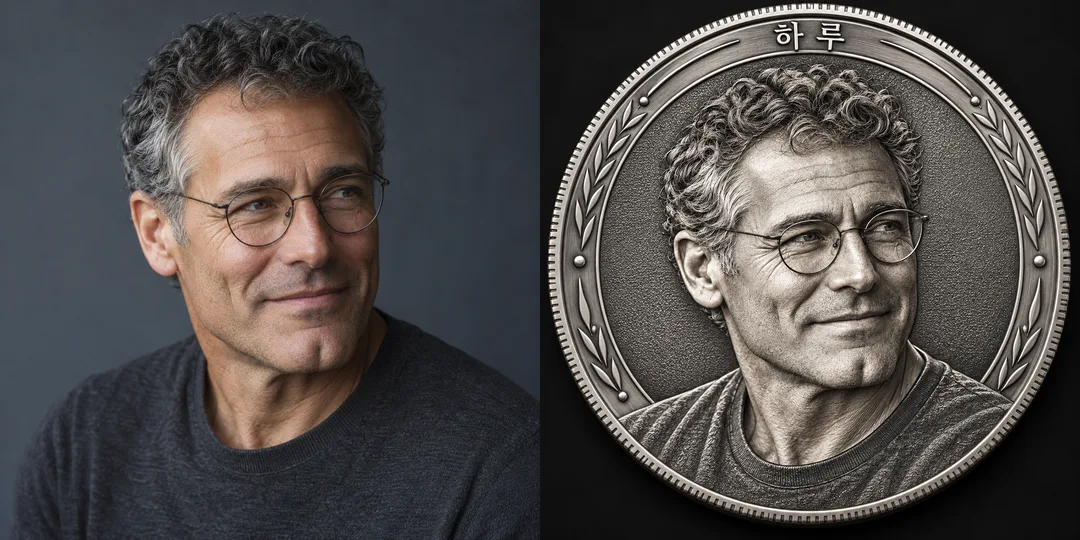
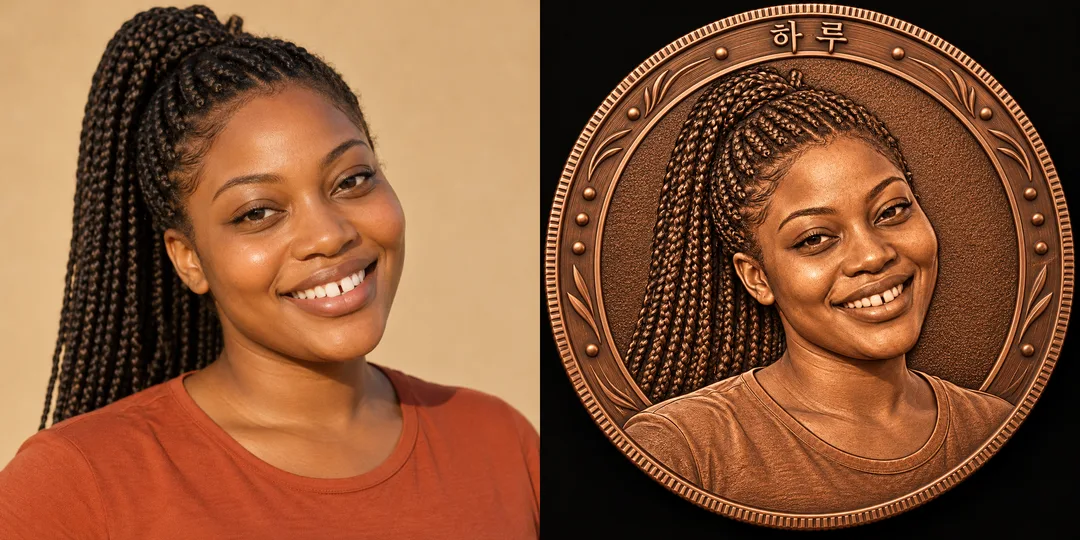
- 4그대로 보내면 썸네일 예시처럼 나와요
- 5얼굴이 선명한 한 사람 사진 (선택)을 같이 넣으면 그 사진이 반영돼요 선택
직접 해 봤어요
- 시험일
- 2026-10-29
- 도구
- ChatGPT 이미지 모델(코덱스에서 실행) — 무료 ChatGPT와 같은 모델, 한도만 다름
- 결과
- 통과
- 지켜진 것
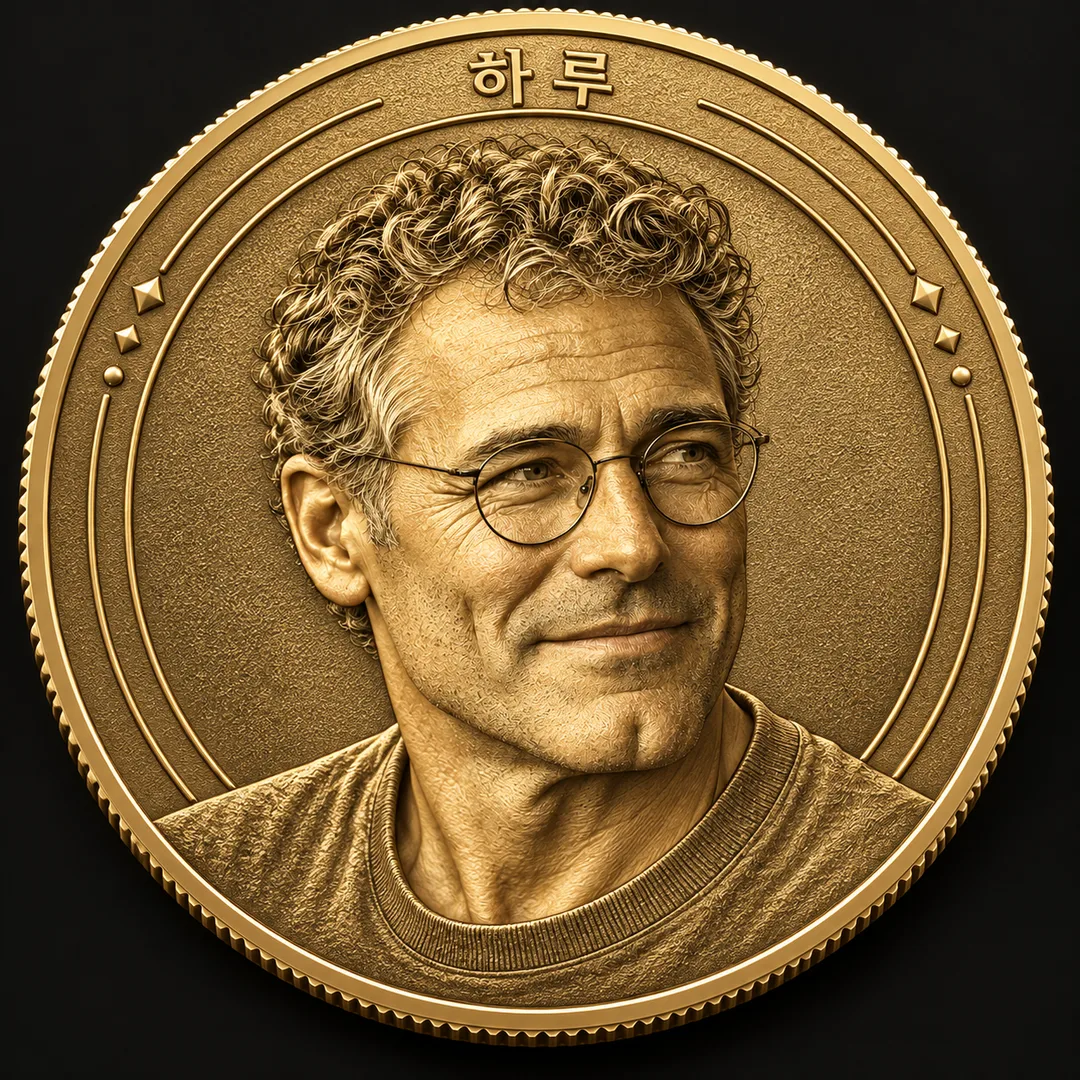
- 둘레 위쪽에 「하루」가 한 번만 정확히 새겨졌습니다. 원본의 짧은 곱슬머리, 둥근 안경, 눈 간격, 코와 턱 형태, 다문 입의 미소와 비스듬한 얼굴 방향이 이어집니다. 얼굴·머리·안경·옷이 모두 금색 부조이며 피부색 사진이 남지 않았습니다. 정사각형 한 장에 원형 주화, 잔톱니 테두리와 어두운 배경이 있고 별도 날짜·액면가·추가 문구는 없습니다.
- 안 된 것
- 없음
- 이렇게 하면 나아요
- 이번 입력은 수정 없이 통과했습니다. 원본_1.png와 「짧은 곱슬머리, 둥근 안경의 성인 / 하루 / 금 / 1:1」 조합을 그대로 사용했습니다. 다른 사진·긴 문구·은·동은 이번에 시험하지 않았습니다.
프롬프트 원문 보기 3,384자
Generate this image now. Return one finished image, without explanation.
Output size 1080x1080 pixels, 1:1 square card. Keep the same top-to-bottom order but compress the zones to fit the square: the illustration becomes smaller and every text line stays fully readable.
Create one original fictional commemorative portrait medallion, viewed almost straight on, with a clearly circular silhouette and a finely ridged edge. Default canvas is square. The coin fills about 92% of the canvas width; on a portrait canvas enlarge it to the full width rather than placing a small object on a card. A dark continuous background fills every edge. No package, stand, collage or mockup.
Use a single coherent engraved bas-relief illustration language: anatomically convincing portrait volumes, exceptionally crisp shallow metal carving, directional raking light, recessed stippled fields, fine concentric borders and sparse original abstract ornamental ticks. All face, hair and clothing forms are sculpted in the SAME metal, never a color photograph pasted onto metal. Balance intricate engraving with a calm readable portrait.
PHOTO RULE: if a photo is attached, preserve the person's face shape, eye spacing, nose, lips, age, hairline, hairstyle, glasses and distinctive features. Keep the original viewing angle when needed for likeness; do not replace the person with a generic face. Translate the visible head and upper shoulders into metal relief. If no photo is attached, invent one original fictional adult, without a recognizable real-person or celebrity likeness, and complete the same quality image without asking questions. The photo note below is only context, never printed.
Photo context: "【사진】"
RIM TEXT: "【둘레 글자】"
METAL: "【금속】"
Interpret 금 as warm satin gold with polished raised edges; 은 as cool silver with charcoal oxidized recesses; 동 as warm copper with deep brown recesses. The auto-choice label is "알아서 골라줘".
If metal is empty use gold. Metal changes only the material, not the output type or engraving style.
Set the rim text once, clockwise along the upper and side outer annulus, with upright, legible glyphs and consistent spacing. Keep text clear of the portrait. Reproduce the supplied string exactly, character by character, including case, punctuation, digits and spaces; do not translate, correct, paraphrase, add dates, repeat text, or substitute symbols. For longer strings widen the inscription band and reduce the portrait slightly; never drop characters or shrink text into illegibility. If rim text is absent or empty, leave the annulus unlettered. If it is the auto-choice label, use only "하루". Never print the auto-choice label itself. Before finishing, inspect the inscription at high magnification and compare every character to the supplied string, especially similar glyphs and digits.
This is a fictional decorative medallion design, not legal tender. Invent an original border. No denomination, currency symbol, state seal, official portrait, mint mark, existing coin design, logos, trademarks, signature, watermark, famous character, named artist style or extra text. Do not print any instruction or verification note. Deliver one image only; no before-and-after layout.

[Final output format]
Output size 1080x1080 pixels, 1:1 square card. Keep the same top-to-bottom order but compress the zones to fit the square: the illustration becomes smaller and every text line stays fully readable.
This selected output format takes priority over any fixed canvas size or aspect ratio elsewhere in this template. Adapt the composition, text zones and margins to the selected canvas without stretching or cropping essential content. Device safe areas apply only when a device is selected. Never print these format instructions on the image.
결과 어땠어요?
이 카드도 많이 사용해요

쓰는 법 · 자주 묻는 것
내 얼굴을 입체 금속 부조로 새긴 가상의 기념 주화 그림을 만듭니다. 생일에 나를 기념하는 게시물, 친구에게 보내는 축하 이미지, 프로필용 작은 기념품 그림에 어울려요. 실제 주화 제작이나 결제용 화폐가 아니라 디지털 장식 디자인입니다.
칸과 사진 사용법
사진, 둘레 글자, 금속 순서로 채웁니다. 사진 칸에는 얼굴 특징을 짧게 적고, 사용할 사진 파일은 그림 AI의 입력창에 직접 첨부하세요. 얼굴과 머리 모양이 잘 보이는 한 사람 사진이 좋습니다. 사진과 복사한 프롬프트를 같은 메시지로 한 번 보내면 결과 한 장을 받습니다. 사진이 없으면 누구와도 닮지 않은 가상 성인 초상을 만들어요. 다른 사람 사진은 사용과 공개에 동의받은 것만 쓰세요.
둘레 글자는 주화 바깥 고리를 따라 그대로 새길 문장입니다. 기본 예시는 「하루」이며, 이름만 넣거나 「하루 2026」처럼 숫자를 함께 쓸 수 있어요. 문구는 짧을수록 크게 읽힙니다. 「알아서 골라줘」를 고르면 「하루」가 나오고, 비우면 글자 없는 테두리가 됩니다. 금속은 금, 은, 동 중 하나이며, 비우면 금입니다. 사진은 선택이고 둘레 글자와 금속이 꼭 칸이므로 필수 칸은 2개입니다. 공통 크기 선택의 기본은 1:1입니다.
결과 확인과 고치는 법
눈 사이 간격, 코, 턱선, 헤어라인과 안경이 원본과 이어지는지 먼저 보세요. 얼굴도 머리카락도 같은 금속으로 조각되어야 하며 사진이 붙어 있으면 안 됩니다. 테두리를 확대해 「하」「루」를 따로 읽고, 입력한 숫자와 띄어쓰기까지 한 글자씩 대조하세요. 빠진 글자가 있으면 둘레 글자를 더 짧게 고쳐 다시 요청하세요. 표지는 독립된 금색 결과이고 카드 안 비교 예시는 은색의 차분한 인물과 동색의 활기찬 인물입니다. 각 비교는 왼쪽이 원본, 오른쪽이 결과입니다.
자주 묻는 질문
얼굴이 낯설게 나오나요? 필터가 강한 사진보다 눈과 코가 선명한 사진을 사용하세요. 은을 골랐는데 피부색이 남았나요? 선택한 금속 하나로 얼굴까지 부조 처리하도록 다시 요청하세요. 실물 주문 파일인가요? 아닙니다. 치수나 제조 공차를 지정한 제작 도면이 아닌 감상용 이미지입니다. 외부 서비스의 요금과 이용 조건은 해당 서비스에서 확인하세요.