

496내 사진 모자이크 초상 — 유리와 금 조각으로 빛나는 얼굴
내 얼굴의 특징은 남기고 표정만 살짝 과장한 비잔틴 금빛 모자이크 초상을 만들어요.
받는 것
- 작은 유리와 금 조각으로 만든 초상 한 장
- 얼굴 특징과 원래 표정을 살린 모자이크
- 선택한 배경 색, 글자 없는 완성 그림
ChatGPT 무료 OK
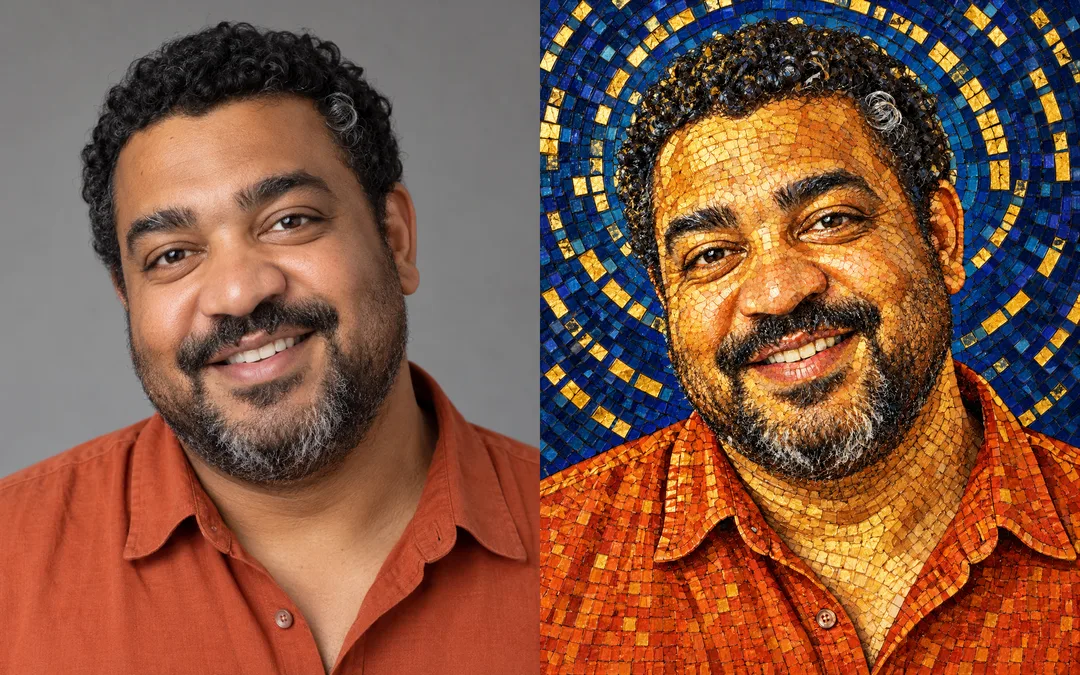
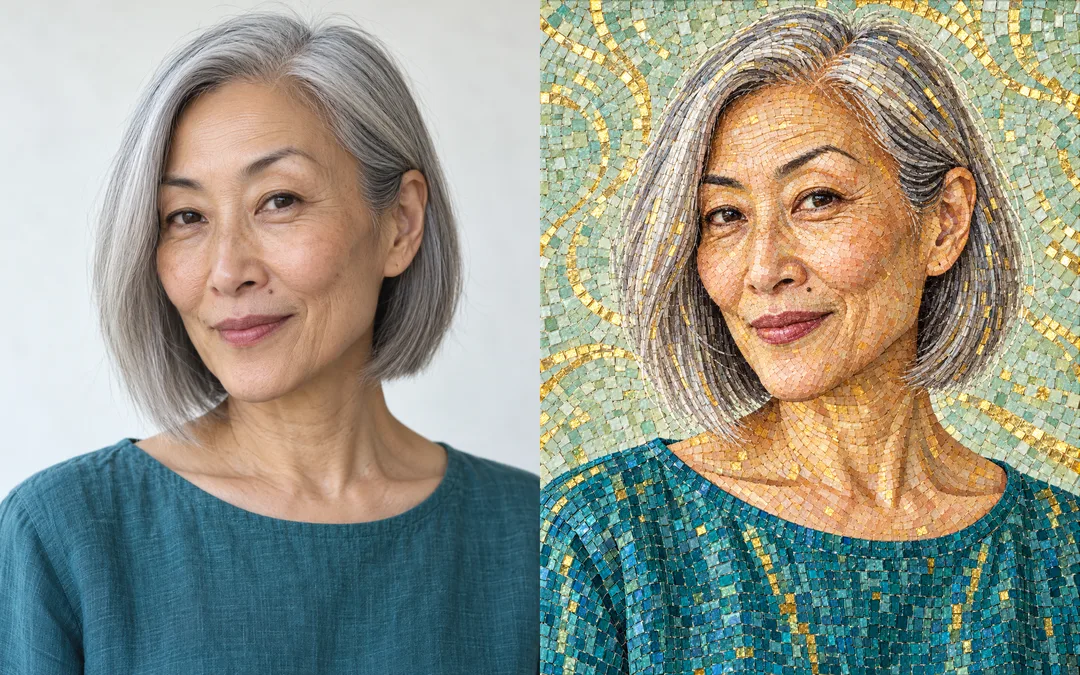
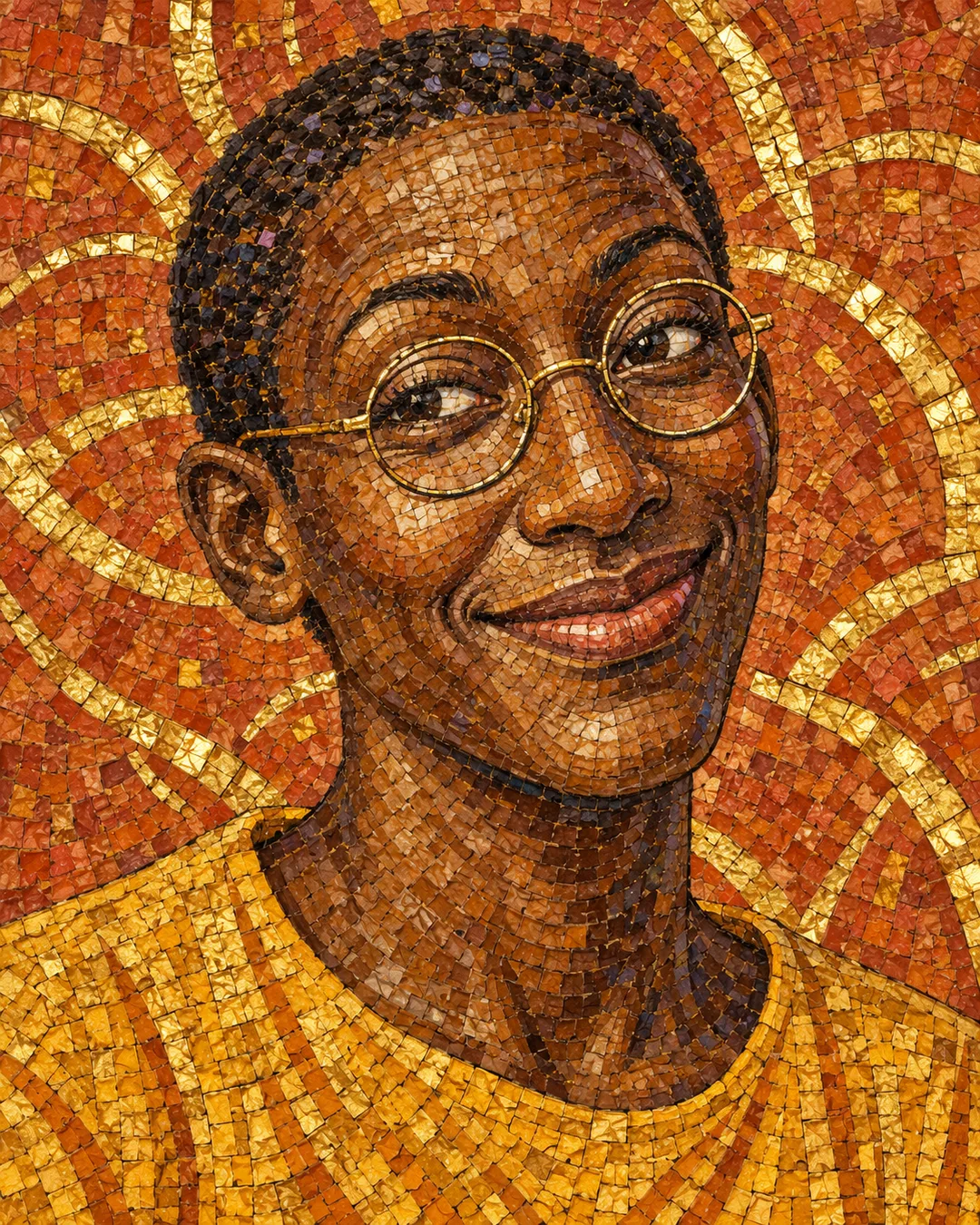
칸 채우기
- 1칸을 채워요
- 2복사 버튼을 눌러요
- 3GPT 채팅창에 붙여넣어요
- 4그대로 보내면 썸네일 예시처럼 나와요
- 5내 사진 한 장 (선택)을 같이 넣으면 그 사진이 반영돼요 선택
프롬프트 원문 보기 2,453자
Generate this image now. Draw it directly; do not explain or ask questions.
Output size 1080x1350 pixels, 4:5 portrait, Instagram standard.
Create ONE full-bleed Byzantine gold-and-glass mosaic caricature portrait. Default aspect ratio: 4:5. No comparison panels or mockup.
PHOTO: 【사진】
Use the attached photo as the identity reference. Preserve facial silhouette, eye spacing, nose, mouth, distinctive marks, age, skin tone, hairstyle, facial hair, clothing and head angle. Slightly amplify the existing expression only; keep the person immediately recognizable. If several people appear, portray only the most prominent foreground person. Remove visible branding from clothing.
If no photo is attached, do not ask for one: invent a unique ordinary adult with no intended resemblance to a public figure, and finish the same quality portrait. The photo field is a note; actual identity comes from the attachment, not a name.
BACKGROUND COLOR: 【배경 색】
Use the selected color for the background glass; retain warm gold-leaf highlights in every palette. If color is empty, use deep plum. Adapt lighting and background tile flow to the person's expression: dark colors give dramatic jewel-like depth; pale colors give soft diffuse light and quieter gold shimmer. Keep the same Byzantine mosaic medium throughout.
Build the ENTIRE face, hair, clothing and background from dense tiny irregular hand-cut colored glass and gold-leaf tesserae. Thin visible dark grout; directional tile flow follows facial planes, eyelids and hair. Use smaller pieces at eyes, nostrils and lips to retain identity. Varied tile size and angle, tactile cut edges, restrained raking reflections; no smooth photographic skin, giant polygon facets or repeated tile stamps. Tight head-and-shoulders portrait fills the canvas. Preserve head silhouette and leave the face unobstructed.
No text, letters, numbers, labels, names, signatures, logos, watermarks, existing characters, recognizable celebrities, religious figures or copied artwork. Do not print field values. Output only one finished image.

배경 색 보기: 짙은 자주색 / 미드나이트 블루 / 옅은 청자색 / 알아서 골라줘. 알아서 골라줘는 옷과 표정에 어울리는 색을 선택한다.

[Final output format]
Output size 1080x1350 pixels, 4:5 portrait, Instagram standard.
This selected output format takes priority over any fixed canvas size or aspect ratio elsewhere in this template. Adapt the composition, text zones and margins to the selected canvas without stretching or cropping essential content. Device safe areas apply only when a device is selected. Never print these format instructions on the image.
결과 어땠어요?
이 카드도 많이 사용해요
쓰는 법 · 자주 묻는 것
작은 조각으로 남기는 내 표정
프로필이나 기념 선물에 쓸 얼굴 그림을 만들 때 쓰세요. 얼굴 위에 금색 필터만 덮는 대신, 눈가와 입술까지 작은 유리 조각으로 다시 구성하는 비잔틴 모자이크 초상이에요. 코의 모양과 눈 사이 거리, 머리 윤곽은 남기고 원래 웃음이나 눈썹의 움직임만 살짝 강조해요. 배경까지 조각으로 가득 채워 액자나 종이 목업 없이 완성 그림 한 장을 받아요.
사진과 배경 색 넣는 법
사진 칸에는 「하루의 초상 사진」처럼 첨부할 사진을 구별하는 메모를 적으세요. 칸에 적는 이름이 얼굴을 불러오는 것은 아니에요. 복사한 프롬프트를 그림 AI에 붙여 넣을 때 얼굴이 선명한 사진 한 장을 함께 첨부하세요. 사진 칸과 첨부를 모두 비우면 특정인을 본뜨지 않은 가상 성인 초상이 나와요. 여러 사람이 찍혔다면 앞쪽에서 가장 크게 보이는 한 사람을 사용해요.
배경 색은 짙은 자주색, 미드나이트 블루, 옅은 청자색 중에서 고르거나 원하는 색을 적을 수 있어요. 「알아서 골라줘」는 사진의 옷과 표정에 맞춰 정해요. 비우면 짙은 자주색이 적용돼요. 어두운 배경은 보석 같은 대비를, 옅은 배경은 부드러운 금빛을 보여 줘요. 배경 색을 바꿔도 금 조각과 유리 모자이크라는 결과는 같아요.
예시와 확인할 곳
표지는 사진 없이 만든 별도 가상 초상이에요. 첫 비교판은 하루라는 가상 남성의 웃는 사진과 파란 배경 결과, 둘째는 하루라는 가상 여성의 은빛 단발 사진과 옅은 청자색 결과예요. 각 비교판은 왼쪽 원본, 오른쪽 결과이며, 실제 고객 사진을 사용하지 않았어요. 결과를 따로 중복 전시하지 않아요.
셋째 예시는 사진 없이 만든 별도 가상 초상으로, 둥근 안경과 황토빛 배경을 보여 줘요. 배경 색에 원하는 색을 직접 적으면 이렇게 다른 색감도 만들 수 있어요.
눈 사이 거리, 코끝, 수염이나 점, 머리 윤곽부터 원본과 비교하세요. 얼굴이 달라졌다면 「표정 과장을 줄이고 원본의 눈·코·입 비율을 더 정확히 유지해 줘」라고 수정하세요. 피부가 매끈한 사진으로 남으면 「얼굴 전체를 작은 유리 조각과 가는 줄눈으로 구성해 줘」라고 요청하세요. 글자를 출력하지 않는 카드이므로, 뜻하지 않은 글자나 서명이 생기지 않았는지도 확인하세요. 본인 사진이나 사용 허락을 받은 사진을 사용하고, 미성년자 사진은 보호자의 동의를 먼저 확인하세요. 외부 서비스의 요금과 이용 조건은 해당 서비스에서 확인하세요.