
전체 · 만화/일러스트 · 인물
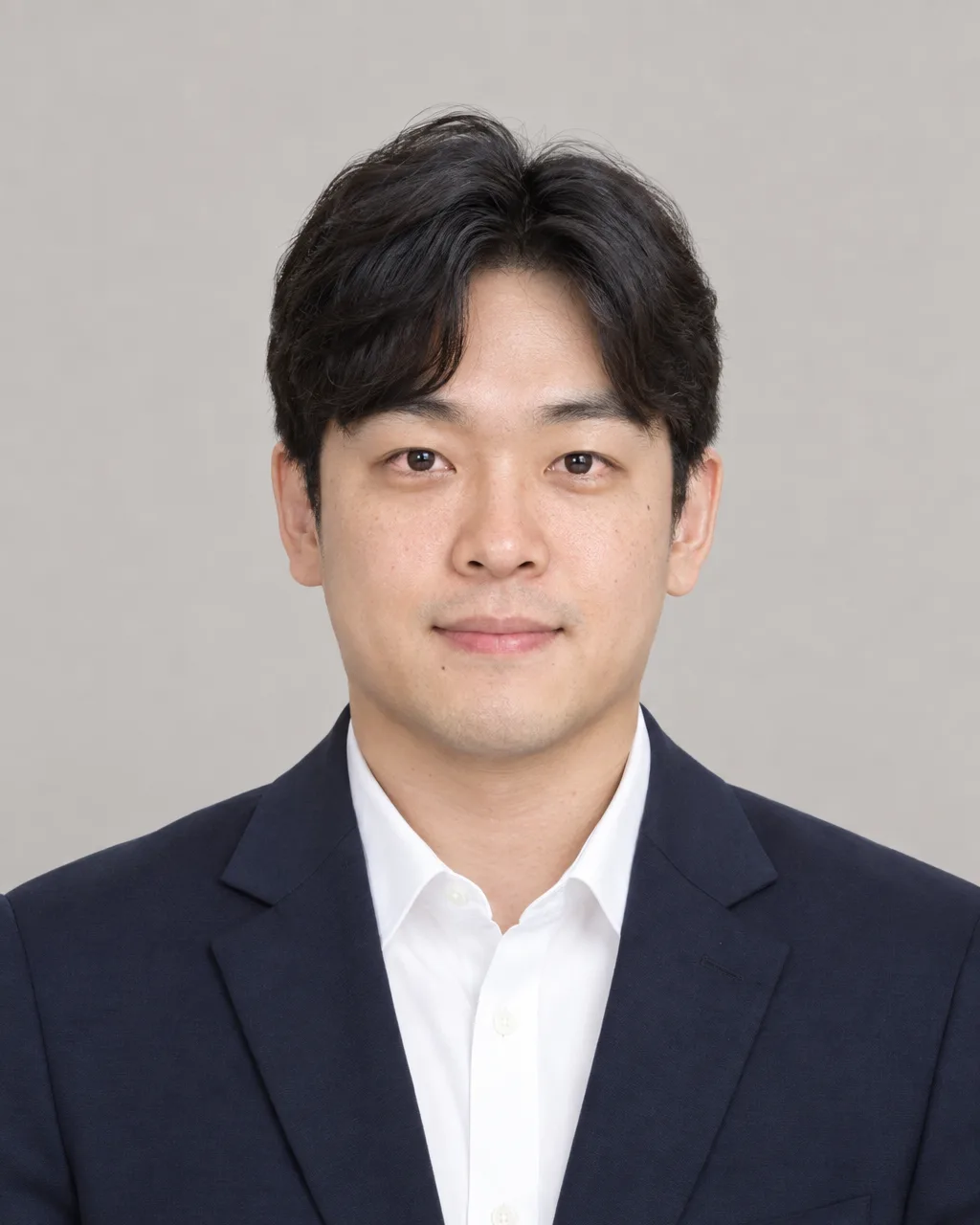
012내 사진으로 만드는 증명 사진
내 사진 한 장과 복장 · 배경색 · 분위기를 고르면 얼굴은 바꾸지 않고 같은 사람으로 보이는 증명 사진을 만들어요.
칸 채우기
- 1칸을 채워요
- 2복사 버튼을 눌러요
- 3GPT 채팅창에 내 사진을 올리고, 프롬프트를 같이 붙여넣어요
- 4내 사진과 프롬프트가 둘 다 들어간 걸 보고 보내요
프롬프트 원문 보기 5,895자
Generate this image now. Draw it directly - do not describe it, explain it, or ask questions.
Output size 2480x3508 pixels, A4 portrait, 300dpi, print-ready poster.

[Purpose]
Create a clean Korean-style ID photo (증명사진) for résumés, job applications, and staff or student cards, using the one attached photograph as the sole identity reference. The result must unmistakably depict the exact same person in the uploaded photo. Identity preservation is the highest-priority requirement and overrides beautification, styling, clothing, background, mood, and every other instruction. It is not a passport, government ID, visa, license, or biometric-compliance submission.

[Scene]
Show one person only, framed as a clean head-and-shoulders portrait, facing the camera straight on with level shoulders and natural posture. Use the selected clothing exactly in spirit: "【복장】". Use a plain seamless "【배경색】" background with no room, furniture, scenery, pattern, gradient halo, frame, border, or decorative object. Convey "【분위기】" through a subtle natural expression, relaxed shoulders, attentive eyes, and restrained professional styling. Keep the composition centered, uncluttered, easy to crop, and readable at a small print size. Leave comfortable space above the hair and around both shoulders. Do not crop the chin, hair, ears, or shoulders awkwardly.

[Attached photo]
Use the uploaded photo as the mandatory and only source of the person's identity. Preserve the person's facial identity with maximum fidelity: the same facial proportions, face shape, jawline, chin, cheek structure, forehead, hairline, eyebrow shape and spacing, eye shape and spacing, eyelids, nose shape and width, nostrils, philtrum, lip shape, mouth width, ears, skin tone, age, visible freckles, moles, scars, asymmetry, and other distinctive features. Preserve the natural relationship among all features, not merely a vague resemblance. The output must look like a new photograph of the same real person taken moments later in a professional setting, never like a similar model, relative, idealized version, or face inspired by the reference.

Do not replace, redesign, average, reconstruct, or reinterpret the face. Do not make the eyes larger, the nose narrower, the jaw sharper, the face slimmer, the skin lighter, the person younger, or the features more symmetrical. Do not apply beauty filters, glamour retouching, cosmetic changes, face swapping, or identity blending. Keep the person's ethnicity, apparent age, gender presentation, and recognizable appearance unchanged. If any styling request conflicts with identity fidelity, preserve identity and simplify the styling. Preserve the existing hairstyle, hair color, hair texture, and natural part as closely as possible; only tidy stray hairs minimally. If glasses are present, retain their recognizable shape and placement unless glare makes the eyes unreadable; remove glare without changing the glasses. Do not invent teeth if they are not visible in the reference. Do not change facial hair except for minimal grooming of stray hairs.

[Text layout]
No text. Do not render names, job titles, captions, letters, numbers, logos, badges, watermarks, signatures, UI elements, or marks anywhere in the image.

[Style]
Natural contemporary studio portrait photography with realistic optics and honest skin texture. Professional but not stiff, polished but not artificial. Use a portrait-lens perspective equivalent to approximately 70-100 mm on full frame, with the camera near eye level to avoid facial distortion. Keep both eyes sharply focused. Clothing should look physically plausible, correctly fitted, and free from distracting patterns. The portrait must remain useful after a square or vertical crop. Avoid an editorial fashion look, cinematic character styling, painterly rendering, illustration, anime, 3D graphics, or synthetic stock-photo perfection.

[Visual hierarchy]
First: the exact recognizable face of the attached person. Second: clear eyes and a natural expression matching "【분위기】". Third: the neat silhouette of "【복장】" against the "【배경색】" background. Nothing may compete with the face. The background and clothing must support recognition rather than transform the person.

[Lighting and texture]
Use soft, even studio light from slightly above and in front, with gentle fill and a very light separation from the background. Keep exposure natural across the forehead, cheeks, and chin. Preserve pores, fine lines, natural under-eye texture, and realistic tonal variation while reducing only temporary distractions such as harsh shine or a single stray hair. No plastic skin, waxy smoothing, heavy sharpening, HDR, dramatic rim light, colored light, hard shadow across the face, blown highlights, crushed blacks, glow, lens flare, or vignette. Maintain realistic fabric texture and clean background color.

[Text rules]
There must be no visible text or typographic element. The selected Korean values are instructions only and must never be printed in the portrait.

[Avoid]
any change of identity; a merely similar person; generic model face; face swap artifacts; mixed identity; altered facial proportions; changed eye, nose, mouth, jaw, skin tone, age, ethnicity, gender presentation, hairline, hairstyle, glasses, facial hair, moles, scars, or natural asymmetry; excessive beautification; skin whitening; slimming; de-aging; enlarged eyes; narrow nose; sharpened jaw; heavy makeup; glamour retouching; artificial smile; invented teeth; expression that obscures recognition; side profile; tilted camera; wide-angle distortion; low resolution; blur over the eyes; extra person; duplicate face; cropped chin or hair; hands near the face; busy background; office scenery; props; logos; text; border; watermark; passport template; government emblem; official seal; biometric guides; illustration; cartoon; anime; painting; 3D render; uncanny skin; malformed ears; asymmetrical glasses; mismatched eye direction
이 카드도 많이 사용해요

쓰는 법 · 자주 묻는 것
사진 한 장을 먼저 같이 올려 주세요
내 사진 한 장을 GPT에 같이 올려야 만드는 카드예요. 정면 · 밝은 곳 · 얼굴 하나가 선명하게 나온 사진을 골라 주세요. 여러 사람이 함께 찍힌 사진, 얼굴이 너무 작거나 흔들린 사진, 선글라스나 손으로 얼굴을 가린 사진은 같은 사람의 인상을 지키기 어려워요.
이 카드의 목표는 예쁜 다른 얼굴을 만드는 것이 아니에요. 옷과 배경만 단정하게 바꾸되, 사진 속 얼굴 비율 · 눈매 · 코 · 입 · 턱선 · 피부색 · 나이 · 헤어라인 · 점 같은 특징을 그대로 살려서 누가 봐도 같은 사람으로 보이는 증명 사진을 만드는 것이 전부예요. 프롬프트에서도 얼굴 보존을 모든 꾸밈보다 먼저 따르도록 강하게 적어 두었어요.
이런 때 쓰세요
- 이력서 · 입사 서류: 사진관에 갈 시간이 없는데 단정한 증명 사진이 급할 때
- 사원증 · 학생증 · 회원증: 정면에 배경이 깔끔한 사진이 필요할 때
- 옷만 바꾸고 싶을 때: 사진은 있는데 평상복이라 재킷 차림으로 바꾸고 싶을 때
여권 · 주민등록증 · 운전면허증처럼 공식 신분증에 내는 사진은 AI로 합성하거나 보정한 사진을 받지 않을 수 있어요. 그런 곳에 낼 사진은 제출처 규정을 먼저 확인해 주세요.
칸 채우는 법
- 복장: 실제로 입지 않은 옷을 합성하므로 목선과 어깨 부분이 자연스러운지 꼭 보세요.
- 배경색: 얼굴과 머리카락이 묻히지 않는 색을 고르세요. 어두운 머리에는 밝은 배경이 안전해요.
- 분위기: 표정을 크게 바꾸는 말보다 믿음직함, 친근함, 차분함처럼 작은 인상 차이를 고르세요.
- 화면 비율: 처음 값은 증명사진 · 3×4cm (추천)이에요. 이력서 · 입사 서류에 흔히 쓰는 3×4cm 비율로 머리 위 여백과 어깨까지 맞춰 나와요. 카톡이나 SNS 프로필로 쓰고 싶다면 4:5나 1:1을 고르세요.
내 사진을 넣는 순서
① GPT 대화창에 사진을 올립니다. 아직 보내지 않습니다. ② 같은 입력 칸에 이 카드에서 복사한 프롬프트를 붙여넣습니다. ③ 사진과 프롬프트가 둘 다 들어간 것을 확인한 뒤 함께 보냅니다. 사진만 먼저 보냈다면, 프롬프트 끝에 "위 사진으로 그려줘"라고 덧붙여 보내세요.
정면에서 찍고 얼굴에 그림자가 적은 원본일수록 결과가 안정적이에요. 필터 앱으로 눈이나 턱을 바꾼 사진보다 휴대폰 기본 카메라로 밝게 찍은 사진이 좋습니다. 한 번에 사진은 한 장만 올리는 편이 얼굴이 섞이지 않아요.
그림이 나오면 꼭 볼 것
- 첫눈에 같은 사람인지: 이름을 가리고 봐도 가족이나 동료가 바로 알아볼 수 있어야 해요.
- 얼굴 특징이 남았는지: 눈 사이 간격, 코 폭, 입 모양, 턱선, 헤어라인, 점과 좌우 차이를 원본과 나란히 보세요.
- 합성 흔적이 없는지: 목과 옷깃의 경계, 귀, 안경테, 머리카락 끝, 양쪽 어깨가 자연스러운지 확인하세요.
- 증명사진 틀에 맞는지: 얼굴이 가운데에 있고, 머리 위에 여백이 조금 있고, 양쪽 어깨가 보여야 해요.
닮지 않았다면 그 결과를 쓰지 말고 다시 요청하세요. 이력서처럼 다른 사람이 본인을 확인하는 곳에서는 작은 미화보다 같은 사람으로 보이는 것이 훨씬 중요해요.
인쇄하려면
완성된 사진을 휴대폰에 저장한 뒤 사진관이나 편의점 · 마트의 사진 인화기에서 3×4cm 증명사진으로 뽑으면 돼요. 파일로 내는 곳이라면 그대로 올리면 됩니다.
틀린 곳 고치는 법
같은 채팅창에서 원본 사진을 다시 붙이고, 달라진 부분만 짧고 구체적으로 말하세요. 예를 들면 "원본의 눈 크기와 턱선을 그대로 복원하고, 옷과 배경은 유지해 줘. 미화하지 말고 같은 사람으로 보여야 해"라고 적으면 돼요. 얼굴 전체를 새로 예쁘게 만들어 달라는 표현은 피하세요. 여러 번 고칠수록 멀어지면 새 대화를 열어 원본 사진과 프롬프트를 다시 함께 보내는 편이 낫습니다.
자주 묻는 것
- 셀카도 되나요? 가능하지만 가까운 셀카는 코와 얼굴 윤곽이 왜곡될 수 있어요. 팔을 조금 뻗거나 다른 사람이 눈높이에서 찍은 정면 사진이 더 좋아요.
- 옷만 바꿀 수 있나요? 네. 이 프롬프트는 얼굴과 머리의 인상을 유지하고 복장과 배경을 정돈하는 데 초점을 맞췄어요.
- 얼굴이 더 예쁘게 나오나요? 미화가 목적이 아니에요. 피부를 과하게 매끈하게 하거나 눈 · 코 · 턱을 바꾸지 않고 실제 인상을 살리는 쪽으로 지시해요.
- 여권이나 주민등록증 사진으로 써도 되나요? 권하지 않아요. 공식 신분증은 합성 · 보정 사진을 받지 않을 수 있으니 제출처 규정을 먼저 확인해 주세요.
- 3×4cm 말고 다른 크기도 되나요? 화면 비율에서 4:5, 1:1 등을 고르면 프로필용으로 나와요.
- 사진을 여러 장 올리면 더 닮나요? 이 카드는 한 장 기준이에요. 서로 다른 각도나 보정이 섞이면 얼굴 특징이 평균화될 수 있어 가장 선명한 정면 사진 한 장을 권해요.