
전체 · 배경화면 · 영화·연출
381붉은 누아르 애니 배경화면
내 사진의 머리와 안경을 살리거나 새 성인 인물을 만들어, 검정 바탕과 강렬한 붉은 빛의 애니 잠금화면으로 바꿔요.
받는 것
- 검정과 붉은 빛의 애니 배경화면 한 장
- 사진 특징을 살린 성인 인물 또는 새 오리지널 성인
- 선택한 소품과 선택한 큰 세로 글자
칸 채우기
- 1칸을 채워요
- 2복사 버튼을 눌러요
- 3GPT 채팅창에 붙여넣어요
- 4그대로 보내면 썸네일 예시처럼 나와요
- 5내 성인 사진 한 장 (선택)을 같이 넣으면 그 사진이 반영돼요 선택
프롬프트 원문 보기 3,420자
Generate this image now. Draw it directly, without explanation or questions.
Output size 1080x1920 pixels, 9:16 portrait story. Keep all text inside the central 80% of the height: compress every zone percentage below into the 10-90% range.
Create exactly ONE full-bleed premium red noir anime wallpaper; default portrait 9:16. No mockup, borders, collage, clock, UI or watermark.
PERSON: "【인물】". With an attached adult personal photo, preserve recognizable face structure, age impression, skin tone, hair length and shape, glasses and distinctive visible marks. The photo overrides conflicting appearance text. Rebuild as a clearly illustrated anime portrait, not a photo filter. Without a photo, invent an entirely original adult using the description; if empty, use an adult woman around 30 with short wavy charcoal hair, amber-brown skin and a fully closed black high-collar coat. Never ask for a photo. If the attached image contains no adult person, use the written description or this original adult fallback. Select one adult foreground subject only; do not transform a child into a mature or sensual character.
ATMOSPHERE: "【소품 분위기】". Use one chosen prop setting: 빨간 커튼 = richly folded red silk curtain at an edge with one strong crimson slit of light; 창살 빛 = one sharp crimson window beam and geometric window-bar shadows crossing the eyes and cheek; 사슬 = loose hanging metal chain at an edge with crimson rim light, never binding the subject; 검은 날개 = sculptural black feather wings behind the shoulders with crimson edge light, never obscuring the face. Empty means 빨간 커튼. Custom prop descriptions are allowed within this same black-and-red anime look; do not change medium or make a second layout.
LETTERING: "【큰 타이포 글자】". Empty means no text at all. If 알아서 골라줘, use exactly HARU. Otherwise render only the supplied lettering, preserving spelling and capitalization verbatim. Use oversized condensed magazine lettering stacked down one side in the middle 20–85% of the image, each glyph clearly readable, clear of the face. For HARU render exactly H, A, R, U in that order. No invented slogans or extra labels.
Fixed style: detailed cinematic anime ink lines, individual hair strands, nuanced crosshatching, rich fabric or metal texture, deep ink-black and strong scarlet contrast with controlled midtones. Natural face proportions, vivid red-lit irises, calm intense expression. One dominant red light source; all red derives from light and cloth. Large chest-up or shoulder portrait, face around the middle, hair and shoulders extending toward canvas edges. Keep upper 15% quiet and dark for the actual phone clock; continue the artwork to every edge and keep the bottom readable as clothing or shadow. Modest fully closed original black clothing; preserve a plain closed jacket from the photo when suitable, remove any branding.
Entirely original characters, faces and garments. Do not recreate recognizable existing anime characters, celebrity faces, signature hairstyles, uniforms, costume designs, character names, logos or reference typography. No weapons, blood, wounds, gore, nudity, cleavage or sexualized poses. Never print internal choice labels. Deliver one finished illustration only.

[Final output format]
Output size 1080x1920 pixels, 9:16 portrait story. Keep all text inside the central 80% of the height: compress every zone percentage below into the 10-90% range.
This selected output format takes priority over any fixed canvas size or aspect ratio elsewhere in this template. Adapt the composition, text zones and margins to the selected canvas without stretching or cropping essential content. Device safe areas apply only when a device is selected. Never print these format instructions on the image.
결과 어땠어요?
이 카드도 많이 사용해요
쓰는 법 · 자주 묻는 것
검정 화면에 붉은 빛을 넣고 싶을 때
내 얼굴의 특징을 남긴 애니 휴대폰 배경화면이나, 글로 정한 오리지널 인물의 잠금화면을 만들어요. 검정 바탕에 강한 빨강 빛 하나를 넣고 머리카락과 옷의 선을 촘촘하게 그립니다. 위쪽 15%는 어둡고 조용하게 두어 실제 휴대폰 시계가 들어갈 공간을 확보해요. 기본 결과는 9:16 한 장이며, 공통 비율 메뉴를 바꾸면 그 화면에 맞춰 다시 구성합니다.
세 칸은 이렇게 채우세요
필수 칸은 없어요. 인물에는 나이대·머리·안경·옷처럼 눈에 보일 특징을 적으세요. 사진이 없고 이 칸도 비면 짧은 웨이브 검정 머리의 30대 여성과 검정 하이넥 코트를 새로 만듭니다. 소품 분위기는 빨간 커튼·창살 빛·사슬·검은 날개 중 하나를 고르거나 소품을 직접 적을 수 있어요. 비우면 빨간 커튼이 됩니다. 사슬은 가장자리에 느슨하게 걸리며 몸을 묶지 않습니다. 큰 타이포 글자는 선택이에요. HARU를 적으면 큰 세로 글자가 얼굴 옆에 들어가고, 비우면 글자가 전혀 나오지 않아요. 「알아서 골라줘」를 누르면 HARU가 들어갑니다.
내 사진을 붙이는 순서
본인이 사용해도 되는 성인 한 명의 얼굴 사진을 그림 AI의 입력창에 먼저 붙이고, 전송하기 전에 이 카드에서 복사한 프롬프트를 같은 입력창에 붙여 넣으세요. 한 번 전송하면 배경화면 한 장을 받습니다. 얼굴 윤곽·머리 모양·안경·눈에 보이는 점은 남기고, 눈빛과 조명·배경을 붉은 누아르 애니로 바꿉니다. 사진과 글의 외모 설명이 다르면 사진을 우선해요. 성인 인물이 없는 사진은 글 설명이나 기본 오리지널 성인으로 만듭니다.
예시와 결과 확인
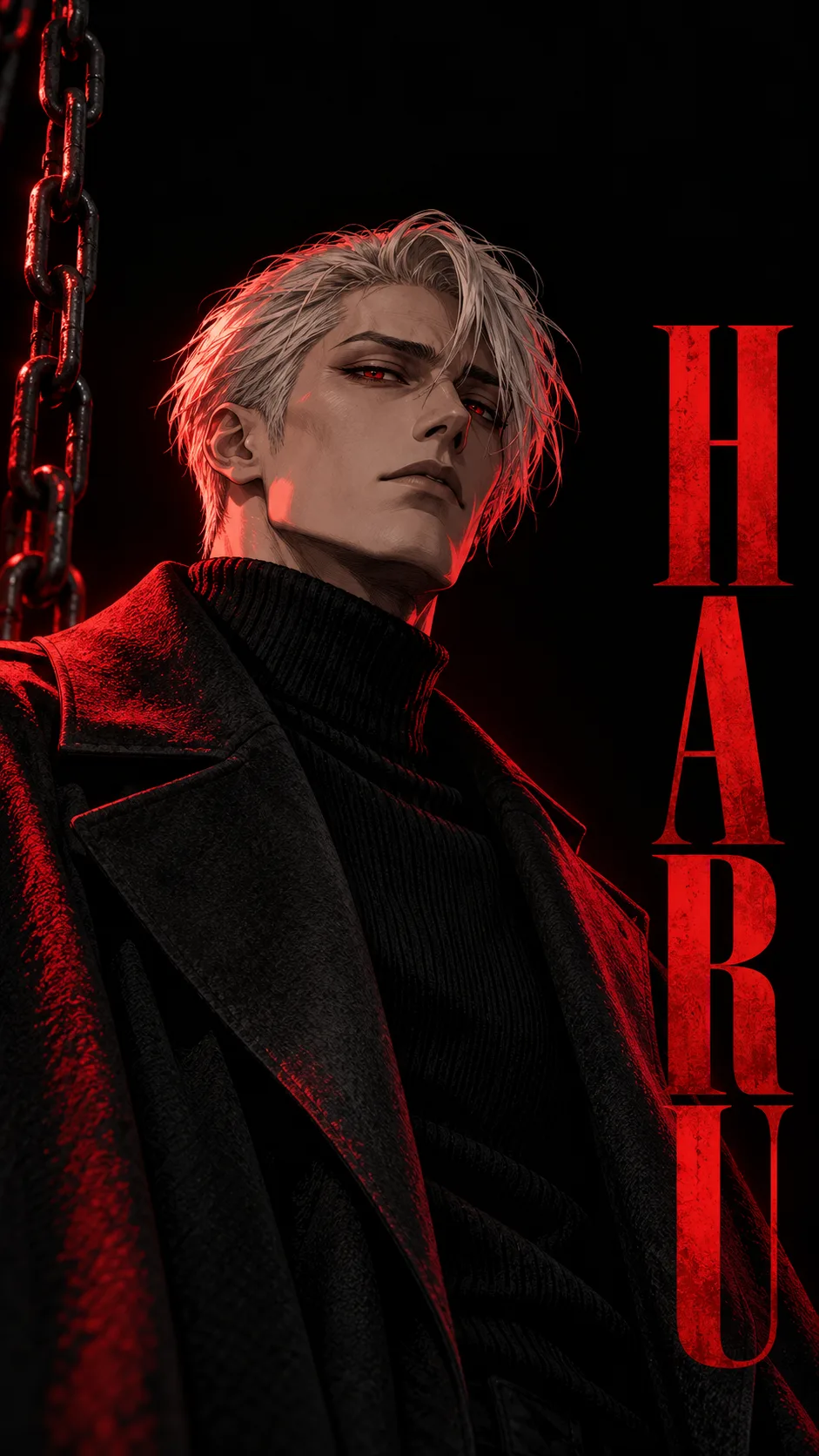
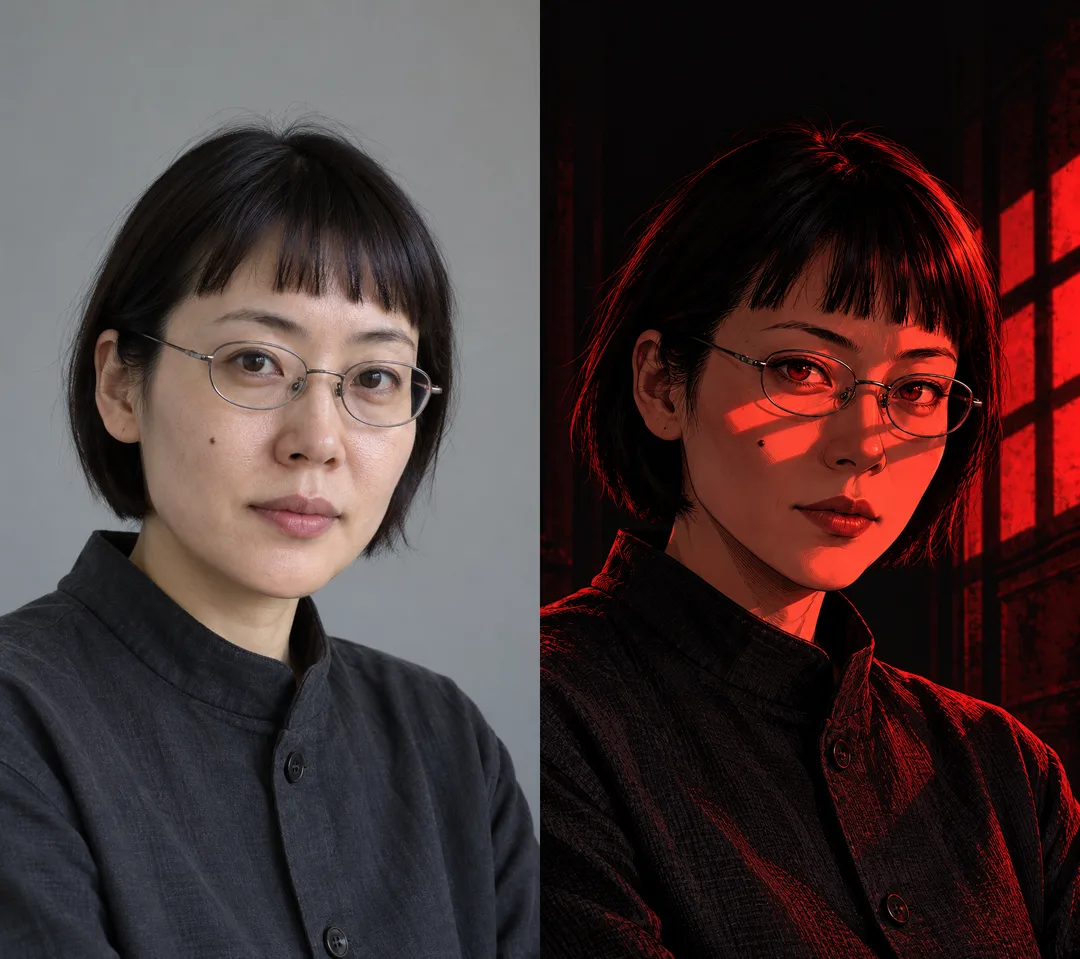
표지는 커튼과 붉은 빛을 쓴 독립 결과예요. 첫 예시는 은빛 머리 성인 남성·사슬·HARU이고, 둘째는 생성한 가상 성인 사진(왼쪽)과 창살 빛으로 바꾼 결과(오른쪽)입니다. 실제 고객 사진은 사용하지 않았어요. 짧은 앞머리와 타원 안경, 볼의 점이 이어지는지 확인하세요. 글자가 있다면 H·A·R·U를 한 자씩 대조하고, 휴대폰에 설정했을 때 시계가 눈을 가리지 않는지 보세요. 안경이 사라졌다면 인물 칸에 안경의 모양을 구체적으로 적어 다시 만들면 됩니다.
자주 묻는 것
사진이 꼭 필요한가요? 아니요. 글 설명만으로도 같은 그림체의 새 인물을 만듭니다. 글자 없이도 되나요? 큰 타이포 칸을 비우면 됩니다. 특정 작품 인물을 만들 수 있나요? 이 카드는 새 성인 인물과 새 의상을 만드는 용도예요. 빨강은 빛과 천으로만 표현하고 피·상처·선정적인 장면은 넣지 않습니다.