
All · Comics & illustration · Scenery
249Blue Line Embroidery Pattern
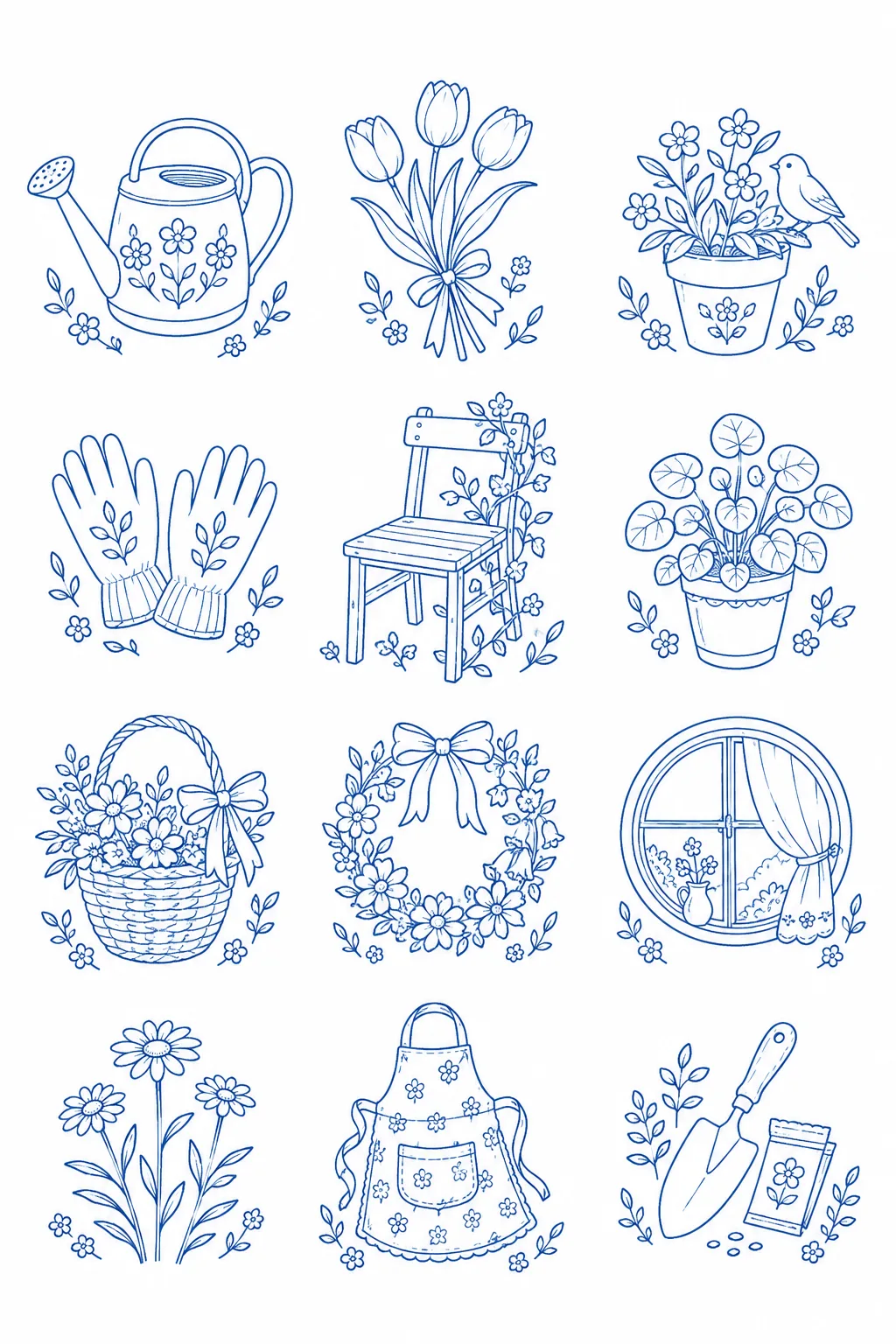
A single embroidery template featuring twelve subjects drawn with blue outlines and small leaf decorations. You can trace them without filled areas.
What you get
- Twelve different motifs
- Blue template with chosen line thickness and spacing
- A single sheet pattern for tracing
ChatGPT Free OK
Fill in the fields
- 1Fill in the fields
- 2Copy the prompt
- 3Paste it into a GPT chat
- 4Send it as is and you get an image like the thumbnail example
- 5Attach a real photo that fits the card and it is used in the result: a background photo for background cards, a person or food photo for those cards Optional
Full prompt 4,023 characters
Generate one finished line art image directly now. Return only a single image without questions, explanations, or code.
Size: Output exactly one finished 2:3 portrait image, 1024x1536 pixels. Leave the top 12% and bottom 15% free of essential text.
Set Theme: 【Set Theme】
Subject 1: 【Subject 1】
Subject 2: 【Subject 2】
Subject 3: 【Subject 3】
Subject 4: 【Subject 4】
Subject 5: 【Subject 5】
Subject 6: 【Subject 6】
Subject 7: 【Subject 7】
Subject 8: 【Subject 8】
Subject 9: 【Subject 9】
Subject 10: 【Subject 10】
Subject 11: 【Subject 11】
Subject 12: 【Subject 12】
Side Decoration: 【Side Decoration】
Line Thickness: 【Line Thickness】
Blue Color: 【Blue Color】
Pattern Spacing: 【Pattern Spacing】

A set of twelve independent embroidery outlines drawn in a solid blue monochromatic contour on clean white paper. Contains all motifs on a single sheet in 3 columns and 4 rows for portrait, or 4 columns and 3 rows for landscape. Draw the twelve subjects one by one starting from the top left in input order. Group each subject into a single motif, and components of a single subject like a pair of gloves are drawn together within the same cell. Do not mix different subjects into other cells. If 'Choose for me' is specified, select and draw one unused subject related to the set theme. No circular embroidery hoops, fabric, finished embroidery, yarn bundles, or photo mockups.

Distinct plant illustrations and daily life objects with clean outlines. The round watering can highlights details that make the object recognizable such as the handle, long spout, and strainer plate; flowers feature bending stems, overlapping leaves, and asymmetrical petals; windows include frames, latches, and small curtains. Use curves that do not blur from overlapping lines, outer silhouettes, and thin internal dividing lines. The selected side decorations are added in small numbers below or to one side of each subject and do not become larger than the subject. All motifs have a similar visual size and are not surrounded by rectangular photo frames, badges, or border boxes.

The lines are in a single chosen blue color and the background is pure white. The inside of the subjects is also white with no solid fills, shading, gradients, hatching, 3D shadows, or paper smudges. Even when thin lines are selected, maintain clear medium-thickness lines printable for tracing. Include 8 to 15 details per motif that make the object recognizable. The types of details vary, such as joint lines and floral patterns on the watering can, inner handle curves, glove wrist wrinkles, apron seam lines, basket coarse weaves, and window curtains and latches. Small flowers and leaves connect asymmetrically to form an elegant plant arrangement with the central subject, rather than ending in a two- or three-line summary like a ready-made simple icon. The blue outer outlines are medium thickness and internal dividing lines are thinner, creating a line hierarchy with a single midrib visible on each leaf. Small flowers have five petals and a small center circle, and ribbons have folded lines without filling one side in black or blue. Create the density of a rich plant illustration while avoiding line overlaps, hatching, and excessively small hatching lines. Spacing between patterns reflects the selection while ensuring lines do not touch and leaving ample margin for cutting or tracing. Centrally and evenly arrange the entire composition on a single sheet.

Do not duplicate the same object twelve times. Do not use titles, labels, numbers, trademarks, existing characters, artist names, signatures, or watermarks. The image itself is a single pattern and should not be expressed as if actual thermal transfer processing or sewing has already been done. End with just a single image without asking.

[Final output format]
Output exactly one finished 2:3 portrait image, 1024x1536 pixels. Leave the top 12% and bottom 15% free of essential text.
This selected output format takes priority over any fixed canvas size or aspect ratio elsewhere in this template. Adapt the composition, text zones and margins to the selected canvas without stretching or cropping essential content. Device safe areas apply only when a device is selected. Never print these format instructions on the image.
How did it turn out?
You may also like

How to use it · FAQ
Template for Tracing Before Embroidery
This is not a finished photo with thread, but twelve motifs drawn in blue lines. You can print them on paper to transfer to fabric, or refer to them as templates for diary decoration. Since the subjects are separated within a single sheet, it is easy to select and use only what you need.
One Subject per Cell
The theme of the cover is a small windowside garden. Enter subjects 1 to 12 respectively, such as a watering can, tulips, and gloves. A 'round watering can' tells you the exact shape, whereas 'pretty thing' cannot convey the shape. If you want to use the same flower multiple times, specify differences like 'fully bloomed flower, bud, sideways-bent flower'. 'Choose for me' selects a new subject fitting the theme.
Clear Lines Instead of Complexity
Side decorations can be changed to small leaves or stars next to the subject. When transferring small patterns to fabric, you may choose subjects only without any decoration. Thin lines show slightly more internal structure, while thick lines reveal outer shapes better. Even with narrowed spacing, motifs maintain a composition where they do not stick together. The blue button only changes the line color.
Count the Twelve Subjects and Lines First
Check if the cover has twelve distinct subjects and if lines like handles and flower stems are uninterrupted. If there are overly small leaf veins, you can say 'keep the outer petal outlines and cut the internal leaf veins in half'. The actual size of the printout depends on the print scale, so test with a small piece of paper first. Image files do not automatically turn into thermal transfer patterns or embroidery machine files, and you must transfer them to fabric yourself using appropriate methods.