
All · Comics & illustration · Scenery
248Vintage Album Scrap Sheet
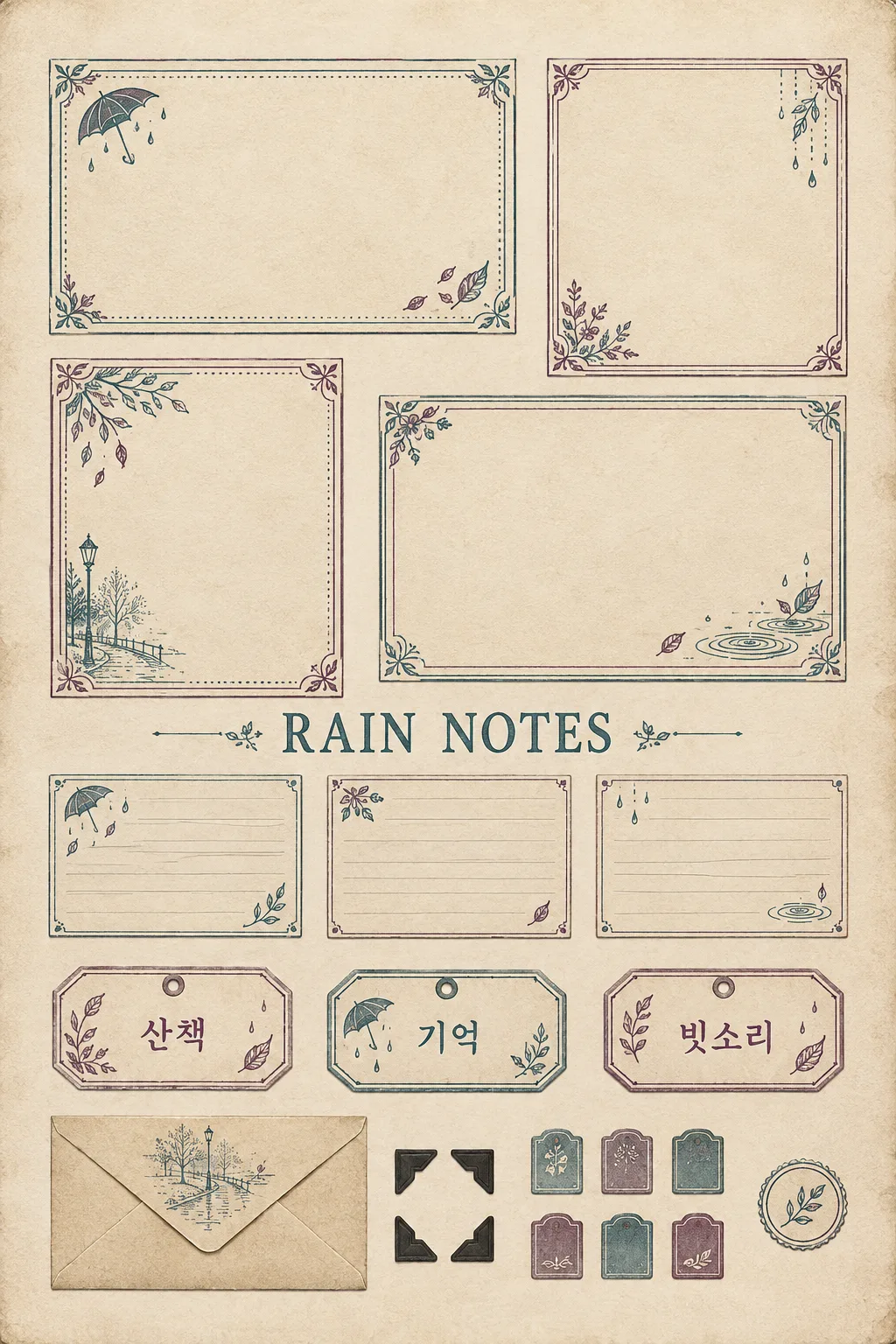
A single album decoration sheet featuring empty photo frames, small labels, envelopes, and corner decorations bound together in the same paper texture.
What you get
- Four empty frames to attach photos
- Small recording slips, tags, envelopes, and corner decorations
- One decorative sheet bound with the same theme
ChatGPT Free OK
Fill in the fields
- 1Fill in the fields
- 2Copy the prompt
- 3Paste it into a GPT chat
- 4Send it as is and you get an image like the thumbnail example
- 5Attach a real photo that fits the card and it is used in the result: a background photo for background cards, a person or food photo for those cards Optional
Full prompt 5,298 characters
Directly generate one completed decorative paper sheet image now. Finish with a single image without questions, explanations, or code.
Output exactly one finished 2:3 portrait image, 1024x1536 pixels. Leave the top 12% and bottom 15% free of essential text.
Memory Theme: 【Memory Theme】
Small Symbol: 【Small Symbol】
Paper Color: 【Paper Color】
Ink Color: 【Ink Color】
Wear and Tear: 【Wear and Tear】
Frame Edge: 【Frame Edge】
Large Label Text: 【Large Label Text】
Text to print on tag 1: 【Small Label 1】
Text to print on tag 2: 【Small Label 2】
Text to print on tag 3: 【Small Label 3】

Create a top-down single-page vintage album decoration sheet. Arrange a total of 22 separate pieces: four photo frames, three thin recording slips, three small tags, one closed flat paper envelope, four black paper corner mounts, six short plain tabs, and one round plain sticker. All pieces share the same theme, paper, and ink colors, but differ in size and detail borders. There are only four photo frames in total, placed in the upper half in two rows of two. The first row has one horizontal frame and one vertical frame; the second row has one vertical frame and one horizontal frame. Below them, place the three recording slips in one row, below that the three tags in one row, and finally, arrange one envelope, four small corners, six tabs, and one round sticker closely without overlapping. The overall scale features large photo frames, medium recording slips, small tags, and even smaller final decorations. Do not make a fifth photo frame or style recording slips as photo frames. The background is plain paper in a much lighter shade of the selected paper color. Each piece has a deeper paper color, fine texture, and a thin border clearly defining its edge. Do not add a heavy outer border or rough background stains. Leave narrow, light blank gaps for cutting out the pieces, and no single piece overlaps or gets cut off. There are no grid lines, price tags, or number tags. This is not a photo of a tilted desk, a physical mockup with tools, or multiple printouts spread out, but this single paper sheet itself.

The inside of your four photo frames consists of large, clean blank spaces to attach photos, while only the outer borders are decorated with the chosen edge and print ornaments. Both horizontal frames and both vertical frames leave at least 75% of their central area empty. Do not draw fake photos, window views, or people in the center. Place small symbols matching the theme as independent fine etching lines and small monochrome print illustrations on corners, tags, and in front of the envelope. Delicately draw the ribs of an umbrella, thin leaf veins, small ripples of raindrops, fine etching lines of street lamps and trees on a walking path, envelope folds, paper fibers, pressed marks on paper edges, and selected handling wear. The outer borders of the four photo frames combine distinct thin double lines, corner leaf motifs, dotted lines, and small flowers to look as intricate as old stationery prints. Do not replicate the exact same umbrella motif three times, but vary them into different small illustrations of raindrops, leaves, an umbrella, and a wet walking path. However, the empty inner area for attaching photos remains clean without decorations. Smudges should be applied very lightly only on the outer corners so as not to spoil the writing space. Do not create forms that replicate real tables, or genuine travel tickets, stamps, or certificates.

Print the large label text exactly once in the horizontal blank space between the four photo frames and the three recording slips. On the three tags, print the text specified for tags 1, 2, and 3 respectively, exactly once in a readable, medium-sized, dark typeface. Do not leave the tags blank. The left tag is Tag 1, the middle tag is Tag 2, and the right tag is Tag 3. Small etching decorations must not cover the tag text. If 'Choose for me' is selected, choose a short original title or a short label for the relevant field, fitting the theme and do not print the selection request phrase itself. The three recording slips are vertical low rectangles with faint horizontal lines and very small theme illustrations at the edges. Do not add names, dates, or blank title lines. The six tabs and one round sticker contain no text, only borders and small etching patterns. The tag holes and small reinforcing eyelets fit entirely inside the paper. The envelope shows actual paper folding lines and adhesive boundaries without added text.

Splendor is created not through many brands or texts, but through a combination of different paper thicknesses, printing pressure, thin border decorations, and corner cutting. Limit the two selected inks to faded colors. Maintain a balanced size and spacing for the photo frames. Place important labels in the center, outside the top 12% and bottom 15%. No logos, trademarks, existing transport companies, existing characters, artist names, signatures, watermarks, or shadow mockups. Return the single image file itself.

[Final output format]
Output exactly one finished 2:3 portrait image, 1024x1536 pixels. Leave the top 12% and bottom 15% free of essential text.
This selected output format takes priority over any fixed canvas size or aspect ratio elsewhere in this template. Adapt the composition, text zones and margins to the selected canvas without stretching or cropping essential content. Device safe areas apply only when a device is selected. Never print these format instructions on the image.
How did it turn out?
You may also like




How to use it · FAQ
A decorative sheet before attaching photos
Create photo frames and small recording slips to attach to an album or diary on a single sheet. The empty inside of the photo frames is not an error; it is the spot to attach your own photos after printing. Four photo frames, three recording slips, three tags, one envelope, four corner decorations, six small plain tabs, and one round sticker are connected by the same color and memory theme. A total of 22 pieces are organized on one sheet.
Start with a rainy day example
In the theme, write memories you want to keep, such as 'Walking on a rainy day'. For the small symbol, write three drawings, such as 'Umbrella, raindrops, fallen leaves'. Write the large label short like RAIN NOTES, and write a short single word in each box for small labels 1 to 3. The examples walk, memory, and rain sound go into different tags. If no phrasing comes to mind, you can use 'Choose for me'.
Make the paper aged, keep photo spots clean
Selecting more wear increases worn marks on the outer corners. The inner area to attach photos remains empty. Border buttons only change the frame edge and do not change the paper type to a new printout. Accent inks repeat across small symbols and labels, making different pieces look like one set.
Test print small first
Test the downloaded picture at the actual printing size. This card does not guarantee printer resolution or photo centimeter dimensions. If the photo frames are small, adjust the print scaling, and if pieces stick together, modify with 'Widen the blank gaps between each piece slightly'. Check label spellings and empty photo frame interiors before cutting. Only a single image appears, and this card does not automatically create a PDF or an actual envelope template.