
All · Social posts · Offers & events · New menus
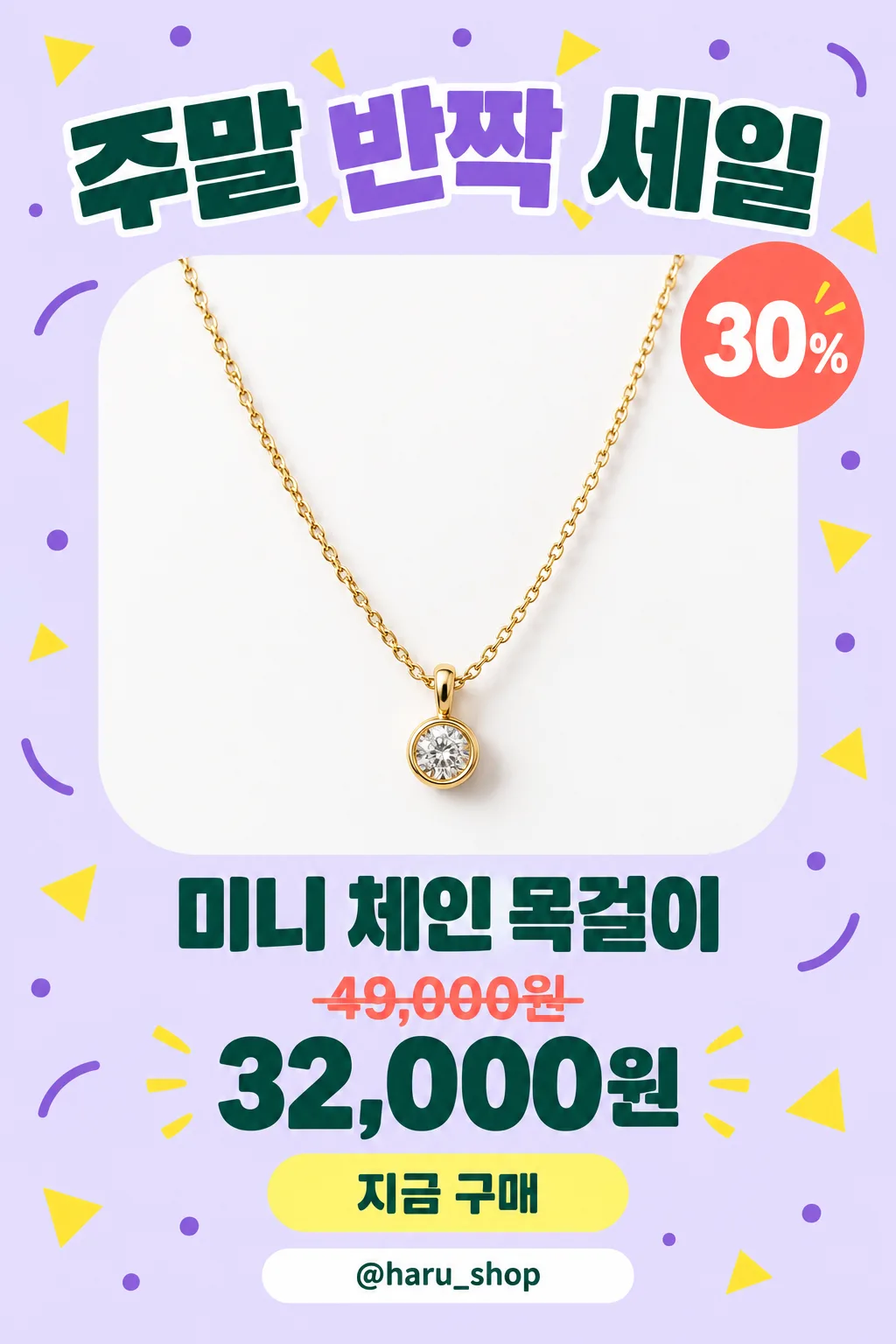
294Instagram sale ad — your product pops out of a discount post
Add a product photo and sale details to get an Instagram sale ad with a big title, a % badge, a struck-through price and a button.
What you get
- One sale ad with your product popping out
- A big headline, discount badge, old and new price
- A button shape and one contact line
ChatGPT Free OK
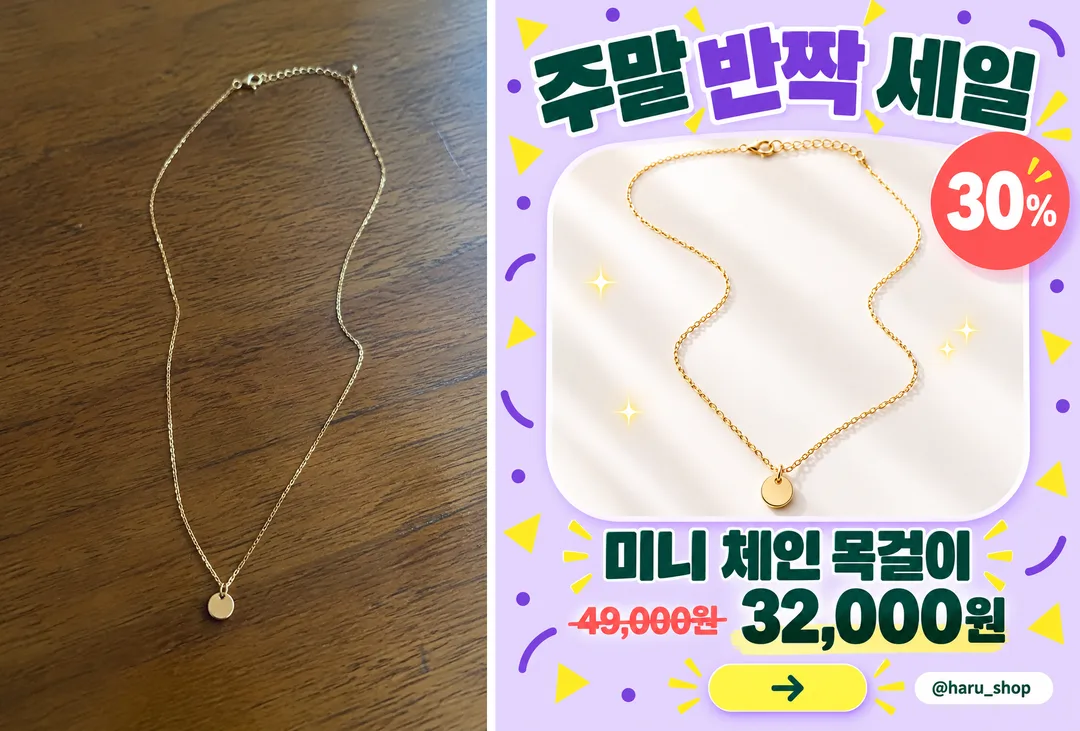
Fill in the fields
- 1Fill in the fields
- 2Copy the prompt
- 3Paste it into a GPT chat
- 4Send it as is and you get an image like the thumbnail example
- 5Attach a real photo that fits the card and it is used in the result: a background photo for background cards, a person or food photo for those cards Optional
Full prompt 4,078 characters
Generate this image now. Draw it directly - do not describe it, explain it, or ask questions.
Output size 1080x1350 pixels, 4:5 portrait, Instagram standard.

Create one dense, polished Instagram sale advertisement with one dominant product photograph, a huge headline, a rounded product frame, playful geometric decorations, a prominent product name, a discount badge when supplied, a clear price hierarchy, a rounded action button with a simple arrow icon, and a bottom contact strip when supplied. Use a vertical 4:5 composition by default. Keep the layout lively and full while preserving excellent readability and safe margins.

[Attached photo]
Use the attached product photo as the product reference. Preserve its shape, materials, color, functional details, and product count. Isolate the product cleanly, improve its lighting, and place it in the advertisement with believable highlights and a soft grounding shadow. Omit brand marks and any source-photo text or watermarks.
PHOTO RULE: if a photo is attached, use it as described; if no photo is attached, never ask for one and never stop — invent a fitting fictional subject and finish the image.

PRODUCT NAME text: "【Product name】"
Print the supplied product name exactly as quoted. If this line is missing or empty, omit the product-name text; do not invent a name.

HEADLINE text: "【Headline】"
Print the supplied headline exactly as quoted in very large, heavy display typography. If this line is missing or empty, omit the headline text; do not invent a slogan.

DISCOUNT text: "【Discount】"
If supplied, print this exact string inside a bright circular or scalloped discount badge. If this line is missing or empty, omit both the discount badge and its text; do not invent a percentage or calculate one.

ORIGINAL PRICE text: "【Original price】"
If supplied, print this exact string at a smaller size with a clear strikethrough. If this line is missing or empty, omit the original price; do not invent a price or a price label.

SALE PRICE text: "【Sale price】"
If supplied, print this exact string prominently in bold contrasting type. If this line is missing or empty, omit the sale price; do not invent a price or a price label.

CONTACT text: "【Contact】"
If supplied, print this exact string inside a clean rounded contact strip near the bottom. If this line is missing or empty, omit the contact strip and its text; do not invent a handle, phone number, website, or contact icon that implies an unavailable channel.

COLOR selected: "【Color】"
Interpret only the selected choice:
- Lavender: A light lavender background with deeper violet accents, yellow decorations, coral badges, and dark green price typography.
- Yellow: A warm yellow background with cream product framing, black headline typography, coral badges, and deep blue accents.
- Mint: A pale mint background with white product framing, dark teal typography, coral badges, and soft yellow accents.
- Pink: A pastel pink background with cream product framing, dark plum typography, coral badges, and pale blue accents.
If this selection line is missing or empty, use Lavender only.

Allow the product to overlap the inner frame slightly for a convincing dimensional effect. Use crisp commercial product photography, strong typographic hierarchy, rounded panels, and compact purposeful spacing. Reflow the layout when optional elements are absent, keeping the product large. The action button contains only an arrow icon and no invented wording.

Render all supplied text exactly as quoted, including Korean syllables and final consonants. Never translate, rewrite, correct, or add words. No additional text, brands, logos, signatures, or watermarks.
The choice names in this prompt are internal labels only; never print them as text.

[Final output format]
Output size 1080x1350 pixels, 4:5 portrait, Instagram standard.
This selected output format takes priority over any fixed canvas size or aspect ratio elsewhere in this template. Adapt the composition, text zones and margins to the selected canvas without stretching or cropping essential content. Device safe areas apply only when a device is selected. Never print these format instructions on the image.
How did it turn out?
You may also like
- 29380s mall studio portrait — laser backdrop and soft focus
- 288Dictionary definition poster — one word defined like a dictionary page
- 287Front page me — starring on a 90s tabloid front page
- 286Trail cam capture — the culprit caught on our night camera (infrared meme)
- 28590s disposable camera party photo — direct flash, film grain, orange date stamp
- 282My life in 6 icons — hobbies, pets, food and travel as one vintage icon set
How to use it · FAQ
When to use it
Post a sale in one image: a big sale title, your product popping out of a rounded card, a "30% OFF" badge, a struck-through price, a bold sale price, a button and your contact line.
Filling in the fields
Product name and headline are enough; empty lines disappear. Only use an original price you actually charged.
Using your product photo
① Upload the photo — do not send yet ② paste the prompt ③ send when both are there. The in-card example shows a plain necklace photo (left) and the result (right).
Check the result
- Are all numbers exact? Does the product match the real item?