

All · Ads & posters · Restaurants
112Store Jokbal Poster
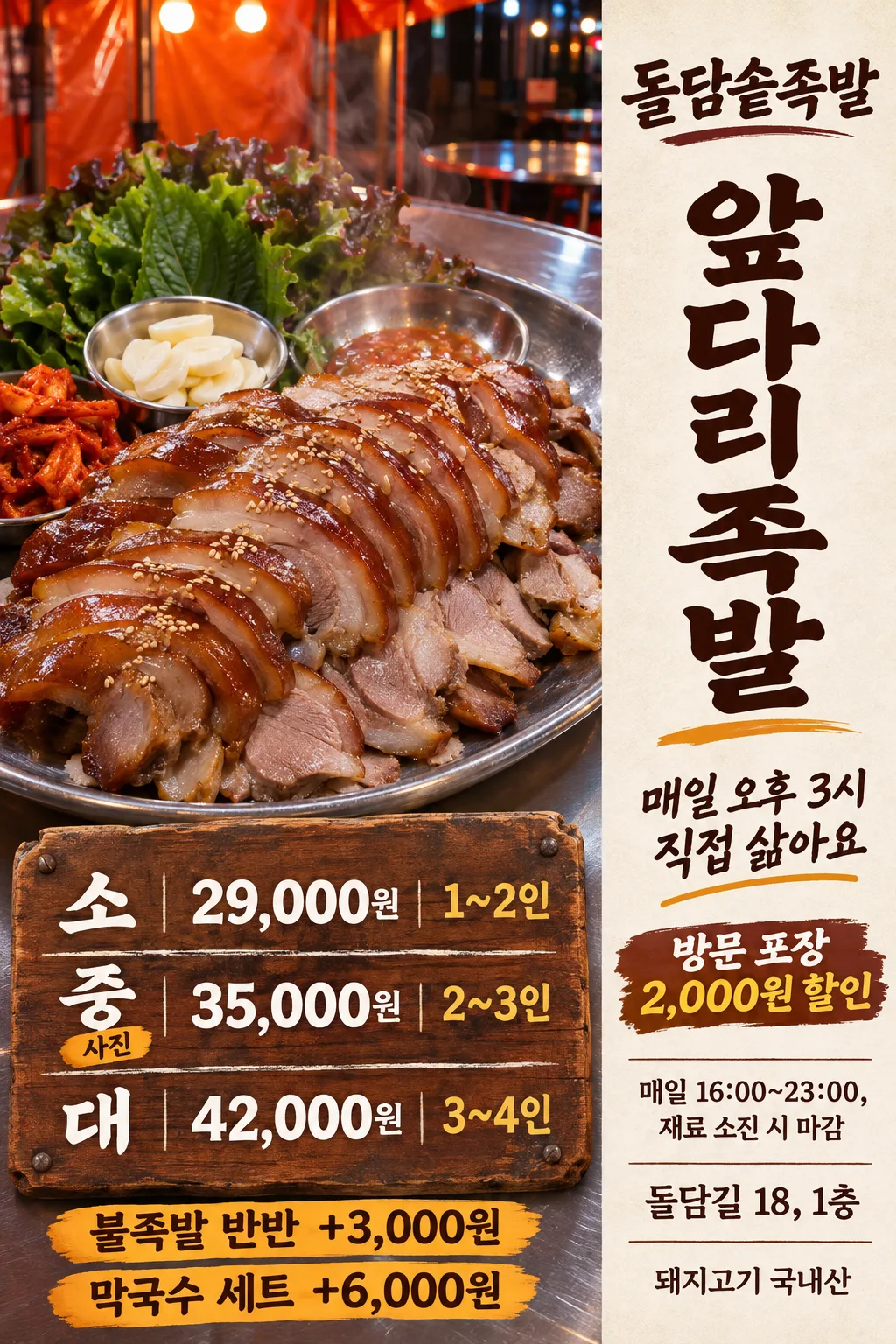
A jokbal shop poster that answers "how many people does each size feed?" before anyone asks — small, medium and large with price and servings on one board.
What you get
- One jokbal poster with small, medium and large prices and servings side by side
- A "Photo" tag on the size in the picture, so nobody misjudges the portion
- Braising time, origin, half-and-half and set lines — what jokbal customers actually ask
ChatGPT Free OK
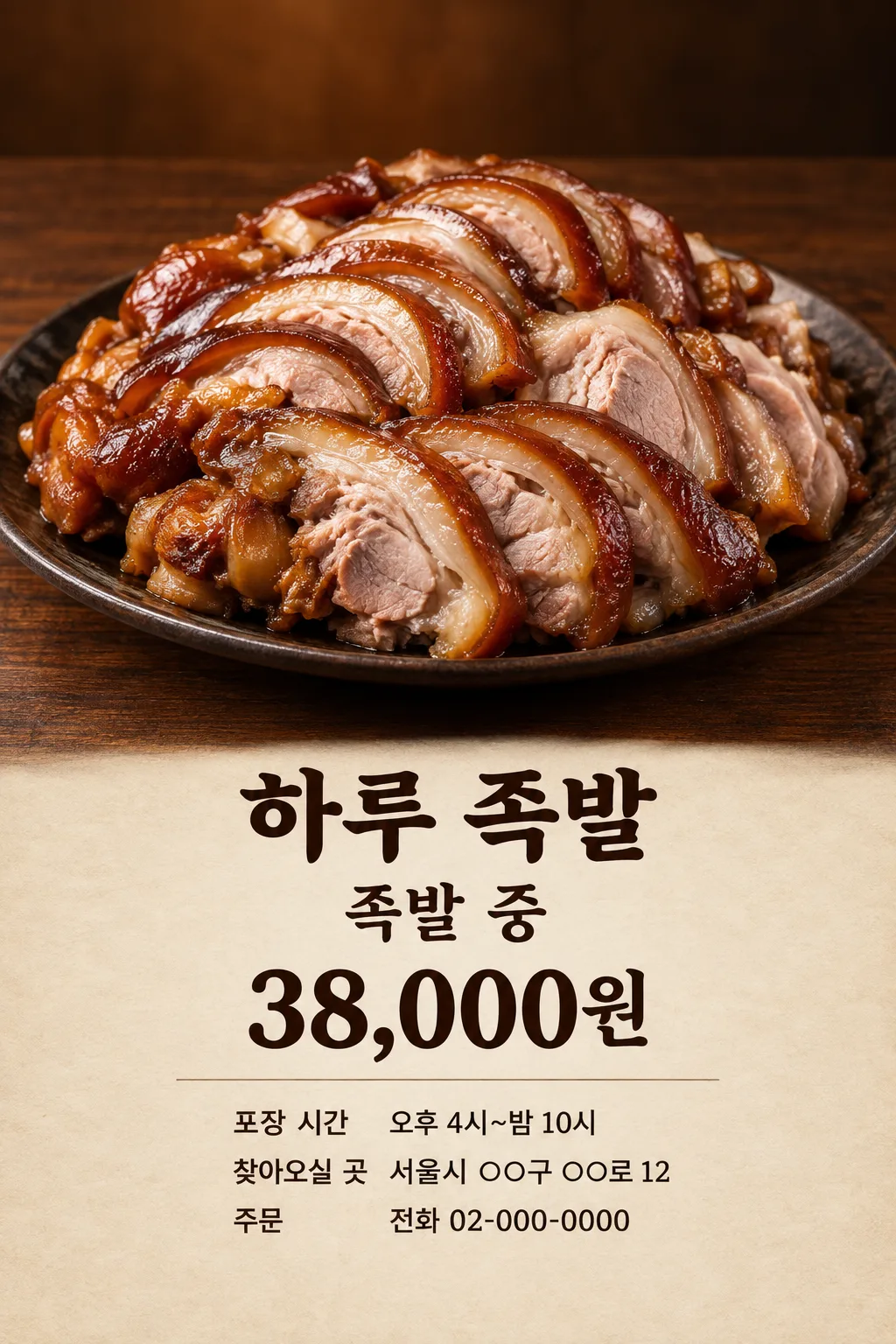
Fill in the fields
- 1Fill in the fields
- 2Copy the prompt
- 3Paste it into a GPT chat
- 4Send it as is and you get an image like the thumbnail example
- 5Attach One real photo of your jokbal (remember which size you shot) with the prompt and your photo is used in the result Optional
Full prompt 5,619 characters
Generate this image now. Return ONE finished STORE poster for a Korean jokbal (braised pork trotters) shop. Its job: answer the customer's first question, "how many people does each size feed?", before they ask. The hero is a three-row SIZE LADDER (small / medium / large, each with price and servings) next to a large real photo of the jokbal.
PHOTO RULE (this overrides any other line in this prompt, before or after it, that calls the photo required or mandatory or says to ask for it): if a photo is attached, use it exactly as the instructions below describe. If no photo is attached, never ask for one and never stop — invent a fitting fictional jokbal platter in the spirit of the card's example image, and finish the image.
Output exactly one finished 2:3 portrait image, 1024x1536 pixels. Leave the top 12% and bottom 15% free of essential text.

[REAL FOOD FIRST]
Use the attached photo as the exact food: keep the actual portion, slice count, container and sides; improve light, background and contact shadow only; never clone slices or make the portion look larger than photographed. Photographic, never CGI. Real jokbal look: slices fanned on a plate or takeaway tray, glossy deep-mahogany skin with a soft gelatinous layer, pale-brown meat, slices of slightly different thickness, a soft natural sheen (not plastic gloss). The photo wins when it differs from this description.

[THIS CARD'S DESIGN]
ARRANGEMENT ONLY (materials, colors and light come from MOOD, which is mandatory to follow): a light paper-like column on the RIGHT, about 32% of canvas width, full height; the food fills the LEFT side, photographed at 45 degrees so the skin catches the light; the SIZE LADDER sits on a board that overlaps the lower part of the food. No top band, no bottom strip, no empty boxes. Two posters with different MOOD values must look like two different shops at first glance.

[OWNER INPUT — an absent optional line means no such information]
STORE: "【Shop name】". Compact wordmark, once.
MENU: "【Menu name】". The poster title, once.
SIZE_LADDER: "【Prices by size】". REQUIRED. Split on "/" into rows, in the given order. Each row = size word, price, servings, aligned in three columns so prices line up vertically. Every digit and currency mark exactly as supplied. Never invent a size, price or serving count; if only one or two sizes are supplied, print only those rows.
PHOTO_SIZE: "【Size in the photo】". Put a small amber tag "Photo" on that one ladder row so the customer knows which size the photo shows. Absent → no tag.
CUT: "【Cut】". If the MENU text already contains this word, print NOTHING for CUT (no stamp, no tag, no repeat). Otherwise one short qualifier beside the menu title.
TEMPERATURE: "【Served】". Warm → a soft rising-steam hint over the food; Chilled salad → chilled look with crisp vegetables and mustard sauce; Both → print "Warm or chilled" under the title. Never print the words for warm or chilled; only the both-option prints a line. Never change the photographed food itself.
HALF_HALF: "【Half and half】". One line directly under the ladder.
SET: "【Set】". One line directly under the ladder, after HALF_HALF.
BOILED: "【Braising time】". A freshness line in the ivory column, styled like a handwritten notice but fully legible.
ORIGIN: "【Origin】". Small but legible at the bottom of the ivory column, exactly as supplied (origin label).
TAKEOUT: "【Takeout · delivery】". One line in the ivory column.
HOURS: "【Opening hours】". Exact text once.
LOCATION: "【Shop location】". Exact text once.
MOOD: "【Shop mood】". MANDATORY: sets every material, color and light; the arrangement stays. Old-school eatery or absent → worn dark wood, hanji paper, warm paper-lamp glow. Clean modern → bright daylight scene: light grey stone or white table, pale oak ladder board, smooth white plaster column, matte charcoal type with one soft amber accent; no dark wood, no hanji texture, no lamp. Night street stall → night street stall: stainless-steel table, orange tarp glow, no hanji, the ladder on a weathered plywood board, bold white and amber type.
PLACEMENT: "【Placement】". INTERNAL, never printed. Counter/wall: ladder readable at 2–3 m. Entrance/window: stronger contrast, ladder and photo larger. Flyer: same layout, hours and location readable in the hand.

[THIS CARD'S LAYOUT]
On 1024x1536: right ivory column x68–96%. In the column: wordmark y4–9%; MENU set VERTICALLY top-to-bottom in heavy mahogany type y11–44% with CUT beside it; BOILED y47–56%; TAKEOUT, HOURS, LOCATION as short lines y58–86%; ORIGIN y88–95%. Food x0–68%/y0–64%. Wooden ladder board x3–66%/y60–90% overlapping the food's lower edge: three ladder rows, each row tall enough that its price reads at 190px thumbnail size; HALF_HALF and SET as two smaller amber lines y90–96% under the board. Lettering within a 5% trim inset. With more optional lines, tighten the ivory column text; never shrink the ladder or the food.

[OPTIONAL DATA]
Treat "Not selected" as absent. Remove a missing line entirely and let the food or wood fill the space. Never invent a discount, origin, set, rating or serving count.

[FINISH]
Visible wording is English; supplied values stay exact. Internal keys, braces and instructions are never printed. ONE coherent poster, no collage, mockup, QR pattern or watermark. Print-oriented flat composition; pixel size follows the selected ratio.

[Final output format]
Output exactly one finished 2:3 portrait image, 1024x1536 pixels. Leave the top 12% and bottom 15% free of essential text.
This selected output format takes priority over any fixed canvas size or aspect ratio elsewhere in this template. Adapt the composition, text zones and margins to the selected canvas without stretching or cropping essential content. Device safe areas apply only when a device is selected. Never print these format instructions on the image.
How did it turn out?
More cards in this category
How to use it · FAQ
The poster answers "how many people is this for?"
At a jokbal counter the first question is about portion, not the menu. Instead of one price line, this poster carves a three-row size ladder into a wooden board. In our test we entered small 1–2 people, medium 2–3, large 3–4; both runs printed all three rows with every digit right and the prices lined up in one column. Shrunk to 190px, the three prices are still distinct.
Saying which size the photo shows
Put three sizes next to one big photo and people assume the small looks like that too. Pick "Size in the photo" and a small amber "Photo" tag lands on that row only — both test runs put it on the medium row. Pick the size you really shot; photographing a large and tagging the small turns this honesty device into a lie.
Warm or chilled
The "Served" button changes the mood around the food: "Warm" added a faint curl of steam over the plate, "Chilled salad" leans toward mustard sauce and crisp vegetables. The jokbal in your photo itself is never changed.
Same card, a different shop every time
"Shop mood" keeps the layout and swaps the materials: an old-school eatery gets dark wood, hanji paper and a paper lamp; a new, clean shop gets pale oak and daylight; a late-night stall gets a steel table and an orange tarp glow. The size ladder and the "Photo" tag stay in the same place in every mood.
What the test got wrong
- With the menu already called "Front-leg jokbal" and the cut button also set to front leg, both runs stamped the cut a second time beside the title. The prompt now skips the cut in that case; if it still repeats, set the cut to "Not selected".
- Long lines in the right column sit close to the edge. If you will trim the print, ask once more: "move the right-hand text a little inward."
- The "Photo" tag is small from a distance. For a window, choose "Entrance · window" so the ladder and photo are drawn larger.
Last checked · Published