
All · Social posts · Business stories · Seasons & holidays
377Christmas Decorations for Your Shop
Keep your shop’s signs and layout while adding wreaths and warm Christmas lights.
Fill in the fields
- 1Fill in the fields
- 2Copy the prompt
- 3Paste it into a GPT chat
- 4Send it as is and you get an image like the thumbnail example
- 5Attach One exterior or interior shop photo (optional) with the prompt and your photo is used in the result Optional
Full prompt 3,415 characters
Generate this image now. Return exactly ONE finished full-bleed photorealistic photograph without explanations or questions.
Output exactly one finished 2:3 portrait image, 1024x1536 pixels. Leave the top 12% and bottom 15% free of essential text.
SHOP SCENE: "【Shop scene】"
DECORATION LEVEL: "【Decoration level】"
TIME OF DAY: "【Time of day】"
MUST KEEP: "【Must keep】"
PHOTO RULE: If one shop photo is attached, edit that exact shop. Lock its building shape, facade materials and colors, sign shape and location, all windows and doors, camera viewpoint, perspective, furniture and equipment count and placement, existing plants and surrounding buildings. Add only removable Christmas decorations and a time-of-day light change. Never add permanent light fixtures, alter weather, wet the ground, or remove door hardware. Never remodel, repaint, relocate or remove existing objects. The photo overrides the scene field; MUST KEEP adds preservation constraints, never authorizes structural changes. Preserve original sign lettering verbatim; if exact reproduction is uncertain, keep the same sign surface and gently blur existing letters. Never invent, replace, translate or add lettering, logos, menu text or slogans.
If no photo is attached, create a fictional independent shop from SHOP SCENE; if blank use a modest Haru Coffee storefront with cream plaster, dark green window and door frames and small wooden tables. Use a blank sign without text. If MUST KEEP is blank, preserve every existing architectural feature and layout.
FIXED RESULT: One continuous realistic shop photograph, no comparison panels, border, poster, caption, mockup or watermark. Respect the requested aspect ratio (default 2:3); if it differs from the photo, extend only peripheral surroundings without cropping or distorting the shop. Natural smartphone perspective, real material texture and plausible reflections, physically consistent shadows. Warm golden micro fairy lights, natural evergreen, burgundy velvet ribbons and restrained gold ornaments. Install decorations at believable scale and attachment points. Keep signs, door handles, entrances, aisles and equipment accessible; never cover shop identity with decorations.
Subtle: one door or wall wreath, a short string of warm lights, a few small removable window snowflake stickers and one compact tree or poinsettia pot wherever there is genuine free space.
Festive: add evergreen garlands with golden lights around existing frames, burgundy bows, a wreath, a compact ornamented tree and poinsettia pots, plus a few removable snowflake window stickers. Omit any item lacking free space. Do not add fake falling snow, gifts, furniture or people.
Daytime: natural daylight, original surface colors, subtle visible lights. Dusk: soft cool ambient twilight and warm interior light. Night: credible dark exterior with warm practical lights, detailed architecture still legible, no exaggerated bloom. Empty decoration and time fields default to subtle and dusk.
Before finishing compare the sign outline, each window and door, furniture positions and visible equipment against the photo. Output only the decorated shop photograph.

[Final output format]
Output exactly one finished 2:3 portrait image, 1024x1536 pixels. Leave the top 12% and bottom 15% free of essential text.
This selected output format takes priority over any fixed canvas size or aspect ratio elsewhere in this template. Adapt the composition, text zones and margins to the selected canvas without stretching or cropping essential content. Device safe areas apply only when a device is selected. Never print these format instructions on the image.
How did it turn out?
You may also like
- 360My Year, Remembered by AI
- 357Autumn portrait — your own look on a fall avenue
- 355AI Ideal Partner Test — Your AI reads your personality from past chats and predicts who suits you
- 342Silhouette behind fluted glass — a softly blurred figure and warm light
- 341Cinematic couple photo — two photos become a movie-like portrait together
- 337Assembly manual illustrations — cooking ramen or getting ready for work, furniture-manual style
How to use it · FAQ
A Christmas preview of your own shop
Turn one everyday exterior or interior photo into a realistic view with wreaths, golden lights and removable window snowflakes. The shop’s structure, sign shape, windows, doors and furniture arrangement stay recognizable. Use it to plan decorations before buying them, or for seasonal posts and profile photos after checking that it matches what visitors will actually see. If decorations are only planned, describe the image as a preview in your post.
Fill in the fields
There are 3 required fields. Shop scene identifies the business and view, such as Haru Coffee exterior or Haru Flowers interior. An attached photo takes priority over this description. Without a photo, the prompt creates a fictional shop; an empty scene defaults to a cream-walled cafe with dark green frames. Decoration level offers Subtle or Festive. Subtle focuses on a wreath and short light string; Festive adds garlands and burgundy bows. Empty means Subtle. Time of day offers Daytime, Dusk or Night; empty means Dusk. Daylight keeps materials easy to see, while evening emphasizes warm practical lights. Must keep is optional: name the awning color, door hardware, vase count or other details. Empty preserves all existing architecture and layout.
Send one photo and one prompt
Attach a shop photo you have permission to use to an image AI, paste the completed prompt into the same input and send once. You receive one decorated photograph, without a comparison board or explanation. A photo is optional for fictional scenes. Choose the aspect ratio using the shared ratio control; matching the source ratio reduces cropping of signs and entrances. Check the external service’s fees and terms there.
Check before sharing
Compare the sign outline and original lettering, window and door positions, handles, tables and equipment with the source. Existing sign letters stay unchanged, or are gently blurred when exact preservation is uncertain. No new name, translation or slogan is added. If a wreath hides a handle or a tree blocks an aisle, state that location in Must keep and resend the same photo. Decorations lacking free space are omitted. The prompt changes removable decorations and light, without repainting walls or replacing furniture.
Examples and common questions
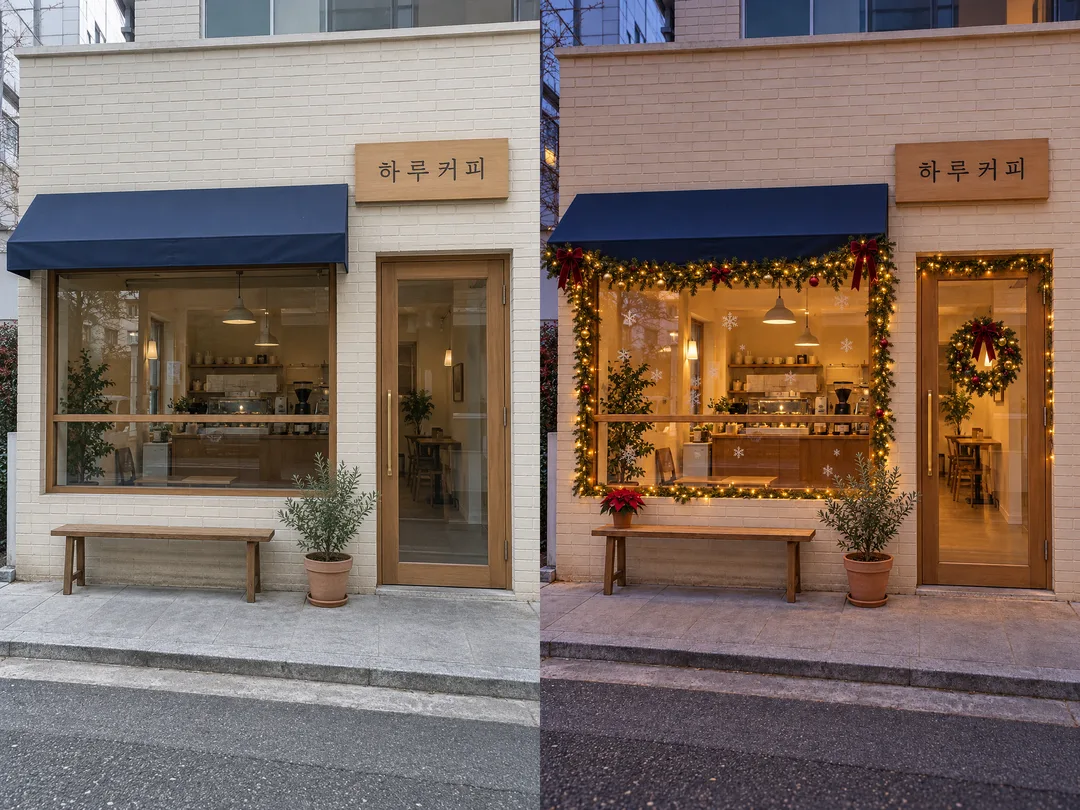
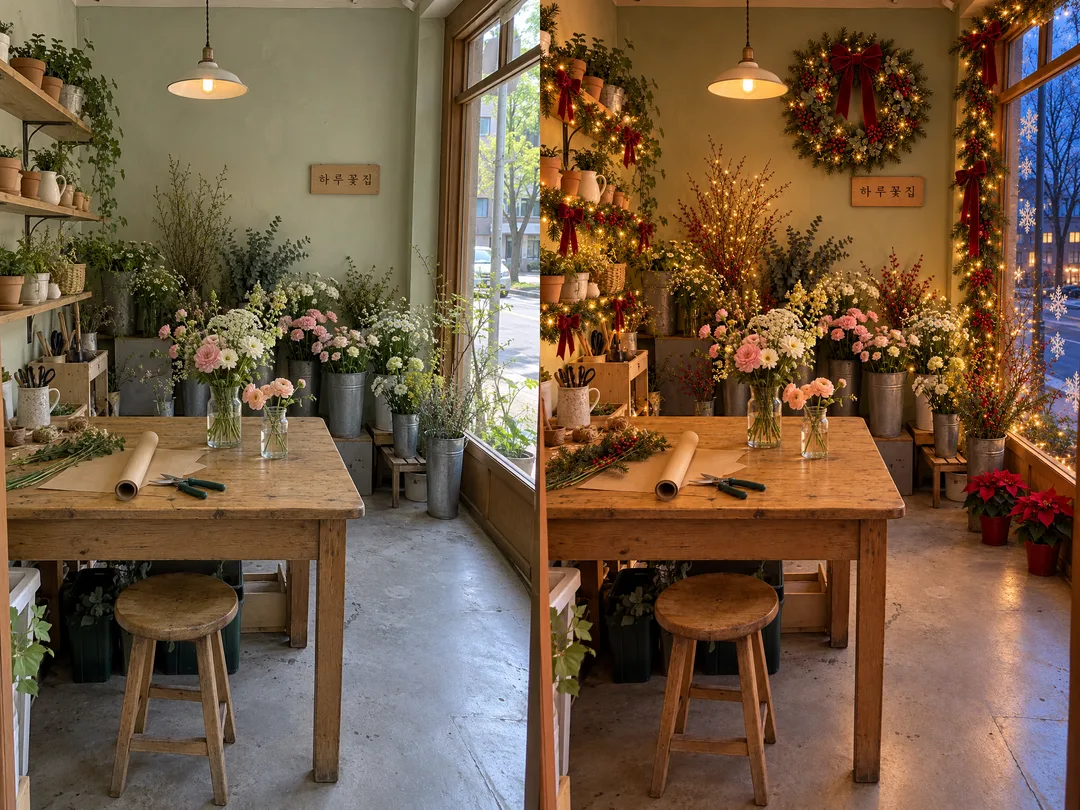
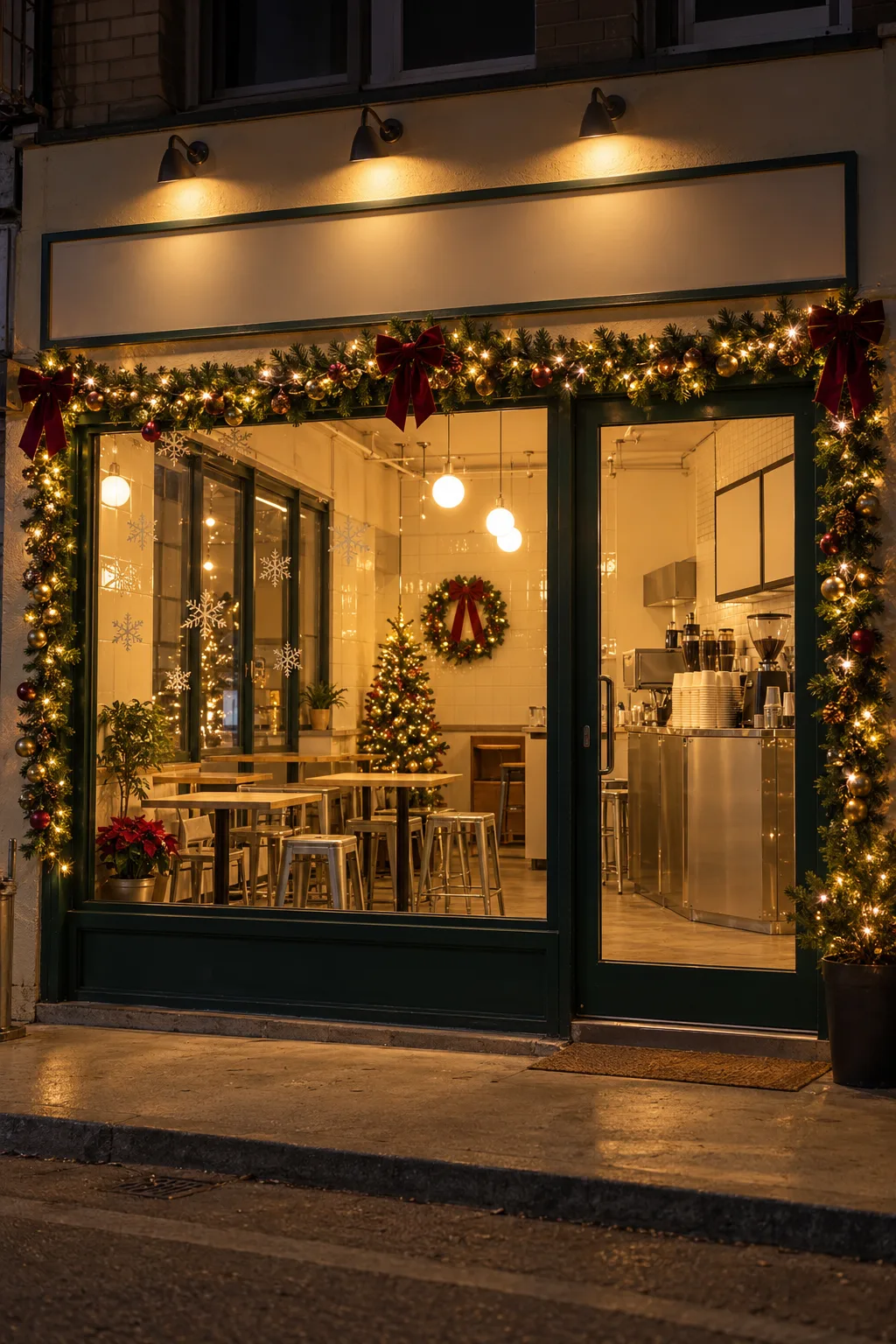
The first pair shows a fictional cafe exterior going from plain daytime to festive dusk. The second transforms a fictional florist interior into festive winter dusk, with a wreath, warm fairy lights and window-frame garlands, bows, snowflake window stickers and poinsettia pots. Outside are leafless trees and cool early-evening winter light. In each pair the source is on the left and the result on the right. These are generated fictional shops, not customer photographs. The separate result shows another fictional cafe exterior at night; the cover is a different cafe. Results have no color retouching; only the two-photo comparison boards were assembled.
Does this order decorations? It creates a visual preview, without quantities or estimates. Can I replace the sign? This card preserves the original. Will a tree always appear? No; access and free space take priority. Can I skip the photo? Yes for a fictional shop; attach a photo to preserve your own shop.