
All · Wallpapers · Seasons & scenery
362Winter Phone Wallpaper
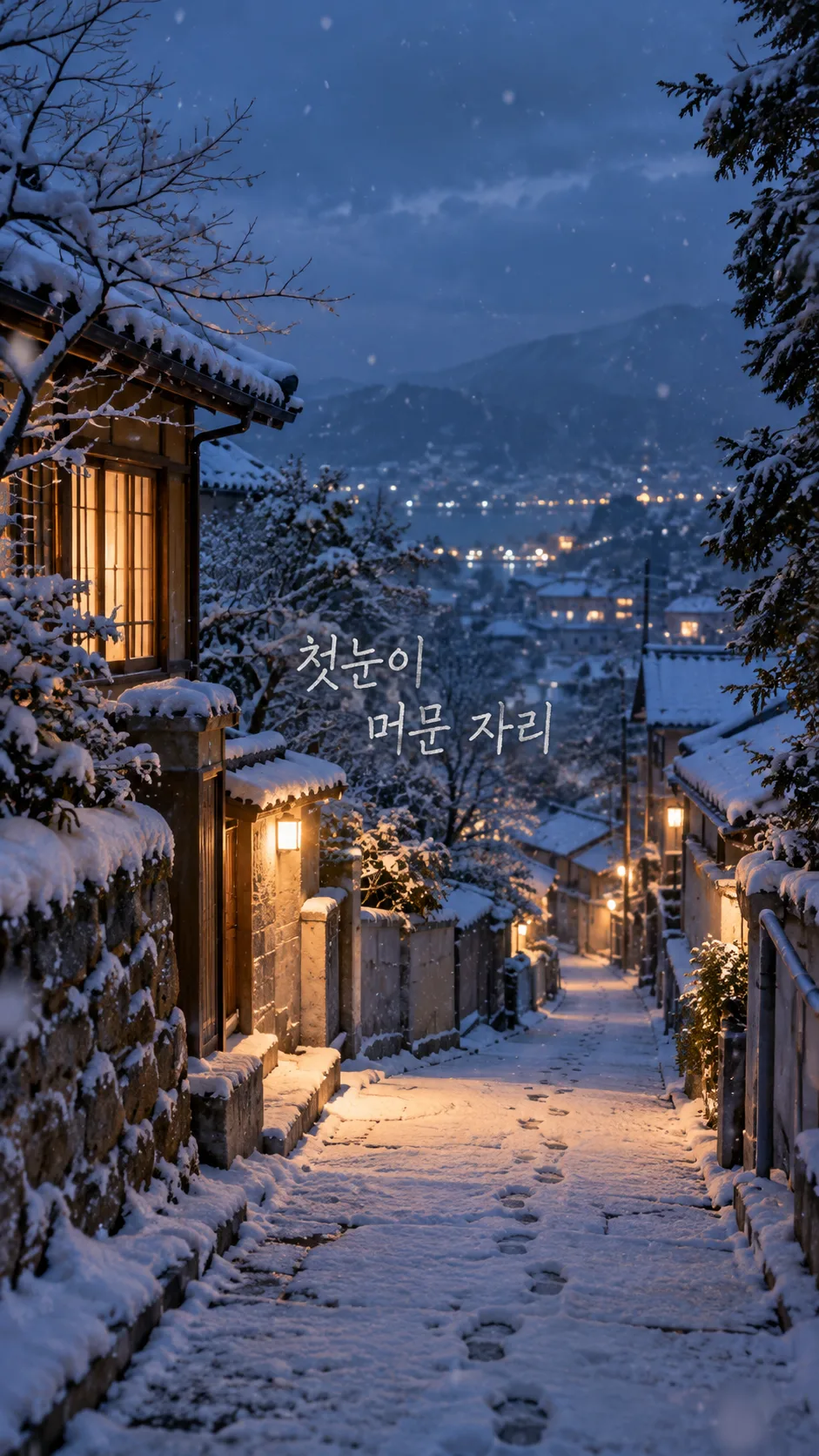
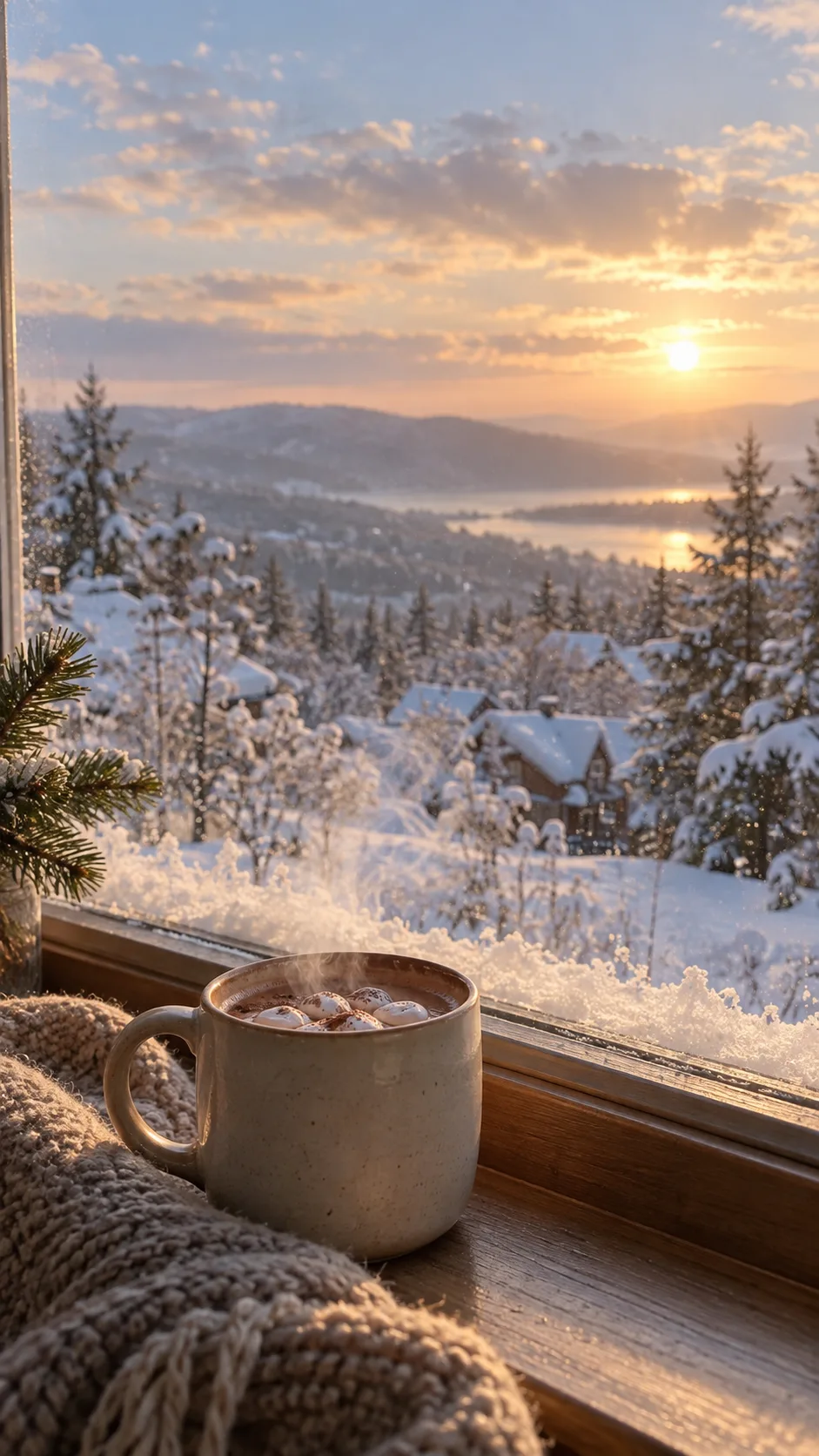
Winter photography with an optional pencil quote and calm clock space.
Fill in the fields
- 1Fill in the fields
- 2Copy the prompt
- 3Paste it into a GPT chat
- 4Send it as is and you get an image like the thumbnail example
- 5Attach a real photo that fits the card and it is used in the result: a background photo for background cards, a person or food photo for those cards Optional
Full prompt 4,651 characters
Generate this image now. Draw directly; do not explain or ask questions.
Create exactly ONE original winter phone wallpaper: realistic atmospheric photography with optional pencil handwriting. Keep this single photographic treatment; mood never changes the medium. Full bleed, no phone mockup, collage, border, logos, watermark, UI, clock, icons, people, readable shop signs or known artwork.


Scene: "【Scene】". If "Choose for me", choose exactly one of the four scenes below; never print option names. Interpret custom scene entries as winter setting descriptions, keeping one coherent scene.
1. first-snow lane: a quiet narrow lane receiving its first light snow, believable irregular footprints and warm window light; no readable signs.
2. snow-covered forest: a gently receding forest path, varied snow-laden evergreens and dark trunks, soft distance; no identical repeated trees.
3. window cocoa and snow: one plain ceramic cocoa mug grounded on a windowsill, restrained steam, snow visible outdoors through credible glass; no labels or branding. Keep the mug below the clock zone and avoid a sharp window frame across the upper band.
4. Christmas-lit street: an original anonymous street with restrained Christmas bulbs and light snow; local warm lights against winter dusk, no recognizable landmark, shop lettering or giant foreground ornaments. Do not add Christmas decoration to the other scenes.

Mood: "【Mood】". calm overcast day means soft cool overcast winter light with gentle contrast. cozy sunlight means subtle warm low-angle winter sunlight against cool snow. quiet blue evening means quiet blue-hour light with restrained amber windows or distant lights. These are photographic lighting moods, not illustration styles. Snow stays textured, not blown-out white, glitter or plastic. Use a limited ice-blue, gray, deep evergreen and warm ivory palette, believable depth and natural fine grain. Avoid excessive HDR, artificial glow, repeated snowflake stamps or a synthetic composite appearance.

Compose for actual phone use. Top 0–25% is calm sky, softly distant scenery or low-detail wall for the real clock and camera area. No focal object, bright light, sharp branch or lettering there. Bottom 80–100% is quiet snow, subdued pavement or tabletop for the dock and gestures. Main subject sits within 30–70%. Continue the scene to every edge: no pasted blank bars, empty paper margins or blurred rectangles. Adapt safe zones to verified screen geometry and leave crop tolerance near edges. Dense environmental detail belongs in the middle, not behind clock digits.

Optional sentence: "【One-line quote】". If empty, render absolutely no words and keep the composition complete. If "Choose for me", invent one short original English winter sentence and render only that sentence. Otherwise reproduce the supplied sentence exactly once in English, preserving characters, spacing and punctuation. Put it in a naturally quiet pocket within 42–68% height, with generous side margins and no overlap with the subject. Graphite pencil on light background or warm ivory pencil on dark background; visible pencil grain, natural handwritten strokes, complete legible characters around 4–5% of canvas height. Use one line, or at most two balanced lines at natural phrase boundaries. No box, sticker, outlines, heavy shadow, tiny lettering or extra title. Check each character. Never print Choose for me or instructions. No signature, year, date, season label or subtitle.

No attached photo is required or supported as an identity-preserving transformation: invent the scene from the fields. Return the finished wallpaper only. Do not require code, cropping, compositing or another step from the user.
FINAL OUTPUT CHECK: The requested optional sentence is "【One-line quote】". When this value is nonempty, the finished image MUST visibly contain it exactly once (or its generated English line when set to Choose for me). Do not omit requested lettering. Give EACH character a height of at least 4% of the full image height, not merely a 4% total line box. For phrases longer than six characters, use two balanced lines near the image center so lettering remains large and readable; do not use a tiny one-line caption. When empty, the finished image MUST contain no lettering.

[Final output format]
Output size 1080x1920 pixels, 9:16 portrait story. Keep all text inside the central 80% of the height.
This selected output format takes priority over any fixed canvas size or aspect ratio elsewhere in this template. Adapt the composition, text zones and margins to the selected canvas without stretching or cropping essential content. Device safe areas apply only when a device is selected. Never print these format instructions on the image.
How did it turn out?
You may also like
- 356My Room Pixel Art Wallpaper
- 344Tiny worlds inside objects — a village in a teacup, glass jar or walnut shell
- 334Forest spirit fantasy — meet a glowing stag or wolf spirit in a night forest
- 328Cinematic winter animal portrait — a fox, snow leopard or your dog in a coat on snowy mountains
- 322Retrofuturism collage — cut-out astronauts and race cars with planets and orbits
- 310Bookish dreamscape wallpaper — bookshelf canyons, a sea over an open book, glowing lanterns
How to use it · FAQ
A small winter scene for your phone
Move from autumn to winter using the same four fields: device, scene, mood and an optional quote. This card keeps one realistic photographic treatment. Mood changes the light, not the medium. Choose a first-snow lane, snowy forest, cocoa beside a snowy window or a Christmas-lit street. Christmas decorations appear only in the last scene, so the other scenes also suit January and February.
Fill the fields
The three required fields are Device, Scene and Mood. Name the actual device and distinguish a foldable main screen from its cover screen. Use 9:16 if unsure. Verified model information guides the display ratio; if it cannot be found, the prompt requests a generous portrait composition without inventing a resolution. A ratio in Device uses the common canvas selector: choose 9:16 for the phone examples. The listing cover is 2:3.
Choose for me selects one scene rather than combining all four. The mood choices are calm overcast day, cozy sunlight and quiet blue evening. All keep realistic photography. The optional quote can be your own short sentence; Choose for me creates a short English winter line. An empty quote removes every word, including dates, titles and signatures. No uploaded photo or business name is needed; this is scene generation, not a photo transformation.
Make and check
Copy the prompt once into an image AI to request one finished wallpaper. Check the external service's prices and terms there. Save it and preview both the lock screen and home screen. The upper 25% stays quiet for the clock; the lower 20% stays quiet for the dock. These areas continue the scenery rather than becoming blank bars. Phone zoom, crop settings and widgets can change the visible area.
Check textured snow, varied trees, believable footprints and grounded cups. Snow in the window scene belongs outdoors. The Christmas street must have no readable invented shop signs. Compare quote characters and punctuation to the input. Gallery images use Korean inputs; your English prompt requests English lettering. For a typo, supply the exact quote again and ask to regenerate only the lettering. For glare behind the clock, request calmer upper scenery or choose overcast light. Watercolor is not a mood option: this card keeps its photographic finish. After Christmas, switch to the lane, forest or window scene for a decoration-free winter.