

All · Social posts · Seasons & holidays
078Year-End Gathering Invitation
A winter invitation with an attached RSVP leaf, as a bottom tear-off slip or an unfolded side flap.
What you get
- One invitation with the appointment and a separate RSVP leaf
- A bottom tear-off or side fold-out construction
ChatGPT Free OK
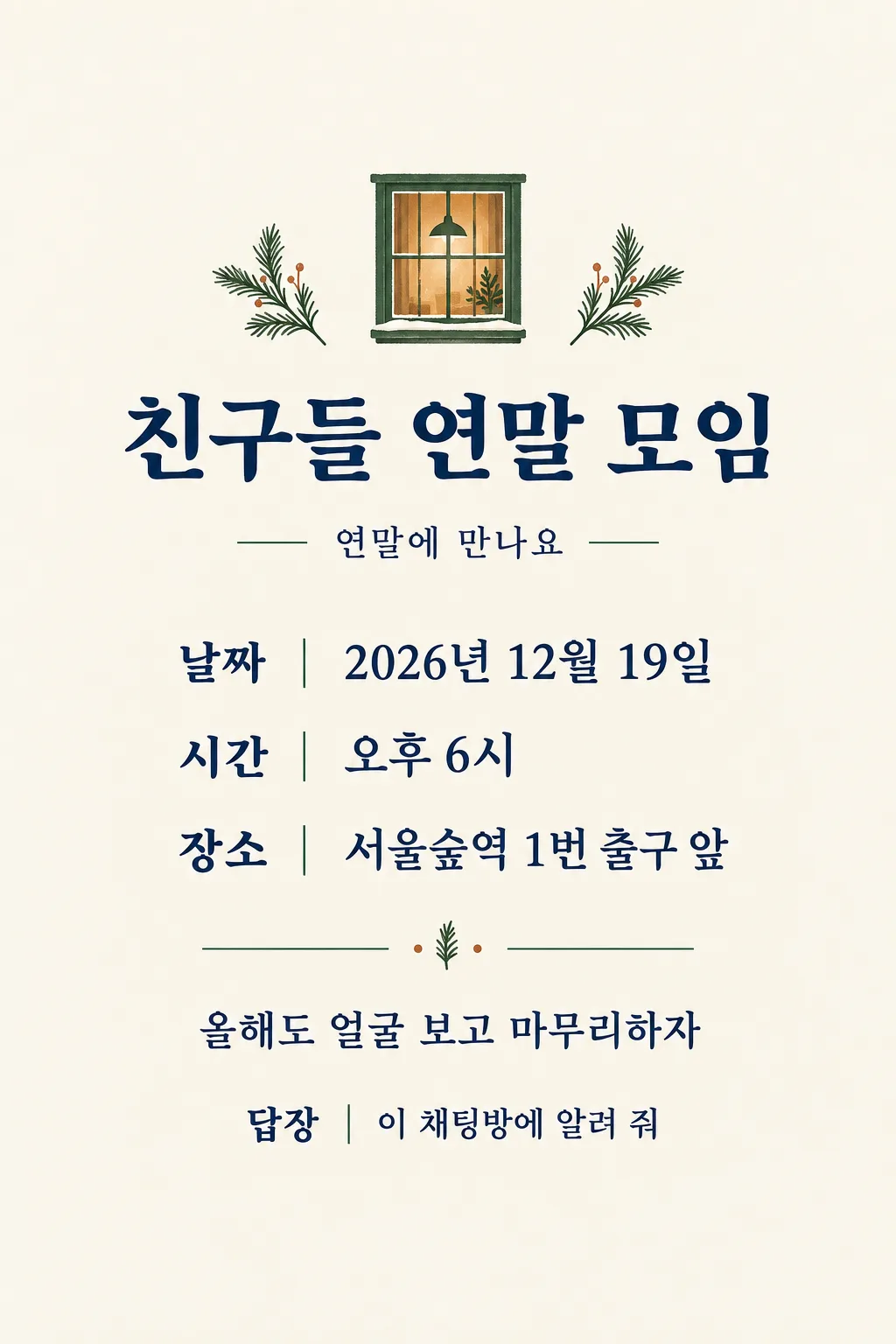
Fill in the fields
- 1Fill in the fields
- 2Copy the prompt
- 3Paste it into a GPT chat
- 4Send it as is and you get an image like the thumbnail example
- 5Attach a real photo that fits the card and it is used in the result: a background photo for background cards, a person or food photo for those cards Optional
Full prompt 3,497 characters
Create a finished year-end gathering invitation, one portrait 2:3 image. Generate the image itself.
Output exactly one finished 2:3 portrait image, 1024x1536 pixels. Leave the top 12% and bottom 15% free of essential text.

THE INVITATION'S MECHANISM
An invitation has a main appointment leaf and a physically attached RSVP reply leaf. The reply leaf gathers the question, reply route and deadline so guests can distinguish the appointment from the action they need to take. This is illustrated stationery for sharing, with crisp printed words; no actual interactive controls.

PAPER CONSTRUCTION: "【Reply leaf binding】". This is an internal selector; never print its value.
For Bottom tear-off: one tall cream invitation body with a wide, shallow reply slip joined along its BOTTOM edge. A horizontal perforation and small scissor glyph divide the two. Main appointment above, all RSVP wording in the bottom slip. No side panel.
For Side fold-out: an OPEN TWO-LEAF invitation, shown straight on. A broad tall appointment leaf on the LEFT and a narrower tall RSVP flap unfolded on the RIGHT, joined by a vertical scored fold. All RSVP wording on that right flap. No bottom slip, no horizontal perforation. The two panels must occupy the same vertical span. Fit the entire open stationery into the portrait canvas.

APPOINTMENT LEAF
Title: "【Gathering name】", large and centered over a tiny original pine sprig.
Date: "【Date】", the strongest fact after the title.
Start: "【Start time】". End: "【End time】" if supplied, joined to start with a dash.
Place: "【Meeting place】", kept together as a readable destination block, wrapping as needed.
Invitation sentence: "【Invitation line】".
Optional detail lines: fee "【Fee】", bring "【Bring】", dress "【Dress code】". Keep these on the appointment leaf.

REPLY LEAF ONLY
Heading "RSVP".
Question "【Reply question】", then two small EMPTY square outlines with the printed labels "Attending" and "Not attending". Neither is checked; they illustrate what to reply, not a registration widget.
Route "【Reply route】".
Deadline "【Reply deadline】" if supplied.
Do not repeat the date, place, title or greeting in the reply leaf.

ART DIRECTION
Warm matte cream paper, deep ink navy lettering, a quiet pine-green accent and a small copper line. Fine original winter botanical illustration, restrained and welcoming, with generous paper space. Flat frontal print design: paper edges and a scored seam are drawn, not a photographed desk mockup. No food, drinks, people or venue photograph. Do not invent a menu, program, host, weekday or attendance count. No ticket numbers, promotional badges or QR patterns.
Keep all essential lettering within the central 12–88% of canvas height and a 6% side inset; simplify the sprig before shrinking the destination or reply route. Make the two physical constructions unmistakably different at thumbnail size.
Visible language is English. Supplied wording occurs once, exactly; optional absent values or "Not selected" leave no label or empty row. Internal selector values, braces and instructions stay invisible. The only additional wording allowed is the RSVP heading, its two choices and short labels for the supplied facts. Return a single complete image without watermark.

[Final output format]
Output exactly one finished 2:3 portrait image, 1024x1536 pixels. Leave the top 12% and bottom 15% free of essential text.
This selected output format takes priority over any fixed canvas size or aspect ratio elsewhere in this template. Adapt the composition, text zones and margins to the selected canvas without stretching or cropping essential content. Device safe areas apply only when a device is selected. Never print these format instructions on the image.
How did it turn out?
More cards in this category
How to use it · FAQ
The reply slip moved from the bottom to the side
Two Korean trials of the same bookshop gathering placed the RSVP wording below a horizontal perforation. Changing only the binding selector produced a tall reply flap on the right. The appointment stayed on the left. These observations come from the Korean samples; English image generation has not been tested.
Empty squares do not submit a reply
Both attendance squares stayed empty in all three images. They are printed cues for a message, not working controls. Marking the image does not notify the organizer. Keep a usable route such as the group chat on the reply leaf. The samples separated the December 19 appointment from the December 12 reply deadline.
A side flap leaves less room for the title
The Korean title fitted on one line above the tear-off slip but wrapped to two lines beside the fold-out flap. If a long destination also crowds the appointment leaf, shorten the greeting while retaining the floor or room detail.
In both bottom-slip samples the deadline fell below the requested safe area, although it was not clipped in the original. If a sharing screen covers the bottom, ask: “Move the perforation and reply slip upward; keep all wording above 88% of the canvas height.” Other address lengths and translated image output remain untested.
Last checked · Published