

All · Ads & posters · Hours & closures · Holidays & occasions
021Year-end and New-year Opening Hours Poster
Separate December exceptions from January changes with a month seam, keeping the return to regular hours outside both months.
What you get
- One month-seam schedule poster with a separate regular-hours line
ChatGPT Free OK

Fill in the fields
- 1Fill in the fields
- 2Copy the prompt
- 3Paste it into a GPT chat
- 4Send it as is and you get an image like the thumbnail example
- 5Attach a real photo that fits the card and it is used in the result: a background photo for background cards, a person or food photo for those cards Optional
Full prompt 2,803 characters
Create one finished year-end and new-year shop hours poster, not a mockup. Portrait A4.
The signature is a MONTH-SEAM schedule: December exceptions on one side of a bold rule, January exceptions on the other. Warm ivory uncoated paper, charcoal sans-serif and muted vermilion. Tiny pine sprig and small rising-sun semicircle at outer corners only. Flat refined editorial typography, no photos or Christmas motifs.
SHOP: "【Shop name】"
DECEMBER: "【December changes】"
JANUARY: "【January changes】"
RESUMPTION: "【Regular hours resume】"
GREETING: "【New-year greeting】"
SEAM: "【Month seam】"
Print SHOP small at top, then "Year-end · New year" and "Opening hours". The schedule fills the middle and dominates the greeting.
SEAM Side by side: one vertical vermilion rule divides the central area into two open columns; large "December" heading on the left and "January" on the right. DECEMBER appears below December, JANUARY below January. Not stacked.
SEAM Stacked: replace the two-column composition with two full-width tiers separated by one horizontal vermilion rule; "December" with DECEMBER above, "January" with JANUARY below. No vertical divider.
Split each month input at commas into separate lines. Each line includes the day and its status or hours; preserve all supplied characters and associate the status with its date. Never create an extra date, year, weekday or calendar cell. Monthly headings identify the month; do not repeat them on each line.
Below the schedule print "Regular hours resume" with RESUMPTION in a single bold baseline, outside both month areas. GREETING is a smaller final line. No booking, promotion or contact invented. Empty GREETING disappears. No colored boxes, scrolls, hanging date leaves, doorway plaques, clocks, calendar grids, arrows or decorative numerals. Only the listed English copy and supplied digits/punctuation. Keep broad print margins and complete glyphs. Ignore attachments. Follow only the chosen SEAM; changing it rotates the month division and recomposes the schedule, while retaining the paper, palette and all wording.

ACTIVE GEOMETRY OVERRIDE: 【Month seam】. Side by side means December strictly LEFT at x5–47%, January strictly RIGHT at x53–95%, BOTH at y38–72%, vertical rule x50%; hours may wrap below their day. Stacked means December y36–53%, January y57–74%, horizontal rule y55%. Ignore the unselected branch and prior image compositions. Visible labels must be English.

[Final output format]
Output size 2480x3508 pixels, A4 portrait, 300dpi, print-ready poster.
This selected output format takes priority over any fixed canvas size or aspect ratio elsewhere in this template. Adapt the composition, text zones and margins to the selected canvas without stretching or cropping essential content. Device safe areas apply only when a device is selected. Never print these format instructions on the image.
How did it turn out?
More cards in this category





How to use it · FAQ
The first divider went the wrong way
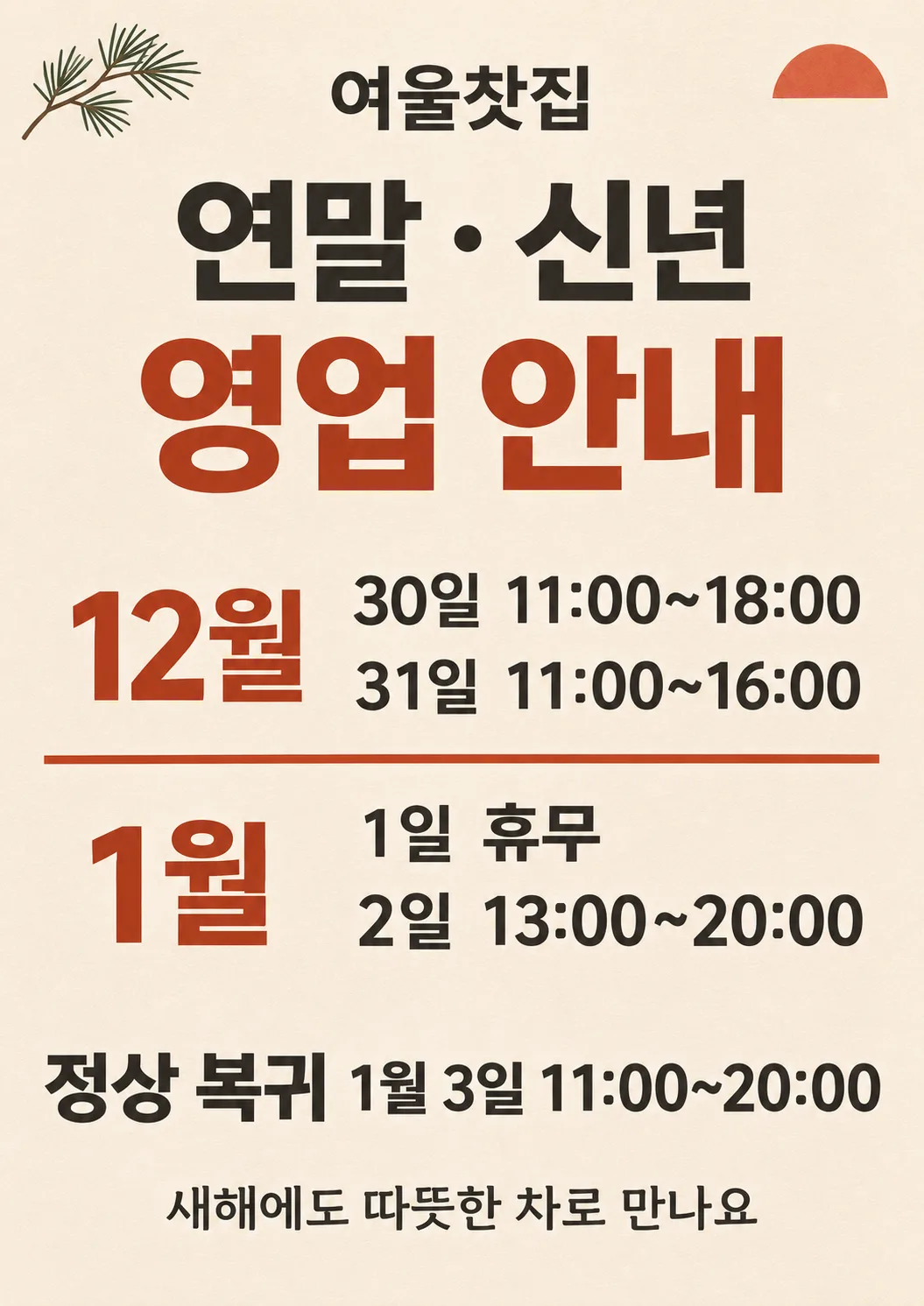
Our first Korean trials stacked December above January despite selecting side-by-side months. They also added English month names. After one final geometry instruction was added, both new baseline images put December on the left and January on the right, without the extra English. December 30 and 31 stayed together; January 1 closure and January 2 late opening occupied the other side.
A horizontal seam gives the hours more room
Changing only the month seam to Stacked replaced the vertical divider with a horizontal rule. December moved above January and each time range fitted beside its date. In the side-by-side images, the hours wrapped below the day. The palette and greeting stayed the same; the reading direction changed.
Reopening on the second is not the regular schedule
The fictional test shop opened at 13:00 on January 2, then returned to 11:00 opening on January 3. All three revised images kept the January 3 regular-hours line outside the monthly exceptions. Put the special hours in the January changes and the actual return to the usual schedule in the separate resumption field.
Separate date-and-status entries with commas; the month heading already supplies the month. This is an exceptions notice rather than a full calendar. We tested two entries per month, not a long holiday list. The resumption line was wide in both baseline images, so keep it to the date and hours. These observations come from Korean image trials; English lettering was not separately tested.
Last checked · Published