
すべて · 広告・ポスター · 新商品 · カフェ・スイーツ
280ハードライトの商品写真 — 単色背景・くっきりした影の広告カット
スマホで撮った商品写真一枚が、強い日差しとくっきり長い影、単色背景の雑誌広告カットになります。
受け取れるもの
- 商品が主役の広告写真一枚
- 単色の背景と長くのびるくっきりした影
- ガラスや金属の反射まで
ChatGPT 無料 OK
項目を入力
- 1項目を入力します
- 2コピーを押します
- 3GPTのチャットに貼り付けます
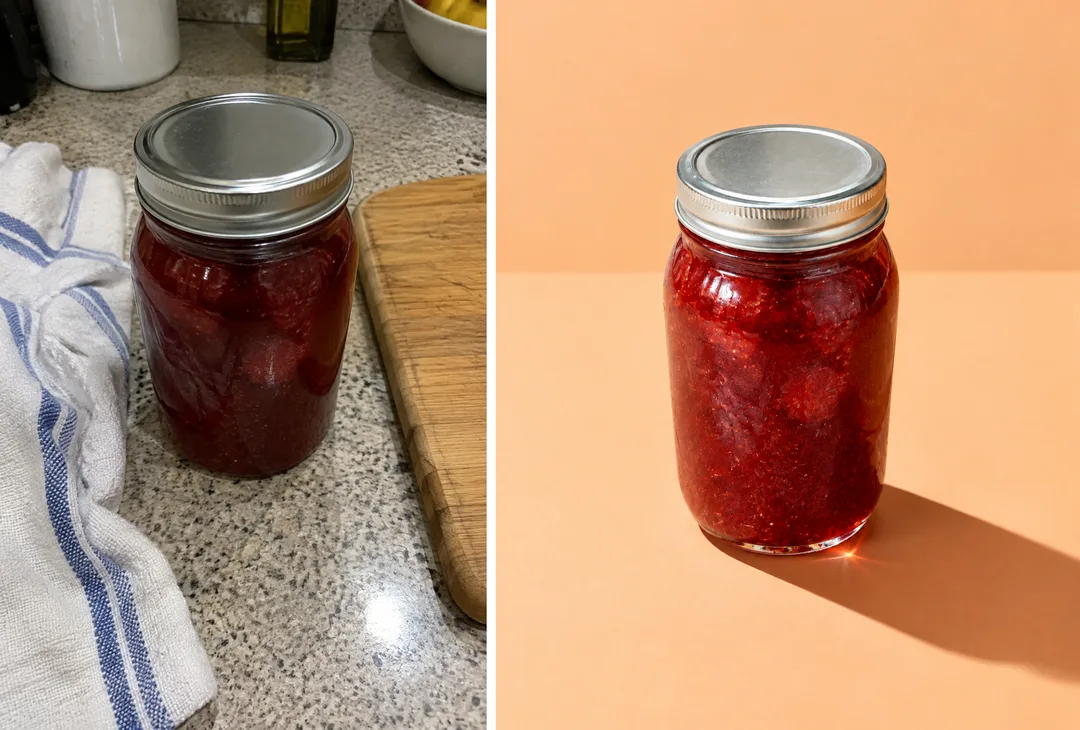
- 4そのまま送ると、サムネイルの例のような画像になります
- 5カードに合う実際の写真を一緒に入れると反映されます。背景カードなら背景の写真、人物・料理カードならその写真 任意
プロンプト全文を見る 3,246文字
Generate this image now. Draw it directly - do not describe it, explain it, or ask questions.
出力サイズは1080×1350ピクセル、4:5の縦型Instagram投稿にしてください。

Create one finished commercial hard-light product photograph.
PRODUCT: "【商品】"
Show the specified product as a substantial, realistic object with convincing material, shape, surface texture, and packaging construction. Keep the product fully visible and the entire principal cast shadow inside the image.

[Attached photo]
If a product photo is attached, use that product as the visual reference: preserve its silhouette, proportions, material, color, contents, and distinctive non-branded details. Replace the original setting with the studio scene below. Remove brand names, logos, watermarks, and existing characters; retain believable unbranded packaging. Do not paste a flat photo cutout.
PHOTO RULE: if a photo is attached, use it as described; if no photo is attached, never ask for one and never stop — invent a fitting fictional subject and finish the image.

BACKGROUND selected: "【背景色】"
Interpret only the selected choice:
- アプリコット: Warm matte apricot background and matching tabletop.
- 空色: Clear pale sky-blue background and matching tabletop.
- 若草: Fresh pale lime-green background and matching tabletop.
- バター黄: Soft butter-yellow background and matching tabletop.
- 淡いピンク: Warm pale pink background and matching tabletop.
- 灰白: Light chalk-gray background and matching tabletop.
If this selection line is missing or empty, use アプリコット only.

SHADOW selected: "【影の向き】"
Interpret only the selected choice:
- 右下: Hard light from the upper left; a crisp elongated shadow falls diagonally toward the lower right.
- 左下: Hard light from the upper right; a crisp elongated shadow falls diagonally toward the lower left.
- 後ろへ長く: Hard light from the front; a long crisp shadow recedes behind the product, visibly extending across the tabletop.
If this selection line is missing or empty, use 右下 only.

PROPS selected: "【小物】"
Interpret only the selected choice:
- なし: Product alone; no decorative objects.
- 材料を一、二個: Add only one or two small raw ingredients directly related to the product, beside its base, without obscuring the product or its shadow.
- 小さな台: Place the product on one small plain geometric pedestal; preserve convincing contact and cast shadows.
If this selection line is missing or empty, use なし only.

Use one strong direct light with sharp shadow edges, concentrated highlights, deep but readable shadows, and realistic reflections or transmitted light appropriate to the material. Seamless single-color studio set, subtle camera elevation, premium advertising photograph. Let the product occupy roughly 40–55% of image height and leave room for the dramatic shadow.

Output only the final photograph. No layout, headings, captions, real-person likeness, trademarks, brands, existing characters, logos, or watermarks. Do not invent packaging text.

[Final output format]
出力サイズは1080×1350ピクセル、4:5の縦型Instagram投稿にしてください。
This selected output format takes priority over any fixed canvas size or aspect ratio elsewhere in this template. Adapt the composition, text zones and margins to the selected canvas without stretching or cropping essential content. Device safe areas apply only when a device is selected. Never print these format instructions on the image.
結果はどうでしたか?
こちらのカードも人気です
使い方・よくある質問
こんなときに
ネットショップやインスタに載せる商品のメイン写真が必要なのに、照明もスタジオもないときに使います。スマホで撮った商品写真一枚を入れると、片側から強い日差しが当たりくっきりした長い影が落ちる単色背景の広告カットになります。ガラス瓶は光が透けて床に色がにじみ、金属のふたはきらりと反射します。
海外の有料プロンプト販売サイトで売られている「ハードライト商品写真」と同じ形式です。商品一つと影だけのミニマルな構成なので、商品がいちばん大きく見えます。
欄の埋め方
商品名を書くだけです。背景色は商品と反対の色を選ぶとはっきりします(赤いジャム → アプリコット・空色)。影の向きは文字を入れる側の反対に。小物は「なし」が基本です。
自分の商品写真を入れるとき
① 写真をアップロード — まだ送らない ② 同じ欄にプロンプトを貼る ③ 両方入ったのを確認して送る。写真だけ先に送ったら、プロンプトの最後に「上の写真で描いて」と付けてください。カード内の例は台所で撮った写真(左)と結果(右)です。
出てきたら確認すること
- 形・ふたの色・ラベルの位置は実物と同じですか?販売写真は実物と違って見えてはいけません。
- ラベルの文字がつぶれたら「ラベルの文字は写真のまま」と伝えてください。
よくある質問
- ショップのメイン画像に使えますか? 実物と同じなら使えます。
- 白背景が必要です。 「灰白」を選び、純白が必要な場所には元の切り抜き写真を使ってください。