
전체 · 광고/포스터 · 신메뉴·신상품
385착시 3D 모서리 전광판 광고
우리 메뉴와 상품이 도심 건물의 꺾인 LED 화면에서 튀어나오는 듯한 실사 광고 장면을 만들어요.
받는 것
- 모서리 LED 두 면에 상품이 입체로 튀어나오는 듯한 가상 거리 사진 한 장
- 입력한 시간
- 날씨의 거리와 선택한 상호 표시
ChatGPT 무료 OK
칸 채우기
- 1칸을 채워요
- 2복사 버튼을 눌러요
- 3GPT 채팅창에 붙여넣어요
- 4그대로 보내면 썸네일 예시처럼 나와요
- 5선택을 같이 넣으면 그 사진이 반영돼요 선택
프롬프트 원문 보기 4,038자
Generate ONE full-bleed photorealistic street photograph directly, no questions, code, collage or poster layout.
Output exactly one finished 2:3 portrait image, 1024x1536 pixels. Keep all important text inside the central 73% of image height: leave the top 12% and bottom 15% free of essential lettering.
PRODUCT: "【상품】"
SHOP: "【가게 이름】"
TIME: "【시간】"
CITY MOOD: "【도시 분위기】"

[FIXED CORNER LED ILLUSION]
An invented contemporary commercial building at an imaginary intersection. Ground-level camera at the designated corner viewing point, looking upward. A massive L-shaped LED billboard spans TWO perpendicular exterior walls, both planes clearly visible. Real straight dark top/bottom bezel, metal cladding, windows and consistent street vanishing points. The screen dominates the middle two thirds; sky, architecture and street fill all image edges. Small ordinary adults on the sidewalk look up, at plausible real architectural scale.
INSIDE the screen, a deep virtual recessed box spans both panels continuously. One enormous hero product appears to project toward the viewer across the corner and over the VIRTUAL lip. Align virtual floor, side walls, contact shadows, foreshortening and occlusion to the same viewpoint. All digital elements stay within the physical outer screen boundaries. Subtle luminous LED pixel texture distinguishes the digital imagery from the rigid real building. This is a photographed anamorphic LED ad, never a physical giant object floating in the street, miniature workshop or tabletop scene.

[PRODUCT AND PHOTO RULE]
If a product photo is attached, use it as identity reference: preserve recognizable silhouette, proportions, colors, layer count, toppings, materials and distinctive decorations; remove original background and integrate its enlarged likeness into the LED virtual box. Do not reproduce third-party logos, packaging branding or source captions. Preserve permitted owner-supplied shop wording through SHOP only. If no photo is attached, create a convincing fictional product matching PRODUCT without asking for a photo. One hero product only; supporting splash or a few product pieces may establish depth, never introduce a different menu.
Food must look edible and photographic: iced latte has irregular transparent ice, condensation, pale milk and brown espresso marbling; tteokbokki has short thick rice-cake cylinders in uneven directions, viscous red sauce, irregular folded fish cake and fine scallions; cake has natural porous sponge, soft cream and strawberry seeds. No plastic sheen, identical repeated pieces or ornamental food coils. Other products keep plausible material texture.

[TIME AND CITY]
Use TIME for illumination: daylight gives natural shadows; sunset gives warm sky and reflected evening light; neon night gives a dark sky, luminous screen and restrained city reflections. Empty TIME defaults to sunset.
Use CITY MOOD for street setting: commercial avenue means an invented busy modern intersection; rainy street means wet pavement, reflections and pedestrians with umbrellas; snowy plaza means open paving, snow at edges and winter coats. Empty CITY MOOD defaults to a contemporary commercial avenue. Match weather, clothes and street lighting to both inputs. Never copy a real landmark, building, screen operator or advertiser.

[EXACT TEXT]
If SHOP is nonempty, print it exactly ONCE in small plain type inside a corner of the LED scene, at middle image height (between 35% and 70%), not a logo. Check every letter. Empty SHOP means no shop text, badge or blank sign. PRODUCT, TIME and CITY MOOD are visual instructions, never printed captions. Visible text uses Korean; preserve supplied owner wording. No invented slogan, price, promotion, health claim, QR code, watermark, real advertiser or unrelated street lettering. Output one finished photograph requiring no retouching.

[Final output format]
Output exactly one finished 2:3 portrait image, 1024x1536 pixels. Keep all important text inside the central 73% of image height: leave the top 12% and bottom 15% free of essential lettering.
This selected output format takes priority over any fixed canvas size or aspect ratio elsewhere in this template. Adapt the composition, text zones and margins to the selected canvas without stretching or cropping essential content. Device safe areas apply only when a device is selected. Never print these format instructions on the image.
결과 어땠어요?
이 카드도 많이 사용해요

쓰는 법 · 자주 묻는 것
우리 신메뉴가 거리의 대형 화면에 걸린다면
카페 사장님, 분식집 운영자, 상품 마케터가 신메뉴 소개나 출시 피드에 쓰는 가상 광고 사진이에요. 건물 모서리를 감싼 두 면의 LED에 상품을 크게 넣고, 화면 안쪽의 깊은 상자와 그림자로 튀어나오는 착시를 만들어요. 거리의 사람과 실제 크기의 건물 외벽이 함께 보여요. 작은 작업실 세트나 음식 옆 미니어처 사람들이 주인공인 사진과는 구도가 달라요. 실제 옥외 광고를 집행했다는 인증 사진은 아니며, 게시 글에는 가상 광고 이미지라고 밝혀 주세요.
4칸 사용법과 사진 첨부
꼭 칸은 상품 1개예요. ‘투명 유리잔의 아이스 라테’처럼 모양과 재료를 적으면 사진 없이도 가상 상품을 그려요. 떡볶이, 딸기 생크림 케이크, 강아지 간식도 보기에서 고를 수 있어요. 한 번에 한 상품을 넣어요. 내 상품을 쓰려면 복사한 프롬프트와 상품 사진 한 장을 그림 AI에 함께 첨부하세요. 사진은 별도 입력 칸이 아니라 첨부 파일이에요. 케이크의 층, 장식, 포장 모양처럼 남겨야 할 특징을 상품 칸에도 적으면 확인하기 쉬워요. 원본 배경은 사라지고 상품은 전광판 안의 광고 장면에 들어가요.
가게 이름은 선택이에요. 적으면 LED 안쪽 구석에 작은 글자로 한 번 표시하고, 비우면 상호와 빈 이름판을 모두 없애요. 시간은 낮·해 질 녘·밤 네온 중에서 고르며 빈칸이면 해 질 녘이에요. 도시 분위기는 가상 번화가·비 오는 거리·눈 오는 광장 중에서 골라요. 비우면 현대적인 번화가예요. 시간은 하늘과 화면 빛, 거리 분위기는 바닥·우산·겨울옷을 바꿔요. 화면 비율은 공통 선택을 쓰세요. 이름과 시간만 바꾸어도 결과 종류는 같은 모서리 전광판 사진으로 유지돼요.
표지와 예시
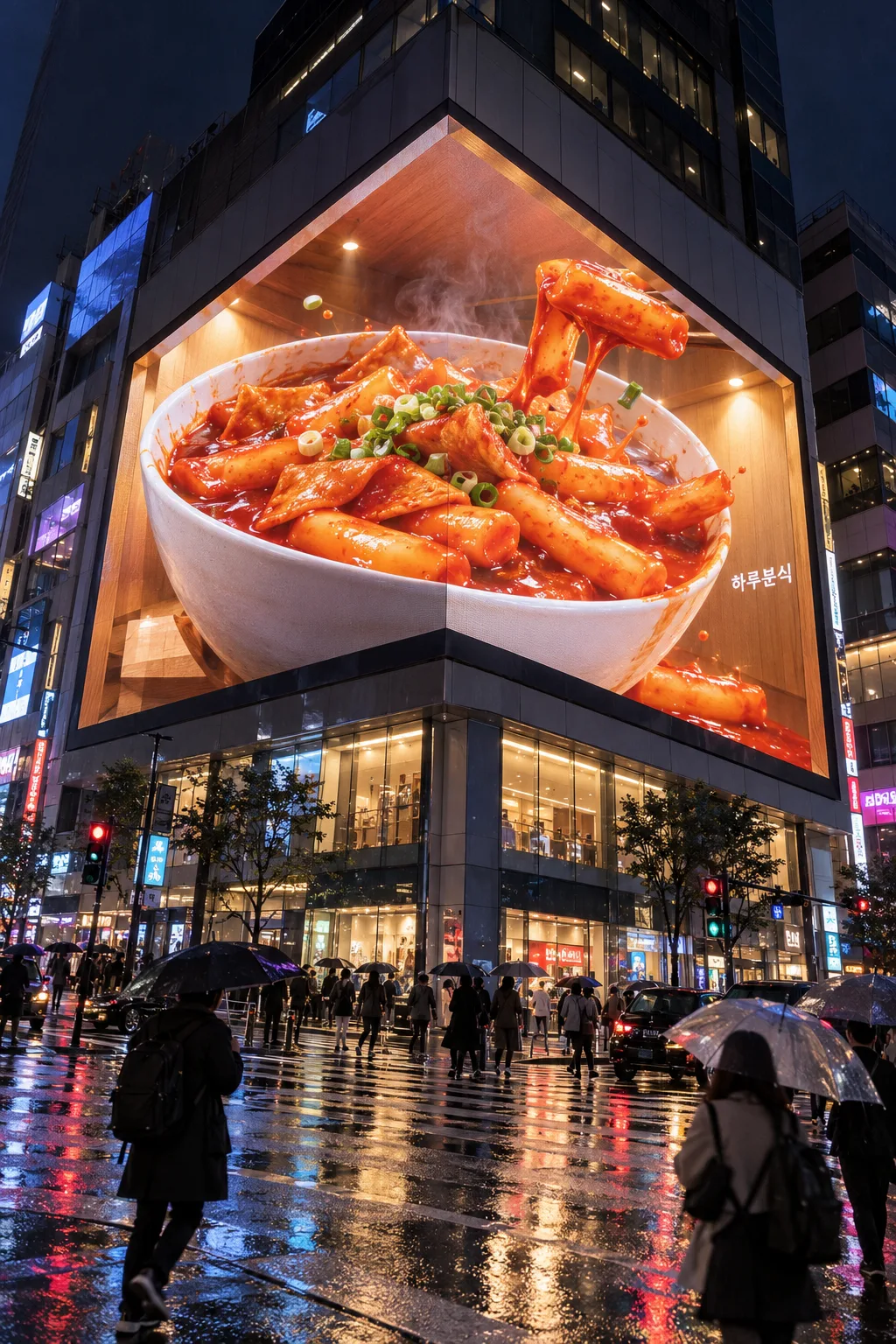
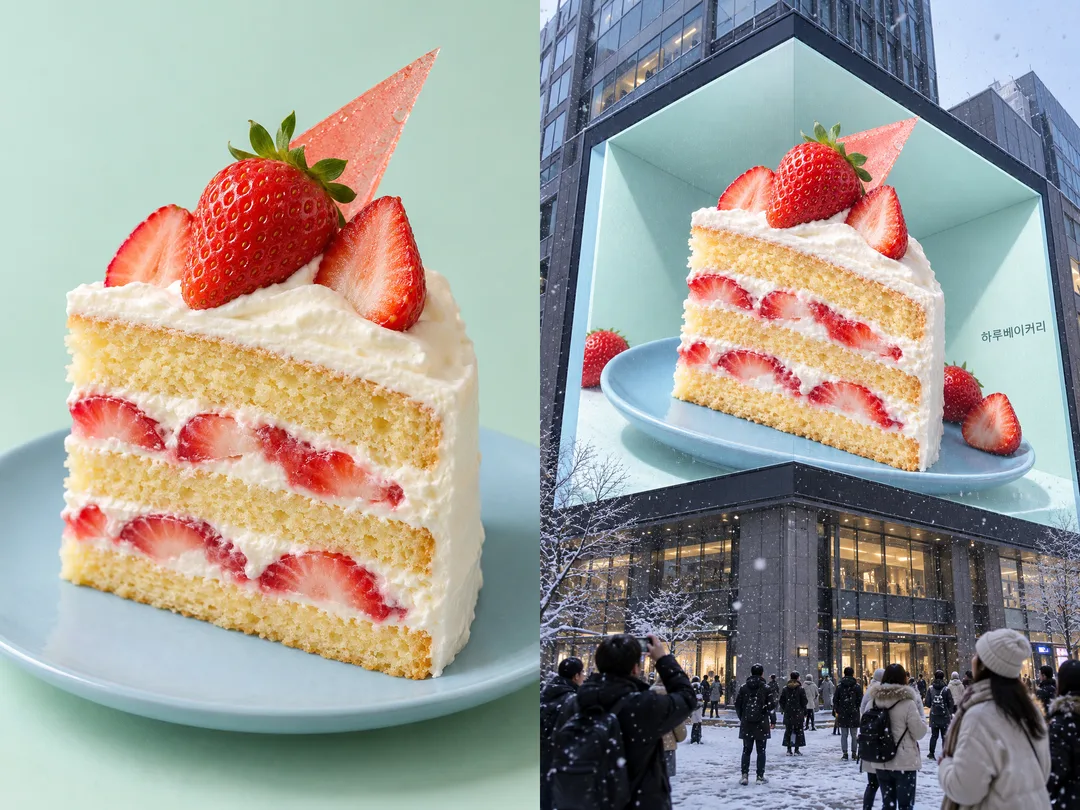
표지는 하루커피의 아이스 라테, 해 질 녘 가상 번화가예요. 첫 예시는 하루분식의 떡볶이, 밤 네온과 비 오는 거리예요. 두 번째 예시는 가상 케이크 상품 사진과 낮의 눈 오는 광장 전광판 결과를 나란히 보여 줘요. 세 겹의 노란 시트, 두 겹의 딸기 크림, 분홍 장식과 파란 접시가 결과에도 남았는지 비교하세요. 비교 속 결과를 별도 갤러리 사진으로 반복하지 않아요.
사용 전 확인과 다시 요청하는 법
먼저 꺾인 화면 두 면이 같은 상품과 상자를 이어 보여 주는지 확인해요. 실제 검은 화면 테두리와 건물 외벽은 곧게 남아야 하고, 디지털 상품이 화면 경계 밖의 실제 거리로 떠다니면 실패예요. ‘상호와 상품은 유지하고 두 면의 상자 바닥과 그림자 원근을 맞춰 줘’처럼 한 문제를 짚어 다시 요청하세요. 라테의 얼음·물방울, 떡볶이의 불규칙한 떡과 양념, 케이크의 단면이 실물처럼 보이는지도 확인해요. 상호는 한 글자씩 대조하세요. 실제 건물이나 다른 업체 로고가 나오면 가상 건축물과 무표기 거리로 다시 요청하세요.
자주 묻는 것
실제 전광판 광고 파일로 바로 납품할 수 있나요? 이 카드는 SNS에 쓰는 거리 장면 한 장을 만들어요. 실제 LED 송출용 영상이나 장비별 투시 보정 도면은 포함하지 않아요. 사진이 없어도 되나요? 상품 글만으로 가상 상품을 만들 수 있어요. 이름 없이 쓸 수 있나요? 상호를 비우면 글자 없이 상품과 거리만 나와요. 생성 결과는 매번 달라질 수 있어요. 외부 서비스의 요금·약관은 해당 서비스에서 확인하세요.