
전체 · 광고/포스터 · 음식점·식당
375겨울 국물 요리 매장 포스터
뚝배기에서 올라오는 김과 보글보글 국물을 크게 담고 메뉴 이름·가격을 또렷하게 보여 주는 겨울 매장 포스터예요.
받는 것
- 김과 건더기가 보이는 국물 요리 가격 포스터 한 장
- 큰 메뉴 이름과 실제 판매 가격, 짧은 문구
- 입력한 판매 단위와 주문 안내
ChatGPT 무료 OK
칸 채우기
- 1칸을 채워요
- 2복사 버튼을 눌러요
- 3GPT 채팅창에 붙여넣어요
- 4그대로 보내면 썸네일 예시처럼 나와요
- 5카드에 맞는 실제 사진을 같이 넣으면 그 사진이 반영돼요 — 배경 카드는 배경 사진, 인물 · 음식 카드는 그 사진 선택
프롬프트 원문 보기 3,916자
Generate ONE finished winter soup restaurant PRICE poster directly. Return a single image, no questions, code, mockup or collage.
Output exactly one finished 2:3 portrait image, 1024x1536 pixels. Keep all important text inside the central 73% of image height: leave the top 12% and bottom 15% free of essential lettering.

[ONE FIXED DESIGN]
Full-bleed dark warm charcoal photographic backdrop, dark wooden table continuing to the bottom edge. Warm ivory extra-bold clean lettering above a huge soup bowl; large amber flat price below the food. Strong warm side light and realistic backlit steam. Food photography, not illustration or CGI. One dish only, one price, no design variants.
Keep all essential text between 13% and 84% of the height, 5% inset from side edges. Shop at 13-17%; large menu at 18-29%; short line at 31-35%; soup at 37-73%, about 94% canvas width; price at 77-83%. Optional unit/order information is compact beside the price inside the same safe area. Above 12% only dark steam backdrop; below 85% only photographic wood and bowl, never empty paper. Text readable at thumbnail size. No letters overlap broth, steam never obscures letters. Longer titles may use two tight lines in the same title area.

[FOOD STRUCTURE]
One rough dark glazed earthenware bowl at a 45-degree camera angle. Visible liquid broth, realistic simmering bubbles around the rim and natural diffuse rising steam. Preserve a plausible single serving. Irregular meat slices partly submerged, sliced scallions, fine pepper flecks, genuine soft food textures and restrained liquid reflections. Use the main ingredients if specified; do not add meat, egg, rice or sides beyond those ingredients. For a blank ingredients field, make a plausible fictional serving of the named dish. Pork rice soup: pale milky broth and thin pork slices. Soft tofu stew: red-orange broth and delicate irregular soft curds, not firm perfect cubes. Kimchi stew: uneven softened cabbage leaves. Knife-cut noodles: flat loose strands partly submerged with zucchini, never coils, a dome or a lattice. Fish cake soup: varied flat folded fish cake pieces and radish, not identical balls. Beef rib soup: plausible irregular bone-in ribs in clear broth. Adapt vessel depth to the dish. No plastic sheen, repeated pieces, ornamental steam spirals, overflowing volcano or promotional side dishes.

[EXACT OWNER VALUES]
SHOP: "【가게 이름】". Print once in plain type, not a logo.
MENU: "【메뉴 이름】". Print once, large, above the soup.
PRICE: "【판매 가격】". Print once, exact punctuation, digits and currency. Never calculate a discount or invent a former price.
INGREDIENTS: "【주요 건더기】". Internal visual direction only, never print this field as a caption.
BROTH: "【국물 색】". Internal only. Empty or "알아서 맞춰줘" means match the named dish; otherwise use the selected natural broth color. Keep ingredient identity.
COPY: "【한 줄 문구】". Print once exactly. For "알아서 골라줘", choose one short everyday invitation about a hot bowl, never print that instruction. Empty means omit the line.
UNIT: "【판매 단위】". Print only if supplied, exact wording beside price. Never invent included rice or serving counts.
ORDER: "【주문 안내】". Print only if supplied, exact wording beside price.

[EMPTY FIELDS AND SAFETY]
Absent optional values remove their labels and rows; close gaps with photo background. No extra text, internal keys, input instructions, blank badges, ratings, origin claims, health benefits, treatment, tonic or nourishment claims. No third-party logo, trademark, QR code, watermark or invented offer. Visible text is Korean, with supplied values exactly preserved. Generate a convincing fictional food photograph without asking for an uploaded photo. No manual compositing or retouching is required.

[Final output format]
Output exactly one finished 2:3 portrait image, 1024x1536 pixels. Keep all important text inside the central 73% of image height: leave the top 12% and bottom 15% free of essential lettering.
This selected output format takes priority over any fixed canvas size or aspect ratio elsewhere in this template. Adapt the composition, text zones and margins to the selected canvas without stretching or cropping essential content. Device safe areas apply only when a device is selected. Never print these format instructions on the image.
결과 어땠어요?
이 카드도 많이 사용해요
쓰는 법 · 자주 묻는 것
국물이 보이는 겨울 메뉴판
11월부터 2월까지 국밥집·찌개집·분식집의 벽이나 유리창에 붙일 가격형 포스터예요. 짙은 배경 위에 밝은 메뉴 이름을 올리고, 검은 뚝배기의 뜨거운 국물과 김을 크게 보여 줘요. 메뉴 아래에는 호박색 가격이 들어가요. 여러 메뉴를 모은 메뉴판이 아니라 한 메뉴를 소개하는 포스터 한 장을 만들어요.
꼭 채우는 값과 선택하는 값
꼭 칸은 3개예요. 가게 이름은 실제 상호, 메뉴 이름은 손님에게 판매하는 이름, 판매 가격은 실제 결제 금액과 통화까지 적어요. 기본 예시는 하루국밥·돼지국밥·9,000원이에요. 메뉴 보기에는 국밥·순두부찌개·김치찌개·칼국수·어묵탕·갈비탕이 있고 다른 국물 요리 이름도 쓸 수 있어요. 한 번에는 하나만 넣어요.
주요 건더기는 화면에 보여야 할 재료예요. 돼지고기와 파, 순두부와 파처럼 실제 음식에 맞춰 적어요. 비우면 해당 메뉴의 일반적인 가상 음식이 그려져요. 국물 색은 음식 내부를 바꾸는 단추이며 포스터에 글자로 찍히지 않아요. 메뉴에 맞는 색을 모르겠으면 ‘알아서 맞춰줘’를 두세요. 한 줄 문구는 보기에서 고르거나 직접 쓸 수 있고, ‘알아서 골라줘’는 짧은 초대 문장으로 바뀌어요. 이 칸을 비우면 문구 줄이 사라져요.
판매 단위와 주문 안내는 선택 칸이에요. 밥이 별도인지 포함인지 매장 기준을 적으면 가격 옆 작은 글자로 들어가요. 비우면 밥·반찬·인분을 임의로 덧붙이지 않아요. 주문 안내도 빈칸이면 사라지고 음식 배경으로 자리를 채워요. 사진을 준비하지 않아도 프롬프트를 그림 AI에 한 번 붙여 넣으면 완성 포스터를 받아요. 생성된 음식은 가상 사진이므로 실제 제공량과 재료를 매장 주인이 확인해야 해요. 외부 서비스의 요금·약관은 해당 서비스에서 확인하세요.
표지와 두 예시 읽기
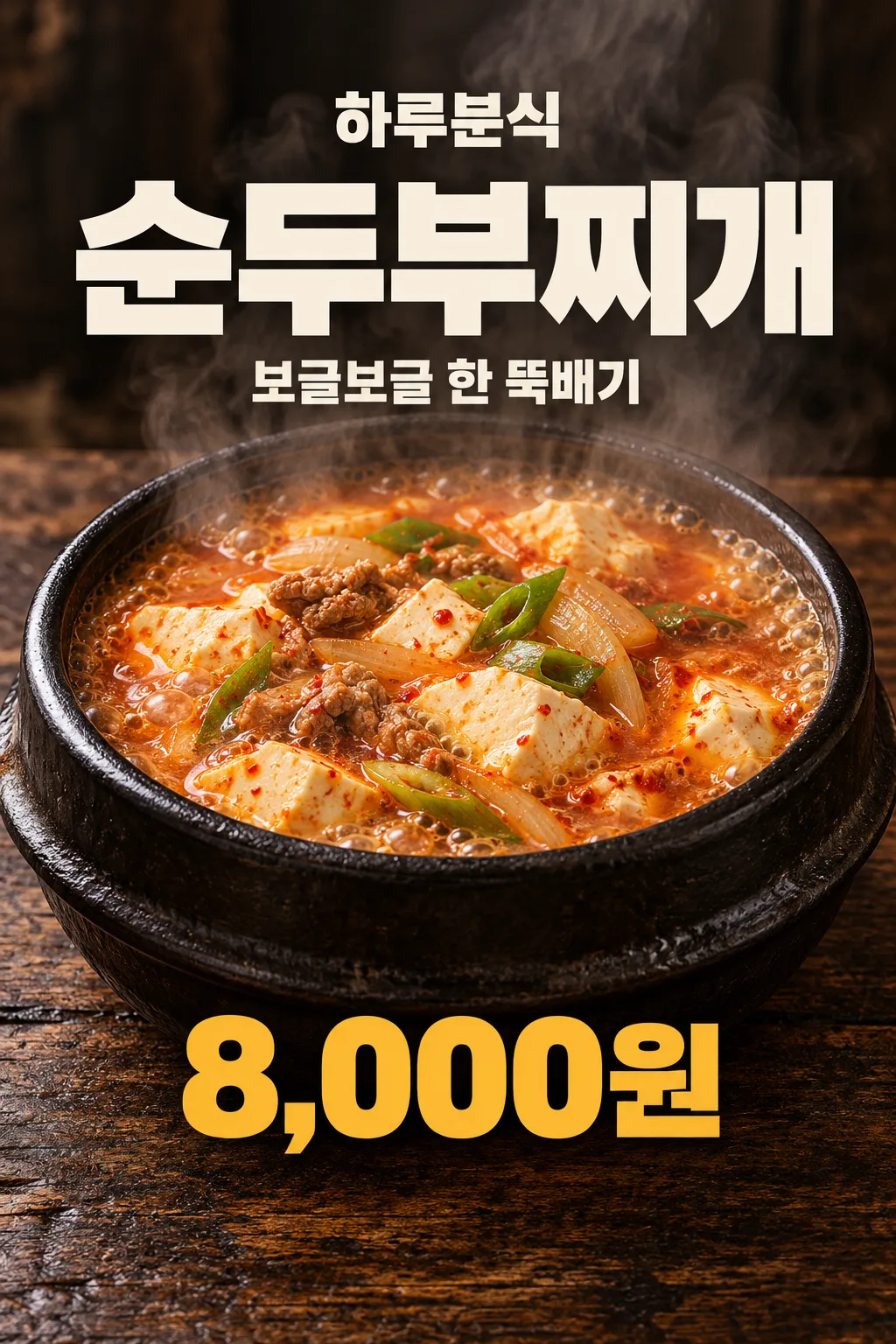
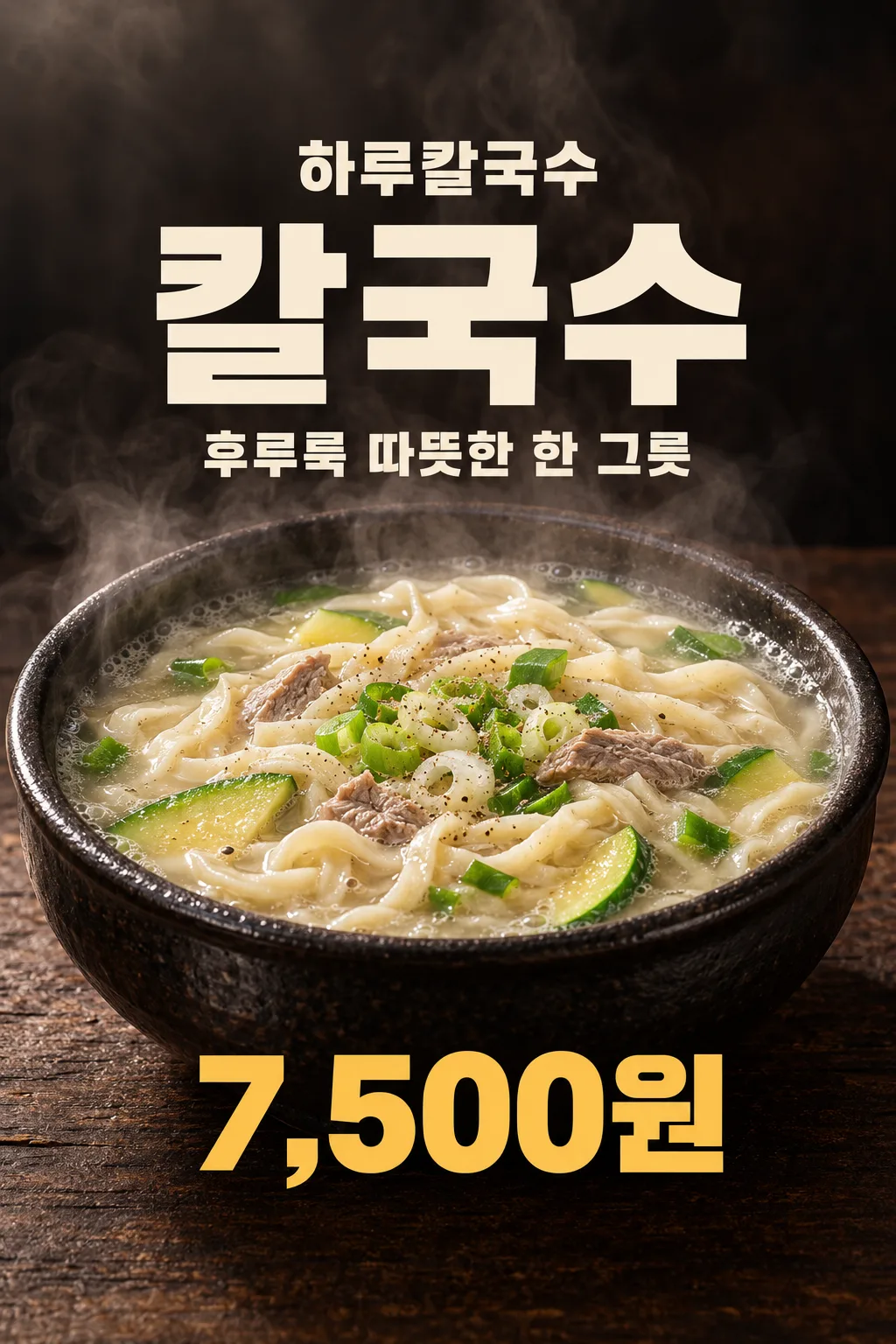
표지는 하루국밥의 돼지국밥 9,000원과 ‘추운 날엔 뜨끈하게’예요. 첫 예시는 하루분식의 순두부찌개 8,000원과 ‘보글보글 한 뚝배기’, 둘째는 하루칼국수의 칼국수 7,500원과 ‘후루룩 따뜻한 한 그릇’이에요. 모두 별도로 생성한 포스터이며 색·선명도·글자를 손질하지 않았어요. 순두부 예시는 주요 건더기를 ‘순두부·돼지고기·양파·파’, 칼국수 예시는 ‘칼국수 면·애호박·소고기·파’로 설정한 모습이에요. 메뉴만 바꾸면 같은 짙은 사진 배치 안에서 음식이 달라져요.
붙이기 전 확인과 고치는 법
한글은 가게 이름부터 한 글자씩, 가격은 쉼표와 원 단위까지 대조하세요. 건더기가 국물 위에 플라스틱처럼 쌓이지 않았는지, 칼국수 면이 똬리나 그물 모양이 되지 않았는지 확인해요. 잘못 나오면 ‘메뉴와 가격은 그대로 두고, 순두부를 모서리 없는 부드러운 덩어리로 바꿔 줘’처럼 음식 한 부분을 짚어 다시 요청하세요. 실제 매장에 없는 고기나 밥이 생기면 주요 건더기와 판매 단위를 고쳐요. 건강 효능, 원산지, 할인 문구는 임의로 넣지 않아요.
자주 묻는 것
가격 없는 사진도 만들 수 있나요? 이 카드는 가격형 매장 포스터라 가격을 꼭 적어요. 메뉴 여러 개를 한 장에 넣나요? 한 메뉴가 주인공인 고정 배치예요. 출력 크기를 바꾸려면 공통 화면 비율 선택을 쓰세요. 생성 픽셀이 인쇄 품질을 자동 보장하지 않으므로 한 장 먼저 출력하고 붙일 자리에서 메뉴와 가격을 읽어 보세요.