
전체 · 배경화면 · 폰 배경화면 · 계절·풍경
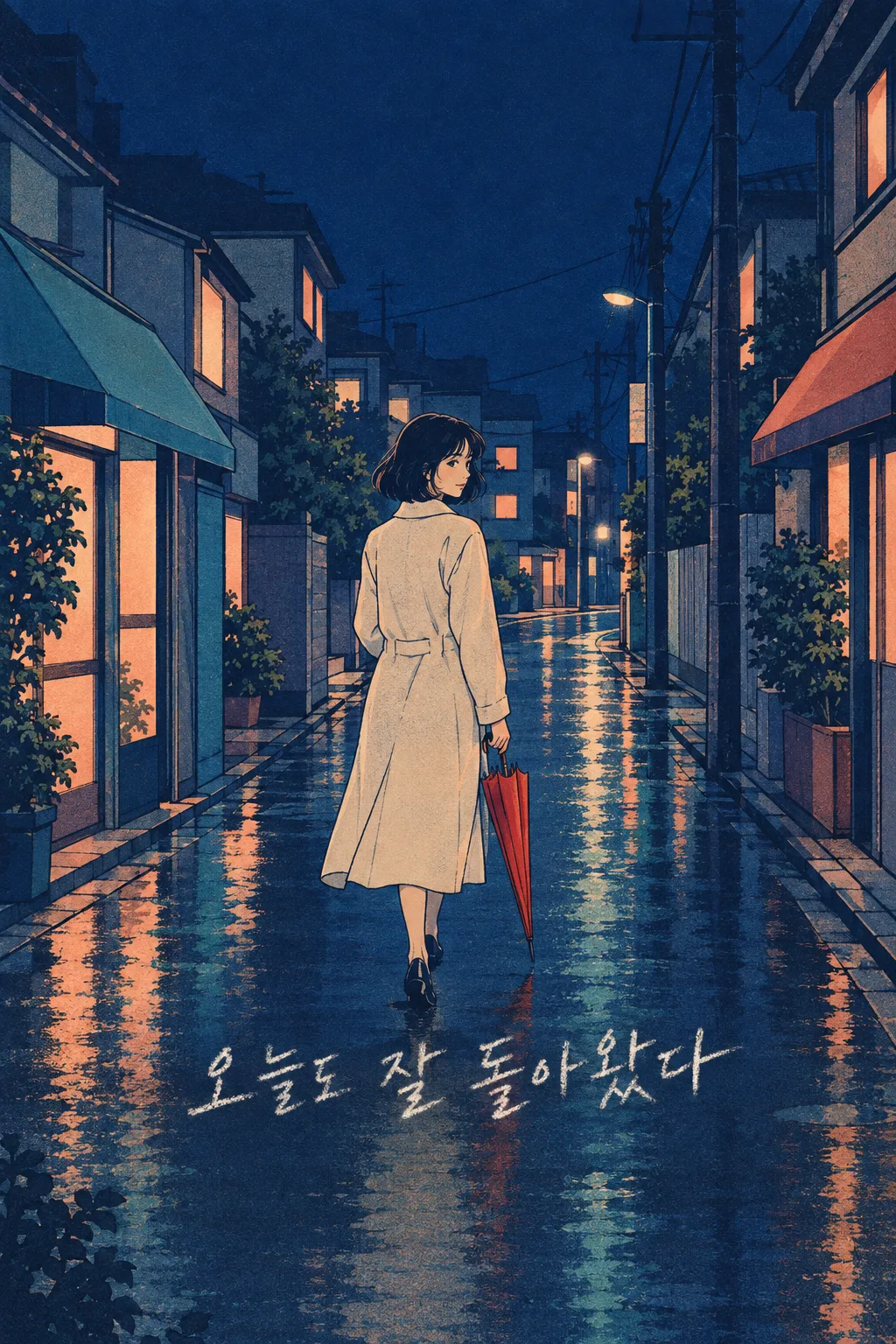
102시티팝 필름 배경화면
내 밤거리 사진을 올리는 사람이 시티팝 필름 그림 한 장으로 바꿔 휴대폰 잠금화면과 인스타 스토리에 써요.
칸 채우기
- 1칸을 채워요
- 2복사 버튼을 눌러요
- 3GPT 채팅창에 내 사진 1장을 올리고, 프롬프트를 같이 붙여넣어요
- 4내 사진 1장과 프롬프트가 둘 다 들어간 걸 보고 보내요
프롬프트 원문 보기 4,492자
Generate this image now. Draw it directly - do not describe it, explain it, or ask questions.
Output size 2480x3508 pixels, A4 portrait, 300dpi, print-ready poster.

[Purpose]
Create exactly ONE finished vertical phone lock-screen wallpaper illustration from the user's attached personal photo. This single image must be ready to set as a wallpaper or share unchanged as an Instagram Story. The result is one flat full-bleed artwork, not a phone mockup, multi-image comparison, poster, card advertisement, carousel, crop plan or code. Its visual style is fixed below; do not ask the user to pick another style. The user's memory is "【그날의 기억】". Preserve the personal photo detail "【사진에서 꼭 살릴 것】". Print one short handwritten line based on "【손글씨 한 줄】".

[Attached photo and scene]
The user attaches exactly one photo in this same message. Use it as the factual source for the people, recognizable faces, hair, clothing, companions, carried objects and overall street arrangement. Keep the number of people and the named detail intact. Transform the photo into an original, softly cinematic Japanese-city-pop-inspired printed illustration. If the original background is a street, keep its main shapes; if it is a different ordinary place, preserve the recognizable subject and reinterpret only light and surface color. Do not invent a famous landmark or claim the photo was taken in Tokyo. Do not fabricate a new umbrella, companion, storefront, event, weather condition or facial expression. Use the memory only to guide mood and the one written line, not to assert a hidden action the photo cannot show. If no photo is attached, request that one photo rather than fabricating a personal likeness.

[Fixed composition]
Use one continuous vertical portrait composition. Place the recognizable person or main subject in the central 35% to 70% of the image, large enough to recognize on a phone; leave clear breathing room around the face. Keep the upper 23% calm and without any writing or important facial features so a lock-screen clock can sit there. The lower 15% stays free of important writing for phone controls and the site's card overlay. The artwork fills the canvas; no border, inset, second frame, photo strip, Polaroid rim or split before-and-after view. Let one wet reflection or window glow, only if supported by the uploaded photograph, guide the eye toward the subject. The layout is fixed and should resemble this card's thumbnail.

[One handwritten line]
Write exactly one Korean line in the middle-lower safe area, roughly 72% to 79% of image height. Use the supplied words "【손글씨 한 줄】" if they are a real line. If the field says "알아서 골라줘", silently create a gentle Korean line of at most 14 Hangul syllables from the visible photo and "【그날의 기억】"; never print the instruction phrase. The line should sound like a private note rather than a motivational slogan. Letter it in large graphite-pencil handwriting with human pressure changes and a slightly uneven baseline, but make each syllable readable at lock-screen size. Put the letters over a clean low-detail patch of the artwork; do not add a colored caption box. Do not repeat the line, add a title, date, location label, hashtags, signature, watermark or English translation.

[One fixed look]
Render every part as an original late-1980s city-pop print illustration: deep muted navy shadows, dusty peach windows, desaturated teal reflections, confident dark-blue ink contours, subtle analog film grain and a restrained soft airbrush glow. Keep the palette coherent with the subject and adjust only lightness for readability; avoid hard neon tubes or modern glossy 3D effects. Let a little off-register print texture and paper tooth remain visible in broad color areas. Skin should look illustrated yet preserve the photo's identity, without beautifying, de-aging or changing body shape. Handwriting has a pencil feel, not a perfect digital font. No named artist, album cover, film, animation studio, series or existing character. Blank awnings and shop signs: never invent pseudo-Japanese letters, logos or brand marks.

[Quality check]
Return one and only one complete image in the requested aspect ratio. Check that the user's people, clothing and specified detail are recognizable; there is one visual style, one continuous wallpaper scene and one correctly spelled handwritten Korean sentence. Verify the clock area and bottom controls remain calm and that no accidental lettering appears in the background. Do not describe or explain the image and do not ask for a second generation.
이 카드도 많이 사용해요
쓰는 법 · 자주 묻는 것
이런 때 쓰세요
밤에 찍은 사진이 마음에 남아 휴대폰을 켤 때마다 다시 보고 싶다면 이 카드가 맞습니다. 사진 속 사람과 그날의 소품을 살리고, 남색 밤과 복숭아빛 창문이 있는 시티팝 필름 그림으로 바꿉니다. 결과는 잠금화면 한 장이며 같은 이미지를 인스타 스토리에도 올릴 수 있습니다. 여행 사진, 퇴근길, 친구와 헤어져 집에 가던 길처럼 내 사진에 사연이 있을 때 더 의미가 생깁니다. 보편적인 예쁜 야경을 새로 그리는 카드가 아니라 내 얼굴과 내 기억을 다른 질감으로 남기는 카드입니다.
칸 채우는 법
그날의 기억에는 실제로 있던 일 하나를 짧게 적으세요. 사진에 보이지 않는 사건을 길게 꾸미기보다 「비가 그친 퇴근길에 골목이 반짝였다」처럼 빛이나 걸음을 적으면 한 장에 잘 맞습니다. 사진에서 꼭 살릴 것에는 내가 아는 소품이나 옷, 함께 나온 사람을 적습니다. 그 값은 그림이 사진에서 멀어지지 않게 하는 기준입니다. 손글씨 한 줄은 원하는 말을 적거나 「알아서 골라줘」를 누르세요. 자동 문구를 고르면 GPT가 사진과 기억을 보고 짧은 한국어 문장을 만들며, 그 지시 문구 자체는 그림에 넣지 않습니다. 그림체와 배치는 고르는 칸이 없습니다. 언제 뽑아도 이 카드 표지와 같은 시티팝 필름 그림입니다.
사진을 넣는 순서
내가 찍었거나 사용할 권한이 있는 사진 한 장을 무료 GPT 이미지 대화창에 올리세요. 아직 보내지 마세요. 같은 입력창에 채운 프롬프트를 붙여넣고 사진과 글이 둘 다 들어간 것을 본 뒤 한 번만 보내세요. 사진만 먼저 보냈다면 이어서 복사한 프롬프트 끝에 「위 사진으로 그려줘」를 붙이면 됩니다. 여러 장을 만들거나 잘라 붙이는 과정은 없습니다. 얼굴이 선명한 사진일수록 원래 사람을 알아보기 쉽습니다. 다른 사람이 알아볼 정도로 나온다면 공개 범위와 동의를 먼저 확인하세요.
그림이 나오면 꼭 볼 것
얼굴, 머리, 옷과 사진에서 꼭 살릴 것이 원본과 맞는지 살펴보세요. 바뀌어서는 안 될 우산 색이나 동행 인원도 확인해야 합니다. 위쪽은 시계가 놓일 공간이고 아래쪽은 휴대폰 조작부가 겹칠 자리이므로 중요한 얼굴이나 문구가 거기 걸리면 불편합니다. 손글씨는 연필처럼 자연스러워야 하지만 잠금화면 축소 크기에서도 한 번에 읽혀야 합니다. 엉뚱한 간판 글자나 다른 작품을 닮은 인물이 생기면 그 결과는 쓰지 마세요. 배경화면으로 지정한 뒤 실제 시계와 아이콘이 얼굴을 가리지 않는지도 확인하세요.
자주 묻는 것
- 사진이 꼭 필요한가요? 네. 이 카드는 내 사진을 그림 배경으로 바꾸는 용도입니다.
- 일본에서 찍은 사진이어야 하나요? 아니요. 일본 감성의 인쇄 그림체를 쓰되 원래 사진의 사람과 중요한 물건을 기준으로 합니다.
- 문구 없이 만들 수 있나요? 이 카드는 짧은 연필 손글씨 한 줄이 있는 잠금화면으로 고정했습니다. 직접 쓰기 어렵다면 「알아서 골라줘」를 고르세요.
- 결과가 여러 장인가요? 아닙니다. 한 번 붙여넣어 배경화면 이미지 한 장을 받습니다.