
전체 · SNS/카드뉴스 · 밈·공감
127다음 영상 알림 카드
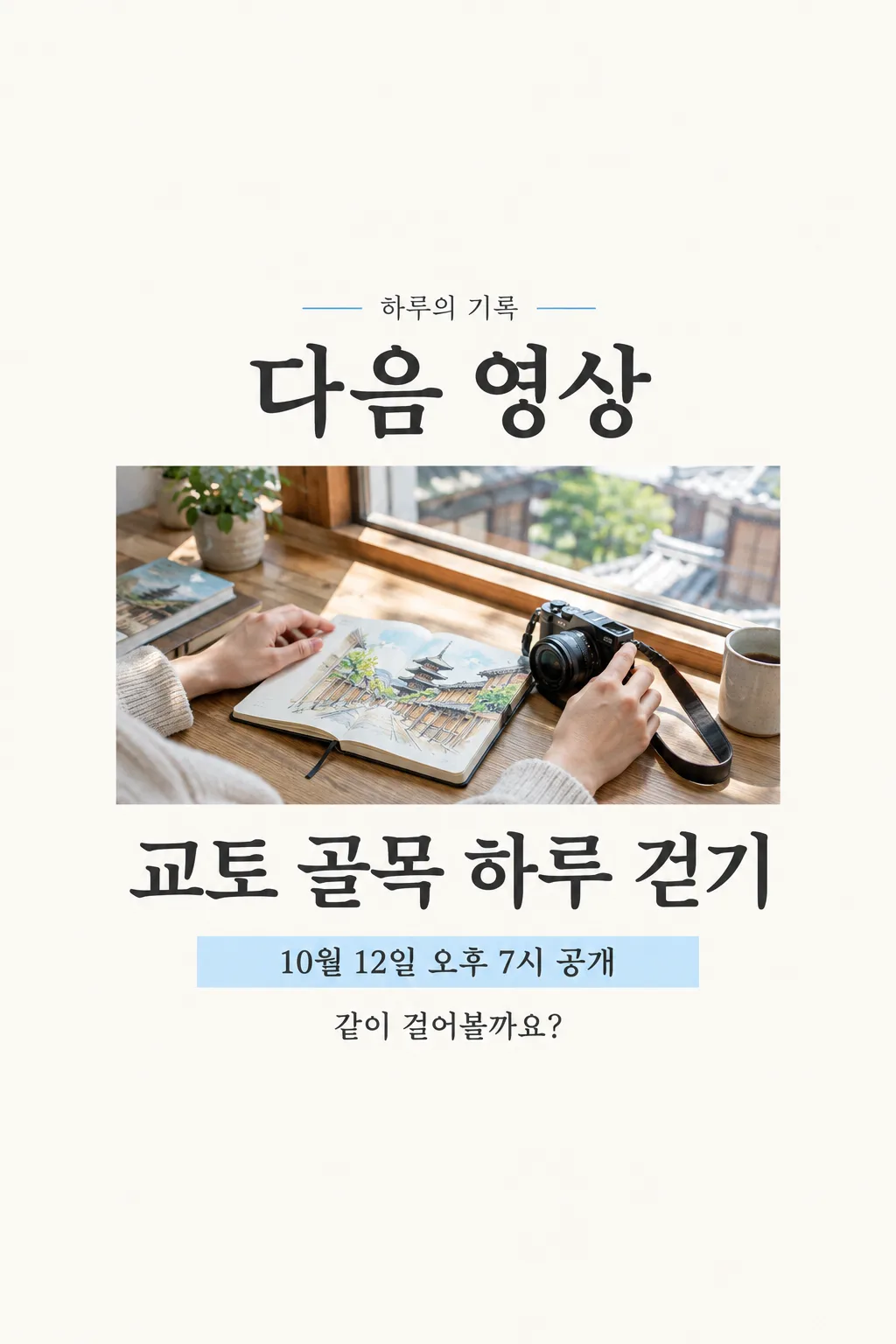
영상 크리에이터가 다음 영상의 실제 제목·공개 시각·대표 사진을 넣어 커뮤니티나 인스타 스토리에 올려요.
칸 채우기
- 1칸을 채워요
- 2복사 버튼을 눌러요
- 3GPT 채팅창에 다음 영상 대표 사진 1장을 올리고, 프롬프트를 같이 붙여넣어요
- 4다음 영상 대표 사진 1장과 프롬프트가 둘 다 들어간 걸 보고 보내요
프롬프트 원문 보기 3,149자
Generate this image now. Draw it directly - do not describe it, explain it, or ask questions.
Output size 2480x3508 pixels, A4 portrait, 300dpi, print-ready poster.

[Purpose]
Create exactly ONE ready-to-post Korean NEXT VIDEO ANNOUNCEMENT for a video creator. The owner attaches ONE genuine photograph or still frame from the actual forthcoming video in this SAME unsent message as the prompt. The result is a vertical community-post or Story image, not the video thumbnail, a countdown animation, a channel banner, a filmstrip of multiple images, an app screenshot, a phone mockup or several alternatives. Preserve the factual title and scheduled release as entered. If the attached still is absent, ask for it instead of inventing what the video shows. The entire announcement must work as one complete image without cropping or another step.

[Photo truth]
The attached photo should remain the dominant central picture. Preserve the recognizable person, object, location and overall activity visible there. You may crop its edges within the generated layout and adjust light gently, but do not create a dramatic scene or a guest who was not in the source. Avoid platform logos, fake engagement counts, play-button trademark shapes and deceptive news styling. The card announces a scheduled video; it must not claim it is already live.

[One fixed layout]
Use a restrained graphite-and-sky-blue editorial notice on off-white paper. Keep the upper 12% and lower 15% clear of essential text. At about 17–22%, print the small but clear channel name "【채널 이름】" once. Directly below, at 24–30%, put the large exact headline "다음 영상". Center ONE wide rectangular image window at 32–64%, using the owner's attached video still as the whole window, no mosaic or secondary frames. Add a thin blue line beneath the photo. At 66–74%, print the exact "【영상 제목】" in strong dark Korean type, wrapping to no more than two lines. At 76–82%, print the exact "【공개 날짜와 시간】" once inside one pale-blue schedule strip. In the same lower central area, place ONE short teaser sentence based on "【한 줄 예고】" if room allows, smaller than the date but readable. If the value is "알아서 골라줘", write a calm, generic anticipation line based ONLY on the verified video title and visible photo; do not print those four Korean words. If the owner gave a sentence, preserve it without making any promise not present in it. Keep title, date and teaser distinct, never duplicate the title or date in badges.

[Hierarchy and checks]
The still image and video title should be the first two things seen in a small feed tile. Use clean type, large enough for a phone, and one coherent fixed layout for every user. The photo may supply its own colors but the paper, graphite typography and narrow sky-blue accent stay consistent. Do not invent release day of week, time zone, episode number, premiere feature, live chat, subscription reward, guest, link, campaign period, giveaway, capacity or discount. Do not add a call to action promising a link or a countdown unless given. Check every Hangul character and digit against owner input. No code, export instructions, cut lines, alternate image or follow-up request. Return only the finished announcement image.
이 카드도 많이 사용해요

쓰는 법 · 자주 묻는 것
이런 때 쓰세요
다음 영상 공개 시각을 확정한 크리에이터가 커뮤니티 게시물이나 인스타 스토리로 미리 알릴 때 쓰세요. 실제 영상의 한 장면이 가운데 크게 들어가고, 아래에는 제목과 공개 일정이 나뉘어 보입니다. 시청자가 시간을 기억하고 게시물을 저장하기 좋은 한 장짜리 공지입니다. 영상 자체의 썸네일처럼 클릭을 유도하는 과장된 문구는 넣지 않습니다.
칸 채우는 법
채널 이름은 실제 표기를, 영상 제목은 게시할 제목 그대로 적으세요. 공개 날짜와 시간은 업로드 예약 화면에 표시된 내용과 같은 형식으로 적어야 합니다. 아직 일정이 정해지지 않았다면 이 카드를 만들기보다 먼저 일정을 확정하세요. 한 줄 예고를 쓰기 어렵다면 「알아서 골라줘」를 고르세요. 그 경우 GPT가 제목과 사진에 드러난 내용만으로 짧은 문장을 만듭니다.
사진을 넣는 순서
- 다음 영상의 실제 대표 사진이나 장면 한 장을 올리고 아직 보내지 마세요.
- 같은 입력창에 채운 프롬프트를 붙여넣으세요.
- 사진과 글이 함께 보이는지 확인한 뒤 한 번만 보내세요.
그림이 나오면 꼭 볼 것
가운데 장면이 실제 영상과 맞는지 먼저 보세요. 제목과 날짜·시간은 한 글자만 틀려도 시청자를 혼동시키므로 예약 정보와 대조해야 합니다. 아직 공개 전인데 ‘지금 보세요’처럼 쓰이거나, 없는 출연자·경품·링크가 생겼다면 그대로 올리면 안 됩니다. 화면 목록에서 제목과 일정이 읽히는 크기인지도 확인하세요.
틀린 곳 고치는 법
글자가 빠졌다면 긴 제목을 줄이고 원래 예약 시각을 정확히 다시 넣으세요. 사진이 예상 영상과 달라 보이면 실제 캡처를 더 선명하게 골라 사진과 프롬프트를 한 번에 다시 보내세요. 다른 이미지를 잘라 붙이거나 별도 디자인 도구에서 완성하는 방식은 아닙니다.
자주 묻는 것
- 영상 썸네일로도 쓰나요? 이 카드는 공개 일정을 알리는 세로 공지입니다. 영상 썸네일과 용도가 다릅니다.
- 공개 시간이 아직 없으면요? 시청자에게 잘못 알리지 않도록 시간을 확정한 뒤 만들어요.