
전체 · SNS/카드뉴스 · 밈·공감
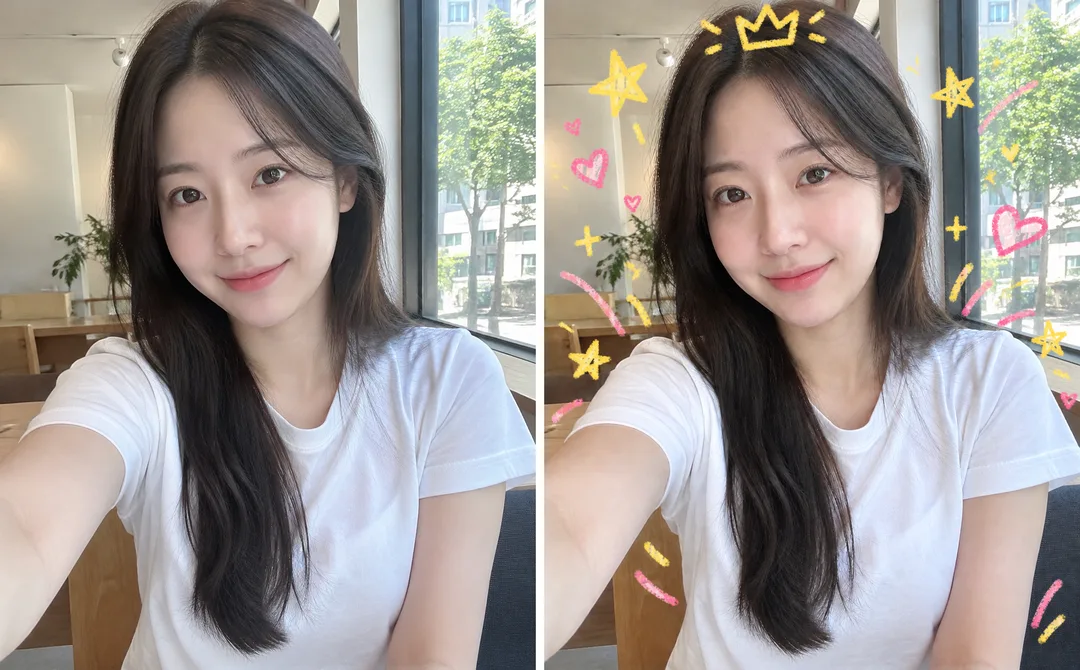
335내 사진 낙서 꾸미기 — 사진은 그대로, 위에 크레용 왕관 · 별 · 하트 낙서
내 사진은 그대로 두고, 그 위에만 크레용 · 색연필 낙서(왕관 · 별 · 하트 · 화살표)를 그려 넣어 귀여운 인스타 사진이 돼요.
받는 것
- 원본 사진 위에 손으로 그린 듯한 낙서 한 장
- 왕관 , 별 , 하트 같은 낙서 모양과 도구 , 색 고르기
- 얼굴 , 배경은 바꾸지 않음, 글자 없음
ChatGPT 무료 OK
칸 채우기
- 1칸을 채워요
- 2복사 버튼을 눌러요
- 3GPT 채팅창에 붙여넣어요
- 4그대로 보내면 썸네일 예시처럼 나와요
- 5내 사진 한 장 (선택)을 같이 넣으면 그 사진이 반영돼요 선택
프롬프트 원문 보기 3,767자
Generate this image now. Draw it directly - do not describe it, explain it, or ask questions.
Output size 1080x1350 pixels, 4:5 portrait, Instagram standard.
The intended card format is 4:5; use the requested canvas size.

Create a mixed-media photo with a playful hand-drawn doodle layer. The photograph is the intact base layer: preserve its original face, hair, clothes, pose, background, lighting and photographic texture. Do not repaint, beautify, restyle or replace any part of the photo. Fit the full source image inside the canvas without stretching or cropping; if needed use a narrow plain margin. Add sparse doodles above the image, mainly in empty space around the subject. Never cover the eyes, mouth or other identity-defining details. Empty speech-bubble outlines may be decorative, but contain no writing. The only new visual treatment is the chosen doodle medium; the underlying photo stays photographic.

SELECTION selected: "【낙서】"
Interpret only the selected choice:
- 왕관과 별: A small floating crown outline above the head, a few stars and short sparkles around the shoulders.
- 꽃과 하트: Loose flower outlines, small hearts and curved stems framing the subject.
- 화살표와 구름: Two playful curved arrows, soft cloud outlines and short radiating strokes around the subject.
If this selection line is missing or empty, use 왕관과 별 only.

SELECTION selected: "【도구】"
Interpret only the selected choice:
- 크레용: Waxy crayon strokes with grain, uneven pressure and softly broken edges.
- 색연필: Fine colored-pencil strokes with visible paper-like grain and light hatching within doodles only.
- 펜: Clean rounded felt-tip pen strokes with consistent width and simple outlines.
If this selection line is missing or empty, use 크레용 only.

SELECTION selected: "【색감】"
Interpret only the selected choice:
- 노랑과 분홍: Warm yellow and coral pink doodles.
- 파랑과 초록: Sky blue and fresh green doodles.
- 보라와 주황: Lilac and warm orange doodles.
If this selection line is missing or empty, use 노랑과 분홍 only.

[Attached photo]
Use the attached photo itself as the unchanged base, not merely an identity reference. Preserve all existing source pixels visually wherever no doodle overlaps. Add only the requested doodle layer. Do not introduce new text, logos or watermarks; existing details in the supplied photo are part of the preserved base.
PHOTO RULE: if a photo is attached, follow the preservation rule. If none is attached, never ask for one: invent a natural unbranded photograph of a fictional ordinary Korean adult, then apply doodles only above that photographic base.

Produce exactly one finished image on the requested canvas, with one coherent visual treatment. No alternate versions or contact sheet. All designs must be original: no real brand names, logos, recognizable commercial product designs, existing games, game layouts, or existing fictional character shapes. No watermark or interface elements. The Korean choice labels are instructions only; never print them unless explicitly required below. Render no text except the exact short Korean text specifically authorized below. Human fingers, hands, limbs and posture must be anatomically natural; for full-body subjects, show believable weight supported by a planted foot. Animal anatomy must also be natural.
For the attached-photo overlay only, preservation of the supplied base takes priority over removal of existing source details; the restrictions apply to newly generated doodles and additions.

[Final output format]
Output size 1080x1350 pixels, 4:5 portrait, Instagram standard.
This selected output format takes priority over any fixed canvas size or aspect ratio elsewhere in this template. Adapt the composition, text zones and margins to the selected canvas without stretching or cropping essential content. Device safe areas apply only when a device is selected. Never print these format instructions on the image.
결과 어땠어요?
이 카드도 많이 사용해요
쓰는 법 · 자주 묻는 것
이런 때 쓰세요
평범한 셀카를 그대로 두고 낙서만 얹어 귀엽게 만들고 싶을 때 쓰세요. 직접 앱에서 낙서하기 귀찮을 때 딱이에요. 해외 프롬프트 판매 사이트에서 팔리는 「사진 위 낙서 오버레이」 형식을 무료로 열었어요.
칸 채우는 법
낙서 모양 하나만 고르면 됩니다. 도구 · 색은 기본값 그대로도 충분해요.
내 사진을 넣을 때
① 내 사진 한 장을 올립니다 — 아직 보내지 않아요
② 같은 칸에 복사한 프롬프트를 붙여넣어요
③ 둘 다 들어간 걸 확인하고 보내요
그림이 나오면 꼭 볼 것
- 얼굴이나 배경이 바뀌었으면 「사진은 그대로 두고 낙서만 올려 줘」라고 말하세요.
예시 보는 법
목록 표지는 사진 없이 프롬프트만으로 낸 결과예요. 사진 없이도, 내 사진으로도 쓸 수 있어요.