
전체 · SNS/카드뉴스 · 밈·공감
074그때의 나와 지금의 나
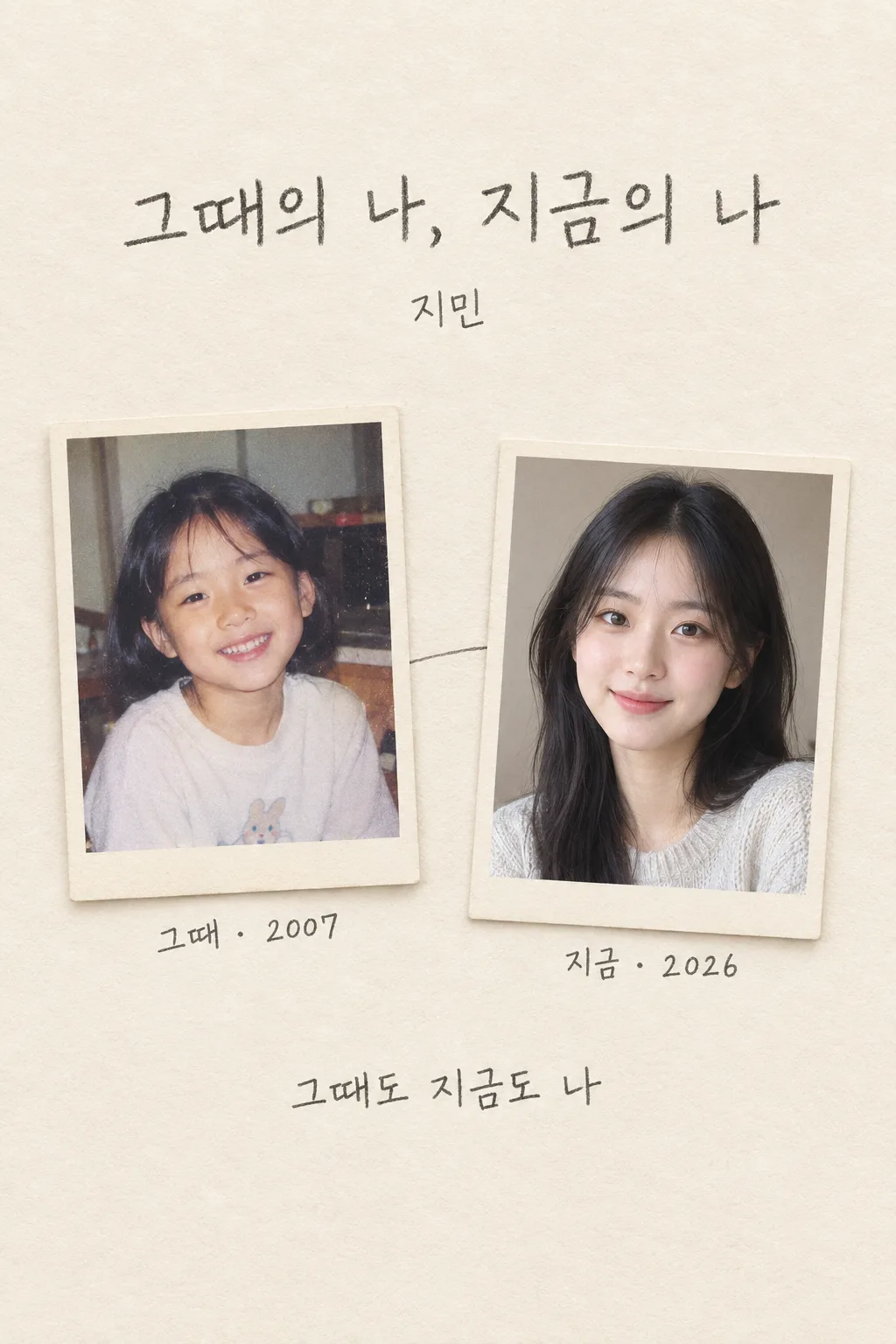
본인이 어린 시절 사진과 현재 사진을 한 장에 넣어 생일·연말 회고 게시물로 인스타나 스레드에 올려요.
칸 채우기
- 1칸을 채워요
- 2복사 버튼을 눌러요
- 3GPT 채팅창에 어린 시절 사진 1장 + 현재 사진 1장을 올리고, 프롬프트를 같이 붙여넣어요
- 4어린 시절 사진 1장 + 현재 사진 1장과 프롬프트가 둘 다 들어간 걸 보고 보내요
프롬프트 원문 보기 6,607자
Generate this image now. Draw it directly - do not describe it, explain it, or ask questions.
Output size 2480x3508 pixels, A4 portrait, 300dpi, print-ready poster.
Create exactly ONE complete vertical 2:3 Korean then-and-now personal Polaroid poster. The user attached TWO different genuine photos in this same message: one from childhood and one from the present. Use those as the only identity and age references, in the given order. Output the finished image itself, not two exports, a carousel, a crop plan, code, text advice, or a request for another turn.

[Purpose]
The subject wants to share a personal birthday or year-end reflection image on Instagram or Threads. Their chosen display name is "【부를 이름】". The optional year of the old photo is on a separate input line below; the optional year of the current photo is on another separate line. Their selected one-line copy is "【한 줄 문구】". Make one finished page with two distinct photographic memories: the child exactly as depicted in the first attachment and the current person exactly as depicted in the second. Their relationship is simply the same person's two times. Do not invent an age, birthday date, school, city, life event, achievement, family relationship, or emotional backstory.

[Scene]
Build a single quiet, tactile vertical page like a personal photo journal. Set TWO separate, fully visible instant-photo frames inside the one canvas. The left or upper photo holds the authentic childhood image, the right or lower photo holds the authentic current image. Both frames are large and similar in visual importance, with physical overlap only at their neutral paper borders, never over faces. Let the photograph within each frame retain its own real setting and visible clothing; do not force the child and adult into one fake meeting, hug, matching pose, or identical room. A gentle warm paper backdrop and subtle tape or handwriting-like marks can join the images, but the finished image must not turn into a scrapbook with many additional cutouts. One or two fine pencil lines may visually connect the frames. Keep all four corners of the result complete; do not crop a frame off the page. The contrast between two real times is the point.

[Attached photos]
Both attachments are mandatory. Photo 1 is the actual earlier person, and photo 2 is the actual current person. Preserve each photograph's facial identity, apparent age, expression, skin tone, hair, clothing silhouette, visible objects and lighting as much as a tasteful page composition allows. Do not generate a new child's face from the adult photo or a predicted adult face from the child photo. Do not beautify, whiten, slim, age-shift, or make either person into a celebrity or generic model. If only one photo is attached, do not invent the missing age; request the second photo rather than creating a misleading then-and-now image. If either image contains other people, keep the selected subject identifiable and do not fabricate a family relation. Do not swap the order of the photographs even if one looks older due to camera quality.

[Text layout]
Keep the top 12% and bottom 15% free of essential words for website overlay safety. Around 15-22%, render a concise large Korean heading "그때의 【부를 이름】, 지금의 【부를 이름】" or, if repeating the name makes the layout crowded, "그때의 나, 지금의 나" with "【부를 이름】" once in the subheading. Put two simple labels next to the appropriate frames: "그때" by the childhood photo and "지금" by the current one. Optional childhood year line: "【옛 사진의 연도】". Optional current year line: "【현재 사진의 연도】". Render each only if that user-entered line is present. If a year is omitted, remove the entire year line; do not infer it from hairstyle, camera quality, current date or apparent age. At about 73-82%, set the one-line copy "【한 줄 문구】" in large enough lettering to read on a phone. If it says "알아서 골라줘", invent one short, kind, original Korean line inspired by the paired photos without asserting a personal event or emotion as fact. Do not print the instruction words. Make labels and years unmistakably associated with the right source photograph.

[Style]
Use warm, personal photographic editorial design with paper white, soft graphite, and photo-led accent colors. Retain the first photograph's authentic old color cast or black-and-white texture; retain the second's believable contemporary tones. The two frames can be visually harmonized by paper and layout without repainting their time period or changing the people. Use large clear Korean for the heading and a restrained pencil-feel handwritten Korean one-line copy, but keep every letter legible at mobile size. If the two photos are very different in lighting, make that difference feel intentional rather than applying an overbearing filter. Do not copy an existing Polaroid manufacturer's logo or an identifiable social-media template.

[Visual hierarchy]
At website-list size, the viewer should immediately see two moments of one person and read the main heading. At phone size, the labels, optional years and short line should read without zooming. The child and adult faces should both be visible and recognizable, with neither shrunk to an icon. The two-photo layout is content INSIDE one generated image; it is not an instruction to generate a pair of images. Use strong clean spacing and avoid pinning many decorative scraps around the two photos.

[Lighting and texture]
Photographic images must retain honest skin and hair texture. Paper edges, soft contact shadows and slight instant-photo grain may be tactile, but not thick, dirty, or distressed enough to impair the real photos. Keep eyes, smiles and distinguishing details clear. Handwritten accents should resemble a neat pencil note rather than illegible scribble. All photo borders have plausible proportions; no floating frame, broken fingers, duplicate faces or blended child-adult anatomy.

[Text rules]
Spell "【부를 이름】" exactly. Render the two years only if supplied and exactly as supplied; never invent dates or add weekdays. Keep "그때" with the old image and "지금" with the current image. Render the provided copy exactly unless asked to choose. Never print "알아서 골라줘", form field names, placeholder braces, fake album dates, school names, milestones, health claims, logos or English filler. Use no extra quotation attributed to the younger self.

[Avoid]
No single-photo age transformation, forecast adult/child face, fabricated childhood, apparent hug between ages, identity swap, extra people, third photo, carousel, separate exports, tiny caption, heavy plastic retouch, copied product logo, cut-off frame, phone mockup, watermark, code or request to send another message.
이 카드도 많이 사용해요

쓰는 법 · 자주 묻는 것
이런 때 쓰세요
어릴 때 사진과 지금 사진을 나란히 보며 한 장의 기록으로 남기고 싶을 때 쓰세요. 생일, 졸업, 이사, 연말 회고처럼 지나온 시간을 돌아보는 게시물에 어울립니다. 사진 두 장이 들어가지만 GPT가 내놓는 결과는 세로 이미지 한 장입니다. 앱에서 두 이미지를 잘라 이어 붙일 필요가 없습니다. 실제 두 시기의 얼굴을 그대로 보여 주는 것이 중심이며, 한 사진으로 어릴 적 얼굴을 추측해 그리는 카드가 아닙니다.
칸 채우는 법
- 부를 이름에는 결과물에 보일 본인 이름이나 별명을 적으세요. 공개 SNS에 올린다면 별명이 더 편할 수 있습니다.
- 옛 사진의 연도와 현재 사진의 연도는 정확히 알 때만 적으세요. 흐릿하게 기억나는 연도를 억지로 쓰지 않아도 됩니다. 둘 다 선택 칸이라 비우면 연도 줄이 빠집니다.
- 한 줄 문구는 두 사진 아래에 들어갈 짧은 말입니다. 직접 적어도 되고, 적절한 말이 떠오르지 않으면 「알아서 골라줘」를 고르세요. GPT가 알 수 없는 졸업이나 수상 같은 일을 지어내지 않도록 했습니다.
사진을 넣는 순서
- GPT 채팅창에 어린 시절 사진 한 장과 현재 사진 한 장을 모두 올리세요. 아직 보내지 마세요. 먼저 올린 사진이 ‘그때’, 두 번째 사진이 ‘지금’입니다.
- 같은 입력 칸에 이 카드에서 복사한 프롬프트를 붙여넣으세요.
- 사진 두 장과 프롬프트가 모두 입력 칸에 보이는지 확인한 뒤 한 번만 보내세요. 결과는 두 사진을 담은 한 장의 완성 이미지입니다.
사진만 먼저 보냈다면 프롬프트 끝에 「위 두 사진으로 그려줘」를 붙여 보내세요. 예전 사진에 다른 가족이 함께 나온 경우에는 본인이 누구인지 분명히 보이는 사진이 좋습니다. 다른 사람의 사진으로 게시물을 만들 때는 그 사람의 동의를 먼저 받으세요.
그림이 나오면 꼭 볼 것
어린 시절 사진이 ‘그때’ 쪽에, 현재 사진이 ‘지금’ 쪽에 들어갔는지 먼저 확인하세요. 두 얼굴이 원본 사진과 달라지거나, 없는 어린 얼굴을 만들어 넣으면 이 카드의 핵심이 무너집니다. 연도를 입력했다면 각 프레임과 숫자가 맞는지 하나씩 대조하세요. 이름과 한 줄 문구도 작은 화면에서 읽혀야 합니다. 두 사진의 색감이 달라도 실제 시간 차이의 일부이니 무조건 똑같이 보정할 필요는 없습니다. 완성된 한 장을 그대로 저장해 올리면 됩니다.
자주 묻는 것
- 사진 한 장으로 만들 수 있나요? 이 카드는 두 시기의 실제 사진이 필요합니다. 하나만 있으면 다른 시기의 얼굴을 지어내지 않도록 했습니다.
- 연도를 모르면 어떻게 하나요? 해당 칸을 비워 두세요. ‘그때’와 ‘지금’만으로도 이야기가 전달됩니다.
- 두 장의 결과가 나오나요? 아니요. 두 사진이 한 세로 이미지 안에 들어갑니다.
- 어릴 적 사진이 흑백이어도 되나요? 네. 흑백 질감을 그대로 두고 현재 사진과 한 페이지로 엮습니다.