
칸 채우기
- 1칸을 채워요
- 2복사 버튼을 눌러요
- 3GPT 채팅창에 붙여넣어요
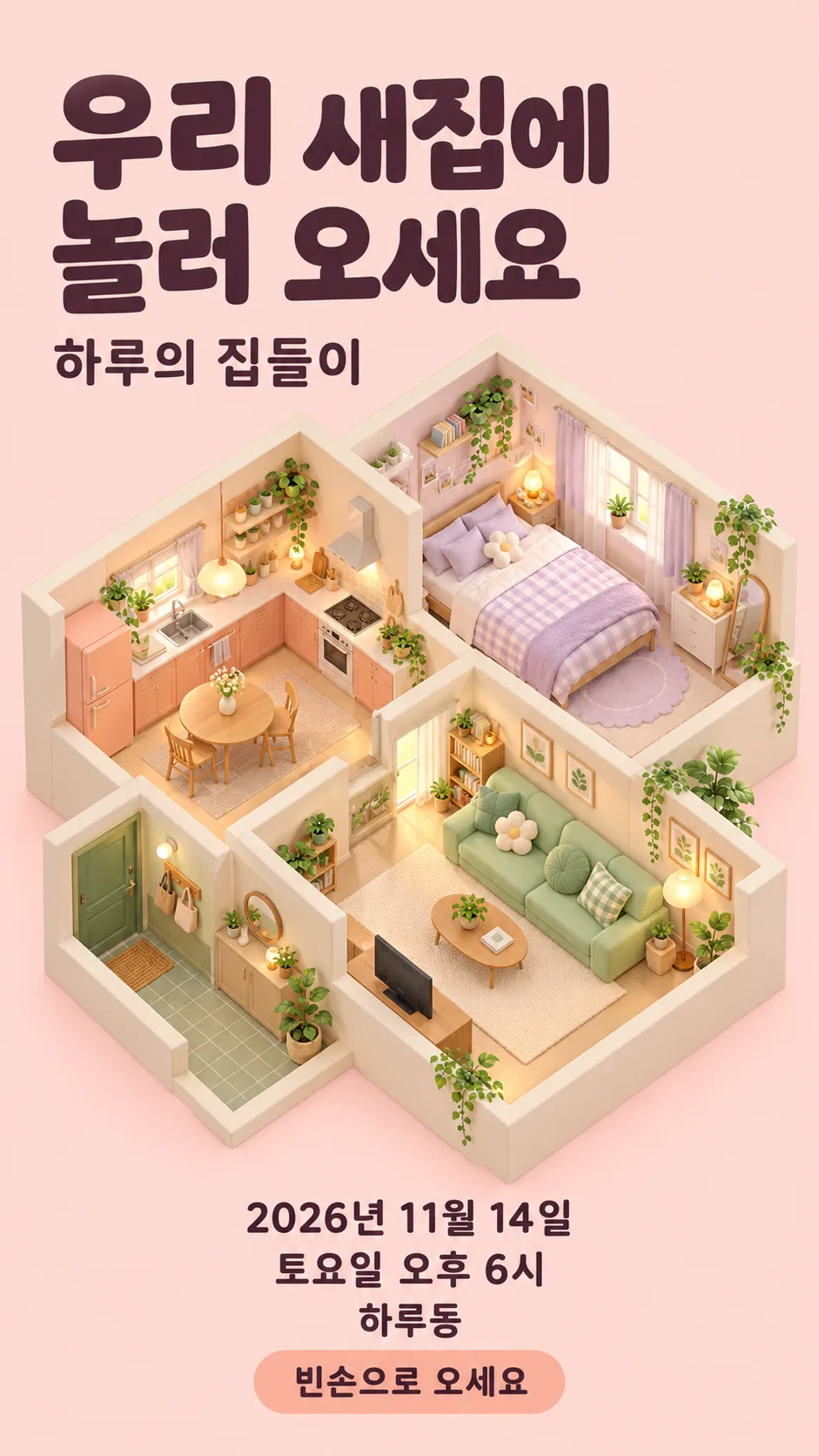
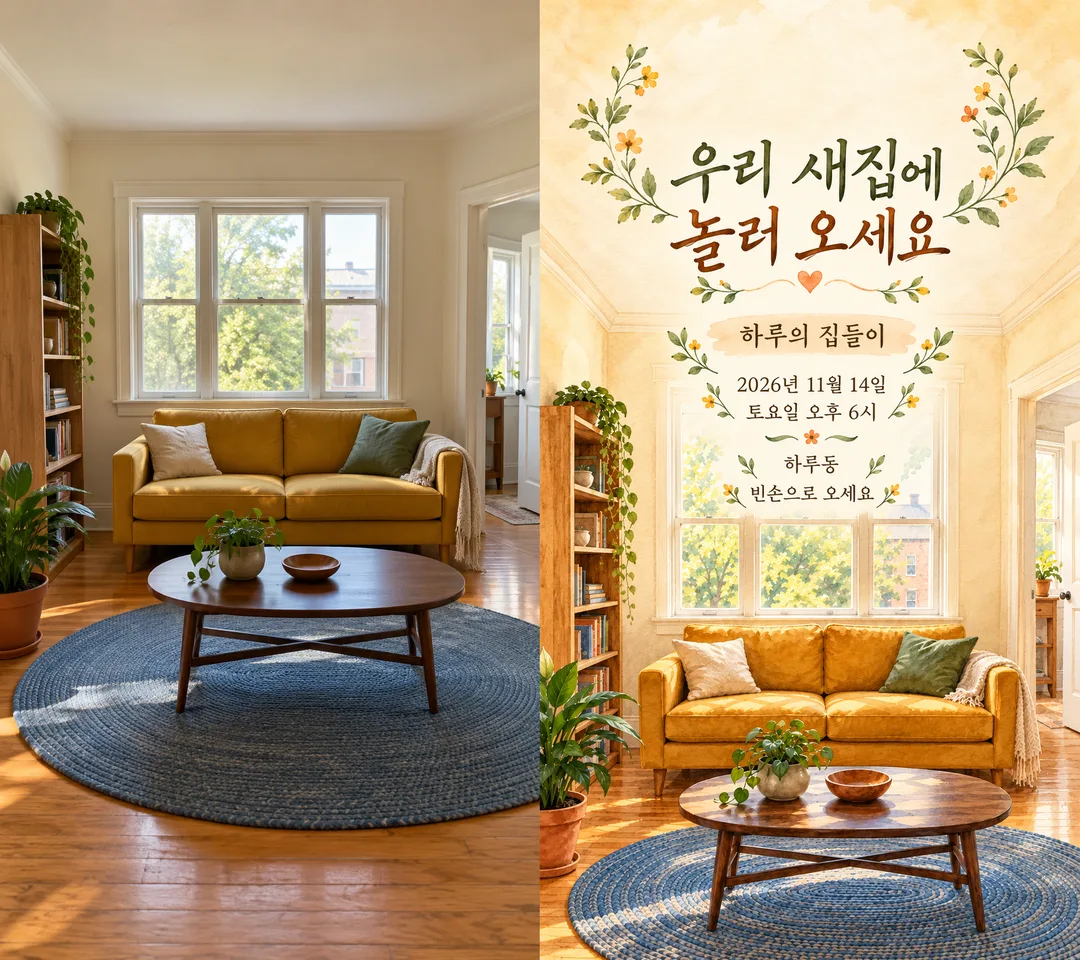
- 4그대로 보내면 썸네일 예시처럼 나와요
- 5사용을 허락한 거실 또는 현관 사진 한 장(없으면 가상 거실)을 같이 넣으면 그 사진이 반영돼요 선택
프롬프트 원문 보기 3,206자
Generate this image now. Return exactly ONE finished full-bleed invitation image, not an explanation, code, mockup, comparison or second page.
Output size 1080x1920 pixels, 9:16 portrait story. Keep all text inside the central 80% of the height: compress every zone percentage below into the 10-90% range.
Use the selected canvas ratio; recommended 9:16. Housewarming invitation in the selected mood "【분위기】" (empty means warm watercolor). Warm watercolor: cream, apricot and muted green washes. Cute isometric house: pastel dollhouse cutaway viewed obliquely from above, living room, kitchen and bedroom visible together. Minimal photo: clean realistic interior and restrained typography. Retro: vintage printed illustration and muted nostalgic colors. Match the layout to the selected mood and crisp high-contrast Korean typography. Fill the entire canvas with the room illustration and integrated invitation design, no card floating on a blank backdrop.

PHOTO RULE: If a living-room or entryway photo is attached, adapt that room to the selected mood while retaining its viewpoint, window and doorway positions, furniture arrangement, main shapes and colors. Keep the same house structure; do not invent extra doors or windows. Add no people. Remove personal text, mail details, access codes, logos and identifying numbers. With no photo, invent a fictional home in the selected mood immediately, without asking for a photo. All furniture and decor are original unbranded designs.

FACTS: host="【초대하는 사람】"; date="【날짜】"; weekday="【요일】"; start="【시작 시간】"; neighborhood="【동네】". Use these facts exactly once; never invent a detailed address, password, contact number, menu, gifts, fee or RSVP deadline. Verify date and weekday against a real Gregorian calendar using available calendar or web tools; if unavailable, preserve supplied values without claiming verification. Never silently replace the supplied weekday.

TEXT: Set HEADLINE once from "【초대 한 줄】". If it equals "알아서 골라줘", use exactly "우리 새집에 놀러 오세요". Render no selection instructions. Print HEADLINE large, wrapping naturally; then "【초대하는 사람】의 집들이"; then "【날짜】"; then "【요일】 【시작 시간】"; then "【동네】". Optional NOTE="【정겨운 한 줄】": if empty or unselected omit its entire row and spacing; if "알아서 골라줘" use exactly "빈손으로 오세요"; otherwise print exactly as supplied. No other text.

LAYOUT: keep text within safe margins and readable on a phone. For isometric mood, put the headline at the top left, the dollhouse in the middle and event details below it. For other moods, integrate the title and information into naturally light space; photo-based layout may use a soft cream watercolor wash behind text while keeping windows and doors recognizable. All date and time lines readable on a phone. Avoid tiny type, overlapping furniture and distorted glyphs. Inspect every letter, number and weekday before finishing. No brand, copyrighted character, signature, watermark, phone interface or outer frame. Return one complete ready-to-share invitation.

[Final output format]
Output size 1080x1920 pixels, 9:16 portrait story. Keep all text inside the central 80% of the height: compress every zone percentage below into the 10-90% range.
This selected output format takes priority over any fixed canvas size or aspect ratio elsewhere in this template. Adapt the composition, text zones and margins to the selected canvas without stretching or cropping essential content. Device safe areas apply only when a device is selected. Never print these format instructions on the image.
결과 어땠어요?
이 카드도 많이 사용해요

쓰는 법 · 자주 묻는 것
새집으로 이사한 뒤 친구나 가족에게 보낼 초대장 한 장을 만듭니다. 분위기 보기에서 따뜻한 수채, 귀여운 아이소메트릭 집, 미니멀 사진, 레트로를 고르세요. 비우면 따뜻한 수채로 완성됩니다. 아이소메트릭은 위에서 비스듬히 본 작은 집 단면으로 거실·부엌·방을 한눈에 보여줍니다.
넣을 내용
꼭 채울 칸은 6개입니다. 초대하는 사람은 하루처럼 짧은 이름, 날짜는 연도까지 포함한 약속일, 요일은 실제 달력에 맞는 요일을 적으세요. 시작 시간은 오전과 오후가 드러나게, 동네는 하루동처럼 지역 이름까지만 적습니다. 초대 한 줄은 보기를 누르거나 직접 정할 수 있으며 ‘알아서 골라줘’는 기본 문구 ‘우리 새집에 놀러 오세요’로 바뀝니다. 정겨운 한 줄은 선택 칸이고, 비우면 해당 줄과 장식 공간이 빠집니다. 이 칸의 ‘알아서 골라줘’는 ‘빈손으로 오세요’로 바뀝니다. 날짜·요일·시간·동네는 비우지 마세요.
사진을 함께 쓰려면
프롬프트를 복사한 뒤 본인이 사용을 허락할 수 있는 거실 또는 현관 사진 한 장을 함께 첨부하세요. 창문, 문, 소파와 가구의 상대 위치를 남기면서 선택한 분위기로 바꿉니다. 사진이 없으면 선택한 분위기의 가상 집으로 바로 완성합니다. 갤러리 첫 예시는 사진 없이 만든 파스텔 아이소메트릭 집 단면이며, 위쪽 제목·가운데 집·아래쪽 일정으로 배치했습니다. 문구는 ‘우리 새집에 놀러 오세요’, ‘하루의 집들이’, ‘2026년 11월 14일’, ‘토요일 오후 6시’, ‘하루동’, ‘빈손으로 오세요’입니다. 표지는 따뜻한 수채이고 두 번째는 가상 원본 사진과 변환 결과를 왼쪽·오른쪽으로 붙인 비교입니다. 실제 사용자에게는 비교판이 아니라 완성 초대장 한 장만 나옵니다.
보내기 전 확인
2026년 11월 14일은 토요일입니다. 다른 날짜로 바꾸면 요일도 달력과 대조하세요. 모델은 달력 확인이 가능한 경우 확인하고, 확인할 수 없으면 요일을 임의로 바꾸지 않도록 지시했습니다. 완성본의 이름, 숫자, 오전·오후, 요일을 한 글자씩 확인해야 합니다. 상세 주소와 출입 비밀번호는 이 이미지에 넣지 말고 필요한 손님에게 별도로 전달하세요. 사진에서도 문패, 우편물, 사람, 출입장치가 보이지 않는 구도를 고르세요.
고치는 법과 자주 묻는 것
글자가 틀렸다면 해당 칸과 정확한 문장을 고쳐 다시 생성하세요. 사진 속 방이 달라졌다면 창문과 문 위치를 유지하라고 함께 적으세요. 이미지 위에 글자를 붙이는 후작업은 필요하지 않습니다. 사진을 꼭 넣어야 하나요? 아니요, 사진 없이도 고른 분위기의 가상 집이 나옵니다. 초대장이 여러 장 나오나요? 아니요, 권장 9:16의 한 장입니다. 일정이 미정인가요? 날짜와 시간을 정한 뒤 만들면 그대로 공유하기 쉽습니다.