
All · Social posts · Seasons & holidays
395Housewarming Invitation
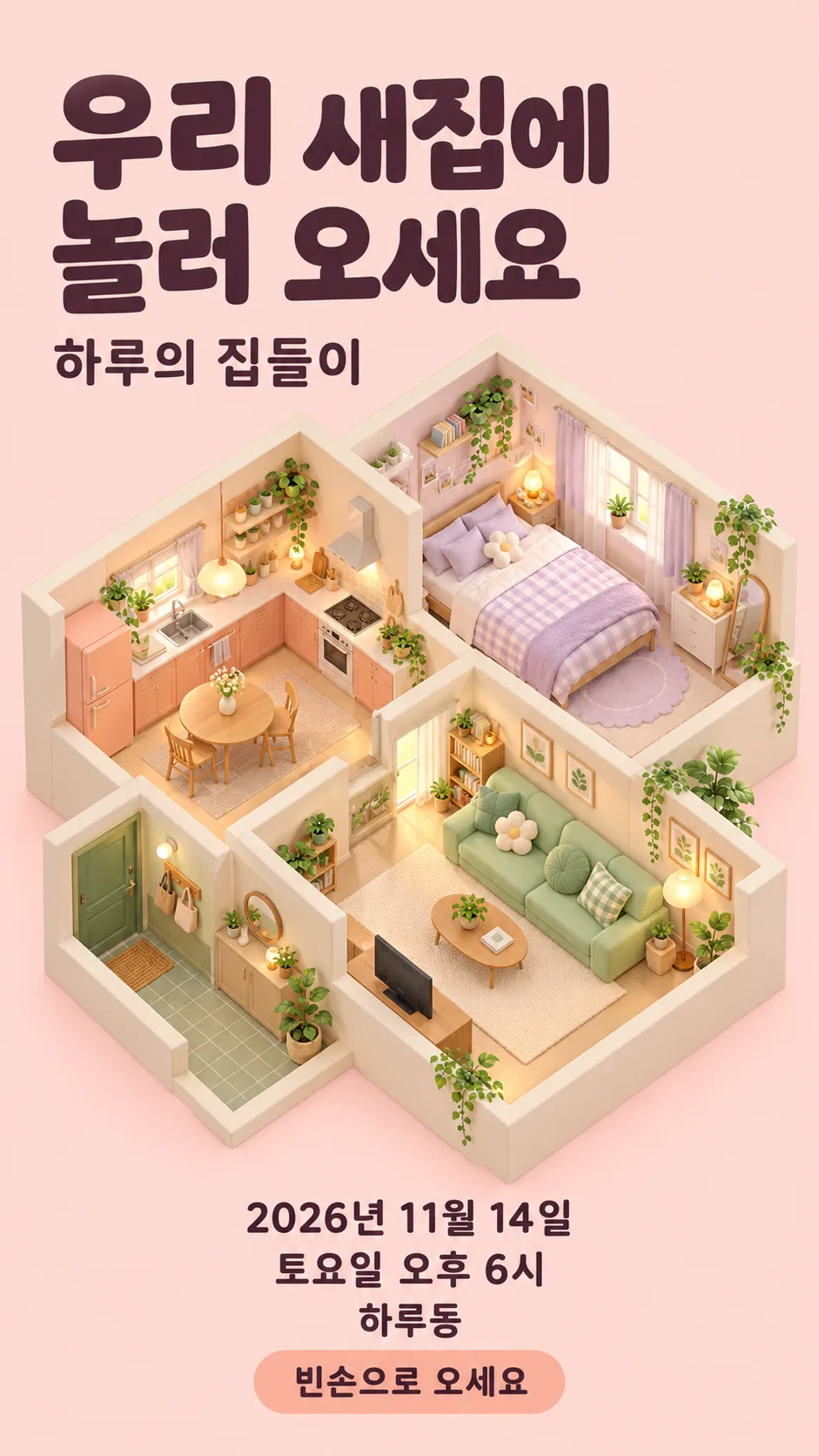
Choose watercolor, a cute isometric house, minimal photography or retro for your invitation.
Fill in the fields
- 1Fill in the fields
- 2Copy the prompt
- 3Paste it into a GPT chat
- 4Send it as is and you get an image like the thumbnail example
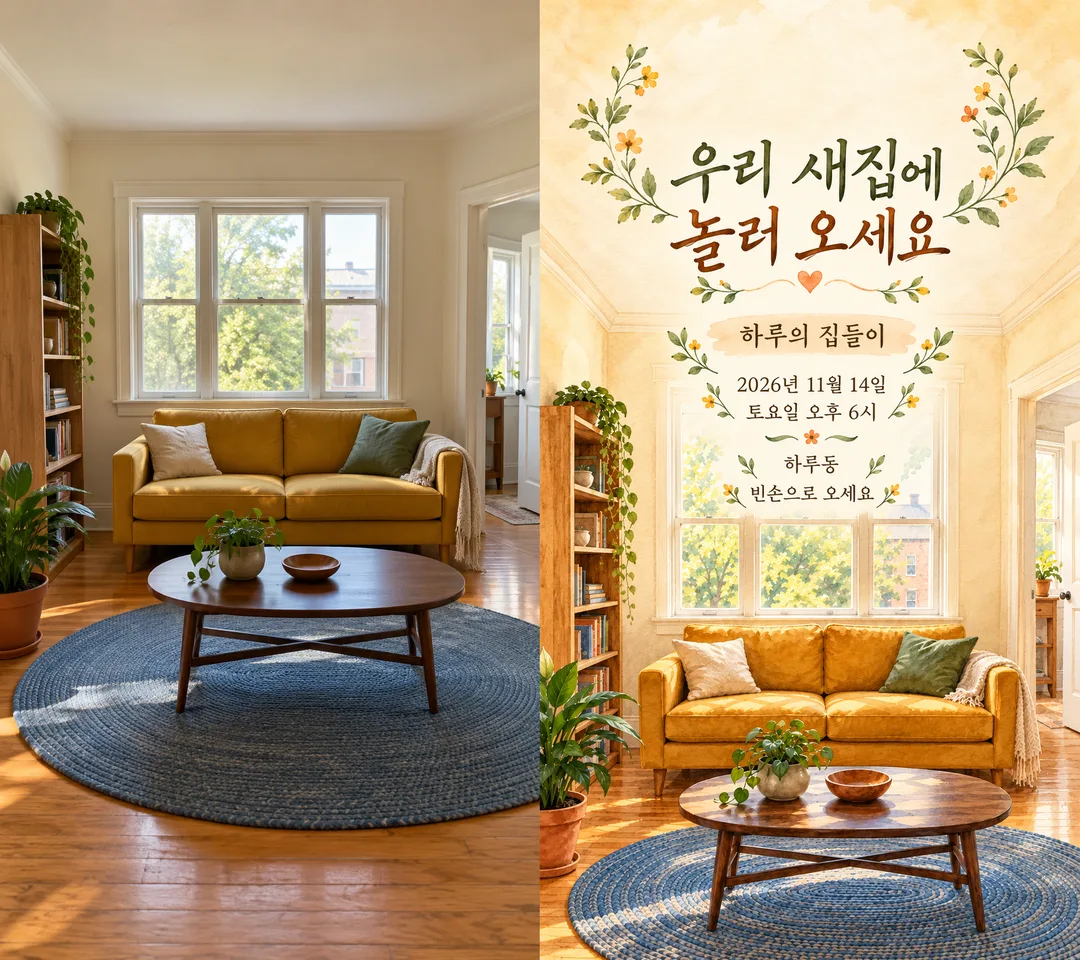
- 5Attach One permitted living-room or entryway photo; optional. with the prompt and your photo is used in the result Optional
Full prompt 3,306 characters
Generate this image now. Return exactly ONE finished full-bleed invitation image, not an explanation, code, mockup, comparison or second page.
Output size 1080x1920 pixels, 9:16 portrait story. Keep all text inside the central 80% of the height.
Use the selected canvas ratio; recommended 9:16. Housewarming invitation in the selected mood "【Mood】" (empty means warm watercolor). Warm watercolor: cream, apricot and muted green washes. Cute isometric house: pastel dollhouse cutaway viewed obliquely from above, living room, kitchen and bedroom visible together. Minimal photo: clean realistic interior and restrained typography. Retro: vintage printed illustration and muted nostalgic colors. Match the layout to the selected mood and crisp high-contrast English typography. Fill the entire canvas with the room illustration and integrated invitation design, no card floating on a blank backdrop.

PHOTO RULE: If a living-room or entryway photo is attached, adapt that room to the selected mood while retaining its viewpoint, window and doorway positions, furniture arrangement, main shapes and colors. Keep the same house structure; do not invent extra doors or windows. Add no people. Remove personal text, mail details, access codes, logos and identifying numbers. With no photo, invent a fictional home in the selected mood immediately, without asking for a photo. All furniture and decor are original unbranded designs.

FACTS: host="【Host】"; date="【Date】"; weekday="【Weekday】"; start="【Start time】"; neighborhood="【Neighborhood】". Use these facts exactly once; never invent a detailed address, password, contact number, menu, gifts, fee or RSVP deadline. Verify date and weekday against a real Gregorian calendar using available calendar or web tools; if unavailable, preserve supplied values without claiming verification. Never silently replace the supplied weekday.

TEXT: Set HEADLINE once from "【Invitation line】". If it equals "Choose for me", use exactly "Come over to our new home". Render no selection instructions. Print HEADLINE large, wrapping naturally; then "【Host】’s housewarming"; then "【Date】"; then "【Weekday】 【Start time】"; then "【Neighborhood】". Optional NOTE="【Warm note】": if empty or unselected omit its entire row and spacing; if "Choose for me" use exactly "Just bring yourself"; otherwise print exactly as supplied. No other text.

LAYOUT: keep text within safe margins and readable on a phone. For isometric mood, put the headline at the top left, the dollhouse in the middle and event details below it. For other moods, integrate the title and information into naturally light space; photo-based layout may use a soft cream watercolor wash behind text while keeping windows and doors recognizable. All date and time lines readable on a phone. Avoid tiny type, overlapping furniture and distorted glyphs. Inspect every letter, number and weekday before finishing. No brand, copyrighted character, signature, watermark, phone interface or outer frame. Return one complete ready-to-share invitation.

[Final output format]
Output size 1080x1920 pixels, 9:16 portrait story. Keep all text inside the central 80% of the height.
This selected output format takes priority over any fixed canvas size or aspect ratio elsewhere in this template. Adapt the composition, text zones and margins to the selected canvas without stretching or cropping essential content. Device safe areas apply only when a device is selected. Never print these format instructions on the image.
How did it turn out?
You may also like


How to use it · FAQ
Create one housewarming invitation. Choose Warm watercolor, Cute isometric house, Minimal photo or Retro in Mood; an empty selection defaults to warm watercolor. Complete the six required fields: host, full date, weekday, start time, neighborhood and invitation line. Use a short host name such as Haru and a neighborhood name rather than a full street address. Include AM or PM in the time. “Choose for me” in Invitation line becomes “Come over to our new home”. Warm note is optional: an empty value removes the whole note row and its reserved spacing. “Choose for me” in that field becomes “Just bring yourself”.
Attach one living-room or entryway photo you have permission to use together with the copied prompt. The selected-mood conversion retains the positions of windows, doors and principal furniture. Without a photo, it generates a fictional home in the selected mood immediately. The first gallery image is a pastel isometric cutaway house with living room, kitchen and bedroom, a headline above and event details below. It uses the same Korean invitation wording, Haru, November 14, 2026, Saturday at 6 PM, Haru neighborhood and the bring-yourself note. The cover remains watercolor. The second places a fictional source photo on the left and its transformed invitation on the right; the actual prompt returns only one finished invitation, not a comparison sheet.
November 14, 2026 is a Saturday. If the date changes, check its weekday against a calendar before sharing. The prompt requests calendar verification when tools are available and preserves your supplied weekday if verification is unavailable. Check every name, digit, weekday and AM/PM marker on the output. Do not put an access code or detailed address in the invitation. Send arrival details privately to invited guests. Choose a photo without people, nameplates, mail or visible entry codes. If text is misspelled, correct the field and generate again. If the room changes too much, repeat the window and door positions in your request. One paste produces one image; the recommended sharing ratio is 9:16.