
All · Comics & illustration · Memes
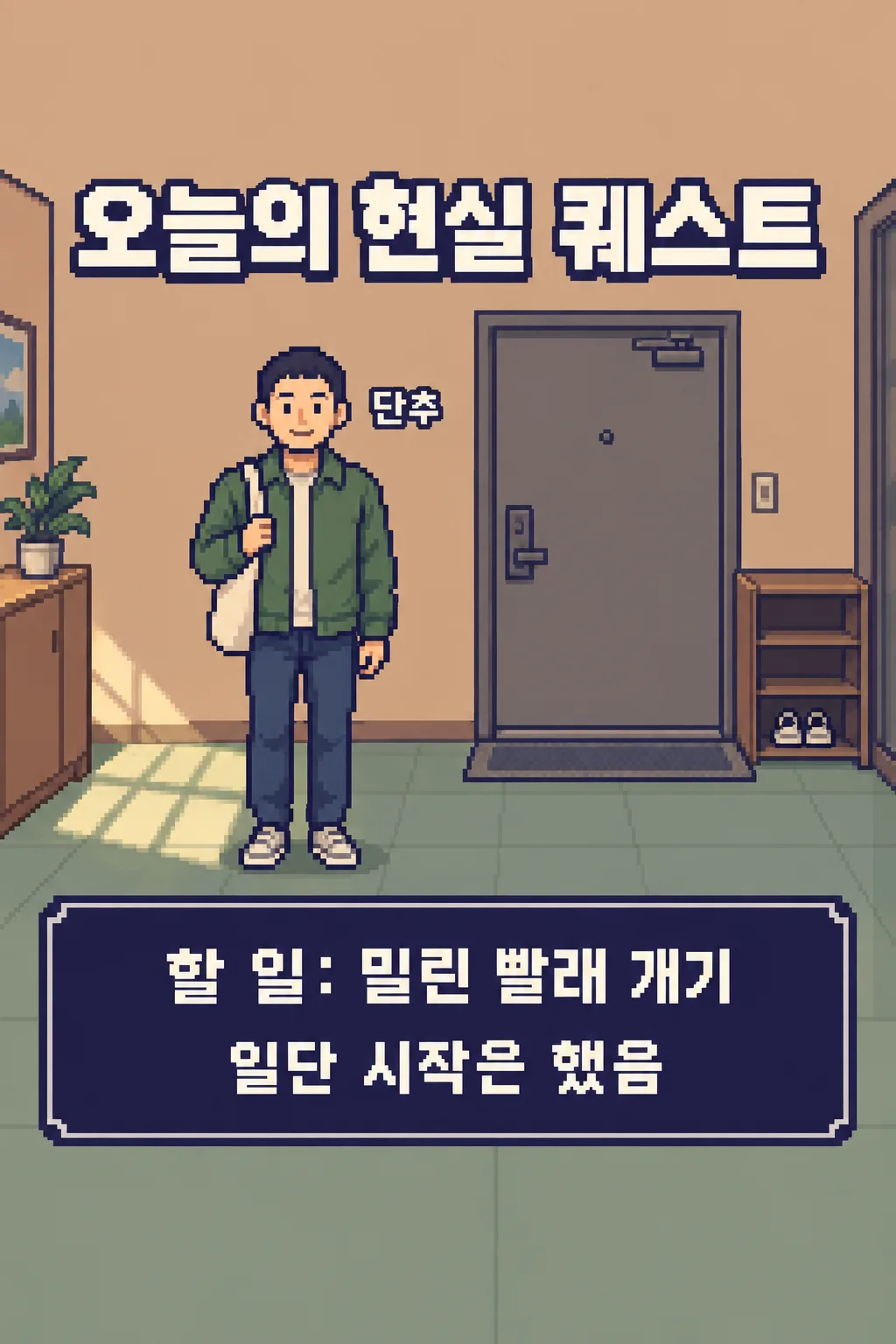
136Today's Real-Life Quest
Turn your portrait and one ordinary task into a shareable single-screen pixel-art joke.
Fill in the fields
- 1Fill in the fields
- 2Copy the prompt
- 3Upload One portrait photo of yourself and paste the prompt into your GPT chat
- 4Check that both the photo and prompt are attached, then send
Full prompt 1,941 characters
Generate this image now. Draw it directly - do not describe it, explain it, or ask questions.
Output size 2480x3508 pixels, A4 portrait, 300dpi, print-ready poster.
Make exactly ONE complete original PIXEL-ART DAILY QUEST SCREEN from ONE face photo attached in the same message. The owner shares it as a playful Instagram Story or Threads image. It is a still illustration, not a playable game, copied game screenshot, comic, character biography poster or multi-image set. Show one adult human avatar, once, with the source person's recognizable hair, glasses, broad facial impression and visible clothing color. "【Visible feature to keep】" matters only if supported by the photo. Do not add a monster, weapon, companion or claim about their real apartment.

The fixed scene is a small fictional sunlit apartment entryway with a rear door, a simple shoe shelf and one pair of shoes. Use a consistent side-on 16-bit-inspired pixel-art look, intentional crisp pixel blocks, deep indigo outlines, muted apricot walls and sage floor. In ONE vertical 2:3 frame, leave upper 12% and lower 15% free of important writing. Put the large title "TODAY'S REAL-LIFE QUEST" at 17–26%. The one avatar stands at central lower-left, about 35% of canvas height. Put "【On-screen nickname】" exactly once close to the avatar but away from the face. In ONE broad dark indigo instruction box around 65–81%, print "TASK: 【Today's one task】" in large readable type, then ONE short witty line from "【Final line】". If that line says "Pick for me", create an encouraging self-aware joke and never print the instruction.

Do not invent a deadline, reward, score, task-complete status, level, progress bar, extra mission or second interface panel. The task text changes, while room, composition, medium and colors remain fixed. Keep all letters crisp at thumbnail size rather than pixel gibberish. No franchise sprite, game console frame, brand, logo, watermark, code, crop or follow-up. Return only the finished single-screen picture.
You may also like
How to use it · FAQ
Use it for
Turn a small task into a funny game-like declaration for a Story or Threads. The image shows your pixel avatar starting one everyday quest in a fictional entryway. It does not claim the job is finished.
Fill and send
Use a nickname you are happy to post, one visible feature and one short task. “Pick for me” supplies a brief ending joke. Upload your own photo or one you have permission to use, leave the message unsent, paste the filled prompt into it, and send both once.
Check and fix
Check the avatar's hair or glasses, the exact nickname and the one task. There should be one room, one avatar and one instruction box. If words are cropped or a completion score appears, shorten the task and generate a new full image.