
All · Ads & posters · Sales & events · Retail
082Ice Cream Fruit Design Poster
Put your brand, a prominent ice cream offer, and real package photos on a print-ready freezer-front poster.
Fill in the fields
- 1Fill in the fields
- 2Copy the prompt
- 3Upload Photos of the actual ice cream packages and paste the prompt into your GPT chat
- 4Check that both the photo and prompt are attached, then send
Full prompt 5,043 characters
Generate this image now. Draw it directly; do not describe it or ask questions.
Output size 2480x3508 pixels, A4 portrait, 300dpi, print-ready poster.

[Purpose and inputs]
Produce one finished, print-ready portrait ice cream sale poster for a convenience-store freezer or market entrance, without a mockup or border. The attached real product photo is the source of truth for the packaging.
Brand name (required): "【Brand name】".
Product name (optional): "【Product name】".
Flavor 1 (optional): "【Flavor 1】".
Flavor 2 (optional): "【Flavor 2】".
Flavor 3 (optional): "【Flavor 3】".
Offer (optional): "【Offer】".
Short tagline (optional): "【Short tagline】".
Regular price per item (optional): "【Price per item】".

[Choose before drawing]
If the offer is blank or exactly "Pick for me", choose a familiar convenience-store ice cream promotion, usually Buy 1, get 1 free, and display the chosen offer prominently. Otherwise render the owner's offer exactly. If the tagline is blank or exactly "Pick for me", write one brief product-appropriate line or omit it. Otherwise render the entered tagline once. Never print "Pick for me", empty inputs, field labels, or instructions. Do not invent sale dates, purchase limits, or mix-and-match conditions. An automatically selected offer is a proposal the owner must check against the actual store promotion before printing.

[Composition]
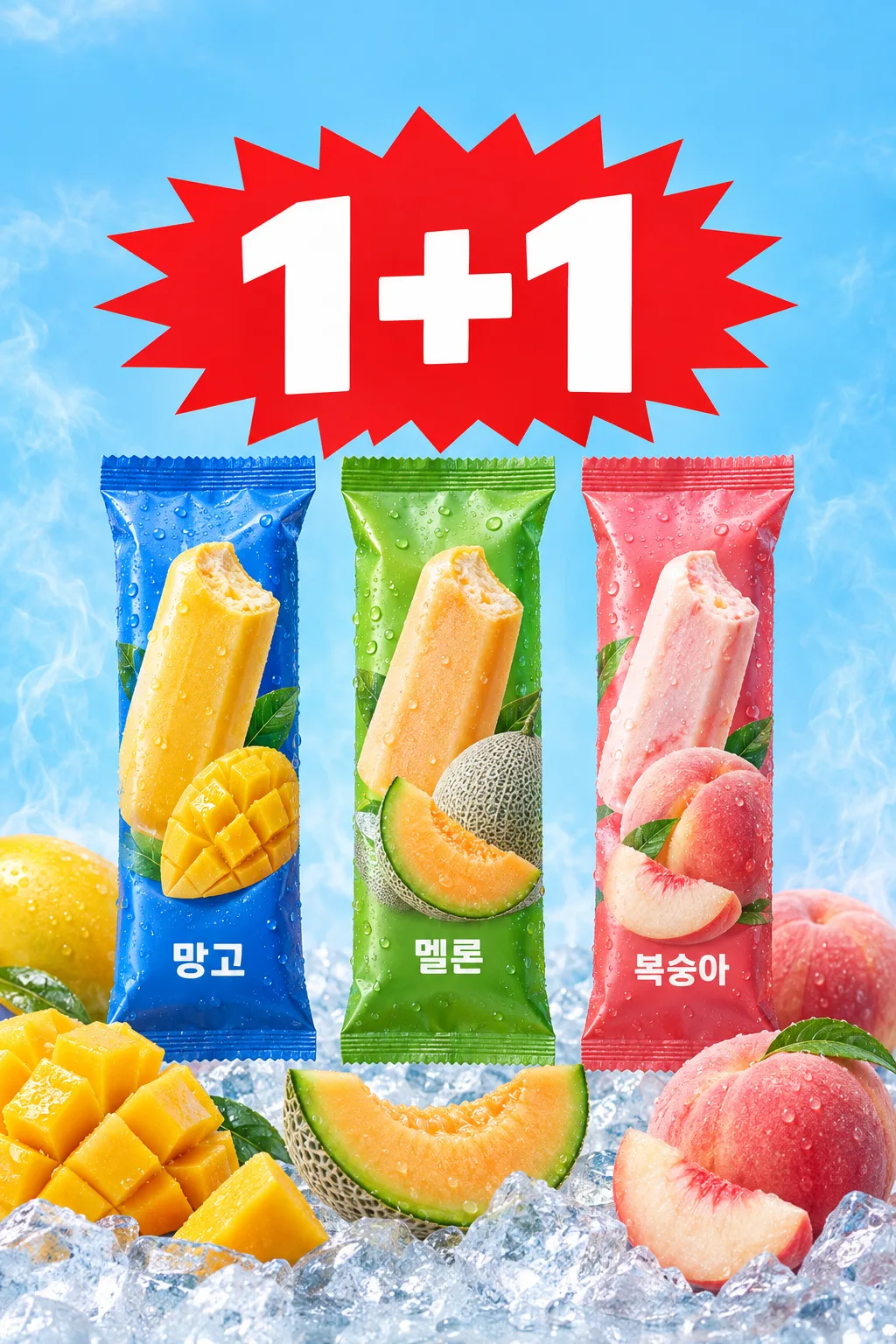
Follow the real freezer-front poster reference: set the exact supplied brand name in large, plain bold type at the very top, a giant red jagged burst with clear white offer lettering in the upper center, and large cutouts of the genuine photographed packs below. The offer is the largest first-read element and the brand remains prominent. Do not fabricate a logo or wordmark. If a product name was supplied, print it once near the brand or packages, smaller than the offer. Show only entered flavors, in order, near their matching packages or fruit zones. With no flavor entered, focus on the packages and do not invent flavor names or fruit types. Arrange one, two, or three filled flavors as one coherent poster with safe print margins. Do not repeat the promotion headline.

[Attached product photos]
Require a clear front-facing photo of the actual packaged ice cream before drawing; if absent, ask for it. Cut out and place only genuine photographed packages. Preserve their silhouettes, seals, colors, label artwork, every visible brand and product letter, fruit images, claims, and proportions exactly. Do not redraw, retouch, replace, or invent a wrapper or its text. Use the required brand input for the top heading; leave brand lettering printed on the wrappers untouched. If more flavors are entered than photographed, show each real wrapper only for its actual variety and represent the other entered flavors through text and restrained fruit or color cues. Never clone a wrapper into another flavor. Match multiple photos to the correct flavors and input order.

[Realistic food]
Use the product photo as the primary reference. Show exposed ice cream only if its interior is visible or known; otherwise show intact packages. Fruit must have natural anatomy and texture: juicy scored mango, rind and cut flesh for melon, realistic peach skin and slices. Use another entered flavor's real fruit or a restrained color cue. Decorative fruit must not imply an ingredient percentage or health benefit. Ice, condensation, and cold vapor must not obscure text or packaging.

[Visible text and price math]
Render the entered brand accurately at the top. Render the chosen offer with correct quantities, plus signs, or percentage. Print filled product, flavor, and tagline inputs accurately once each. If a regular item price was supplied, decide the offer first, then calculate. For Buy N, get 1 free, the group contains N+1 items and costs N times the regular item price; effective price per item is the group total divided by N+1. At $3.00: Buy 1, get 1 means two for $3.00 and $1.50 each; Buy 2, get 1 means three for $6.00 and $2.00 each; Buy 3, get 1 means four for $9.00 and $2.25 each. A 20% discount on $3.00 is $2.40. These are examples only: recalculate from the actual input and chosen offer. Put verified regular and promotional prices in a small secondary line. Round a fractional-cent effective price to the nearest cent, label it "about", and retain the exact group total so the approximate figure is not mistaken for a checkout charge. If a percentage calculation produces fractional cents, omit its calculated checkout price. If the price field is blank, show no numeric price. Check quantities, math, punctuation, and currency independently.

[Final check]
Use crisp commercial food photography, a cool blue background, natural fruit, ice, and strong readable type. Never invent a sale period, store name, mix-and-match permission, limit, additional discount, free gift, price, nutritional or health claim, logo, QR code, or watermark. Do not promote a wrapper claim into a new headline. Compare every visible word, number, package, fruit, and calculation with the inputs and photo. Return one finished image.
You may also like
How to use it · FAQ
When to use this
Print this A4 poster for a freezer door or store entrance. Use clear photos of the real products so the package lettering and brand stay true to what you sell.
Fill the fields
Enter the actual brand name; it appears in large type at the very top. Product name and Flavor 1–3 are optional. Add only flavors included in the promotion. You can enter the exact offer and a short tagline, choose "Pick for me", or leave either blank. A blank or automatic offer makes GPT choose a familiar ice cream deal, usually Buy 1, get 1 free. A blank or automatic tagline becomes a brief line or is omitted. The words "Pick for me" never appear on the poster. Check any automatically chosen offer against the real store promotion before printing.
Add your photos
Attach a clear front-facing package photo, then paste the copied prompt into the same message before sending. Add a real photo for each variety you want pictured. The photographed wrappers and all their lettering remain unchanged; missing varieties are never fabricated.
Check prices and image
Price per item is optional. If entered, the chosen offer determines the group total and effective item price. A fractional effective price is marked "about" while the group total stays exact. If blank, no numeric price is invented. Check the brand at the top, offer, entered product and flavors, original package lettering, and any calculated price before printing.
FAQ
- Can I enter only a brand? Yes. Product name and flavors may be blank; the real photographed packages remain the focus.
- Must I choose an offer? No. Leave it blank or choose "Pick for me" for a common promotion, then verify it against the store sale.
- Must I write a tagline? No. Leave it blank or choose "Pick for me" for a brief line or none.
- Must I enter a price? No. A blank price does not create invented price numbers.
- Do I need photos of all flavors? Only if you want all their packages shown. A missing flavor wrapper is never invented.