
All · Social posts · Tips & facts
174Live Waiting Card
Create a social announcement with your channel name and topic before going live.
Fill in the fields
- 1Fill in the fields
- 2Copy the prompt
- 3Paste it into a GPT chat
- 4To use a photo, upload it together with the prompt Optional
Full prompt 5,171 characters
Generate this image now. Draw it directly - do not describe it, explain it, or ask questions.
Output one landscape A3 poster, 420 x 297 mm, aspect ratio 1.414:1. Use the largest supported resolution. Final print target: 4961x3508 pixels at 300dpi. Keep all text at least 10 mm inside the edges.

[Purpose]
Create ONE complete creator's live-waiting announcement image. The creator posts it on their social account before starting a live session, using their channel name and today's topic. This is finished flat artwork, not an example shown on a device or a set of broadcast assets. Do not imply that the broadcast has begun or that a countdown is running.

[Scene]
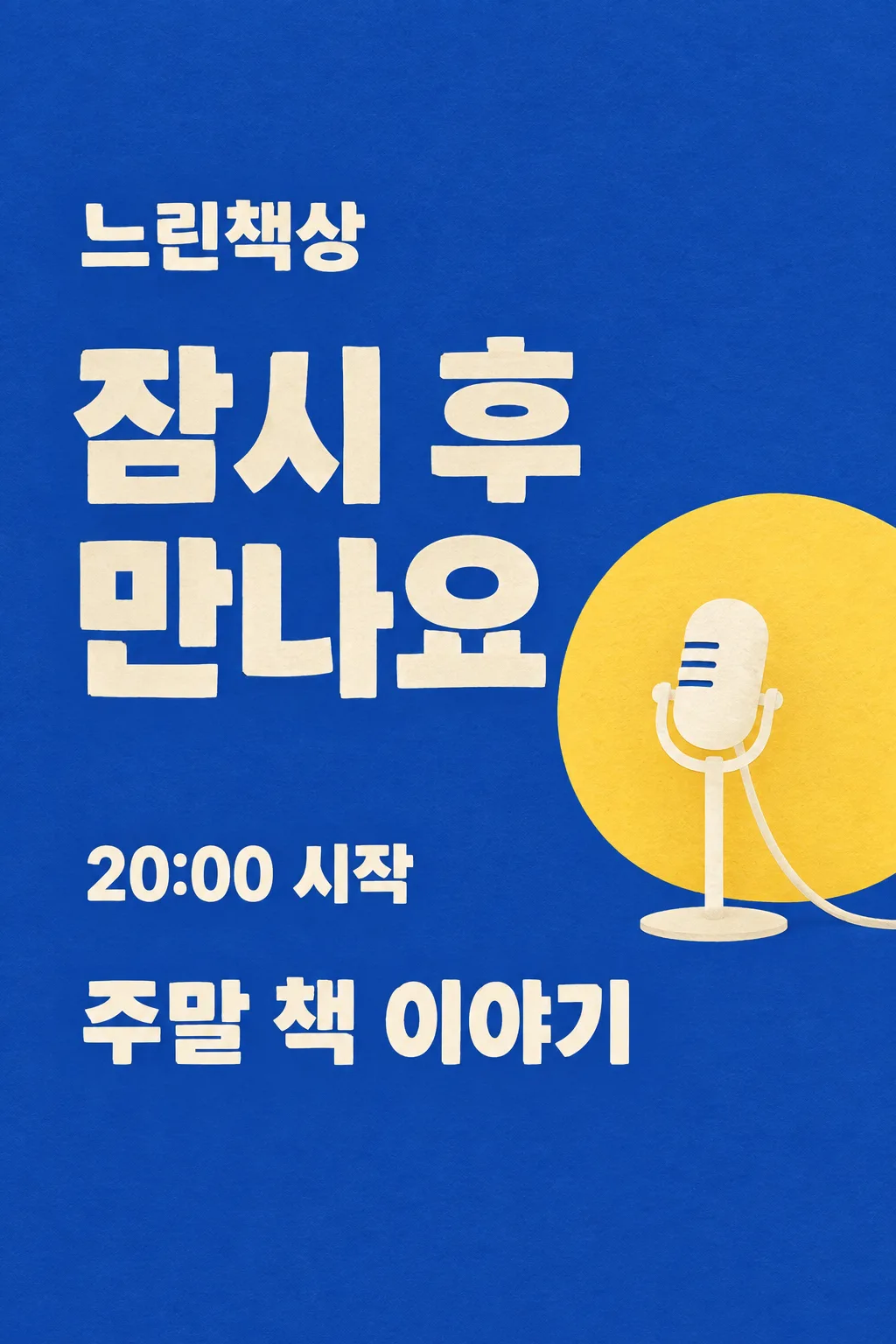
The fixed scene is a cobalt-blue flat paper stage with one warm-yellow semicircular spotlight disc and one simple cream standing microphone on the lower-right. The large waiting phrase is the hero and the microphone is secondary. Channel name: "【Channel name】". Topic: "【Today's topic】". Waiting phrase: "【Waiting phrase】". When the phrase is "Choose for me", invent one friendly waiting sentence, at most twelve Korean/Japanese characters or four English words, suited to the supplied topic. Never print the automatic control words. The wording can be personal but must not claim prizes, subscriber numbers, a schedule, a delay or an exact start unless that information was provided.

[Attached photo]
No photo is required. Do not generate a person, celebrity, branded video-platform interface or real broadcaster logo. Use one original illustrated microphone, with a connected capsule, straight stand and stable oval foot. It remains a graphic stage motif, not a photorealistic product advertisement. The composition does not vary by topic.

[Text layout]
All visible copy is in English. Keep the entire top12% and bottom15% as uncluttered cobalt paper. At15-21% height set "【Channel name】" in medium-large cream letters. At25-52% height, set the waiting phrase in two or three very large lines, left aligned in the left65% of the width. A single yellow disc begins behind the microphone at37% height; it occupies the lower-right quadrant. The microphone is fully contained between44-71% height and must not touch lettering. At73-81% set "【Today's topic】" as one large cream line or two short lines across the available width. Do not add a separate 'topic' label, subtitle or repeated greeting.
If supplied, write "【Start time】" once at62-68% height in the left part, followed by "start". Preserve the exact time and any timezone in the input, and do not infer a date or draw a live countdown. If this line is removed, leave no empty clock, box or placeholder.

[Style]
One fixed graphic paper-stage poster with cobalt background, cream block typography and a soft yellow spotlight circle. Slightly rough cut-paper edges and delicate paper grain give it a friendly studio feel. This is neither pastel speech-bubble welcome art nor a three-line acrostic. Keep the waiting phrase broad, balanced and much larger than the channel signature. No neon, glossy chrome, floating UI buttons or tiny stickers.

[Visual hierarchy]
The waiting sentence reads immediately in a small thumbnail, followed by the session topic. The channel name stays clearly visible but subordinate. Use at least7% side margins. Fit long user text by breaking at words into at most two lines, never by reducing it to microtype. The yellow circle may overlap the microphone's silhouette only; it never fills a price panel or a text box. Do not put the topic below85% height. A horizontal output preserves the same reading order in a left text column and the microphone on the right; no additional panel or second scene is introduced.

[Lighting and texture]
Flat cobalt and cream paper with a restrained warm-yellow disc. The image is graphic rather than lit as an actual room. Add no lens flare, fog, fluorescent glow or beam that crosses text. The microphone has one clear silhouette, and its base is grounded in the composition. Avoid QR codes, fake chat messages, fake verified marks, follow buttons, popularity metrics, invented links, donation requests and unprovided promotions.

[Text rules]
All quoted visible copy belongs to the artwork, while input labels and instruction headings do not. Resolve any automatic wording control into a short original sentence before drawing; never print that control literally. Preserve provided spelling and numbers, and use the target language consistently. Keep readable letters separate from highlights, folds, shadows and decorative marks. Do not invent a price, discount, date, availability, award, endorsement, biography or purchasing condition. The fixed composition and medium stay the same for every user; personal inputs change its content only.

[Avoid and final delivery]
Deliver exactly ONE finished raster image in this response. Draw it directly with image generation. Do not execute code, give drawing instructions instead of an image, offer multiple versions, create separate pages, ask for a next message, or require cropping and assembly. No phone mockup, browser frame, watermark, publisher logo, branded packaging, existing character or celebrity likeness. Finish all artwork within the selected aspect ratio, preserving the composition and large readable lettering. Leave the upper 12% and lower 15% free of essential lettering and maintain generous side margins.
You may also like
How to use it · FAQ
When to use it
Let followers know that you are preparing a live session. Add your real channel name and today's topic to create a cobalt paper-stage image with a large waiting phrase and one cream microphone. Post the complete image in a Story, community update or Threads post. This card makes one still announcement before a session starts; it does not create an ending screen, an asset pack or a moving countdown.
Fill in the fields
Use your actual channel name or creator nickname. Keep today's topic short enough to understand at a glance, such as weekend book chat or a studio tidy-up. Write a waiting phrase or choose “Choose for me.” GPT will make a short original line appropriate to the topic, without printing that control. The start time is optional. Enter it only if you have actually decided it; otherwise clear the field. Dates, delays, subscriber totals, giveaways and other conditions are not invented.
Generate the image
Fill in the fields, choose the site's aspect ratio and copy the prompt. Paste it into an image-enabled GPT conversation and send once. No photograph is needed. You do not need to run code or request another page. A wide ratio keeps the same text order and microphone motif in a wider space. It does not change the illustration medium or turn the result into a different asset.
Check before posting
The waiting phrase should be readable first, even when the image is small. Check the channel spelling, topic, and any time or timezone you supplied. The microphone capsule, stand and foot must connect naturally and stay clear of the topic. The top and bottom safety areas should contain no essential copy. The thumbnail's sample channel and time demonstrate inputs; they are not a real broadcast schedule.
Use the finished announcement
Confirm that the supplied time still matches your plan. If the plan changes, update the time or leave it out and use a general waiting phrase. Posting this image does not schedule a broadcast or connect it to a platform. Add your genuine broadcast link through your normal posting workflow if needed; the artwork does not fabricate a URL or simulate chat messages.
Fix a detail
Provide the exact spelling if a channel name is wrong. If the phrase pushes out the topic, replace it with a shorter sentence of about four English words. Keep the cobalt paper, large typography and single microphone when requesting a correction. Corrections are optional after the first finished result, not required steps.
Questions
- Can I leave out the time? Yes. Only its independent line disappears; your phrase and topic remain.
- Does it automatically register with broadcasting software? No. It is a finished still image for you to post or use in your existing workflow.
- Was the free GPT interface tested? The preview was generated with the image API and inspected. No direct free-interface generation test was performed. Your account's image feature and remaining allowance determine availability.