
전체 · SNS/카드뉴스 · 정보·꿀팁
174라이브 대기 카드
크리에이터가 채널 이름과 오늘 주제로 방송 전 SNS 대기 이미지를 만들어요.
칸 채우기
- 1칸을 채워요
- 2복사 버튼을 눌러요
- 3GPT 채팅창에 붙여넣어요
- 4제품·인물 사진을 쓰려면 사진과 프롬프트를 둘 다 넣은 뒤에 보내요 선택
프롬프트 원문 보기 5,118자
Generate this image now. Draw it directly - do not describe it, explain it, or ask questions.
Output one landscape A3 poster, 420 x 297 mm, aspect ratio 1.414:1. Use the largest supported image resolution. Final print target is 4961x3508 pixels at 300dpi; keep all lettering at least 10 mm inside every paper edge. Preserve the wide composition and print-safe margins.

[Purpose]
Create ONE complete creator's live-waiting announcement image. The creator posts it on their social account before starting a live session, using their channel name and today's topic. This is finished flat artwork, not an example shown on a device or a set of broadcast assets. Do not imply that the broadcast has begun or that a countdown is running.

[Scene]
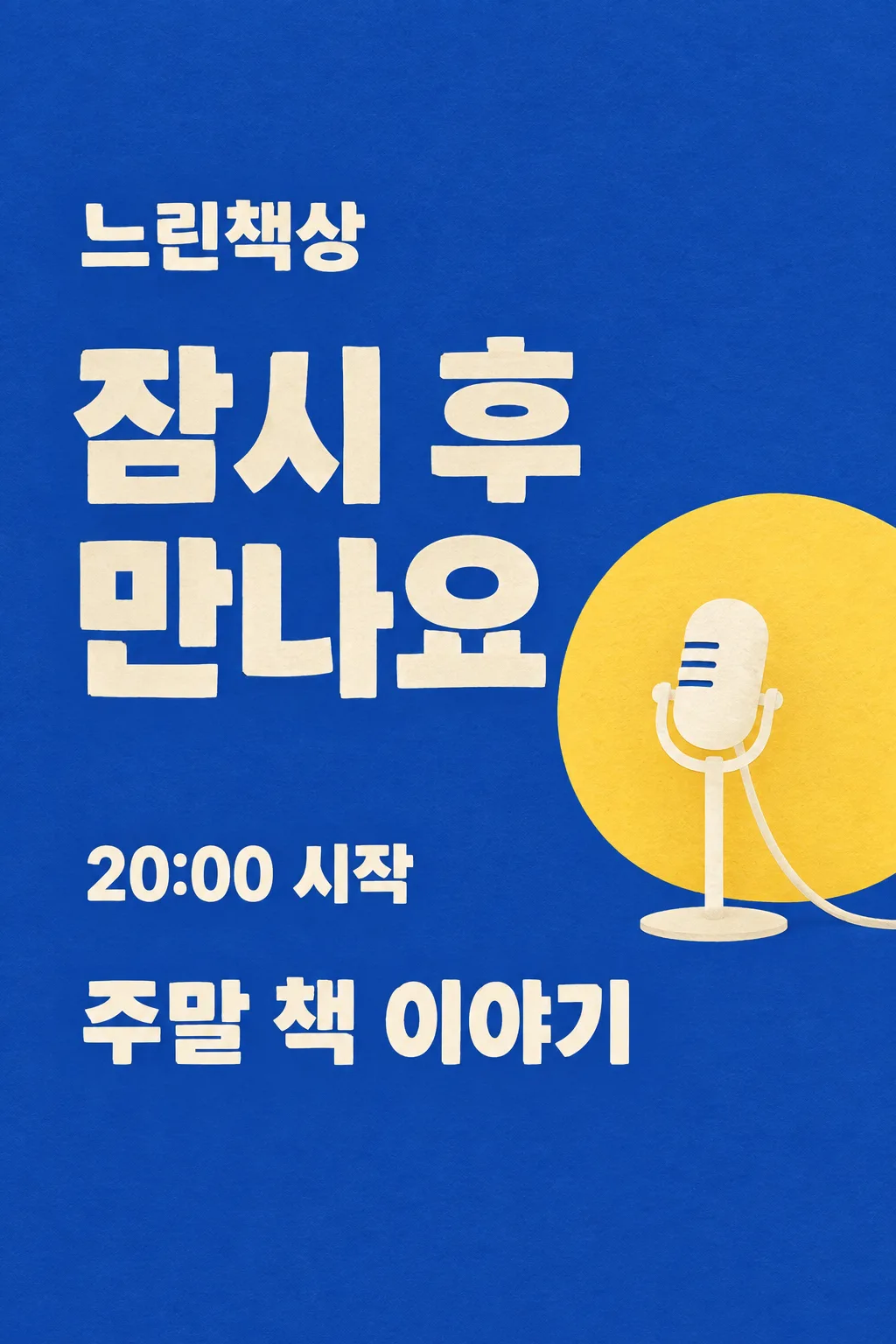
The fixed scene is a cobalt-blue flat paper stage with one warm-yellow semicircular spotlight disc and one simple cream standing microphone on the lower-right. The large waiting phrase is the hero and the microphone is secondary. Channel name: "【채널 이름】". Topic: "【오늘 주제】". Waiting phrase: "【기다리는 한마디】". When the phrase is "알아서 골라줘", invent one friendly waiting sentence, at most twelve Korean/Japanese characters or four English words, suited to the supplied topic. Never print the automatic control words. The wording can be personal but must not claim prizes, subscriber numbers, a schedule, a delay or an exact start unless that information was provided.

[Attached photo]
No photo is required. Do not generate a person, celebrity, branded video-platform interface or real broadcaster logo. Use one original illustrated microphone, with a connected capsule, straight stand and stable oval foot. It remains a graphic stage motif, not a photorealistic product advertisement. The composition does not vary by topic.

[Text layout]
All visible copy is in Korean. Keep the entire top12% and bottom15% as uncluttered cobalt paper. At15-21% height set "【채널 이름】" in medium-large cream letters. At25-52% height, set the waiting phrase in two or three very large lines, left aligned in the left65% of the width. A single yellow disc begins behind the microphone at37% height; it occupies the lower-right quadrant. The microphone is fully contained between44-71% height and must not touch lettering. At73-81% set "【오늘 주제】" as one large cream line or two short lines across the available width. Do not add a separate 'topic' label, subtitle or repeated greeting.
If supplied, write "【시작 시각】" once at62-68% height in the left part, followed by "시작". Preserve the exact time and any timezone in the input, and do not infer a date or draw a live countdown. If this line is removed, leave no empty clock, box or placeholder.

[Style]
One fixed graphic paper-stage poster with cobalt background, cream block typography and a soft yellow spotlight circle. Slightly rough cut-paper edges and delicate paper grain give it a friendly studio feel. This is neither pastel speech-bubble welcome art nor a three-line acrostic. Keep the waiting phrase broad, balanced and much larger than the channel signature. No neon, glossy chrome, floating UI buttons or tiny stickers.

[Visual hierarchy]
The waiting sentence reads immediately in a small thumbnail, followed by the session topic. The channel name stays clearly visible but subordinate. Use at least7% side margins. Fit long user text by breaking at words into at most two lines, never by reducing it to microtype. The yellow circle may overlap the microphone's silhouette only; it never fills a price panel or a text box. Do not put the topic below85% height. A horizontal output preserves the same reading order in a left text column and the microphone on the right; no additional panel or second scene is introduced.

[Lighting and texture]
Flat cobalt and cream paper with a restrained warm-yellow disc. The image is graphic rather than lit as an actual room. Add no lens flare, fog, fluorescent glow or beam that crosses text. The microphone has one clear silhouette, and its base is grounded in the composition. Avoid QR codes, fake chat messages, fake verified marks, follow buttons, popularity metrics, invented links, donation requests and unprovided promotions.

[Text rules]
All quoted visible copy belongs to the artwork, while input labels and instruction headings do not. Resolve any automatic wording control into a short original sentence before drawing; never print that control literally. Preserve provided spelling and numbers, and use the target language consistently. Keep readable letters separate from highlights, folds, shadows and decorative marks. Do not invent a price, discount, date, availability, award, endorsement, biography or purchasing condition. The fixed composition and medium stay the same for every user; personal inputs change its content only.

[Avoid and final delivery]
Deliver exactly ONE finished raster image in this response. Draw it directly with image generation. Do not execute code, give drawing instructions instead of an image, offer multiple versions, create separate pages, ask for a next message, or require cropping and assembly. No phone mockup, browser frame, watermark, publisher logo, branded packaging, existing character or celebrity likeness. Finish all artwork within the selected aspect ratio, preserving the composition and large readable lettering. Leave the upper 12% and lower 15% free of essential lettering and maintain generous side margins.
이 카드도 많이 사용해요
쓰는 법 · 자주 묻는 것
이런 때 쓰세요
라이브 방송을 준비하면서 팔로워에게 잠시 기다려 달라고 알리고 싶은 크리에이터를 위한 카드예요. 오늘 이야기할 주제와 채널 이름을 넣으면 코발트색 무대에 큰 대기 문구, 작은 마이크, 주제 한 줄이 들어갑니다. 인스타 스토리나 커뮤니티 글, 스레드에 올려 방송을 준비하는 분위기를 전할 수 있어요. 영상 엔딩이나 썸네일 세트를 만드는 카드가 아니라, 시작 전에 바로 게시할 대기 이미지 한 장입니다. 이미 방송 중이라는 표시나 움직이는 타이머는 들어가지 않아요.
칸 채우는 법
채널 이름에는 실제 쓰는 닉네임이나 채널명을 적어 주세요. 오늘 주제는 ‘주말 책 이야기’, ‘작업실 정리 함께하기’처럼 시청자가 어떤 이야기를 기다리는지 알 수 있는 짧은 문장이 좋아요. 기다리는 한마디는 직접 적거나 ‘알아서 골라줘’를 누르세요. 자동 선택을 고르면 주제와 어울리는 짧은 대기 문장을 GPT가 만들고, 그 선택 문구 자체는 그림에 찍지 않아요. 시작 시각은 실제로 정한 시간이 있을 때만 적습니다. 정해지지 않았다면 비워 두세요. 방송 날짜나 남은 분 수를 임의로 만드는 카드가 아니에요.
붙여넣는 순서
사이트에서 필요한 값을 넣고 화면 비율을 고른 다음 프롬프트를 복사하세요. 무료 GPT의 이미지 생성이 가능한 대화에 붙여넣고 한 번 보내면 됩니다. 이 카드에는 첨부 사진이 필요하지 않아요. 코드를 실행하거나 다음 장을 요청할 필요 없이 한 장을 직접 그리도록 구성했어요. 세로 이미지는 SNS에 올리기 편하고, 가로 비율을 고르면 같은 글과 마이크를 가로 공간에 맞춰 배치해요. 비율을 바꿔도 다른 그림체나 다른 결과물로 전환되지는 않아요.
그림이 나오면 꼭 볼 것
큰 대기 문장이 작은 화면에서도 먼저 읽히는지 확인하세요. 채널 이름과 주제는 틀린 글자 없이 보이고, 시각을 입력했다면 숫자와 시간대가 그대로여야 해요. 마이크의 머리와 기둥, 받침이 연결되어 있고 주제 글자를 가리지 않아야 합니다. 위쪽 배지 자리와 아래쪽 제목 자리는 여백으로 남겨 두도록 했어요. 썸네일에 있는 채널명, 주제, 시간은 입력법을 보여 주는 예시이며 실제 라이브 일정이 아닙니다. 구독자 수나 선물, 추첨 같은 조건도 넣지 않아요.
실제로 게시할 때
이미지를 게시하기 전에 시작 시각이 지금 운영 계획과 맞는지 다시 확인하세요. 계획이 바뀌었다면 시각 칸을 고쳐 새 이미지로 안내하거나 시각을 비워 대기 문구만 사용할 수 있어요. 이 그림만 게시한다고 라이브가 자동으로 예약되거나 연결되지는 않습니다. 게시물에 방송 주소가 필요하다면 본인이 쓰는 플랫폼에서 실제 링크를 붙여 주세요. 이 카드는 확인되지 않은 링크를 그려 넣지 않아요.
틀린 곳 고치는 법
글자가 틀리면 정확한 채널명이나 주제를 적고 그 부분만 고쳐 달라고 요청하세요. 한마디가 길어서 주제를 밀어냈다면 열두 글자 안팎의 짧은 문구로 바꿔 주세요. 코발트 바탕, 큰 대기 글씨, 마이크 하나라는 고정 구도를 유지하면 목록에서 본 카드와 같은 결과가 나옵니다. 수정은 완성 후 필요한 경우에만 하는 선택이에요.
자주 묻는 것
- 시간을 모르면 만들 수 없나요? 시작 시각은 선택 칸이에요. 비우면 시간 줄만 빠지고 대기 문구와 주제는 남아요.
- 방송 프로그램에 자동 등록되나요? 아니요. 완성된 이미지 파일이에요. 실제 방송 설정과 게시 작업은 본인이 하는 방식 그대로 진행하세요.
- 무료 GPT에서 시험했나요? 표지는 이미지 API로 만들고 글자와 배치를 확인했어요. 무료 GPT 화면에서의 직접 시험은 하지 않았으며, 생성 가능 여부는 계정의 이미지 기능과 남은 사용량에 따라 달라집니다.