
All · Social posts · Memes
410Workout completion story — your photo with your daily records
Keep your workout photo and add a clear title, date and up to three records in one vertical story.
What you get
- One finished workout story; optional photo, up to three records
ChatGPT Free OK
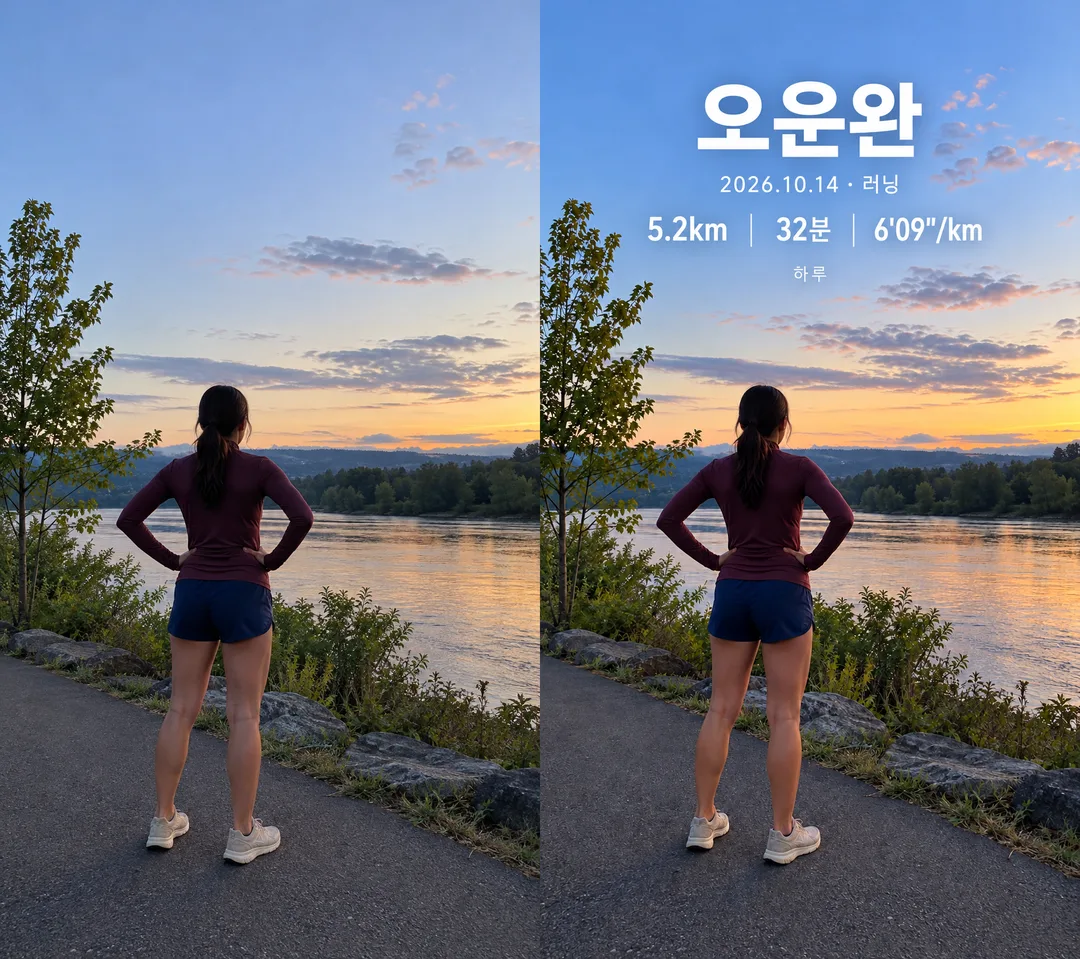
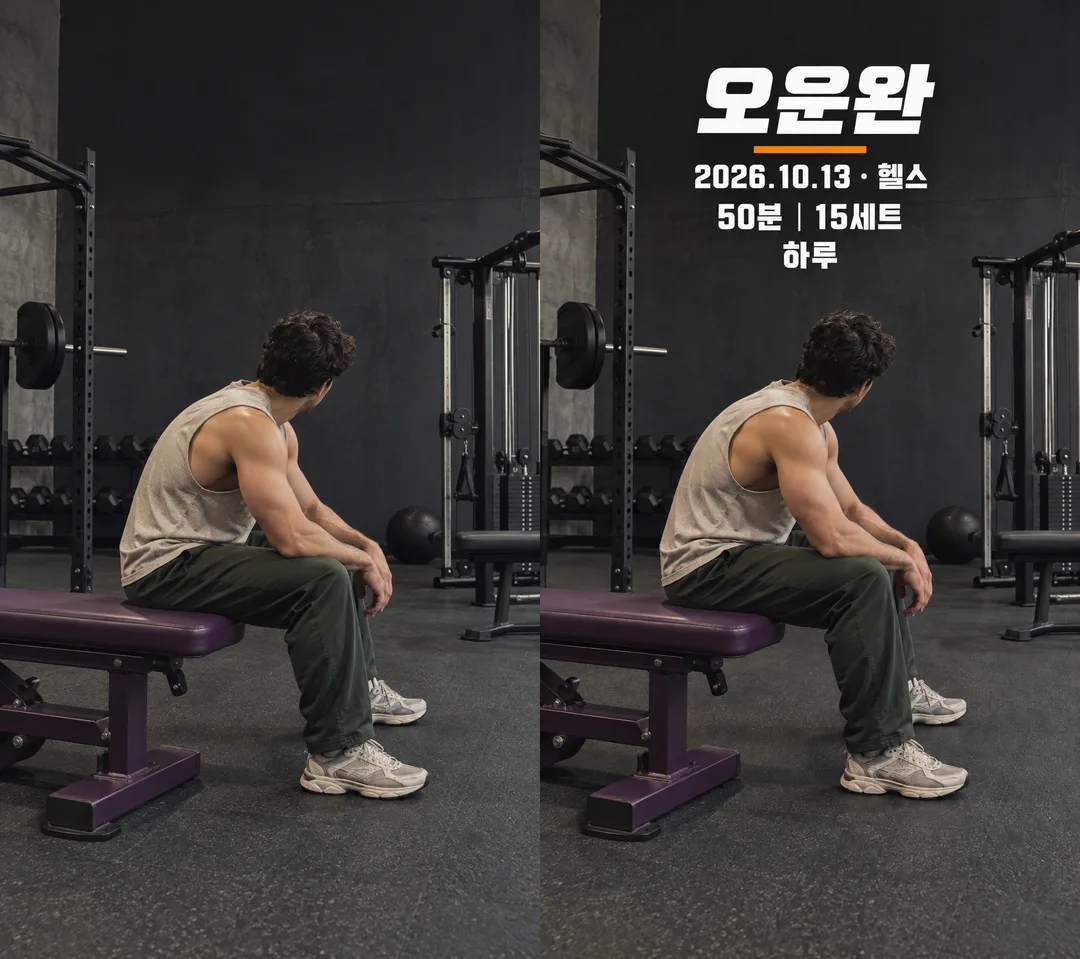
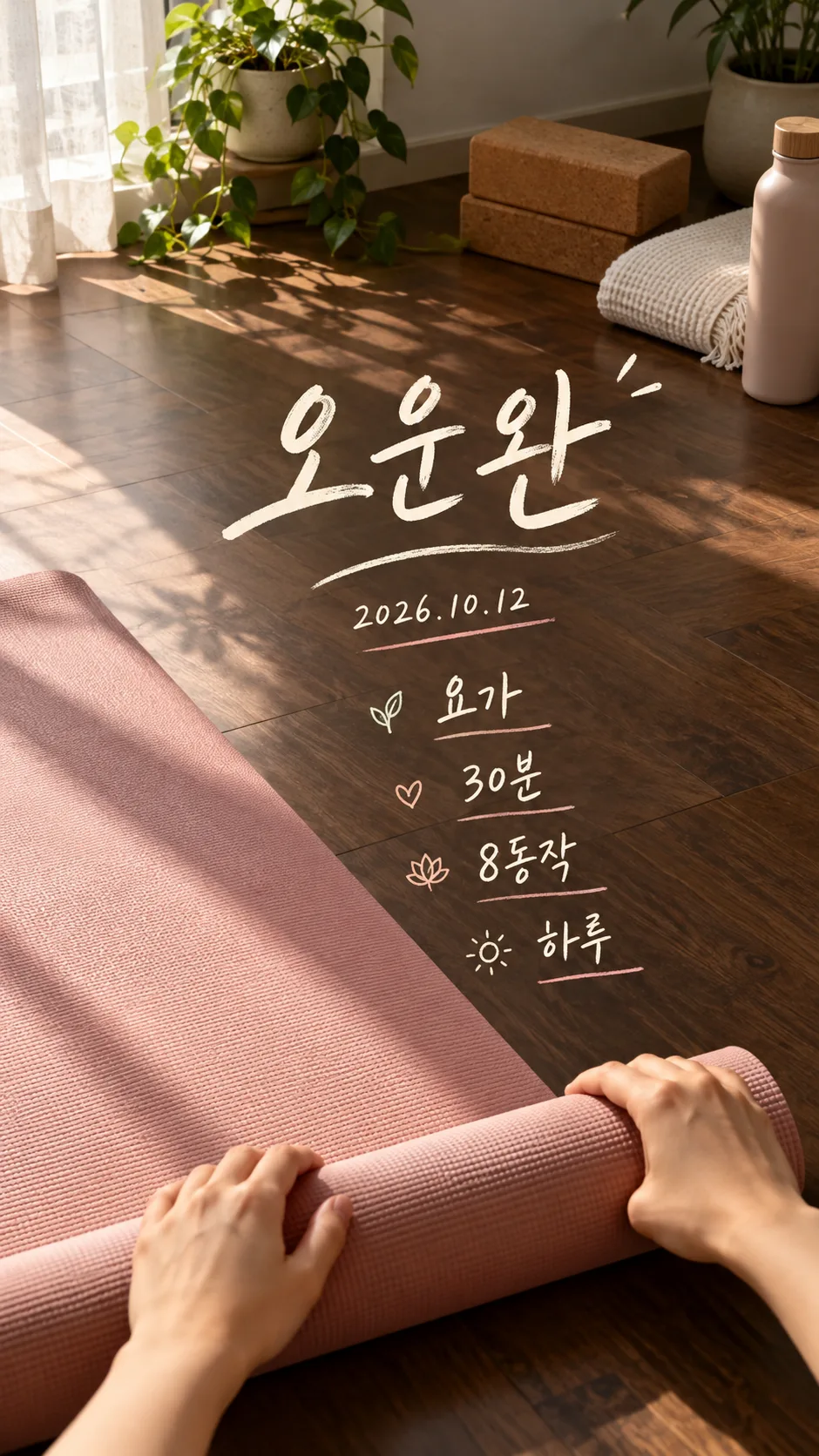
Fill in the fields
- 1Fill in the fields
- 2Copy the prompt
- 3Paste it into a GPT chat
- 4Send it as is and you get an image like the thumbnail example
- 5Attach One workout photo (optional, attach with the prompt) with the prompt and your photo is used in the result Optional
Full prompt 3,286 characters
Generate this image now. Draw it directly; do not describe it or ask questions.
Output size 1080x1920 pixels, 9:16 portrait story. Keep all text inside the central 80% of the height.
Create exactly ONE finished full-bleed workout completion story. Default aspect ratio is 9:16. No mockup, frame, comparison panels or paper placed on another background.
PHOTO RULE: If a photo is attached, use it as the edit target, preserving the person, face if visible, hair, clothes, body proportions, pose, hands, shoes, background and original colors. Add only the record overlay. Do not beautify, change the pose, replace the clothing or recreate the scene. Fit the selected aspect ratio without cutting the person; extend the background only if required. If no photo is attached, finish without asking: create an anonymous fictional scene matching the workout, showing a back view, hands, a mat or unbranded shoes, with no visible face or resemblance to a real public figure. All generated objects must have original fictional designs.
TITLE: "【Title】"
DATE: "【Date】"
WORKOUT: "【Workout】"
RECORD 1: "【Record 1】"
RECORD 2: "【Record 2】"
RECORD 3: "【Record 3】"
DESIGN: "【Design】"
NAME: "【Name】"
If title is empty, use Workout done. If date, workout, any record or name is empty, omit that entire item and its divider; close the gap. Never guess a date, weekday, distance, duration, pace, calorie count, weight or other number. Records are literal strings: preserve every digit, decimal point, apostrophe, quotation mark, slash, unit and supplied language. Do not calculate or convert records. Do not read extra statistics from a photograph or add labels that imply verified achievement. Dates are supplied text; do not add a weekday. Use only the supplied title, date, workout, records and name as lettering.
- Minimal white type: Clean minimal white type, restrained weight and simple spacing.
- Bold sports type: Heavy bold sports headline, short accent rule, no brand identity.
- Handwritten diary: Readable handwritten diary lettering with subtle underlines.
If design is blank, use Minimal white type. Show the selected design only, never combine all three or produce variants.
Use a large readable headline, date and workout below it, and two or three clearly separated large numeric records when supplied. If only one record is supplied, center it. Put the optional name in a smaller line. Locate the overlay on empty background, away from faces, hands and the exercise pose; retain high contrast and comfortable edge clearance. Keep important text out of the top 12% and bottom 15%. The photograph fills all edges. No app UI, app marks, logos, visible branding, watermarks, existing characters, verification notes or extra slogans. Where branding exists in an uploaded photo, hide only its lettering/mark without redesigning the clothes or equipment. Check every rendered character and number against the supplied strings before finishing. Output text is English, except literal user records which remain unchanged.

[Final output format]
Output size 1080x1920 pixels, 9:16 portrait story. Keep all text inside the central 80% of the height.
This selected output format takes priority over any fixed canvas size or aspect ratio elsewhere in this template. Adapt the composition, text zones and margins to the selected canvas without stretching or cropping essential content. Device safe areas apply only when a device is selected. Never print these format instructions on the image.
How did it turn out?
You may also like


How to use it · FAQ
Use this card after a workout to turn your photo into a vertical story or a messenger profile image. Send the copied prompt and your optional photo together to an image AI. It produces one finished image with your title, date, workout and records. The person, clothes and pose should stay as in the source. Without a photo, it creates a fictional scene with a back view, hands or a mat, with no visible face.
Workout and Record 1 are required. The default title is Workout done, and you can replace it. Supply the actual workout date; a blank date removes its entire line. Include the unit in each record, such as 5.2km, 32min and 6'09"/km. Empty Record 2 or Record 3 removes that item and its divider. A distance alone does not cause a duration or pace to be calculated. The example name is Haru; leave Name blank to remove it.
Minimal white type uses clean white lettering. Bold sports type uses a heavy headline and a short accent rule. Handwritten diary uses relaxed handwriting and light underlines. Each option produces the same single workout story format. The default ratio is 9:16; use the shared size selector to change it. A square profile crop may cut off the edges, so check that the important records remain visible.
The first gallery image pairs a fictional running source on the left with a minimal result on the right. The second pairs a gym source with a bold sports result. The third is a handwritten yoga result created without a photo. Gallery lettering illustrates the Korean edition; this edition generates English lettering. The listing cover is a separately generated hiking result. These fictional photos are demonstrations, not evidence of an actual workout.
Before sharing, enlarge the image and compare every digit, unit and date with your entries. Check the clothes, pose and hands against the source. If the photo changes, attach the source again and ask for text only without recreating the photo. For a text error, supply the exact corrected string and request a local correction. Clear sample values that do not describe your workout. Use your own photos or photos you have permission to share. Check any external service's fees and terms with that service.